> ## Documentation Index
> Fetch the complete documentation index at: https://docs.retellai.com/llms.txt
> Use this file to discover all available pages before exploring further.
# Data Retention Policy
> Configure per-agent data retention to automatically delete call and chat data — transcripts, recordings, and logs — after a set period for compliance.
# Data Retention Policy
Retell allows you to configure a data retention period per agent. After the retention period expires, call and chat data associated with that agent is automatically and permanently deleted.
By default, data is kept indefinitely (no automatic deletion).
## How It Works
* Data retention is configured **per agent** under Security & Fallback Settings
* Expired data is automatically deleted on a daily basis
* Deletion is **permanent and irreversible** — deleted data cannot be recovered
* Applies to both voice calls and chats
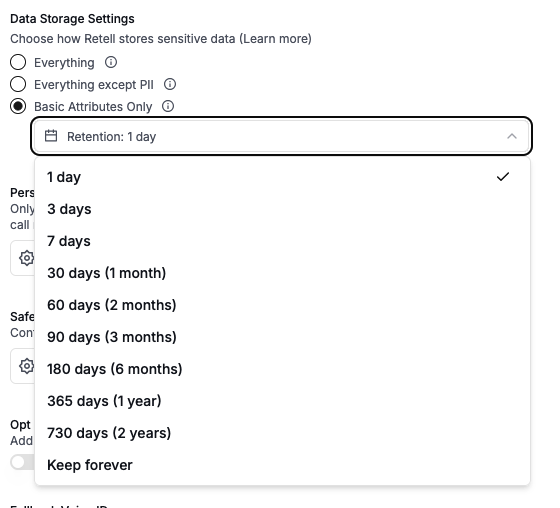 ## How to Configure
1. Navigate to your agent
2. Open **Security & Fallback Settings**
3. Under **Data Storage Settings**, select your preferred data storage mode
4. Use the **Retention** dropdown to set how long data is kept before automatic deletion
The retention period applies regardless of which data storage mode you select (Everything, Everything except PII, or Basic Attributes Only).
## What Gets Deleted
When the retention period expires, the following data is permanently removed:
* **Call recordings** (audio files)
* **Transcripts**
* **Call and chat logs**
* **Knowledge base retrieval logs**
* **Dynamic variables and metadata**
While some basic metadata is retained internally, the call or chat is effectively deleted and will no longer appear in session history or API responses.
Deletion is irreversible. Make sure to export any data you need before the retention period expires. You can use [webhook events](/features/webhook-overview) to capture call data in real time, or use the [Get Call](/api-references/get-call) / [Get Chat](/api-references/get-chat) API to retrieve data before it expires.
## Available Retention Periods
| Option | Duration |
| ------------ | ------------------------------- |
| Keep forever | No automatic deletion (default) |
| 1 day | 24 hours after call/chat starts |
| 3 days | |
| 7 days | |
| 30 days | 1 month |
| 60 days | 2 months |
| 90 days | 3 months |
| 180 days | 6 months |
| 365 days | 1 year |
| 730 days | 2 years |
## API Configuration
You can set the retention period via the API when creating or updating an agent:
```json theme={null}
{
"data_storage_retention_days": 90
}
```
* **Field**: `data_storage_retention_days`
* **Type**: integer (1–730) or `null`
* **Default**: `null` (keep forever)
See the [Update Agent](/api-references/update-agent) or [Create Agent](/api-references/create-agent) API reference for details.
## Related
* [Data Storage Settings](/accounts/privacy-disable) — control what types of data are stored
* [Secure URLs](/accounts/signed-secure-url) — configure URL expiration for recordings and logs
## How to Configure
1. Navigate to your agent
2. Open **Security & Fallback Settings**
3. Under **Data Storage Settings**, select your preferred data storage mode
4. Use the **Retention** dropdown to set how long data is kept before automatic deletion
The retention period applies regardless of which data storage mode you select (Everything, Everything except PII, or Basic Attributes Only).
## What Gets Deleted
When the retention period expires, the following data is permanently removed:
* **Call recordings** (audio files)
* **Transcripts**
* **Call and chat logs**
* **Knowledge base retrieval logs**
* **Dynamic variables and metadata**
While some basic metadata is retained internally, the call or chat is effectively deleted and will no longer appear in session history or API responses.
Deletion is irreversible. Make sure to export any data you need before the retention period expires. You can use [webhook events](/features/webhook-overview) to capture call data in real time, or use the [Get Call](/api-references/get-call) / [Get Chat](/api-references/get-chat) API to retrieve data before it expires.
## Available Retention Periods
| Option | Duration |
| ------------ | ------------------------------- |
| Keep forever | No automatic deletion (default) |
| 1 day | 24 hours after call/chat starts |
| 3 days | |
| 7 days | |
| 30 days | 1 month |
| 60 days | 2 months |
| 90 days | 3 months |
| 180 days | 6 months |
| 365 days | 1 year |
| 730 days | 2 years |
## API Configuration
You can set the retention period via the API when creating or updating an agent:
```json theme={null}
{
"data_storage_retention_days": 90
}
```
* **Field**: `data_storage_retention_days`
* **Type**: integer (1–730) or `null`
* **Default**: `null` (keep forever)
See the [Update Agent](/api-references/update-agent) or [Create Agent](/api-references/create-agent) API reference for details.
## Related
* [Data Storage Settings](/accounts/privacy-disable) — control what types of data are stored
* [Secure URLs](/accounts/signed-secure-url) — configure URL expiration for recordings and logs