> ## Documentation Index
> Fetch the complete documentation index at: https://docs.retellai.com/llms.txt
> Use this file to discover all available pages before exploring further.
# Manage API keys and permission scopes
> Create, delete, and rotate Retell API keys, set a webhook signing key, and restrict permissions with read or edit scopes for Build, Monitor, and Deploy.
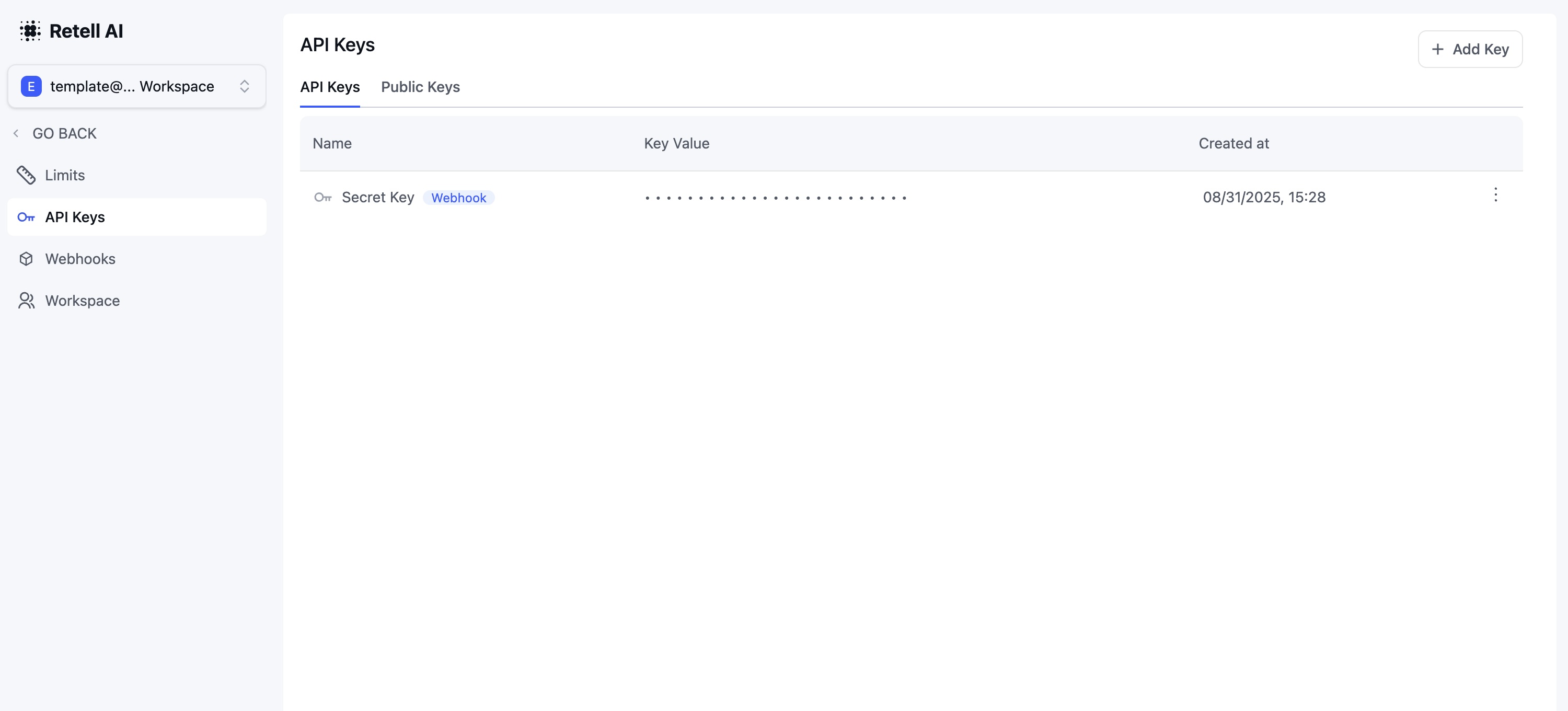
The "API Keys" section belongs to System "Settings". The "API Keys" section allows you to manage your authentication credentials for accessing the API. Here's what you can do:
1. **Create a new API key**
* Click the "Add" button
* Give your key a descriptive name to identify its purpose
2. **Delete an existing API key**
* Locate the key you want to remove
* Click the delete (trash) icon
* Confirm the deletion when prompted
3. **Set a webhook API key**
* Select an existing API key
* Click "Set as Webhook Key" to designate it for webhook authentication
* Only one key can be set as the webhook key at a time
4. **Restrict an API key's permissions**
* Enable "Restrict permissions" when creating or editing a key
* Grant each permission group **No Access**, **Read**, or **Edit**
* See [Restrict API key permissions](#restrict-api-key-permissions) for details
Keep your API keys secure and never share them publicly. If a key is compromised, delete it immediately and create a new one.
 ## Restrict API key permissions
By default, an API key has **full access** to every API endpoint that supports API key authentication. To limit what a key can do, enable **Restrict permissions** when you create or edit the key, then choose an access level for each permission group. Scoped keys are useful when you share a key with a third party or want to limit it to a single integration.
Each group offers up to three access levels:
* **No Access** — the key cannot call any endpoint in this group.
* **Read** — the key can call read-only endpoints in this group (for example, listing or fetching resources).
* **Edit** — the key can call both read and write endpoints in this group. Selecting **Edit** also grants Read access.
Some groups are action-only and have no separate **Read** level — their Read column shows a dash (–). For those groups you can only choose **No Access** or **Edit**.
### Permission groups
| Group | Permission | Access levels | Grants access to |
| ----------- | ---------- | ----------------------- | ------------------------------------------------------------------------------------------------------ |
| **Build** | Agent | No Access · Read · Edit | Agents and chat agents, conversation flows, Retell LLMs, knowledge bases, voices, and folders |
| **Build** | Testing | No Access · Read · Edit | Test cases and results, batch test jobs, playground threads and completions, and web-call testing |
| **Monitor** | History | No Access · Read · Edit | Call and chat history, transcripts, recordings, and call metadata |
| **Monitor** | Export | No Access · Edit | Creating and managing export requests for history data |
| **Deploy** | Call | No Access · Edit | Creating and managing web, phone, and batch calls, chat sessions, and live-call controls |
| **Deploy** | Phone | No Access · Read · Edit | Phone numbers, A2P campaigns, business profiles, branded call and phone verification, and SMS webhooks |
Grant the narrowest access a key needs. For example, a key that only pulls call history needs just **History → Read**, while a key that places outbound calls needs **Call → Edit**.
Restrictions apply only to API requests made with that key, and you can change them anytime by editing the key. A key created without restrictions keeps full access.
## Restrict API key permissions
By default, an API key has **full access** to every API endpoint that supports API key authentication. To limit what a key can do, enable **Restrict permissions** when you create or edit the key, then choose an access level for each permission group. Scoped keys are useful when you share a key with a third party or want to limit it to a single integration.
Each group offers up to three access levels:
* **No Access** — the key cannot call any endpoint in this group.
* **Read** — the key can call read-only endpoints in this group (for example, listing or fetching resources).
* **Edit** — the key can call both read and write endpoints in this group. Selecting **Edit** also grants Read access.
Some groups are action-only and have no separate **Read** level — their Read column shows a dash (–). For those groups you can only choose **No Access** or **Edit**.
### Permission groups
| Group | Permission | Access levels | Grants access to |
| ----------- | ---------- | ----------------------- | ------------------------------------------------------------------------------------------------------ |
| **Build** | Agent | No Access · Read · Edit | Agents and chat agents, conversation flows, Retell LLMs, knowledge bases, voices, and folders |
| **Build** | Testing | No Access · Read · Edit | Test cases and results, batch test jobs, playground threads and completions, and web-call testing |
| **Monitor** | History | No Access · Read · Edit | Call and chat history, transcripts, recordings, and call metadata |
| **Monitor** | Export | No Access · Edit | Creating and managing export requests for history data |
| **Deploy** | Call | No Access · Edit | Creating and managing web, phone, and batch calls, chat sessions, and live-call controls |
| **Deploy** | Phone | No Access · Read · Edit | Phone numbers, A2P campaigns, business profiles, branded call and phone verification, and SMS webhooks |
Grant the narrowest access a key needs. For example, a key that only pulls call history needs just **History → Read**, while a key that places outbound calls needs **Call → Edit**.
Restrictions apply only to API requests made with that key, and you can change them anytime by editing the key. A key created without restrictions keeps full access.