> ## Documentation Index
> Fetch the complete documentation index at: https://docs.retellai.com/llms.txt
> Use this file to discover all available pages before exploring further.
# Data Storage Settings
> Control how Retell stores sensitive call data — recordings, transcripts, dynamic variables, caller IDs, KB logs — with per-agent privacy settings.
# Data Storage Privacy Settings
By default, we store these potentially sensitive data related to your calls, including:
* Call logs
* Transcriptions
* Call recordings
* Caller ID for inbound call
* Callee ID for outbound call
* Knowledge base retrieved contents logs
* Dynamic variables
* Metadata
## How to Manage Data Storage
You can opt out of sensitive data storage at any time:
1. Navigate to your agent
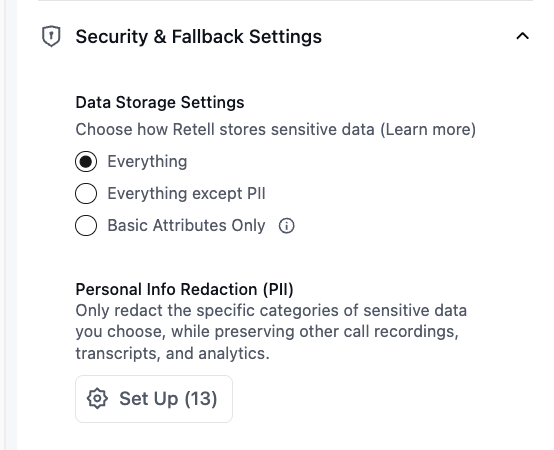
2. Under **Security & Fallback Settings → Data Storage Settings**, select:
* **Everything** — store transcripts, recordings, and logs
* **Everything except PII** — store content, excluding PII when possible
* **Basic Attributes Only** — store only metadata (no transcripts/recordings/logs)
 You can also configure a **data retention period** to automatically delete stored data after a set number of days. See [Data Retention Policy](/accounts/data-retention) for details.
## What Happens When You Change Storage Settings
When you opt out:
* You will continue to receive [webhook events](/features/webhook-overview), where you can access the transcript, call recording, and other sensitive data in it
* The call recording link will expire after 10 minutes upon receiving the webhook
* **Everything**: All artifacts (transcripts, recordings, logs) are stored
* **Everything except PII**: Artifacts are stored with PII removed according to the categories you select in your `pii_config`. See [PII scrubbing](#pii-scrubbing) below for exactly which fields are affected.
* **Basic Attributes Only**: No transcripts/recordings/logs are stored; if you query the call with the get call API later, you will not get these fields
## PII scrubbing
When you choose "Everything except PII", you can configure which personally identifiable information (PII) is removed after the call completes. Scrubbing is applied across the **transcript, recording, public logs, and structured fields on the call record itself** (dynamic variables, metadata, call analysis, tool call arguments and results).
PII configuration is defined on the agent. Per-call storage behavior can still be limited via `data_storage_setting` inherited onto the call.
### Content categories
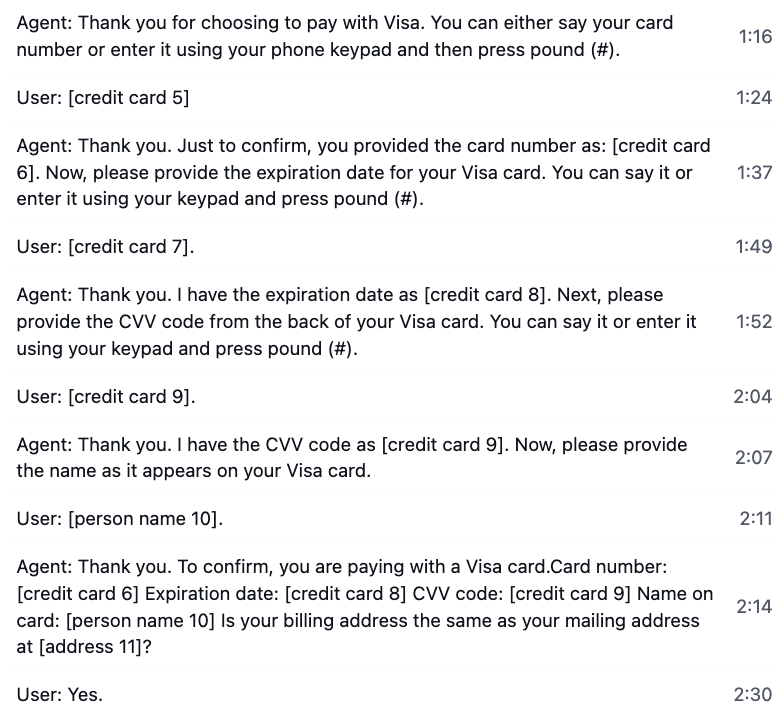
When any of these categories are selected, occurrences are detected post-call and replaced with `[category number]` placeholders (e.g. `[email 1]`, `[person name 2]`):
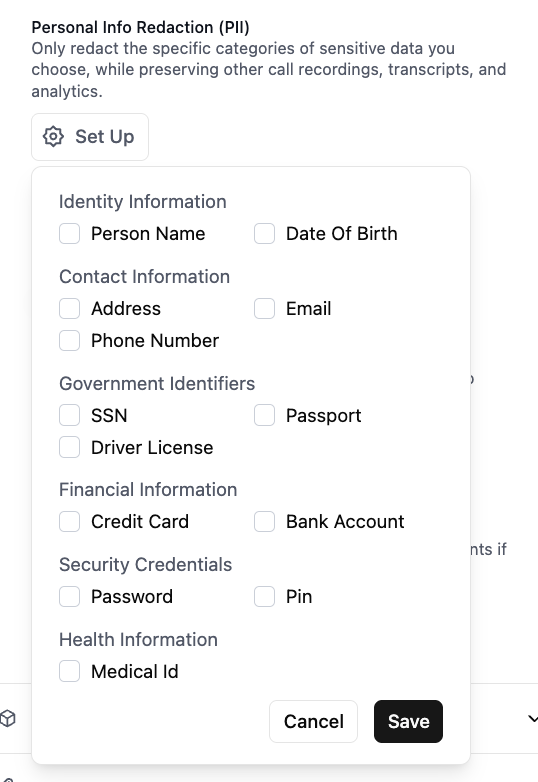
* `person_name`
* `address`
* `email`
* `ssn`
* `passport`
* `driver_license`
* `credit_card`
* `bank_account`
* `password`
* `pin`
* `medical_id`
* `date_of_birth`
* `customer_account_number`
These placeholders are written into the scrubbed copies of:
* **Transcript** — user and agent utterances
* **Recording** — audio is replaced with a beep over the PII intervals (surfaced as `scrubbed_recording_url`)
* **Public logs** — log file content
* **Dynamic variables** — `retell_llm_dynamic_variables`, collected dynamic variables, and override dynamic variables (surfaced as their `scrubbed_*` counterparts)
* **Metadata** — `metadata` (surfaced as `scrubbed_metadata`)
* **Call analysis** — `call_analysis.call_summary` and `call_analysis.custom_analysis_data` (surfaced as `scrubbed_call_analysis`)
* **Tool calls** — arguments and results
* **DTMF digits** — replaced with `[PII INFO]` whenever any PII category is enabled, to avoid exposing touch-tone passwords or PINs
* **SMS message text** (for chat agents)
The raw originals are deleted under "Everything except PII" — only the scrubbed versions remain.
### `phone_number` (directional)
`phone_number` behaves differently from the content categories. Selecting it redacts the **customer's** phone number from the call record itself, not just the transcript:
* **Inbound calls**: `from_number` is removed
* **Outbound calls**: `to_number` is removed
* **SMS chats**: `user_number` is removed
The opposite-direction number (your Retell number) is preserved. The field is removed entirely from the call object — there is no placeholder. If you need to keep the customer's number visible for downstream systems, do not include `phone_number` in your categories.
### What is always preserved
Regardless of the categories you configure, these fields are never altered or removed by PII scrubbing:
* **Identifiers**: `call_id`, `agent_id`
* **Timing**: `start_timestamp`, `end_timestamp`, `duration_ms`
* **Outcome**: `call_status`, `disconnection_reason`, `call_successful`, `user_sentiment`, `in_voicemail`
* **Operational**: `direction`, `transfer_destination`, `call_latency`, `cost_metadata`, `call_cost`, `custom_attributes`
* **Tool call records** — the name, timing, and success of each tool call (their *arguments and results* are still scrubbed when content categories are selected)
To remove these fields as well, use the **Basic Attributes Only** storage setting or configure a [data retention period](/accounts/data-retention).
You can also configure a **data retention period** to automatically delete stored data after a set number of days. See [Data Retention Policy](/accounts/data-retention) for details.
## What Happens When You Change Storage Settings
When you opt out:
* You will continue to receive [webhook events](/features/webhook-overview), where you can access the transcript, call recording, and other sensitive data in it
* The call recording link will expire after 10 minutes upon receiving the webhook
* **Everything**: All artifacts (transcripts, recordings, logs) are stored
* **Everything except PII**: Artifacts are stored with PII removed according to the categories you select in your `pii_config`. See [PII scrubbing](#pii-scrubbing) below for exactly which fields are affected.
* **Basic Attributes Only**: No transcripts/recordings/logs are stored; if you query the call with the get call API later, you will not get these fields
## PII scrubbing
When you choose "Everything except PII", you can configure which personally identifiable information (PII) is removed after the call completes. Scrubbing is applied across the **transcript, recording, public logs, and structured fields on the call record itself** (dynamic variables, metadata, call analysis, tool call arguments and results).
PII configuration is defined on the agent. Per-call storage behavior can still be limited via `data_storage_setting` inherited onto the call.
### Content categories
When any of these categories are selected, occurrences are detected post-call and replaced with `[category number]` placeholders (e.g. `[email 1]`, `[person name 2]`):
* `person_name`
* `address`
* `email`
* `ssn`
* `passport`
* `driver_license`
* `credit_card`
* `bank_account`
* `password`
* `pin`
* `medical_id`
* `date_of_birth`
* `customer_account_number`
These placeholders are written into the scrubbed copies of:
* **Transcript** — user and agent utterances
* **Recording** — audio is replaced with a beep over the PII intervals (surfaced as `scrubbed_recording_url`)
* **Public logs** — log file content
* **Dynamic variables** — `retell_llm_dynamic_variables`, collected dynamic variables, and override dynamic variables (surfaced as their `scrubbed_*` counterparts)
* **Metadata** — `metadata` (surfaced as `scrubbed_metadata`)
* **Call analysis** — `call_analysis.call_summary` and `call_analysis.custom_analysis_data` (surfaced as `scrubbed_call_analysis`)
* **Tool calls** — arguments and results
* **DTMF digits** — replaced with `[PII INFO]` whenever any PII category is enabled, to avoid exposing touch-tone passwords or PINs
* **SMS message text** (for chat agents)
The raw originals are deleted under "Everything except PII" — only the scrubbed versions remain.
### `phone_number` (directional)
`phone_number` behaves differently from the content categories. Selecting it redacts the **customer's** phone number from the call record itself, not just the transcript:
* **Inbound calls**: `from_number` is removed
* **Outbound calls**: `to_number` is removed
* **SMS chats**: `user_number` is removed
The opposite-direction number (your Retell number) is preserved. The field is removed entirely from the call object — there is no placeholder. If you need to keep the customer's number visible for downstream systems, do not include `phone_number` in your categories.
### What is always preserved
Regardless of the categories you configure, these fields are never altered or removed by PII scrubbing:
* **Identifiers**: `call_id`, `agent_id`
* **Timing**: `start_timestamp`, `end_timestamp`, `duration_ms`
* **Outcome**: `call_status`, `disconnection_reason`, `call_successful`, `user_sentiment`, `in_voicemail`
* **Operational**: `direction`, `transfer_destination`, `call_latency`, `cost_metadata`, `call_cost`, `custom_attributes`
* **Tool call records** — the name, timing, and success of each tool call (their *arguments and results* are still scrubbed when content categories are selected)
To remove these fields as well, use the **Basic Attributes Only** storage setting or configure a [data retention period](/accounts/data-retention).