> ## Documentation Index
> Fetch the complete documentation index at: https://docs.retellai.com/llms.txt
> Use this file to discover all available pages before exploring further.
# Code node: run JavaScript in a conversation flow
> Run JavaScript inline in a Retell conversation flow with a code node — no external server needed, perfect for formatting, calculations, and quick lookups.
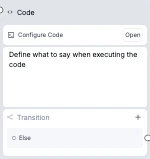
Code node executes JavaScript code when the agent enters it. Unlike [custom functions](/build/conversation-flow/custom-function), code nodes run directly in Retell's sandbox — no external server needed. The node is not intended for having a conversation with the user, but the agent can still talk while code is running if needed.
 ## Code Node vs Custom Function
| | Code Node | Custom Function |
| ----------------- | ----------------------------------------------------------- | ------------------------------------------------ |
| **Runs** | JavaScript in Retell's sandbox | HTTP request to your server |
| **Requires** | Nothing — runs directly | Your own API endpoint |
| **Best for** | Data transformation, simple API calls, logic & calculations | Complex integrations, accessing internal systems |
| **Max code size** | 5,000 characters | N/A (runs on your server) |
Code Node is designed for lightweight logic like formatting, calculations, and simple read-only lookups. Do not use it to access internal systems, write to production databases, or handle sensitive credentials. Both `dv` and `metadata` values are stored in plaintext with every call record. For integrations that require authentication, secrets management, or write access, use a [Custom Function](/build/conversation-flow/custom-function) hosted on your own backend. See [Security and Architecture Guidance](#security-and-architecture-guidance) for details.
## Write Your Code
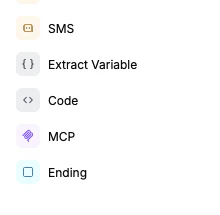
Click the Code node from the left sidebar to add it to the canvas.
## Code Node vs Custom Function
| | Code Node | Custom Function |
| ----------------- | ----------------------------------------------------------- | ------------------------------------------------ |
| **Runs** | JavaScript in Retell's sandbox | HTTP request to your server |
| **Requires** | Nothing — runs directly | Your own API endpoint |
| **Best for** | Data transformation, simple API calls, logic & calculations | Complex integrations, accessing internal systems |
| **Max code size** | 5,000 characters | N/A (runs on your server) |
Code Node is designed for lightweight logic like formatting, calculations, and simple read-only lookups. Do not use it to access internal systems, write to production databases, or handle sensitive credentials. Both `dv` and `metadata` values are stored in plaintext with every call record. For integrations that require authentication, secrets management, or write access, use a [Custom Function](/build/conversation-flow/custom-function) hosted on your own backend. See [Security and Architecture Guidance](#security-and-architecture-guidance) for details.
## Write Your Code
Click the Code node from the left sidebar to add it to the canvas.
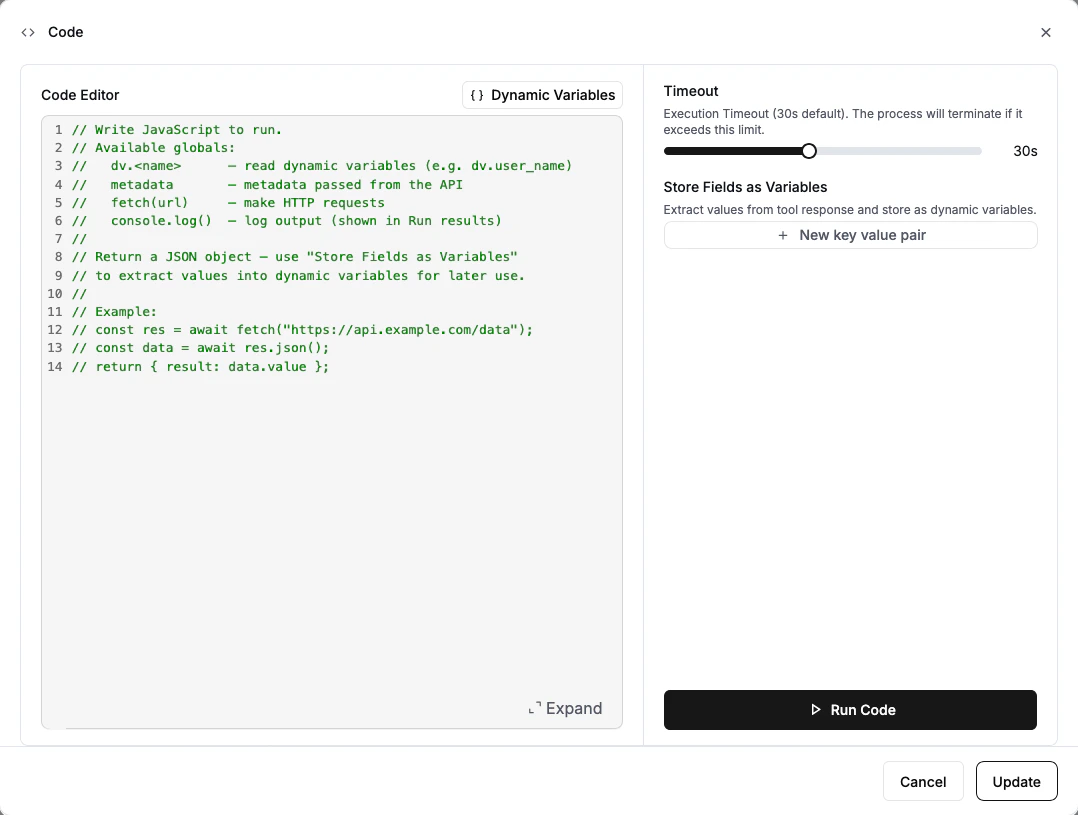
 Click **Open** on the code node to launch the code editor.
Write your JavaScript code in the editor. You have access to dynamic variables, call metadata, and the `fetch` function for HTTP requests. See [JavaScript Environment](#javascript-environment) below for details.
Click **Open** on the code node to launch the code editor.
Write your JavaScript code in the editor. You have access to dynamic variables, call metadata, and the `fetch` function for HTTP requests. See [JavaScript Environment](#javascript-environment) below for details.
 ```javascript theme={null}
// Example: look up an order and return the status
const response = await fetch("https://api.example.com/orders/" + dv.order_id);
const data = await response.json();
return { status: data.status, estimated_delivery: data.delivery_date };
```
Use **Store Fields as Variables** to extract values from your code's return value and save them as dynamic variables. Specify a variable name and the JSON path to the value.
For example, if your code returns `{ "status": "shipped", "estimated_delivery": "March 25" }`:
| Variable Name | JSON Path | Extracted Value |
| --------------- | -------------------- | --------------- |
| `order_status` | `status` | `"shipped"` |
| `delivery_date` | `estimated_delivery` | `"March 25"` |
These variables can then be referenced as `{{order_status}}` and `{{delivery_date}}` in other nodes.
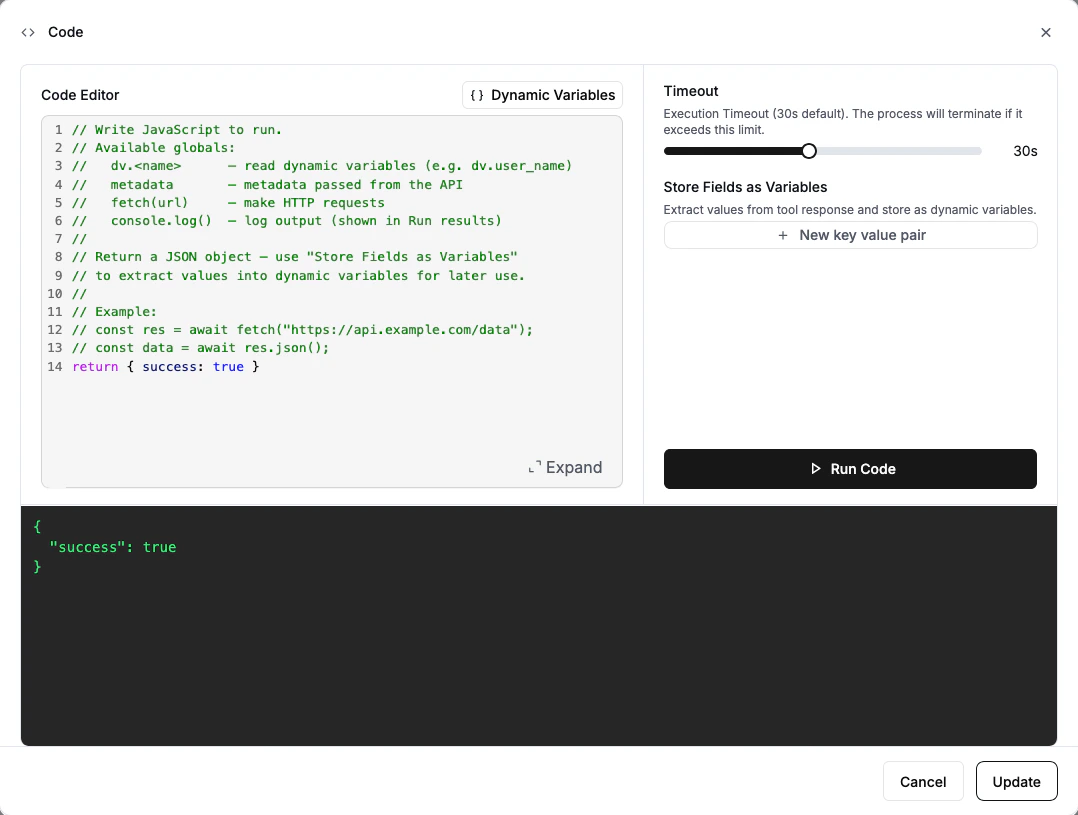
Click **Run Code** at the bottom of the editor to test. Use the **Dynamic Variables** dropdown in the editor to set test values for your variables (e.g., give `customer_name` a value of "John Doe") — these values are only used during testing and won't affect your live agent. The output panel will show the result and any `console.log()` output.
```javascript theme={null}
// Example: look up an order and return the status
const response = await fetch("https://api.example.com/orders/" + dv.order_id);
const data = await response.json();
return { status: data.status, estimated_delivery: data.delivery_date };
```
Use **Store Fields as Variables** to extract values from your code's return value and save them as dynamic variables. Specify a variable name and the JSON path to the value.
For example, if your code returns `{ "status": "shipped", "estimated_delivery": "March 25" }`:
| Variable Name | JSON Path | Extracted Value |
| --------------- | -------------------- | --------------- |
| `order_status` | `status` | `"shipped"` |
| `delivery_date` | `estimated_delivery` | `"March 25"` |
These variables can then be referenced as `{{order_status}}` and `{{delivery_date}}` in other nodes.
Click **Run Code** at the bottom of the editor to test. Use the **Dynamic Variables** dropdown in the editor to set test values for your variables (e.g., give `customer_name` a value of "John Doe") — these values are only used during testing and won't affect your live agent. The output panel will show the result and any `console.log()` output.
 ## JavaScript Environment
Your code runs in a JavaScript sandbox with the following globals available. The code editor provides **autocomplete** — as you type, it will suggest available globals, dynamic variable names, and built-in functions.
### `dv` — Dynamic Variables
Access your agent's dynamic variables as properties on the `dv` object. All values are strings.
```javascript theme={null}
const name = dv.customer_name; // "John Doe"
const orderId = dv.order_id; // "78542"
const total = parseFloat(dv.amount); // Convert to number if needed
```
### `metadata` — Call Metadata
Access metadata passed when the call was created via the API. This is the same object you pass in the `metadata` field of the [Create Call](/api-references/create-phone-call) API.
```javascript theme={null}
const customerId = metadata.customer_id;
const priority = metadata.priority_level;
```
Both `dv` and `metadata` values are stored in plaintext with every call record and are visible in call logs and API responses. Do not use them to pass API keys, database credentials, or other sensitive secrets. See [Security and Architecture Guidance](#security-and-architecture-guidance) for more details.
### `fetch(url)` — HTTP Requests
Make HTTP requests to external APIs. Works like the standard [Fetch API](https://developer.mozilla.org/en-US/docs/Web/API/Fetch_API).
```javascript theme={null}
// GET request
const response = await fetch("https://api.example.com/data");
const data = await response.json();
// POST request
const response = await fetch("https://api.example.com/submit", {
method: "POST",
headers: { "Content-Type": "application/json" },
body: JSON.stringify({ name: dv.customer_name })
});
```
### `console.log()` — Debugging
Log output for debugging. Logs appear in the test output panel when using **Run Code**, and are also available in call logs.
```javascript theme={null}
console.log("Customer:", dv.customer_name);
console.log("API response:", JSON.stringify(data));
```
* Your code can return any value (object, string, number) or return nothing at all.
* Standard JavaScript built-ins are available: `Math`, `JSON`, `Date`, `Array`, `Object`, `String` methods, etc.
* External packages (`require`, `import`) are **not** available. Use `fetch()` for external integrations.
* Code is limited to 5,000 characters.
## Examples
### Format data from dynamic variables
```javascript theme={null}
// Combine and format customer info
const fullName = dv.first_name + " " + dv.last_name;
const summary = `Customer ${fullName} (ID: ${dv.customer_id}) requested a callback.`;
return { full_name: fullName, summary: summary };
```
### Fetch data from a public API
```javascript theme={null}
// Look up current weather for the customer's city
const response = await fetch("https://api.weatherapi.com/v1/current.json?q=" + encodeURIComponent(dv.city));
const weather = await response.json();
return {
location: weather.location.name,
temperature: weather.current.temp_f + "°F",
condition: weather.current.condition.text
};
```
### Conditional logic with API call
```javascript theme={null}
// Route based on customer tier
const response = await fetch("https://api.example.com/customers/" + dv.customer_id);
const customer = await response.json();
if (customer.tier === "premium") {
return { action: "priority_support", wait_time: "0 minutes" };
} else if (customer.tier === "standard") {
return { action: "standard_queue", wait_time: "5 minutes" };
} else {
return { action: "general_queue", wait_time: "10 minutes" };
}
```
## Security and Architecture Guidance
Code Node is best for lightweight, low-risk logic that runs entirely within Retell's sandbox. As your integration needs grow, use a [Custom Function](/build/conversation-flow/custom-function) hosted on your own backend where you control the security boundary.
| Use case | Recommended |
| ------------------------------------------------------------------------------------ | ----------------------- |
| Formatting, calculations, string cleanup | Code Node |
| Simple read-only lookups to low-risk public APIs | Code Node, with caution |
| Accessing internal systems or private APIs | Custom Function |
| Writing to CRM, EHR, booking, payment, or ticketing systems | Custom Function |
| Workflows requiring secrets, audit logs, retries, idempotency, or policy enforcement | Custom Function |
**Do not treat dynamic variables or metadata as a secret vault.** Avoid placing long-lived API keys, database credentials, or other sensitive secrets in dynamic variables or call metadata for use in Code Node. Both `dv` and `metadata` values are stored in plaintext with every call record — anything you pass in will be visible in call logs and API responses. They are not designed for secret management. Prefer short-lived tokens where possible, and use a [Custom Function](/build/conversation-flow/custom-function) for integrations that require sensitive credentials or customer-controlled secret handling.
**Use `fetch()` with caution.** Enabling outbound HTTP requests from an LLM-invoked tool increases security and operational risk. Treat any use of `fetch()` as an external integration surface. Prefer read-only requests to low-risk, public endpoints. Avoid direct state-changing actions (writes, payments, deletions) unless you fully understand the risks and have appropriate controls in place.
**Keep production logic in your own backend.** For anything involving sensitive credentials, direct writes to production systems, payment actions, regulated data workflows, or business-critical operations that require strict authentication, validation, audit logging, idempotency, or approval controls — use a [Custom Function](/build/conversation-flow/custom-function) hosted on your own backend. Code Node should be reserved for data transformation, calculations, and simple read-only lookups.
## Response Variables
Response variables let you extract specific values from your code's return value and store them as dynamic variables for use in other nodes.
Specify each variable as a **name** and a **JSON path** using dot notation:
| Path Syntax | Example | Extracts |
| --------------- | --------------- | ---------------------- |
| Top-level field | `status` | `result.status` |
| Nested field | `data.order.id` | `result.data.order.id` |
| Array element | `items[0].name` | First item's name |
If a path doesn't exist in the return value, the variable is skipped (no error).
## When Can Transition Happen
* If **Wait for Result** is turned off:
* If **Speak During Execution** is on, the agent transitions once done talking
* If **Speak During Execution** is off, the agent transitions immediately after code starts running
* If the user interrupts the agent, transition can happen once the user is done speaking
* If **Wait for Result** is turned on:
* If **Speak During Execution** is on, the agent transitions once code finishes and agent is done talking
* If **Speak During Execution** is off, the agent transitions once code finishes
* If the user interrupts the agent, transition can happen once code finishes and user is done speaking
Since the code node considers the code result for transition timing, you can write [transition conditions](/build/conversation-flow/transition-condition) based on the code result or the extracted dynamic variables.
## Node Settings
* **Speak During Execution**: When enabled, the agent says something while the code runs (e.g., "Let me check that for you."). Choose between **Prompt** (LLM generates the message) or **Static Text** (exact text you provide).
* **Wait for Result**: When enabled, the agent waits for the code to finish before transitioning. This guarantees that when you reach the next node, the result and extracted variables are ready.
* **Timeout**: How long the code can run before timing out. Range: 5–60 seconds. Default: 30 seconds.
* **Global Node**: Read more at [Global Node](/build/conversation-flow/global-node).
* **Block Interruptions**: When enabled, the agent will not be interrupted by the user when speaking.
* **LLM**: Choose a different model for this node. Used for speak during execution message generation if set to Prompt.
* **Fine-tuning Examples**: Can finetune transition. Read more at [Finetune Examples](/build/conversation-flow/finetune-examples).
## FAQ
No. The code runs in a lightweight JavaScript sandbox without access to `require` or `import`. You can use all standard JavaScript built-ins (`Math`, `JSON`, `Date`, `Array` methods, etc.) and the `fetch()` function for external API calls.
If your code exceeds the configured timeout (default 30 seconds), it will be stopped and treated as a failed execution. The result will contain a timeout error message. You can adjust the timeout in Node Settings (5–60 seconds).
If your code throws an error or crashes, the execution is marked as failed and the error message is returned as the result. Response variables will not be extracted. You can use `try/catch` in your code to handle errors gracefully.
Yes. The `fetch()` function is async, so you can use `await` to wait for HTTP responses. Top-level `await` is supported.
Yes, the result is capped at 15,000 characters to prevent overloading the LLM context.
## JavaScript Environment
Your code runs in a JavaScript sandbox with the following globals available. The code editor provides **autocomplete** — as you type, it will suggest available globals, dynamic variable names, and built-in functions.
### `dv` — Dynamic Variables
Access your agent's dynamic variables as properties on the `dv` object. All values are strings.
```javascript theme={null}
const name = dv.customer_name; // "John Doe"
const orderId = dv.order_id; // "78542"
const total = parseFloat(dv.amount); // Convert to number if needed
```
### `metadata` — Call Metadata
Access metadata passed when the call was created via the API. This is the same object you pass in the `metadata` field of the [Create Call](/api-references/create-phone-call) API.
```javascript theme={null}
const customerId = metadata.customer_id;
const priority = metadata.priority_level;
```
Both `dv` and `metadata` values are stored in plaintext with every call record and are visible in call logs and API responses. Do not use them to pass API keys, database credentials, or other sensitive secrets. See [Security and Architecture Guidance](#security-and-architecture-guidance) for more details.
### `fetch(url)` — HTTP Requests
Make HTTP requests to external APIs. Works like the standard [Fetch API](https://developer.mozilla.org/en-US/docs/Web/API/Fetch_API).
```javascript theme={null}
// GET request
const response = await fetch("https://api.example.com/data");
const data = await response.json();
// POST request
const response = await fetch("https://api.example.com/submit", {
method: "POST",
headers: { "Content-Type": "application/json" },
body: JSON.stringify({ name: dv.customer_name })
});
```
### `console.log()` — Debugging
Log output for debugging. Logs appear in the test output panel when using **Run Code**, and are also available in call logs.
```javascript theme={null}
console.log("Customer:", dv.customer_name);
console.log("API response:", JSON.stringify(data));
```
* Your code can return any value (object, string, number) or return nothing at all.
* Standard JavaScript built-ins are available: `Math`, `JSON`, `Date`, `Array`, `Object`, `String` methods, etc.
* External packages (`require`, `import`) are **not** available. Use `fetch()` for external integrations.
* Code is limited to 5,000 characters.
## Examples
### Format data from dynamic variables
```javascript theme={null}
// Combine and format customer info
const fullName = dv.first_name + " " + dv.last_name;
const summary = `Customer ${fullName} (ID: ${dv.customer_id}) requested a callback.`;
return { full_name: fullName, summary: summary };
```
### Fetch data from a public API
```javascript theme={null}
// Look up current weather for the customer's city
const response = await fetch("https://api.weatherapi.com/v1/current.json?q=" + encodeURIComponent(dv.city));
const weather = await response.json();
return {
location: weather.location.name,
temperature: weather.current.temp_f + "°F",
condition: weather.current.condition.text
};
```
### Conditional logic with API call
```javascript theme={null}
// Route based on customer tier
const response = await fetch("https://api.example.com/customers/" + dv.customer_id);
const customer = await response.json();
if (customer.tier === "premium") {
return { action: "priority_support", wait_time: "0 minutes" };
} else if (customer.tier === "standard") {
return { action: "standard_queue", wait_time: "5 minutes" };
} else {
return { action: "general_queue", wait_time: "10 minutes" };
}
```
## Security and Architecture Guidance
Code Node is best for lightweight, low-risk logic that runs entirely within Retell's sandbox. As your integration needs grow, use a [Custom Function](/build/conversation-flow/custom-function) hosted on your own backend where you control the security boundary.
| Use case | Recommended |
| ------------------------------------------------------------------------------------ | ----------------------- |
| Formatting, calculations, string cleanup | Code Node |
| Simple read-only lookups to low-risk public APIs | Code Node, with caution |
| Accessing internal systems or private APIs | Custom Function |
| Writing to CRM, EHR, booking, payment, or ticketing systems | Custom Function |
| Workflows requiring secrets, audit logs, retries, idempotency, or policy enforcement | Custom Function |
**Do not treat dynamic variables or metadata as a secret vault.** Avoid placing long-lived API keys, database credentials, or other sensitive secrets in dynamic variables or call metadata for use in Code Node. Both `dv` and `metadata` values are stored in plaintext with every call record — anything you pass in will be visible in call logs and API responses. They are not designed for secret management. Prefer short-lived tokens where possible, and use a [Custom Function](/build/conversation-flow/custom-function) for integrations that require sensitive credentials or customer-controlled secret handling.
**Use `fetch()` with caution.** Enabling outbound HTTP requests from an LLM-invoked tool increases security and operational risk. Treat any use of `fetch()` as an external integration surface. Prefer read-only requests to low-risk, public endpoints. Avoid direct state-changing actions (writes, payments, deletions) unless you fully understand the risks and have appropriate controls in place.
**Keep production logic in your own backend.** For anything involving sensitive credentials, direct writes to production systems, payment actions, regulated data workflows, or business-critical operations that require strict authentication, validation, audit logging, idempotency, or approval controls — use a [Custom Function](/build/conversation-flow/custom-function) hosted on your own backend. Code Node should be reserved for data transformation, calculations, and simple read-only lookups.
## Response Variables
Response variables let you extract specific values from your code's return value and store them as dynamic variables for use in other nodes.
Specify each variable as a **name** and a **JSON path** using dot notation:
| Path Syntax | Example | Extracts |
| --------------- | --------------- | ---------------------- |
| Top-level field | `status` | `result.status` |
| Nested field | `data.order.id` | `result.data.order.id` |
| Array element | `items[0].name` | First item's name |
If a path doesn't exist in the return value, the variable is skipped (no error).
## When Can Transition Happen
* If **Wait for Result** is turned off:
* If **Speak During Execution** is on, the agent transitions once done talking
* If **Speak During Execution** is off, the agent transitions immediately after code starts running
* If the user interrupts the agent, transition can happen once the user is done speaking
* If **Wait for Result** is turned on:
* If **Speak During Execution** is on, the agent transitions once code finishes and agent is done talking
* If **Speak During Execution** is off, the agent transitions once code finishes
* If the user interrupts the agent, transition can happen once code finishes and user is done speaking
Since the code node considers the code result for transition timing, you can write [transition conditions](/build/conversation-flow/transition-condition) based on the code result or the extracted dynamic variables.
## Node Settings
* **Speak During Execution**: When enabled, the agent says something while the code runs (e.g., "Let me check that for you."). Choose between **Prompt** (LLM generates the message) or **Static Text** (exact text you provide).
* **Wait for Result**: When enabled, the agent waits for the code to finish before transitioning. This guarantees that when you reach the next node, the result and extracted variables are ready.
* **Timeout**: How long the code can run before timing out. Range: 5–60 seconds. Default: 30 seconds.
* **Global Node**: Read more at [Global Node](/build/conversation-flow/global-node).
* **Block Interruptions**: When enabled, the agent will not be interrupted by the user when speaking.
* **LLM**: Choose a different model for this node. Used for speak during execution message generation if set to Prompt.
* **Fine-tuning Examples**: Can finetune transition. Read more at [Finetune Examples](/build/conversation-flow/finetune-examples).
## FAQ
No. The code runs in a lightweight JavaScript sandbox without access to `require` or `import`. You can use all standard JavaScript built-ins (`Math`, `JSON`, `Date`, `Array` methods, etc.) and the `fetch()` function for external API calls.
If your code exceeds the configured timeout (default 30 seconds), it will be stopped and treated as a failed execution. The result will contain a timeout error message. You can adjust the timeout in Node Settings (5–60 seconds).
If your code throws an error or crashes, the execution is marked as failed and the error message is returned as the result. Response variables will not be extracted. You can use `try/catch` in your code to handle errors gracefully.
Yes. The `fetch()` function is async, so you can use `await` to wait for HTTP responses. Top-level `await` is supported.
Yes, the result is capped at 15,000 characters to prevent overloading the LLM context.