> ## Documentation Index
> Fetch the complete documentation index at: https://docs.retellai.com/llms.txt
> Use this file to discover all available pages before exploring further.
# Custom function in conversation flow
> Add a custom function to a Retell conversation flow to call your external API mid-call — configure method, URL, headers, parameters, and response extraction.
Custom functions allow you to extend your agent's capabilities by integrating external APIs, providing additional knowledge, or implementing custom logic.
## Steps to create a custom function
When a custom function is called, Retell sends a request (POST, GET, PUT, PATCH, DELETE) to your specified URL with the function name and parameters.
You can include headers and query parameters in the request, and extract data from the response.
Add a name and description for the custom function. The name should be unique and separated with underscore.
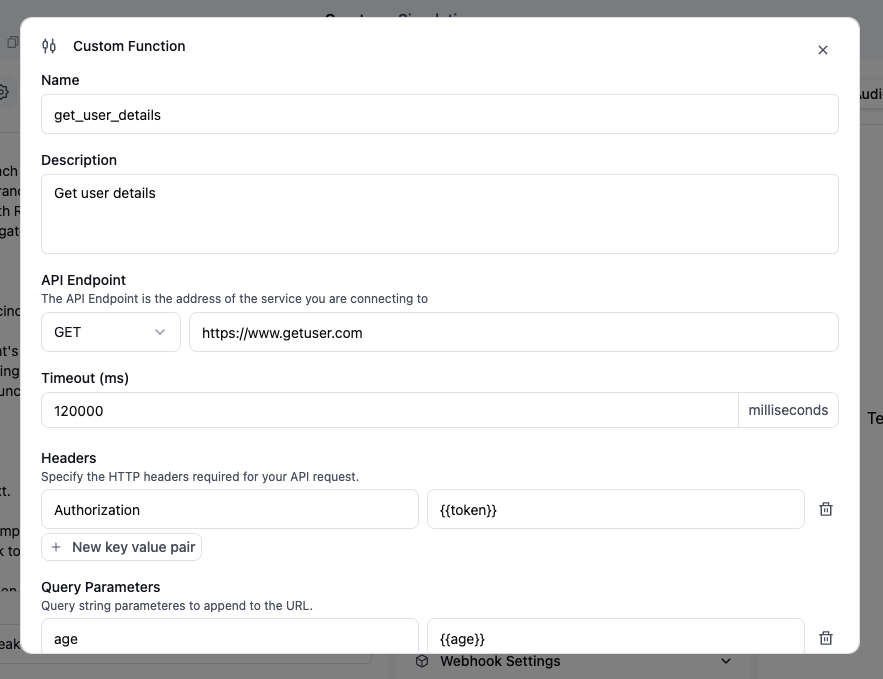 For example:
* Name: `get_user_details`
* Description: `Get user details based on name and age`
Choose the HTTP method that Retell will use to send the request to your endpoint. Available methods include:
For example:
* Name: `get_user_details`
* Description: `Get user details based on name and age`
Choose the HTTP method that Retell will use to send the request to your endpoint. Available methods include:
- GET
- POST
- PATCH
- PUT
- DELETE
Add the URL where Retell will send the request to execute your custom function. This has to be a valid URL.
You can define custom headers to include with the request Retell sends to your endpoint.
Header values can be static or include dynamic variables.
 You can define query parameters to include in the request URL that Retell appends to your endpoint.
There is a switch to change between parameter description or const value. Both description and const value could be dynamic variables.
Description will be resolved by LLM while const value will be applied directly to the function.
You can define query parameters to include in the request URL that Retell appends to your endpoint.
There is a switch to change between parameter description or const value. Both description and const value could be dynamic variables.
Description will be resolved by LLM while const value will be applied directly to the function.
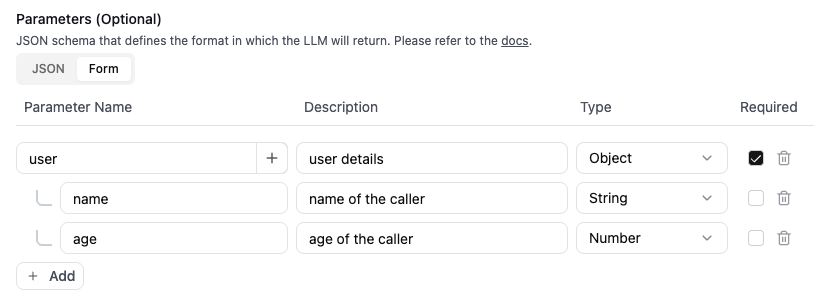
 Define the parameters for the custom function using JSON schema format or JSON form. Only available for POST, PATCH and PUT requests. For guidance, refer to:
* [OpenAI's Function Calling Guide](https://platform.openai.com/docs/guides/function-calling)
* [Function Calling Tutorial](https://semaphoreci.com/blog/function-calling)
**Payload: args only**
When **Payload: args only** is enabled, the JSON body is only the function's arguments: those fields appear at the top level of the request, not nested under `args`. When it is off, the body follows **Request & response spec** below (`name`, `call`, and `args`).
Turn this on when your endpoint expects a flat JSON body that matches your parameter object exactly, with no outer wrapper.
Example parameter schema:
```json theme={null}
{
"type": "object",
"required": [
"order_id"
],
"properties": {
"name": {
"type": "object",
"description": "",
"properties": {
"first_name": {
"type": "string",
"description": "User first name"
},
"last_name": {
"type": "string",
"const": "{{last_name}}"
}
}
},
"order_id": {
"type": "number",
"const": 1234
}
}
}
```
Example JSON form:
Define the parameters for the custom function using JSON schema format or JSON form. Only available for POST, PATCH and PUT requests. For guidance, refer to:
* [OpenAI's Function Calling Guide](https://platform.openai.com/docs/guides/function-calling)
* [Function Calling Tutorial](https://semaphoreci.com/blog/function-calling)
**Payload: args only**
When **Payload: args only** is enabled, the JSON body is only the function's arguments: those fields appear at the top level of the request, not nested under `args`. When it is off, the body follows **Request & response spec** below (`name`, `call`, and `args`).
Turn this on when your endpoint expects a flat JSON body that matches your parameter object exactly, with no outer wrapper.
Example parameter schema:
```json theme={null}
{
"type": "object",
"required": [
"order_id"
],
"properties": {
"name": {
"type": "object",
"description": "",
"properties": {
"first_name": {
"type": "string",
"description": "User first name"
},
"last_name": {
"type": "string",
"const": "{{last_name}}"
}
}
},
"order_id": {
"type": "number",
"const": 1234
}
}
}
```
Example JSON form:
 Extract values from the API response and save them as dynamic variables for use later in the conversation.
For example, you can extract a user’s name from the response and reference it later using
Extract values from the API response and save them as dynamic variables for use later in the conversation.
For example, you can extract a user’s name from the response and reference it later using \{\{user\_name}}.
Example response body
```javascript theme={null}
{
"properties": {
"user": {
"name": "John Doe",
"age": 26
}
}
}
```
 ### Troubleshooting
If you failed to save the custom function, it is likely because the parameters are not valid.
One common mistake is not adding `"type": "object",` to the top level of the JSON schema. We recommend clicking one of the examples and updating accordingly.
## Request & response spec
Retell will send the request to your endpoint with the following request spec.
**Request**
* header
* `X-Retell-Signature`: encrypted request body using your secret key, used to verify the request is from Retell. Read more below.
* Content-Type: application/json. This indicates the payload is in JSON format.
* body (in JSON format, for POST, PUT and PATCH request)
* `name`: the name of the custom function.
* `call`: the call object for you to get more context about the call, it also contains real time transcript up to the time the request is sent. Check out [Get Call API](/api-references/get-call) for more details about the call object.
* `args`: the arguments for the custom function, as a JSON object.
If **Payload: args only** is enabled for a function, the body is only the argument object (no `name`, `call`, or `args` wrapper). Parse parameters from the top level of the JSON, and run signature verification on that same body string.
```json theme={null}
{
"name": "analyze_transcript",
"args": {
"analysis_type": "sentiment"
},
"call": {
"call_type": "web_call",
"access_token": "eyJhbGciOiJIUzI1NiJ9.eyJ2aWRlbyI6eyJyb29tSm9p",
"call_id": "Jabr9TXYYJHfvl6Syypi88rdAHYHmcq6",
"agent_id": "oBeDLoLOeuAbiuaMFXRtDOLriTJ5tSxD",
"agent_version": 1,
"agent_name": "My Agent",
"call_status": "ongoing",
"metadata": {
"internal_customer_id": "cust_12345"
},
"retell_llm_dynamic_variables": {
"customer_name": "John Doe"
},
"custom_sip_headers": {
"X-Custom-Header": "Custom Value"
},
"data_storage_setting": "everything",
"opt_in_signed_url": true,
"start_timestamp": 1703302407333,
"transcript": "Agent: Hi John, thanks for calling! How can I help you today?\nUser: Hi, I'd like to check the status of my recent order.\nAgent: Sure, I'd be happy to help with that. Could you provide me your order number?\nUser: Yes, it's 78542.\nAgent: Let me look that up for you.\n",
"transcript_object": [
{
"role": "agent",
"content": "Hi John, thanks for calling! How can I help you today?",
"words": [
{ "word": "Hi", "start": 0.5, "end": 0.7 },
{ "word": "John,", "start": 0.8, "end": 1.1 },
{ "word": "thanks", "start": 1.2, "end": 1.5 },
{ "word": "for", "start": 1.5, "end": 1.6 },
{ "word": "calling!", "start": 1.7, "end": 2.1 },
{ "word": "How", "start": 2.2, "end": 2.4 },
{ "word": "can", "start": 2.4, "end": 2.5 },
{ "word": "I", "start": 2.5, "end": 2.6 },
{ "word": "help", "start": 2.6, "end": 2.8 },
{ "word": "you", "start": 2.8, "end": 2.9 },
{ "word": "today?", "start": 2.9, "end": 3.3 }
]
},
{
"role": "user",
"content": "Hi, I'd like to check the status of my recent order.",
"words": [
{ "word": "Hi,", "start": 4.0, "end": 4.3 },
{ "word": "I'd", "start": 4.4, "end": 4.6 },
{ "word": "like", "start": 4.6, "end": 4.8 },
{ "word": "to", "start": 4.8, "end": 4.9 },
{ "word": "check", "start": 4.9, "end": 5.2 },
{ "word": "the", "start": 5.2, "end": 5.3 },
{ "word": "status", "start": 5.3, "end": 5.7 },
{ "word": "of", "start": 5.7, "end": 5.8 },
{ "word": "my", "start": 5.8, "end": 5.9 },
{ "word": "recent", "start": 5.9, "end": 6.2 },
{ "word": "order.", "start": 6.2, "end": 6.6 }
]
},
{
"role": "agent",
"content": "Sure, I'd be happy to help with that. Could you provide me your order number?",
"words": [
{ "word": "Sure,", "start": 7.0, "end": 7.4 },
{ "word": "I'd", "start": 7.5, "end": 7.7 },
{ "word": "be", "start": 7.7, "end": 7.8 },
{ "word": "happy", "start": 7.8, "end": 8.1 },
{ "word": "to", "start": 8.1, "end": 8.2 },
{ "word": "help", "start": 8.2, "end": 8.4 },
{ "word": "with", "start": 8.4, "end": 8.6 },
{ "word": "that.", "start": 8.6, "end": 8.9 },
{ "word": "Could", "start": 9.0, "end": 9.2 },
{ "word": "you", "start": 9.2, "end": 9.3 },
{ "word": "provide", "start": 9.3, "end": 9.6 },
{ "word": "me", "start": 9.6, "end": 9.7 },
{ "word": "your", "start": 9.7, "end": 9.9 },
{ "word": "order", "start": 9.9, "end": 10.2 },
{ "word": "number?", "start": 10.2, "end": 10.6 }
]
},
{
"role": "user",
"content": "Yes, it's 78542.",
"words": [
{ "word": "Yes,", "start": 11.5, "end": 11.8 },
{ "word": "it's", "start": 11.9, "end": 12.1 },
{ "word": "78542.", "start": 12.2, "end": 12.9 }
]
},
{
"role": "agent",
"content": "Let me look that up for you.",
"words": [
{ "word": "Let", "start": 13.5, "end": 13.7 },
{ "word": "me", "start": 13.7, "end": 13.8 },
{ "word": "look", "start": 13.8, "end": 14.0 },
{ "word": "that", "start": 14.0, "end": 14.2 },
{ "word": "up", "start": 14.2, "end": 14.3 },
{ "word": "for", "start": 14.3, "end": 14.5 },
{ "word": "you.", "start": 14.5, "end": 14.8 }
]
}
],
"transcript_with_tool_calls": [
{
"role": "agent",
"content": "Hi John, thanks for calling! How can I help you today?",
"words": [
{ "word": "Hi", "start": 0.5, "end": 0.7 },
{ "word": "John,", "start": 0.8, "end": 1.1 }
]
},
{
"role": "user",
"content": "Hi, I'd like to check the status of my recent order.",
"words": [
{ "word": "Hi,", "start": 4.0, "end": 4.3 }
]
},
{
"role": "agent",
"content": "Sure, I'd be happy to help with that. Could you provide me your order number?",
"words": [
{ "word": "Sure,", "start": 7.0, "end": 7.4 }
]
},
{
"role": "user",
"content": "Yes, it's 78542.",
"words": [
{ "word": "Yes,", "start": 11.5, "end": 11.8 }
]
},
{
"role": "agent",
"content": "Let me look that up for you.",
"words": [
{ "word": "Let", "start": 13.5, "end": 13.7 }
]
},
{
"role": "tool_call_invocation",
"tool_call_id": "tool_call_abc123",
"name": "analyze_transcript",
"arguments": "{\"analysis_type\": \"sentiment\"}"
}
],
"latency": {
"e2e": {
"p50": 650,
"p90": 900,
"p95": 1100,
"p99": 1500,
"max": 1600,
"min": 400,
"num": 3,
"values": [400, 650, 1600]
}
}
}
}
```
The request will timeout in your specified timeout period, or 2 minutes if not specified. When request fails, it will be retried up to 2 times.
**Response**
Response should have a status code between 200-299 to indicate success of HTTP request.
Response to the request can be in various formats:
* string
* buffer
* JSON object
* blob
All these formats will be converted to string before sending to LLM for further processing.
The function result is capped at 15000 characters to prevent overloading LLM context window.
## Verifying Request is from Retell
To verify that the request is coming from Retell, you can check the `X-Retell-Signature` header. The value is an encrypted request body using your secret key.
For `GET` and `DELETE` requests, the request body is empty. You can use empty string in the verify function.
```javascript theme={null}
import { Retell } from "retell-sdk";
import express from "express";
const app = express();
// Use raw body for signature verification, not JSON.stringify(req.body).
app.use(express.raw({ type: "application/json" }));
app.post("/check-weather", async (req, res) => {
const rawBody = req.body.toString("utf-8");
if (
!Retell.verify(
rawBody,
process.env.RETELL_API_KEY,
req.headers["x-retell-signature"],
)
) {
console.error("Invalid signature");
return;
}
const content = JSON.parse(rawBody);
if (content.args.city === "New York") {
return res.json("25f and sunny");
} else {
return res.json("20f and cloudy");
}
});
```
```Python theme={null}
from fastapi import FastAPI, Request
from fastapi.responses import JSONResponse
from retell import Retell
retell = Retell(api_key=os.environ["RETELL_API_KEY"])
@app.post("/check-weather")
async def check-weather(request: Request):
try:
raw_body = (await request.body()).decode("utf-8")
valid_signature = retell.verify(
raw_body,
api_key=str(os.environ["RETELL_API_KEY"]),
signature=str(request.headers.get("X-Retell-Signature")),
)
if not valid_signature:
print("Received Unauthorized")
return JSONResponse(status_code=401, content={"message": "Unauthorized"})
post_data = json.loads(raw_body)
args = post_data["args"]
if args["city"] == "New York":
return JSONResponse(status_code=200, content={"result": "25f and sunny"})
else:
return JSONResponse(status_code=200, content={"result": "20f and cloudy"})
except Exception as err:
print(f"Error in webhook: {err}")
return JSONResponse(
status_code=500, content={"message": "Internal Server Error"}
)
```
You can also secure your server from public network by only allowlisting Retell IP addresses: `100.20.5.228`
### Troubleshooting
If you failed to save the custom function, it is likely because the parameters are not valid.
One common mistake is not adding `"type": "object",` to the top level of the JSON schema. We recommend clicking one of the examples and updating accordingly.
## Request & response spec
Retell will send the request to your endpoint with the following request spec.
**Request**
* header
* `X-Retell-Signature`: encrypted request body using your secret key, used to verify the request is from Retell. Read more below.
* Content-Type: application/json. This indicates the payload is in JSON format.
* body (in JSON format, for POST, PUT and PATCH request)
* `name`: the name of the custom function.
* `call`: the call object for you to get more context about the call, it also contains real time transcript up to the time the request is sent. Check out [Get Call API](/api-references/get-call) for more details about the call object.
* `args`: the arguments for the custom function, as a JSON object.
If **Payload: args only** is enabled for a function, the body is only the argument object (no `name`, `call`, or `args` wrapper). Parse parameters from the top level of the JSON, and run signature verification on that same body string.
```json theme={null}
{
"name": "analyze_transcript",
"args": {
"analysis_type": "sentiment"
},
"call": {
"call_type": "web_call",
"access_token": "eyJhbGciOiJIUzI1NiJ9.eyJ2aWRlbyI6eyJyb29tSm9p",
"call_id": "Jabr9TXYYJHfvl6Syypi88rdAHYHmcq6",
"agent_id": "oBeDLoLOeuAbiuaMFXRtDOLriTJ5tSxD",
"agent_version": 1,
"agent_name": "My Agent",
"call_status": "ongoing",
"metadata": {
"internal_customer_id": "cust_12345"
},
"retell_llm_dynamic_variables": {
"customer_name": "John Doe"
},
"custom_sip_headers": {
"X-Custom-Header": "Custom Value"
},
"data_storage_setting": "everything",
"opt_in_signed_url": true,
"start_timestamp": 1703302407333,
"transcript": "Agent: Hi John, thanks for calling! How can I help you today?\nUser: Hi, I'd like to check the status of my recent order.\nAgent: Sure, I'd be happy to help with that. Could you provide me your order number?\nUser: Yes, it's 78542.\nAgent: Let me look that up for you.\n",
"transcript_object": [
{
"role": "agent",
"content": "Hi John, thanks for calling! How can I help you today?",
"words": [
{ "word": "Hi", "start": 0.5, "end": 0.7 },
{ "word": "John,", "start": 0.8, "end": 1.1 },
{ "word": "thanks", "start": 1.2, "end": 1.5 },
{ "word": "for", "start": 1.5, "end": 1.6 },
{ "word": "calling!", "start": 1.7, "end": 2.1 },
{ "word": "How", "start": 2.2, "end": 2.4 },
{ "word": "can", "start": 2.4, "end": 2.5 },
{ "word": "I", "start": 2.5, "end": 2.6 },
{ "word": "help", "start": 2.6, "end": 2.8 },
{ "word": "you", "start": 2.8, "end": 2.9 },
{ "word": "today?", "start": 2.9, "end": 3.3 }
]
},
{
"role": "user",
"content": "Hi, I'd like to check the status of my recent order.",
"words": [
{ "word": "Hi,", "start": 4.0, "end": 4.3 },
{ "word": "I'd", "start": 4.4, "end": 4.6 },
{ "word": "like", "start": 4.6, "end": 4.8 },
{ "word": "to", "start": 4.8, "end": 4.9 },
{ "word": "check", "start": 4.9, "end": 5.2 },
{ "word": "the", "start": 5.2, "end": 5.3 },
{ "word": "status", "start": 5.3, "end": 5.7 },
{ "word": "of", "start": 5.7, "end": 5.8 },
{ "word": "my", "start": 5.8, "end": 5.9 },
{ "word": "recent", "start": 5.9, "end": 6.2 },
{ "word": "order.", "start": 6.2, "end": 6.6 }
]
},
{
"role": "agent",
"content": "Sure, I'd be happy to help with that. Could you provide me your order number?",
"words": [
{ "word": "Sure,", "start": 7.0, "end": 7.4 },
{ "word": "I'd", "start": 7.5, "end": 7.7 },
{ "word": "be", "start": 7.7, "end": 7.8 },
{ "word": "happy", "start": 7.8, "end": 8.1 },
{ "word": "to", "start": 8.1, "end": 8.2 },
{ "word": "help", "start": 8.2, "end": 8.4 },
{ "word": "with", "start": 8.4, "end": 8.6 },
{ "word": "that.", "start": 8.6, "end": 8.9 },
{ "word": "Could", "start": 9.0, "end": 9.2 },
{ "word": "you", "start": 9.2, "end": 9.3 },
{ "word": "provide", "start": 9.3, "end": 9.6 },
{ "word": "me", "start": 9.6, "end": 9.7 },
{ "word": "your", "start": 9.7, "end": 9.9 },
{ "word": "order", "start": 9.9, "end": 10.2 },
{ "word": "number?", "start": 10.2, "end": 10.6 }
]
},
{
"role": "user",
"content": "Yes, it's 78542.",
"words": [
{ "word": "Yes,", "start": 11.5, "end": 11.8 },
{ "word": "it's", "start": 11.9, "end": 12.1 },
{ "word": "78542.", "start": 12.2, "end": 12.9 }
]
},
{
"role": "agent",
"content": "Let me look that up for you.",
"words": [
{ "word": "Let", "start": 13.5, "end": 13.7 },
{ "word": "me", "start": 13.7, "end": 13.8 },
{ "word": "look", "start": 13.8, "end": 14.0 },
{ "word": "that", "start": 14.0, "end": 14.2 },
{ "word": "up", "start": 14.2, "end": 14.3 },
{ "word": "for", "start": 14.3, "end": 14.5 },
{ "word": "you.", "start": 14.5, "end": 14.8 }
]
}
],
"transcript_with_tool_calls": [
{
"role": "agent",
"content": "Hi John, thanks for calling! How can I help you today?",
"words": [
{ "word": "Hi", "start": 0.5, "end": 0.7 },
{ "word": "John,", "start": 0.8, "end": 1.1 }
]
},
{
"role": "user",
"content": "Hi, I'd like to check the status of my recent order.",
"words": [
{ "word": "Hi,", "start": 4.0, "end": 4.3 }
]
},
{
"role": "agent",
"content": "Sure, I'd be happy to help with that. Could you provide me your order number?",
"words": [
{ "word": "Sure,", "start": 7.0, "end": 7.4 }
]
},
{
"role": "user",
"content": "Yes, it's 78542.",
"words": [
{ "word": "Yes,", "start": 11.5, "end": 11.8 }
]
},
{
"role": "agent",
"content": "Let me look that up for you.",
"words": [
{ "word": "Let", "start": 13.5, "end": 13.7 }
]
},
{
"role": "tool_call_invocation",
"tool_call_id": "tool_call_abc123",
"name": "analyze_transcript",
"arguments": "{\"analysis_type\": \"sentiment\"}"
}
],
"latency": {
"e2e": {
"p50": 650,
"p90": 900,
"p95": 1100,
"p99": 1500,
"max": 1600,
"min": 400,
"num": 3,
"values": [400, 650, 1600]
}
}
}
}
```
The request will timeout in your specified timeout period, or 2 minutes if not specified. When request fails, it will be retried up to 2 times.
**Response**
Response should have a status code between 200-299 to indicate success of HTTP request.
Response to the request can be in various formats:
* string
* buffer
* JSON object
* blob
All these formats will be converted to string before sending to LLM for further processing.
The function result is capped at 15000 characters to prevent overloading LLM context window.
## Verifying Request is from Retell
To verify that the request is coming from Retell, you can check the `X-Retell-Signature` header. The value is an encrypted request body using your secret key.
For `GET` and `DELETE` requests, the request body is empty. You can use empty string in the verify function.
```javascript theme={null}
import { Retell } from "retell-sdk";
import express from "express";
const app = express();
// Use raw body for signature verification, not JSON.stringify(req.body).
app.use(express.raw({ type: "application/json" }));
app.post("/check-weather", async (req, res) => {
const rawBody = req.body.toString("utf-8");
if (
!Retell.verify(
rawBody,
process.env.RETELL_API_KEY,
req.headers["x-retell-signature"],
)
) {
console.error("Invalid signature");
return;
}
const content = JSON.parse(rawBody);
if (content.args.city === "New York") {
return res.json("25f and sunny");
} else {
return res.json("20f and cloudy");
}
});
```
```Python theme={null}
from fastapi import FastAPI, Request
from fastapi.responses import JSONResponse
from retell import Retell
retell = Retell(api_key=os.environ["RETELL_API_KEY"])
@app.post("/check-weather")
async def check-weather(request: Request):
try:
raw_body = (await request.body()).decode("utf-8")
valid_signature = retell.verify(
raw_body,
api_key=str(os.environ["RETELL_API_KEY"]),
signature=str(request.headers.get("X-Retell-Signature")),
)
if not valid_signature:
print("Received Unauthorized")
return JSONResponse(status_code=401, content={"message": "Unauthorized"})
post_data = json.loads(raw_body)
args = post_data["args"]
if args["city"] == "New York":
return JSONResponse(status_code=200, content={"result": "25f and sunny"})
else:
return JSONResponse(status_code=200, content={"result": "20f and cloudy"})
except Exception as err:
print(f"Error in webhook: {err}")
return JSONResponse(
status_code=500, content={"message": "Internal Server Error"}
)
```
You can also secure your server from public network by only allowlisting Retell IP addresses: `100.20.5.228`