> ## Documentation Index
> Fetch the complete documentation index at: https://docs.retellai.com/llms.txt
> Use this file to discover all available pages before exploring further.
# Extract Dynamic Variable Node
> Add an extract dynamic variable node to a Retell conversation flow to pull values from the dialogue and store them as text, number, boolean, or enum variables.
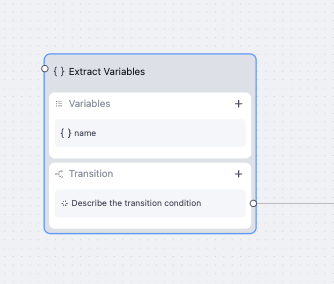
Extract dynamic variable node is used to extract information from conversation and store them as dynamic variable. It's not intended for having a conversation with the user.
 ## Add a variable
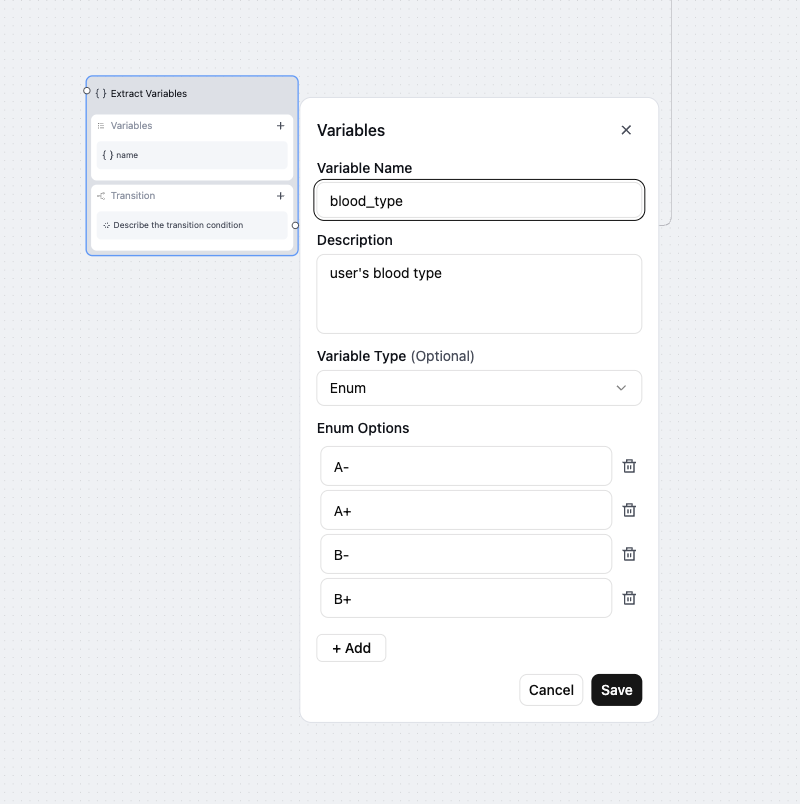
To create a variable, fill in the following details:
* **Variable Name** – A short name to reference this variable.
* **Description** – A brief explanation of what this value should be.
* **Variable Type** – Choose from `Text`, `Number`, `Enum`, or `Boolean`.
* **Enum Options** - Options to choose from. Only when type is enum.
***
## Variable Types
You can create variables of the following types:
* **Text** - Any word or sentence. Examples: `"headache"`, `"John Smith"`
* **Number** - A numeric value. Examples: `42`, `98.6`
* **Enum** - A value from a predefined list. Examples: `"Yes"`, `"No"`, `"Maybe"`
* **Boolean** - True or false.
## Add a variable
To create a variable, fill in the following details:
* **Variable Name** – A short name to reference this variable.
* **Description** – A brief explanation of what this value should be.
* **Variable Type** – Choose from `Text`, `Number`, `Enum`, or `Boolean`.
* **Enum Options** - Options to choose from. Only when type is enum.
***
## Variable Types
You can create variables of the following types:
* **Text** - Any word or sentence. Examples: `"headache"`, `"John Smith"`
* **Number** - A numeric value. Examples: `42`, `98.6`
* **Enum** - A value from a predefined list. Examples: `"Yes"`, `"No"`, `"Maybe"`
* **Boolean** - True or false.
 ## Node Settings
* **Global Node**: read more at [Global Node](/build/conversation-flow/global-node)
* **LLM**: choose a different model for this particular node. Will be used for function argument generation, and potentially speak during execution message generation.
* **Fine-tuning Examples**: Can finetune transition. Read more at [Finetune Examples](/build/conversation-flow/finetune-examples)
## Node Settings
* **Global Node**: read more at [Global Node](/build/conversation-flow/global-node)
* **LLM**: choose a different model for this particular node. Will be used for function argument generation, and potentially speak during execution message generation.
* **Fine-tuning Examples**: Can finetune transition. Read more at [Finetune Examples](/build/conversation-flow/finetune-examples)