> ## Documentation Index
> Fetch the complete documentation index at: https://docs.retellai.com/llms.txt
> Use this file to discover all available pages before exploring further.
# Node Overview
> Nodes are the building blocks of Retell conversation flow agents — learn node types, how edges connect them, and how transition conditions move calls forward.
## What are Nodes?
Nodes are the fundamental building blocks of your conversation flow. Each node represents a specific step or action in your agent's conversation, with its own logic, behavior, and purpose.
### Key Concepts
* **Node Type**: Determines the node's functionality (conversation, subagent, function call, logic, etc.)
* **Edges**: Connections between nodes that define the conversation flow
* **Transition Conditions**: Rules that determine when and where to move next
* **Fine-tuning**: Each node can be optimized independently for better performance
### Why Use Nodes?
By breaking complex workflows into individual nodes:
* **Precise Control**: Define exact behavior for each conversation scenario
* **Better Performance**: Fine-tune specific parts without affecting others
* **Easier Debugging**: Isolate and fix issues in specific conversation paths
* **Reusability**: Connect nodes in different ways for various flows
## Node Types Available
Each node type plays a specific role. Pick the type that matches what the step needs to do.
### Conversation Nodes
* [**Conversation Node**](/build/conversation-flow/conversation-node): Pure dialogue with the user — no tool calling. The agent can hold a multi-turn conversation within a single node, so you don't need a new node for every line. Supports two instruction modes: **Prompt** (the LLM generates responses dynamically) and **Static Sentence** (the agent says a fixed line first, then continues dynamically if the conversation stays in the node). Transitions are evaluated after each user response.
* [**Subagent Node**](/build/conversation-flow/subagent-node): Dialogue where the agent can also call tools/functions based on context. Unlike a function node (which executes deterministically on entry), the LLM decides **whether and when** to invoke each tool from what the user says. Supports multiple tools per node and stays active across multiple turns and tool calls before transitioning. Use a function node instead when a tool must always run at that step.
* [**Extract DV Node**](/build/conversation-flow/extract-dv-node): Extracts information from the conversation so far and stores it as dynamic variables on entry — not for dialogue. The LLM analyzes the full conversation to capture each value you define by name, description, and type (Text, Number, Enum, or Boolean). Useful for structured data that downstream nodes or post-call analysis need.
### Action Nodes
* [**Function Node**](/build/conversation-flow/function-node): Executes a single tool/function deterministically on node entry — not for dialogue. Turn on **Wait for Result** when the next hop depends on the return value, then branch on the outcome directly from this node. The agent can optionally speak while it runs (e.g. "Let me check that for you").
* [**Code Node**](/build/conversation-flow/code-node): Runs JavaScript in Retell's sandbox on entry — no external server needed. Best for data transformation, calculations, formatting, and simple read-only lookups via `fetch()`. Has access to dynamic variables and call metadata, and can store return values into dynamic variables. For anything needing secrets, authentication, or writes, use a custom function instead.
* [**SMS Node**](/build/conversation-flow/sms-node): Sends an SMS during an active phone call, to the caller or another number. Requires an SMS-enabled or SMS-approved Retell number. Transitions once the SMS succeeds or fails. *(Voice agents only.)*
* [**MCP Node**](/build/conversation-flow/mcp-node): Calls a tool on an external MCP (Model Context Protocol) server on entry. Connect your server, select a tool, and optionally extract response values into dynamic variables for later nodes. The agent can speak while it runs.
### Call Control Nodes
* [**Call Transfer Node**](/build/conversation-flow/call-transfer-node): Transfers the call to another phone number or SIP URI. The agent doesn't speak in this node — put a conversation node with **Skip Response** before it for a line like "Let me transfer you." Supports cold, warm (with human detection, whisper/three-way messages), and agentic warm transfer. Use this node — not a conversation node — whenever the agent should transfer to a human. *(Voice agents only.)*
* [**Transfer Agent Node**](/build/conversation-flow/transfer-agent-node): Hands the conversation to a different Retell agent mid-call. Near-instant (no new phone call), the destination agent inherits the full conversation history, and no separate phone number is needed. Preferred over call transfer when routing between AI agents (e.g. front-desk → booking, or language-based routing).
* [**Press Digit Node**](/build/conversation-flow/press-digit-node): Navigates IVR menus by sending DTMF tones. The agent doesn't speak — it listens to IVR prompts and infers which digit to press from your instruction, evaluating on each IVR utterance. Give clear guidance on which options to choose and which to avoid. *(Voice agents only.)*
* [**End Node**](/build/conversation-flow/end-node): Ends the call. Enable **Speak During Execution** with an instruction so the agent gives a closing message before hanging up; otherwise the call ends abruptly.
### Logic & Structure
* [**Logic Split Node**](/build/conversation-flow/logic-split-node): Evaluates conditions and branches the flow immediately on entry — the agent doesn't speak. Useful for splitting on dynamic variables or conditions without stacking everything onto the previous node. Always has an else destination as a fallback so the flow never gets stuck.
* [**Component**](/build/conversation-flow/components): Packages a reusable sub-flow (a group of nodes) that appears as a single node on the main canvas. Components can be local to one agent or shared across agents in a library; they run their internal nodes and return control to the main flow via an exit node. Tools defined inside a component stay scoped to it.
## Add a Node
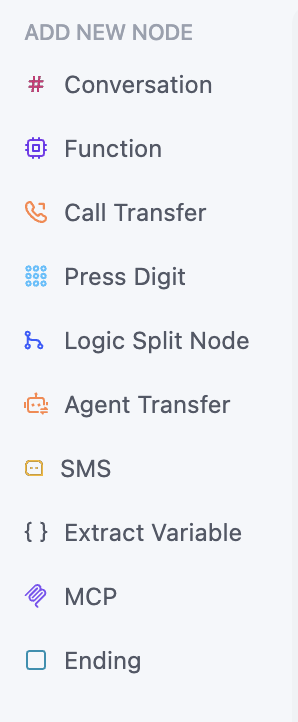
Click from the left sidebar to select the node type you want to add. Click on it, and it will be added to the canvas.
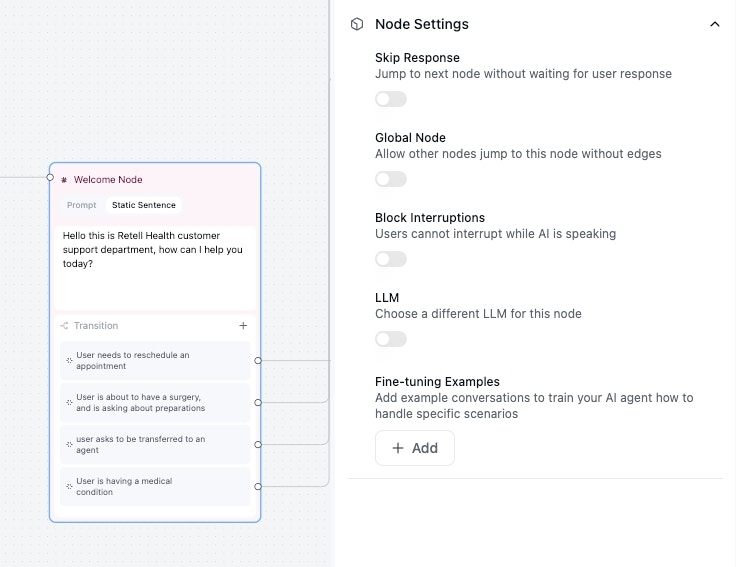
 Configure the node by clicking on the node, check the setting on the right, and fill in node instructions inside the node. Check out respective node guide for more details.
 Add edges by clicking on bottom part of the node, and add your transition conditions. Check out next step for more details on how to add transition conditions.
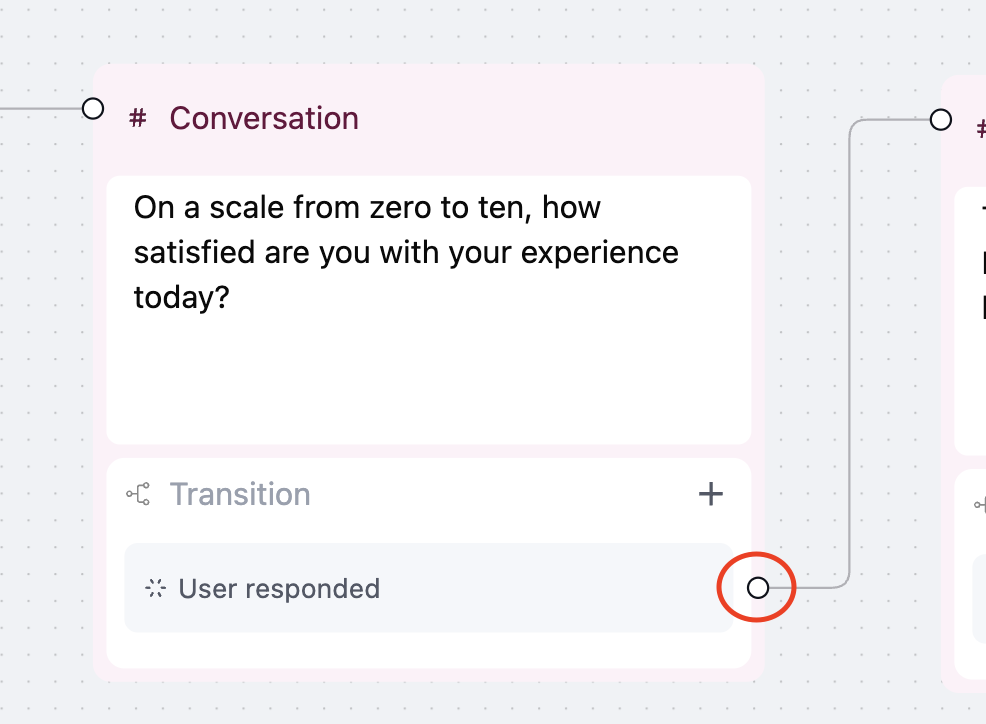
Click and hold the circle to start a line that connects the node to other node, and other node to this node.
Add edges by clicking on bottom part of the node, and add your transition conditions. Check out next step for more details on how to add transition conditions.
Click and hold the circle to start a line that connects the node to other node, and other node to this node.
 ## Organize Nodes
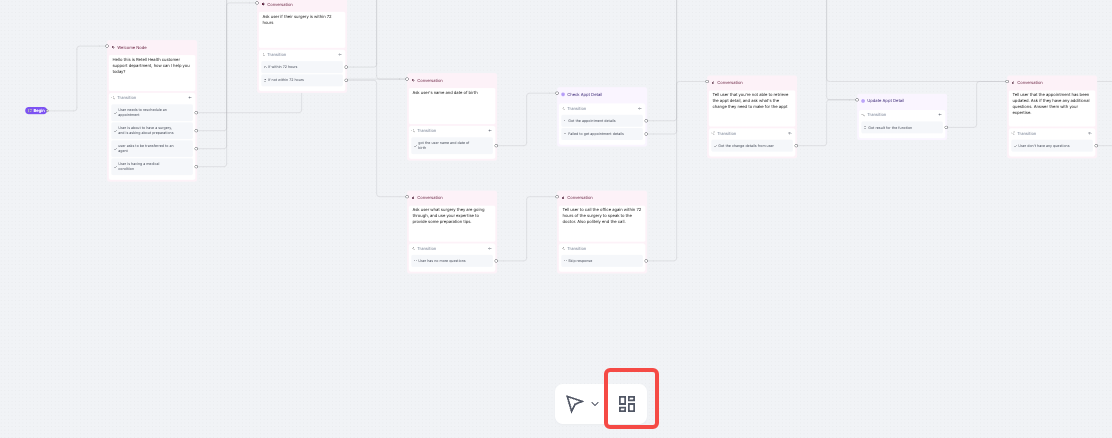
Sometimes after adding a great amount of nodes, the canvas can get cluttered. You can use the `Organize` button to automatically organize the nodes.
## Organize Nodes
Sometimes after adding a great amount of nodes, the canvas can get cluttered. You can use the `Organize` button to automatically organize the nodes.
 ## FAQ
Consider breaking down a node when:
* The node handles multiple complex logic paths
* The LLM struggles with consistency (hallucinations or incorrect responses)
* You need different settings (model, temperature) for different parts
* The conversation flow becomes hard to follow or debug
Breaking complex nodes into smaller, focused nodes often improves reliability.
Depending on whether you are using mouse or touchpad, you can use the scroll wheel or pinch to zoom.
No, you can add as many nodes as you want.
## FAQ
Consider breaking down a node when:
* The node handles multiple complex logic paths
* The LLM struggles with consistency (hallucinations or incorrect responses)
* You need different settings (model, temperature) for different parts
* The conversation flow becomes hard to follow or debug
Breaking complex nodes into smaller, focused nodes often improves reliability.
Depending on whether you are using mouse or touchpad, you can use the scroll wheel or pinch to zoom.
No, you can add as many nodes as you want.