> ## Documentation Index
> Fetch the complete documentation index at: https://docs.retellai.com/llms.txt
> Use this file to discover all available pages before exploring further.
# Handle voicemail and IVR
> Configure Retell agents to detect voicemails and IVR systems on outbound calls and choose what to do next — hang up, leave a message, or navigate the menu.
When making outbound calls, your agent may reach a voicemail or an IVR (Interactive Voice Response) menu instead of a person. You can configure the agent to detect these automatically and choose what happens next.
For example, an outbound reminder campaign can leave a callback message whenever it reaches a voicemail, instead of hanging up silently.
 ## Voicemail detection
The system runs voicemail detection continuously within a timeout window. You can choose what happens when a voicemail is detected:
* **Hang up** — disconnect immediately, even if the voicemail greeting is still playing.
* **Leave a message** — wait for the agent's turn to speak, then deliver a message. Supports [dynamic variables](/build/dynamic-variables).
If the timeout is reached without detecting a voicemail, detection stops and the call continues normally.
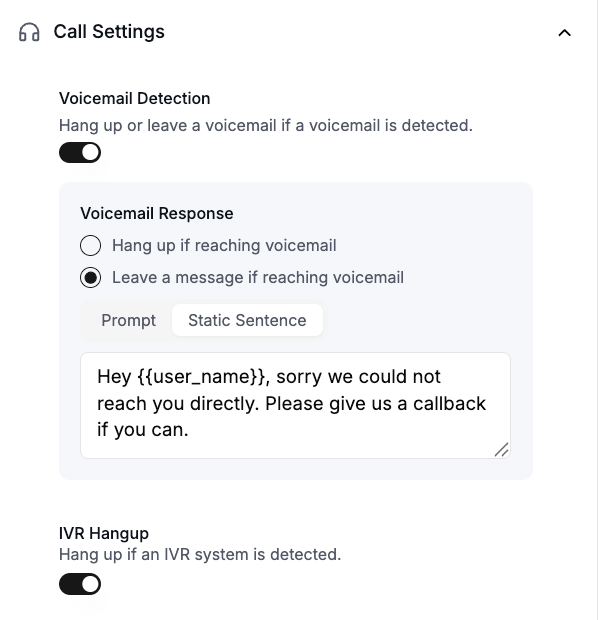
Navigate to your agent settings, then open **Call Settings** and enable **Voicemail Detection**.
Select one of the following options:
* **Hang up if reaching voicemail**: The agent disconnects when it detects a voicemail.
* **Leave a message if reaching voicemail**: The agent waits for its turn to speak, then leaves a message. Choose between:
* **Prompt**: A dynamically generated message based on instructions you provide, such as `Summarize the call and ask the user to call back.`
* **Static Sentence**: A fixed message, such as `Hey {{user_name}}, sorry we could not reach you directly. Please give us a callback if you can.`
## IVR hangup
When enabled, the system detects if your outbound call reaches an IVR (automated phone menu) system and automatically hangs up the call.
IVR hangup is separate from [IVR navigation](/build/telephony/navigate-ivr), which allows your agent to interact with and navigate through IVR menus using DTMF tones.
To enable, navigate to your agent settings, then open **Call Settings** and toggle on **IVR Hangup**.
## FAQ
This most likely means the call is being classified as an IVR rather than a voicemail. Because the two detection types are handled separately, voicemail hang up will not trigger in this case. Enable **IVR Hangup** in your agent's **Call Settings** to handle this scenario and automatically disconnect when an IVR system is detected.
No, voicemail and IVR detection will only run for the first 3 minutes of the call. Please contact [support@retellai.com](mailto:support@retellai.com) if you need to extend this.
Voicemail detection is optimized for real-time use cases and generally adds under 30ms of latency.
If voicemail is detected, the call will have a disconnection reason of `voicemail_reached`. If IVR is detected, the disconnection reason will be `ivr_reached`.
Yes. When set to hang up, the agent disconnects immediately upon detection, regardless of whether the voicemail greeting is still playing.
No. When set to leave a message, the agent waits for its turn to speak before delivering the message.
## Voicemail detection
The system runs voicemail detection continuously within a timeout window. You can choose what happens when a voicemail is detected:
* **Hang up** — disconnect immediately, even if the voicemail greeting is still playing.
* **Leave a message** — wait for the agent's turn to speak, then deliver a message. Supports [dynamic variables](/build/dynamic-variables).
If the timeout is reached without detecting a voicemail, detection stops and the call continues normally.
Navigate to your agent settings, then open **Call Settings** and enable **Voicemail Detection**.
Select one of the following options:
* **Hang up if reaching voicemail**: The agent disconnects when it detects a voicemail.
* **Leave a message if reaching voicemail**: The agent waits for its turn to speak, then leaves a message. Choose between:
* **Prompt**: A dynamically generated message based on instructions you provide, such as `Summarize the call and ask the user to call back.`
* **Static Sentence**: A fixed message, such as `Hey {{user_name}}, sorry we could not reach you directly. Please give us a callback if you can.`
## IVR hangup
When enabled, the system detects if your outbound call reaches an IVR (automated phone menu) system and automatically hangs up the call.
IVR hangup is separate from [IVR navigation](/build/telephony/navigate-ivr), which allows your agent to interact with and navigate through IVR menus using DTMF tones.
To enable, navigate to your agent settings, then open **Call Settings** and toggle on **IVR Hangup**.
## FAQ
This most likely means the call is being classified as an IVR rather than a voicemail. Because the two detection types are handled separately, voicemail hang up will not trigger in this case. Enable **IVR Hangup** in your agent's **Call Settings** to handle this scenario and automatically disconnect when an IVR system is detected.
No, voicemail and IVR detection will only run for the first 3 minutes of the call. Please contact [support@retellai.com](mailto:support@retellai.com) if you need to extend this.
Voicemail detection is optimized for real-time use cases and generally adds under 30ms of latency.
If voicemail is detected, the call will have a disconnection reason of `voicemail_reached`. If IVR is detected, the disconnection reason will be `ivr_reached`.
Yes. When set to hang up, the agent disconnects immediately upon detection, regardless of whether the voicemail greeting is still playing.
No. When set to leave a message, the agent waits for its turn to speak before delivering the message.