> ## Documentation Index
> Fetch the complete documentation index at: https://docs.retellai.com/llms.txt
> Use this file to discover all available pages before exploring further.
# Add backchannel
> Enable and tune backchanneling in Retell — short acknowledgements like uh-huh or I see — to make voice agent conversations sound more engaged and natural.
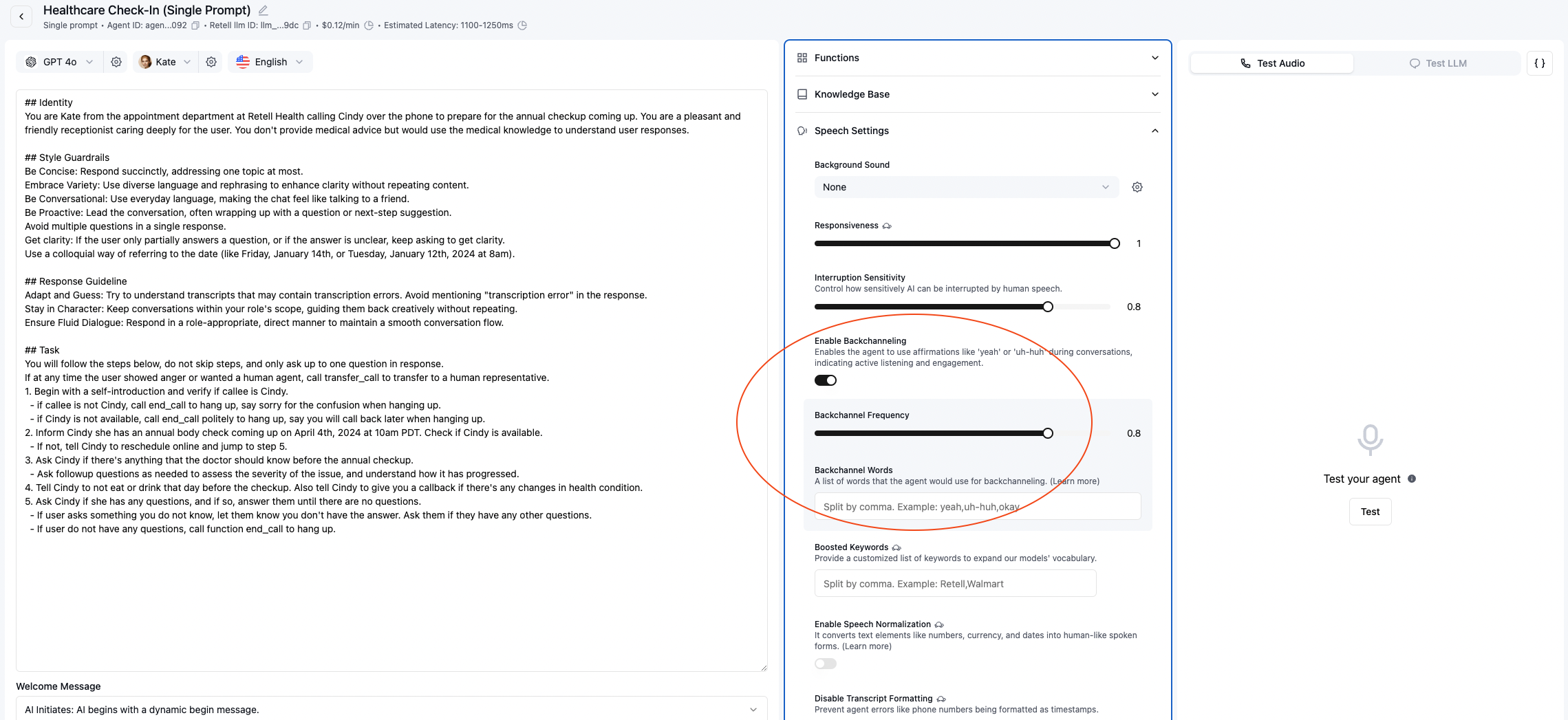 Backchannel is the ability for the agent to make small noises like "uh-huh", "I see", etc. during user speech, to
improve engagement of the call. You can set whether to enable it, how often it triggers, what words are used.
You will look at the following fields in [Create Agent API](/api-references/create-agent):
* `enable_backchannel`: set to `true` to enable backchannel. Default to `false`.
* `backchannel_frequency`: When our engine determines that a backchannel is possible and appropriate here, you don't necessarily always want
to backchannel. Humans often only backchannel at some places, not all possible cases. Therefore, this field controls how often
the backchannel is triggered, with 0 being never, 1 being always when possible. The default is 0.8.
* `backchannel_words`: The words that the agent can use as backchannel. The default is different for each language, and for each
voice provider, as some voice providers do not have support for some of the words. The following tab contains the default backchannel
words for each language and voice provider. You can overwrite this field to customize the backchannel words.
Note that certain voices do not work too well with certain words, so it's recommended to experiment before adding any words.
* `11labs voices`: \["okay", "uh-huh", "mhmm", "yah"]
* `openai voices`: \["okay", "uh-huh", "yah"]
* `deepgram voices`: \["okay", "uh-huh", "yah"]
* `11labs voices`: \["mhm", "ajá", "si", "vale"]
* `openai voices`: \["ajá", "si", "vale"]
* `11labs voices`: \["अरे", "हाँ", "उम्म", "अच्छा", "सही", "ओह"]
* `openai voices`: \["अच्छा", "सही"]
* `11labs voices`: \["mhm", "ja", "genaú"]
* `openai voices`: \["ja"]
* `11labs voices`: \["mhm", "oui"]
* `openai voices`: \["oui"]
* `11labs voices`: \["はい"]
* `openai voices`: \["はい"]
* `11labs voices`: \["certo", "sim", "tá"]
* `openai voices`: \["sim"]
Backchannel is the ability for the agent to make small noises like "uh-huh", "I see", etc. during user speech, to
improve engagement of the call. You can set whether to enable it, how often it triggers, what words are used.
You will look at the following fields in [Create Agent API](/api-references/create-agent):
* `enable_backchannel`: set to `true` to enable backchannel. Default to `false`.
* `backchannel_frequency`: When our engine determines that a backchannel is possible and appropriate here, you don't necessarily always want
to backchannel. Humans often only backchannel at some places, not all possible cases. Therefore, this field controls how often
the backchannel is triggered, with 0 being never, 1 being always when possible. The default is 0.8.
* `backchannel_words`: The words that the agent can use as backchannel. The default is different for each language, and for each
voice provider, as some voice providers do not have support for some of the words. The following tab contains the default backchannel
words for each language and voice provider. You can overwrite this field to customize the backchannel words.
Note that certain voices do not work too well with certain words, so it's recommended to experiment before adding any words.
* `11labs voices`: \["okay", "uh-huh", "mhmm", "yah"]
* `openai voices`: \["okay", "uh-huh", "yah"]
* `deepgram voices`: \["okay", "uh-huh", "yah"]
* `11labs voices`: \["mhm", "ajá", "si", "vale"]
* `openai voices`: \["ajá", "si", "vale"]
* `11labs voices`: \["अरे", "हाँ", "उम्म", "अच्छा", "सही", "ओह"]
* `openai voices`: \["अच्छा", "सही"]
* `11labs voices`: \["mhm", "ja", "genaú"]
* `openai voices`: \["ja"]
* `11labs voices`: \["mhm", "oui"]
* `openai voices`: \["oui"]
* `11labs voices`: \["はい"]
* `openai voices`: \["はい"]
* `11labs voices`: \["certo", "sim", "tá"]
* `openai voices`: \["sim"]