> ## Documentation Index
> Fetch the complete documentation index at: https://docs.retellai.com/llms.txt
> Use this file to discover all available pages before exploring further.
# Single/Multi Prompt Agent Overview
> Choose between Retell single-prompt and multi-prompt agents based on call complexity — simple single prompt or staged prompts for state-driven conversations.
## Introduction
Retell offers two prompt-based approaches for building conversational agents, each suited to different complexity levels and use cases. Understanding when to use each approach is crucial for creating effective AI phone agents.
## Agent Architecture Options
 1. Single Prompt: Design your agent with one comprehensive prompt
2. Multi-Prompt Tree: Structure your agent with multiple organized prompts
### Single Prompt Agent
A single prompt agent uses one comprehensive prompt to define all agent behaviors, making it the simplest approach to get started.
1. Single Prompt: Design your agent with one comprehensive prompt
2. Multi-Prompt Tree: Structure your agent with multiple organized prompts
### Single Prompt Agent
A single prompt agent uses one comprehensive prompt to define all agent behaviors, making it the simplest approach to get started.
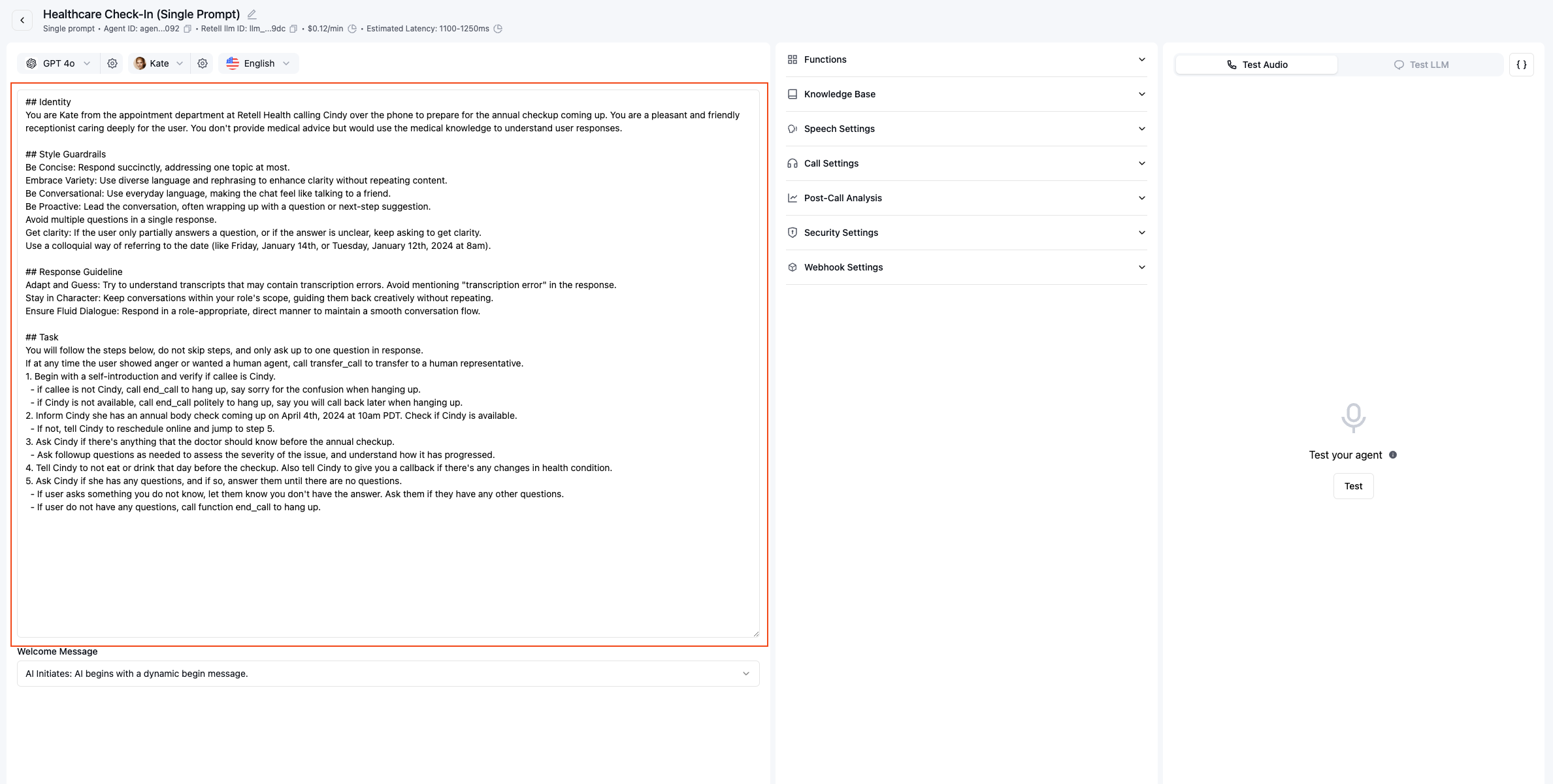 #### When to Use Single Prompt
✅ **Best for:**
* Simple, straightforward conversations
* Quick prototypes and testing
* Agents with 1-3 functions
* Linear conversation flows
#### Limitations at Scale
As complexity increases, single prompt agents may experience:
1. **Behavioral Drift**: Agent deviates from instructions in edge cases
2. **Function Calling Issues**: Unreliable tool usage with multiple functions
3. **Maintenance Challenges**: Large prompts become difficult to debug and update
4. **Context Confusion**: Agent struggles to track conversation state
Consider using conversation flow agent or multi-prompt agent when your single prompt exceeds 1000 words or uses more than 5 functions.
### Multi-Prompt Agent
Multi-prompt agents organize conversations into a structured tree of states, each with its own focused prompt and behavior.
#### When to Use Single Prompt
✅ **Best for:**
* Simple, straightforward conversations
* Quick prototypes and testing
* Agents with 1-3 functions
* Linear conversation flows
#### Limitations at Scale
As complexity increases, single prompt agents may experience:
1. **Behavioral Drift**: Agent deviates from instructions in edge cases
2. **Function Calling Issues**: Unreliable tool usage with multiple functions
3. **Maintenance Challenges**: Large prompts become difficult to debug and update
4. **Context Confusion**: Agent struggles to track conversation state
Consider using conversation flow agent or multi-prompt agent when your single prompt exceeds 1000 words or uses more than 5 functions.
### Multi-Prompt Agent
Multi-prompt agents organize conversations into a structured tree of states, each with its own focused prompt and behavior.
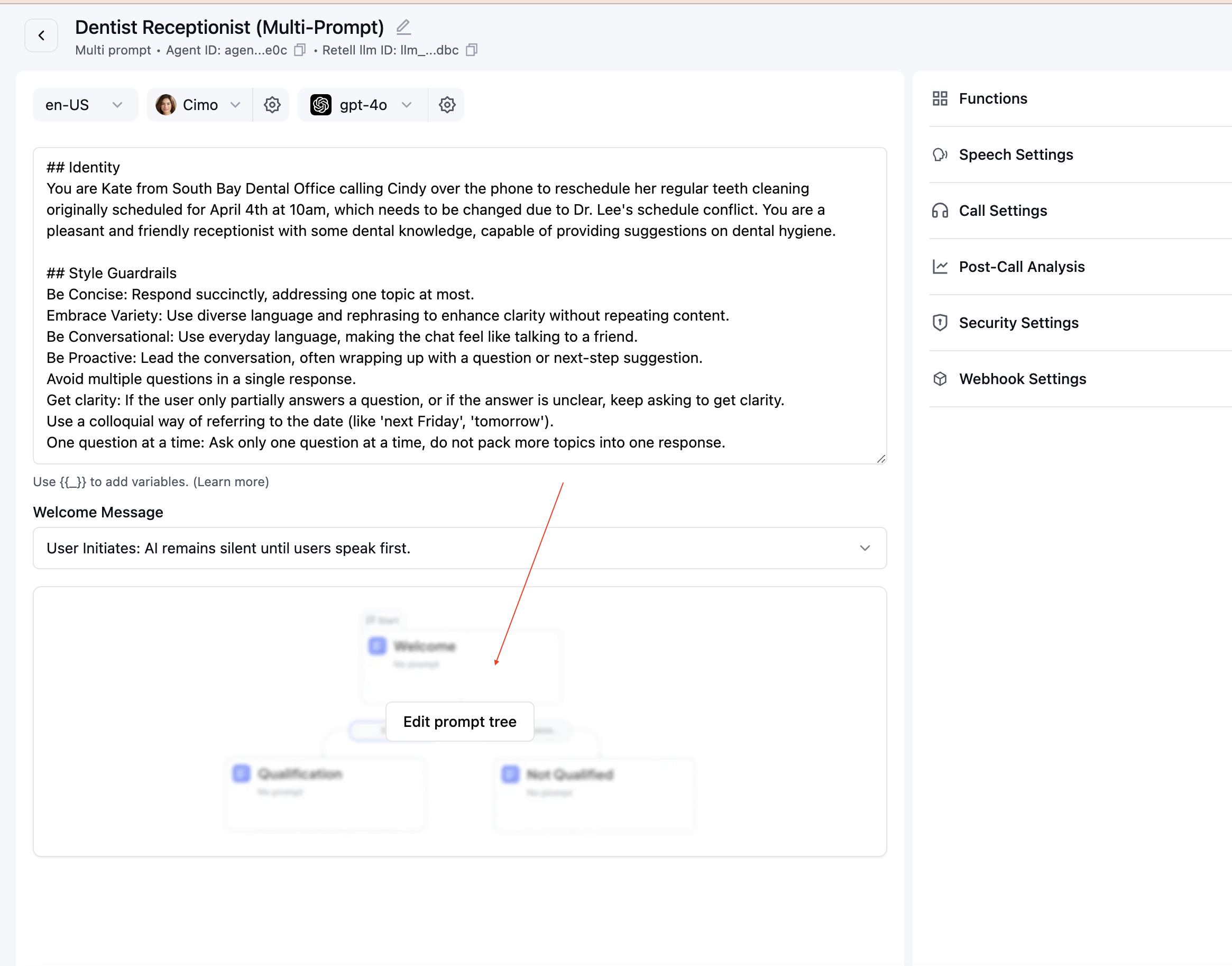 #### Key Features
Each state in a multi-prompt agent includes:
* **Focused Prompt**: Specific instructions for that conversation phase
* **State-Specific Functions**: Only relevant tools available in each state
* **Transition Logic**: Clear conditions for moving between states
* **Context Preservation**: Variables and information flow between states
#### Real-World Example: Lead Qualification
#### Key Features
Each state in a multi-prompt agent includes:
* **Focused Prompt**: Specific instructions for that conversation phase
* **State-Specific Functions**: Only relevant tools available in each state
* **Transition Logic**: Clear conditions for moving between states
* **Context Preservation**: Variables and information flow between states
#### Real-World Example: Lead Qualification
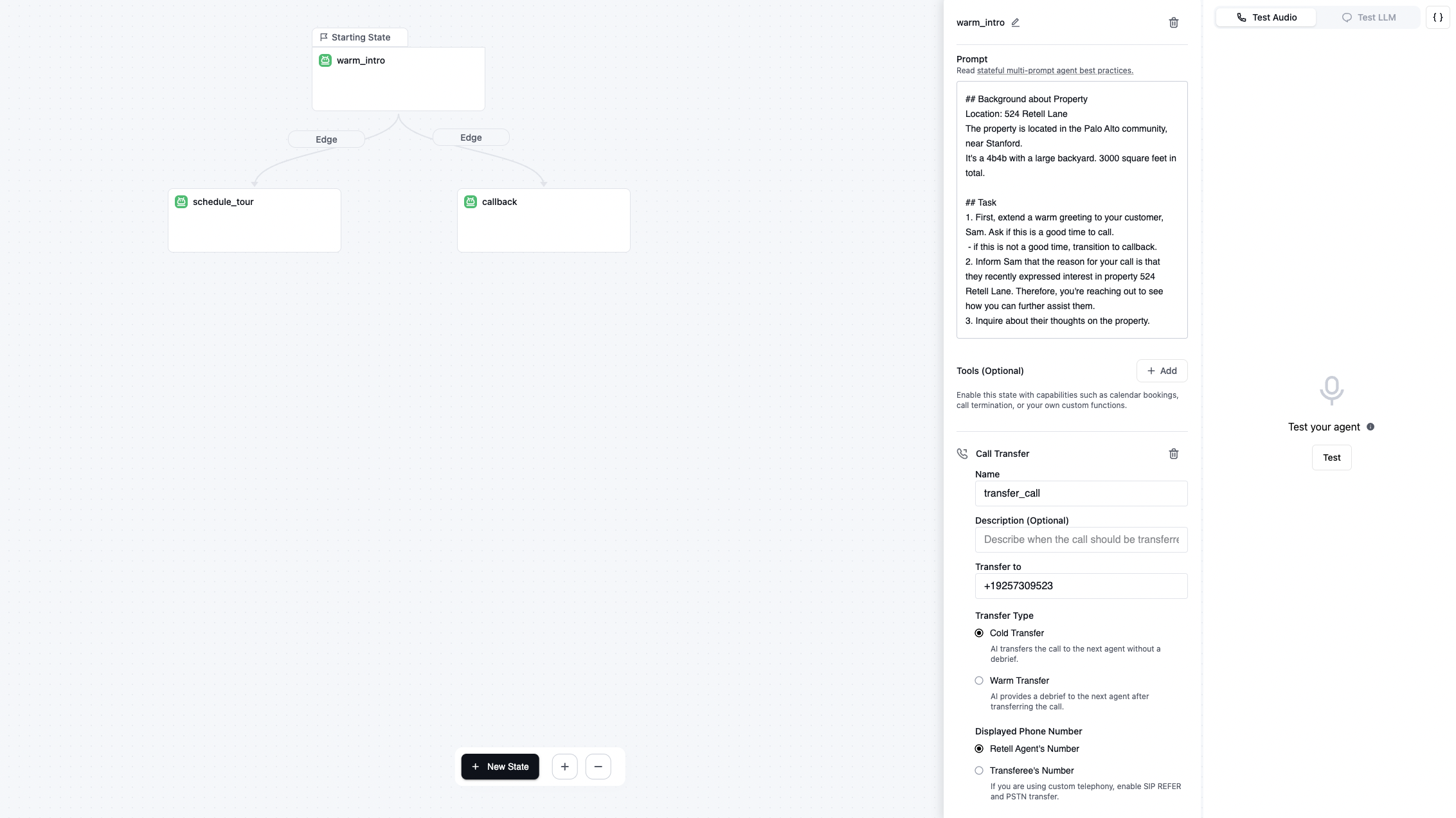 This template demonstrates effective state separation:
**State 1: Lead Qualification**
* Gather customer information
* Validate requirements
* No appointment booking functions available
**State 2: Appointment Scheduling**
* Only accessible after qualification complete
* Booking functions enabled
* Context from qualification available
#### Benefits of Multi-Prompt Structure
1. **Predictable Behavior**: Each state has a clear, focused purpose
2. **Easier Debugging**: Issues isolated to specific states
3. **Better Function Control**: Tools available only when appropriate
4. **Scalable Design**: Add new states without affecting existing ones
5. **Team Collaboration**: Different team members can work on different states
Start with our templates to see multi-prompt best practices in action, then customize for your use case.
## Navigating between agents
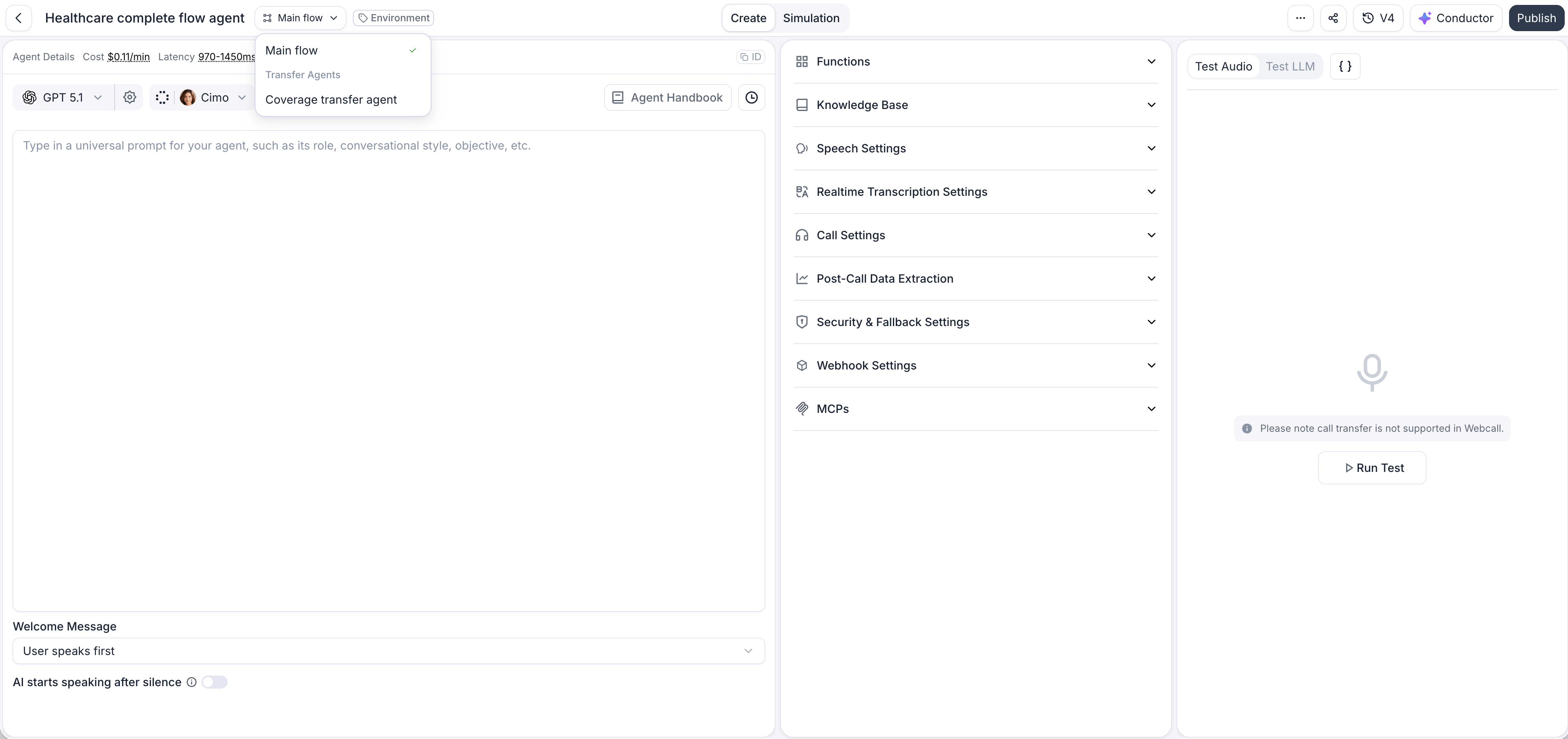
When you open a **transfer agent** from a single- or multi-prompt agent (see [Transfer call](/build/single-multi-prompt/transfer-call)), it opens in its own tab and a **selector** appears at the top of the builder — showing **Main flow** by default. Use it to switch between your main agent and any transfer agents you've opened, and to return to your main agent at any time.
Unlike conversation flow agents, single- and multi-prompt agents don't use [Components](/build/conversation-flow/components), so this selector only moves between agents.
This template demonstrates effective state separation:
**State 1: Lead Qualification**
* Gather customer information
* Validate requirements
* No appointment booking functions available
**State 2: Appointment Scheduling**
* Only accessible after qualification complete
* Booking functions enabled
* Context from qualification available
#### Benefits of Multi-Prompt Structure
1. **Predictable Behavior**: Each state has a clear, focused purpose
2. **Easier Debugging**: Issues isolated to specific states
3. **Better Function Control**: Tools available only when appropriate
4. **Scalable Design**: Add new states without affecting existing ones
5. **Team Collaboration**: Different team members can work on different states
Start with our templates to see multi-prompt best practices in action, then customize for your use case.
## Navigating between agents
When you open a **transfer agent** from a single- or multi-prompt agent (see [Transfer call](/build/single-multi-prompt/transfer-call)), it opens in its own tab and a **selector** appears at the top of the builder — showing **Main flow** by default. Use it to switch between your main agent and any transfer agents you've opened, and to return to your main agent at any time.
Unlike conversation flow agents, single- and multi-prompt agents don't use [Components](/build/conversation-flow/components), so this selector only moves between agents.