> ## Documentation Index
> Fetch the complete documentation index at: https://docs.retellai.com/llms.txt
> Use this file to discover all available pages before exploring further.
# Give Conductor context
> Attach conversation steps, past calls, test cases, and files to your Conductor messages so its suggestions are accurate and tailored to your Retell agent.
Conductor gives better suggestions when it knows exactly what you're referring to. You can attach context to any message — a specific step, a real call, a test case, or a file — so Conductor works from the right information.
## How to attach context
1. In the Conductor message box, click the **attach** (+) button.
2. Choose what you want to add.
3. Pick the specific item from the list.
4. Type your message and send. The attached item appears as a tag on your message.
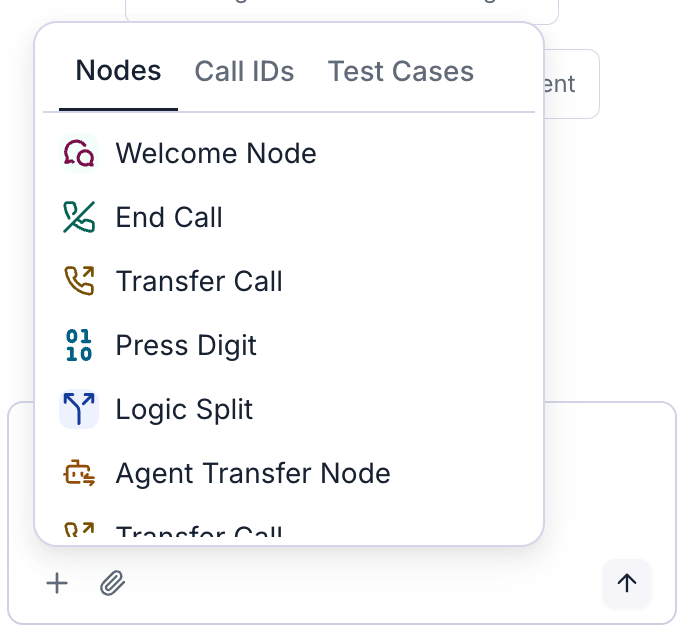 ## What you can attach
Point Conductor at a specific step in your agent so it edits the right place.
*Example:* attach the "Collect email" step and say "Make this step confirm the spelling back to the caller."
Attach a real call so Conductor can see what actually happened and suggest improvements.
*Example:* attach a call where things went wrong and ask "Why did the agent end the call here, and how do I fix it?"
Attach a saved test case to refine how your agent handles that scenario.
*Example:* attach a test case and say "Make sure the agent passes this every time."
Upload a file (such as a document or screenshot) to give Conductor extra information to work from.
## Tips
* **Attach the call or step you're talking about** instead of describing it — it's faster and more accurate.
* **You can attach more than one item** to a single message.
* **Remove an attachment** before sending by clicking the **x** on its tag.
Calls and test cases shown in the picker come from the agent you currently have open.
## What you can attach
Point Conductor at a specific step in your agent so it edits the right place.
*Example:* attach the "Collect email" step and say "Make this step confirm the spelling back to the caller."
Attach a real call so Conductor can see what actually happened and suggest improvements.
*Example:* attach a call where things went wrong and ask "Why did the agent end the call here, and how do I fix it?"
Attach a saved test case to refine how your agent handles that scenario.
*Example:* attach a test case and say "Make sure the agent passes this every time."
Upload a file (such as a document or screenshot) to give Conductor extra information to work from.
## Tips
* **Attach the call or step you're talking about** instead of describing it — it's faster and more accurate.
* **You can attach more than one item** to a single message.
* **Remove an attachment** before sending by clicking the **x** on its tag.
Calls and test cases shown in the picker come from the agent you currently have open.