> ## Documentation Index
> Fetch the complete documentation index at: https://docs.retellai.com/llms.txt
> Use this file to discover all available pages before exploring further.
# Build & refine your agent
> Chat with Conductor in plain English to build and improve your Retell agent — send your first message, use starter suggestions, write clear prompts.
The main way to use Conductor is simple: tell it what you want, in your own words. Conductor figures out what needs to change and proposes it for your review.
## Send your first message
1. Open Conductor from the agent builder (the sparkle icon).
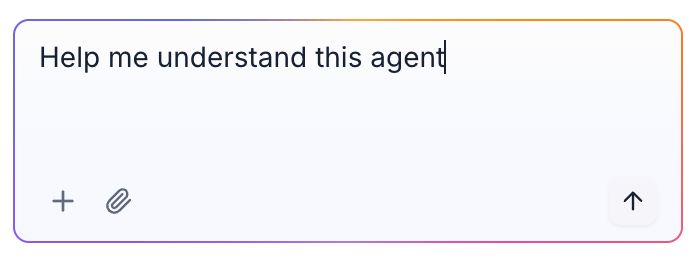
2. Type what you'd like to do in the message box at the bottom.
3. Press **Enter** or click the send button.
Conductor will think for a moment, explain what it's doing, and then either reply or propose changes to your agent.
 ## Not sure where to start?
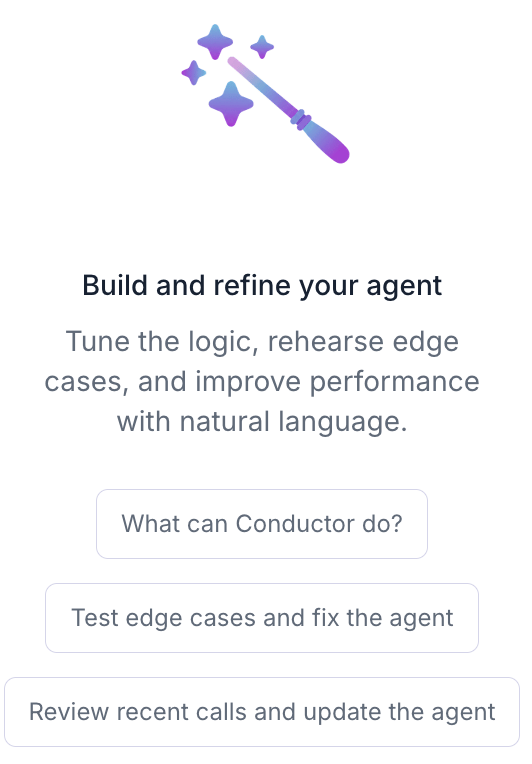
When you open a new conversation, Conductor shows a few **starter suggestions** you can click instead of typing:
* **What can Conductor do?** — a quick tour of its capabilities.
* **Test and refine edge cases** — find and fix tricky situations.
* **Review recent calls and suggest fixes** — improve your agent based on real calls.
## Not sure where to start?
When you open a new conversation, Conductor shows a few **starter suggestions** you can click instead of typing:
* **What can Conductor do?** — a quick tour of its capabilities.
* **Test and refine edge cases** — find and fix tricky situations.
* **Review recent calls and suggest fixes** — improve your agent based on real calls.
 ## Examples of what to ask
* "Make the greeting shorter and friendlier."
* "Ask for the caller's full name before anything else."
* "If the caller sounds upset, apologize and offer to transfer to a human."
* "Add a step that collects the caller's email and confirms the spelling."
* "After booking, ask if they'd like a text reminder."
* "Add a path for callers who only want store hours."
* "Callers say the agent talks over them — can you fix that?"
* "The agent keeps repeating the menu. Help me stop that."
## Tips for great results
* **Be specific.** "Ask for the appointment date and time" works better than "collect info."
* **One goal at a time.** Smaller requests are easier to review and get right.
* **Give context.** Mention the step or call you mean — or better, [attach it](/conductor/add-context).
* **Iterate.** If a suggestion isn't quite right, tell Conductor what to adjust and it will revise.
## Stopping a response
If Conductor is working and you want to stop it, click the **Stop** button in the message box. You can then send a new message.
When Conductor proposes changes, you'll need to [accept or reject them](/conductor/review-changes) before sending your next message. This keeps your agent and the conversation in sync.
## Examples of what to ask
* "Make the greeting shorter and friendlier."
* "Ask for the caller's full name before anything else."
* "If the caller sounds upset, apologize and offer to transfer to a human."
* "Add a step that collects the caller's email and confirms the spelling."
* "After booking, ask if they'd like a text reminder."
* "Add a path for callers who only want store hours."
* "Callers say the agent talks over them — can you fix that?"
* "The agent keeps repeating the menu. Help me stop that."
## Tips for great results
* **Be specific.** "Ask for the appointment date and time" works better than "collect info."
* **One goal at a time.** Smaller requests are easier to review and get right.
* **Give context.** Mention the step or call you mean — or better, [attach it](/conductor/add-context).
* **Iterate.** If a suggestion isn't quite right, tell Conductor what to adjust and it will revise.
## Stopping a response
If Conductor is working and you want to stop it, click the **Stop** button in the message box. You can then send a new message.
When Conductor proposes changes, you'll need to [accept or reject them](/conductor/review-changes) before sending your next message. This keeps your agent and the conversation in sync.