> ## Documentation Index
> Fetch the complete documentation index at: https://docs.retellai.com/llms.txt
> Use this file to discover all available pages before exploring further.
# Conductor on the home page
> Access Conductor from the Retell home page to ask questions, plan changes, and work across multiple agents — without opening a specific agent first.
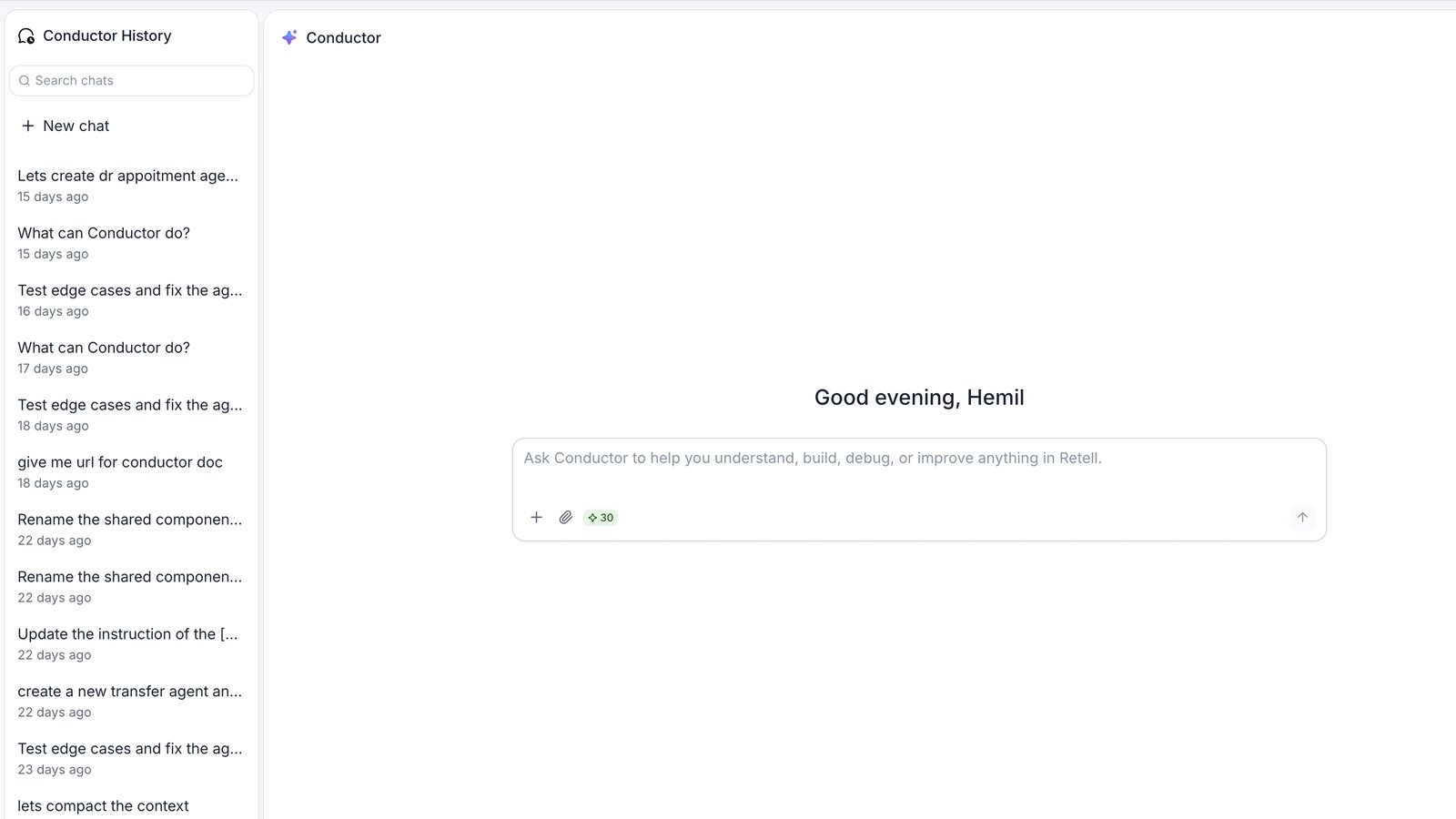
Conductor is available from the Retell home page, not just inside individual agents. Use the home-page Conductor when you want to ask questions or explore ideas across your workspace before drilling into a specific agent.
 ## When to use Conductor from the home page
* You want to ask a general question about Retell before opening an agent.
* You want to compare two agents or reference one agent while working on another.
* You're planning a new agent and want to think through the approach first.
* You're not sure which agent you need to open yet.
## Where to find it
Click **Home** in the sidebar (or open Retell — it's your default landing page). Conductor is the page itself, front and center, with the prompt input ready to go. There's no separate step to open it, and no agent needs to be open first.
## What's different on the home page
The home-page Conductor works the same way as the one inside an agent — same conversation history, same change-review flow — with two differences: **you can attach other agents as context**, and history lives in a dedicated panel alongside it instead of a header icon.
### Attach agents from your workspace
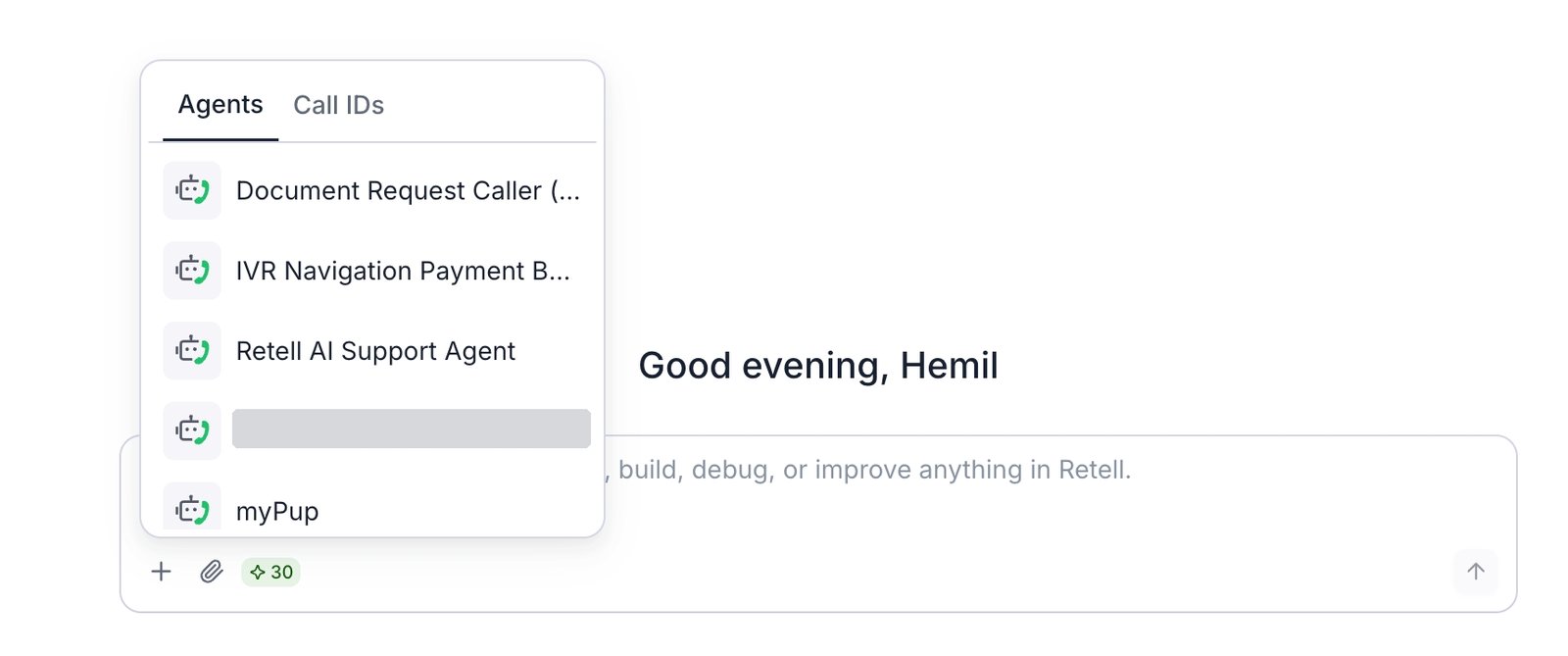
The [attach (+) picker](/conductor/add-context) on the home page includes an **Agents** tab. Use it to pin one or more agents from your workspace to your message so Conductor can reference their settings, prompts, and flows.
## When to use Conductor from the home page
* You want to ask a general question about Retell before opening an agent.
* You want to compare two agents or reference one agent while working on another.
* You're planning a new agent and want to think through the approach first.
* You're not sure which agent you need to open yet.
## Where to find it
Click **Home** in the sidebar (or open Retell — it's your default landing page). Conductor is the page itself, front and center, with the prompt input ready to go. There's no separate step to open it, and no agent needs to be open first.
## What's different on the home page
The home-page Conductor works the same way as the one inside an agent — same conversation history, same change-review flow — with two differences: **you can attach other agents as context**, and history lives in a dedicated panel alongside it instead of a header icon.
### Attach agents from your workspace
The [attach (+) picker](/conductor/add-context) on the home page includes an **Agents** tab. Use it to pin one or more agents from your workspace to your message so Conductor can reference their settings, prompts, and flows.
 This is useful when you want to:
* "Make Agent B handle transfers the same way Agent A does."
* "What's different between my appointment-booking agent and my customer-support agent?"
* "I want to build a new agent similar to this one — what should I change?"
You can still [attach a call](/conductor/add-context) from the home page too — it's pulled from across your workspace instead of just the agent you have open.
### No active agent by default
On the home page, Conductor isn't anchored to a specific agent. If you ask it to make a change and no agent is attached, it'll ask which agent you mean. Attach an agent first (or open the relevant agent and use Conductor from there) to make change proposals apply cleanly.
When Conductor proposes changes from the home page, it redirects you to the agent's details page to accept or reject them. You'll see a **Go to agent details** button in the panel — click it to open the right agent and finish the review.
## Your conversation history is shared
Conversations you start on the home page appear in the same history as conversations you start inside an agent. You can start a conversation on the home page, continue it inside the agent, and find it all in one place.
On the home page, history sits in its own **Conductor History** panel next to Conductor — with search and a **New chat** button — instead of the history icon you'd click inside an agent. See [managing conversations](/conductor/manage-conversations) for what you can do from there.
This is useful when you want to:
* "Make Agent B handle transfers the same way Agent A does."
* "What's different between my appointment-booking agent and my customer-support agent?"
* "I want to build a new agent similar to this one — what should I change?"
You can still [attach a call](/conductor/add-context) from the home page too — it's pulled from across your workspace instead of just the agent you have open.
### No active agent by default
On the home page, Conductor isn't anchored to a specific agent. If you ask it to make a change and no agent is attached, it'll ask which agent you mean. Attach an agent first (or open the relevant agent and use Conductor from there) to make change proposals apply cleanly.
When Conductor proposes changes from the home page, it redirects you to the agent's details page to accept or reject them. You'll see a **Go to agent details** button in the panel — click it to open the right agent and finish the review.
## Your conversation history is shared
Conversations you start on the home page appear in the same history as conversations you start inside an agent. You can start a conversation on the home page, continue it inside the agent, and find it all in one place.
On the home page, history sits in its own **Conductor History** panel next to Conductor — with search and a **New chat** button — instead of the history icon you'd click inside an agent. See [managing conversations](/conductor/manage-conversations) for what you can do from there.