> ## Documentation Index
> Fetch the complete documentation index at: https://docs.retellai.com/llms.txt
> Use this file to discover all available pages before exploring further.
# Receive calls
> Receive inbound phone calls on Retell-managed numbers or imported numbers — bind voice agents to handle inbound traffic and configure per-call context.
### Bind Voice Agents
* Only when you bind agents to a number will the number be able to receive and make calls.
* You can assign different inbound and outbound agents to the number.
* You can leave the agent unset to disable inbound / outbound (for example, you are doing outbound and don't
want callbacks, you can leave `inbound_agent_id` unset)
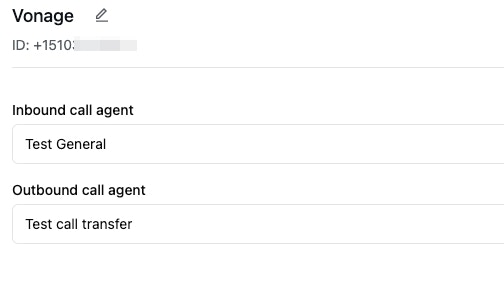 After binding an agent for inbound, you should be able to receive inbound calls already.
### Handle inbound overflow
Inbound calls count toward your workspace concurrency limit. To keep inbound calls available during
high outbound volume, you can reserve part of your concurrency for inbound calls. See
[Reserved Inbound Concurrency](/deploy/concurrency#reserved-inbound-concurrency).
If all concurrency slots are in use, Retell briefly waits for a slot to open. If no slot opens after
about 40 seconds, Retell transfers the call to the phone number's `fallback_number` when one is
configured. Without a fallback number, the call ends with `concurrency_limit_reached`.
### A/B Testing
See [A/B Testing](/deploy/ab-testing).
### Inbound Call Webhook
A lot of times, you want to use different agents to handle inbound calls of a number; also you need a way to provide dynamic variables to use for inbound calls, and other fields specific to that call.
Read more at [Inbound Call Webhook](/features/inbound-call-webhook).
### Inbound Custom SIP Headers
* You can use custom SIP headers to pre-set dynamic variables for a call.
* Retell extracts any header starting with `sip.h.x-`, along with common SIP headers like `Diversion`, `History-Info`, `User-To-User` and `P-Asserted-Identity`, and converts each into a dynamic variable by stripping the `sip.h.` prefix.
* E.g. `sip.h.x-caller: abc` -> `x-caller: abc`
* E.g. `sip.h.p-asserted-identity: +12345678910` -> `p-asserted-identity: +12345678910`
* E.g. `sip.h.diversion: ;privacy=off;reason=no-answer;counter=1;screen=no` -> `diversion: ;privacy=off;reason=no-answer;counter=1;screen=no`
### Get Call Detail
* API: You can use [Get Call API](/api-references/get-call) to get information like
transcript, recording, latency tracking, etc.
* Webhook: You can also set up webhooks to receive real time updates when call is
initiated, ends, and analyzed.
Read more at [Call Webhook Guide](/features/webhook-overview#event-types).
After binding an agent for inbound, you should be able to receive inbound calls already.
### Handle inbound overflow
Inbound calls count toward your workspace concurrency limit. To keep inbound calls available during
high outbound volume, you can reserve part of your concurrency for inbound calls. See
[Reserved Inbound Concurrency](/deploy/concurrency#reserved-inbound-concurrency).
If all concurrency slots are in use, Retell briefly waits for a slot to open. If no slot opens after
about 40 seconds, Retell transfers the call to the phone number's `fallback_number` when one is
configured. Without a fallback number, the call ends with `concurrency_limit_reached`.
### A/B Testing
See [A/B Testing](/deploy/ab-testing).
### Inbound Call Webhook
A lot of times, you want to use different agents to handle inbound calls of a number; also you need a way to provide dynamic variables to use for inbound calls, and other fields specific to that call.
Read more at [Inbound Call Webhook](/features/inbound-call-webhook).
### Inbound Custom SIP Headers
* You can use custom SIP headers to pre-set dynamic variables for a call.
* Retell extracts any header starting with `sip.h.x-`, along with common SIP headers like `Diversion`, `History-Info`, `User-To-User` and `P-Asserted-Identity`, and converts each into a dynamic variable by stripping the `sip.h.` prefix.
* E.g. `sip.h.x-caller: abc` -> `x-caller: abc`
* E.g. `sip.h.p-asserted-identity: +12345678910` -> `p-asserted-identity: +12345678910`
* E.g. `sip.h.diversion: ;privacy=off;reason=no-answer;counter=1;screen=no` -> `diversion: ;privacy=off;reason=no-answer;counter=1;screen=no`
### Get Call Detail
* API: You can use [Get Call API](/api-references/get-call) to get information like
transcript, recording, latency tracking, etc.
* Webhook: You can also set up webhooks to receive real time updates when call is
initiated, ends, and analyzed.
Read more at [Call Webhook Guide](/features/webhook-overview#event-types).