> ## Documentation Index
> Fetch the complete documentation index at: https://docs.retellai.com/llms.txt
> Use this file to discover all available pages before exploring further.
# Purchase phone number
> Purchase Retell-managed US or Canada phone numbers directly in the dashboard — no telephony provider account required, ready for inbound and outbound calling.
This guide will walk through how to purchase a number from Retell. The numbers
are managed by Retell, so you don't have to worry about the telephony infrastructure.
Currently we only support purchase of US and Canada numbers and support making calls to [15 countries](/deploy/international-call). If you are looking to use numbers from other countries, or to make calls to more countries, or to use your own telephony provider, check out [Custom Telephony guide](/deploy/custom-telephony).
### From Dashboard
You can purchase and bind agents to the number from the dashboard. You can optionally specify the
area codes you want to purchase from.
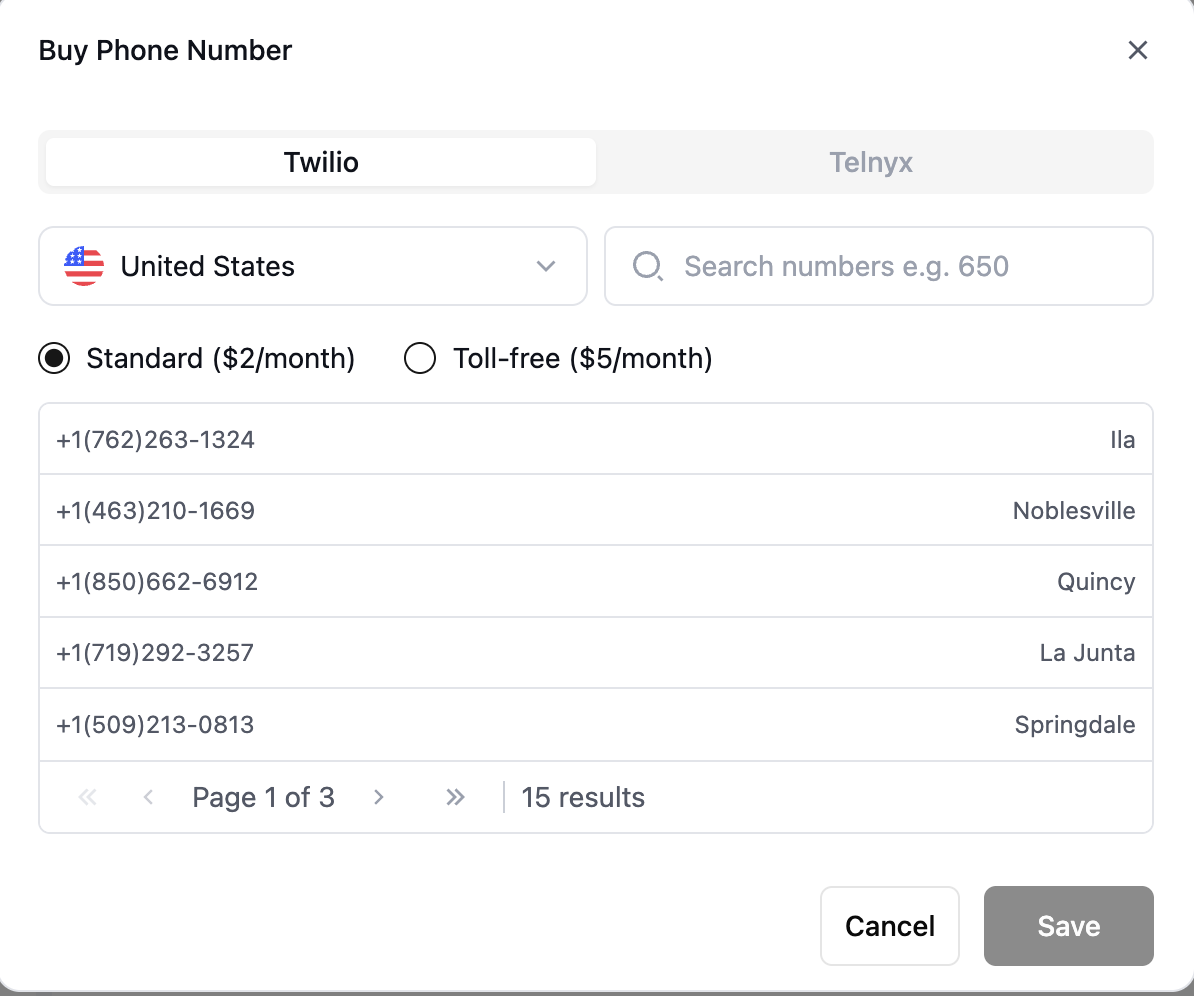 After the number is purchased, you can change its nickname so that it's easier for you to find and identify.
 At this stage, the number should already be ready to accept inbound calls if you have assigned an inbound agent.
Give it a try by calling it!
### From API
Check out [Create Phone Number API Reference](/api-references/create-phone-number)
for all the parameters you can use programmatically.
* Phone numbers are yours once purchased, and can be used indefinitely.
Find numbers you own [here](/api-references/list-phone-numbers).
* You can assign different inbound and outbound agents to the number.
* If you don't want a user to be able to call this number (maybe you are doing outbound and don't
want callbacks), you can leave `inbound_agent_id` unset.
```typescript Node theme={null}
const phoneNumberResponse = await retell.phoneNumber.create({
inbound_agent_id: "oBeDLoLOeuAbiuaMFXRtDOLriTJ5tSxD", // replace with the agent id you want to assign
outbound_agent_id: "oBeDLoLOeuAbiuaMFXRtDOLriTJ5tSxD", // replace with the agent id you want to assign
});
console.log(phoneNumberResponse);
```
```python Python theme={null}
# Purchase a phone number
phone_number = client.phone_number.create(
inbound_agent_id="oBeDLoLOeuAbiuaMFXRtDOLriTJ5tSxD", # replace with the agent id you want to assign
outbound_agent_id: "oBeDLoLOeuAbiuaMFXRtDOLriTJ5tSxD", # replace with the agent id you want to assign
)
print(phone_number)
```
### Pricing
We support both **Twilio** and **Telnyx** numbers:
* **Twilio**
* US numbers: **\$2/month**
* US toll-free numbers: **\$5/month**
* Canadian numbers: **\$2/month**
* **Telnyx**
* US numbers only: **\$2/month**
> ⚠️ **Note:** Toll-free numbers cost \$0.06 per minute for inbound calls. Outbound calls are charged at the same rate as regular U.S. numbers.
At this stage, the number should already be ready to accept inbound calls if you have assigned an inbound agent.
Give it a try by calling it!
### From API
Check out [Create Phone Number API Reference](/api-references/create-phone-number)
for all the parameters you can use programmatically.
* Phone numbers are yours once purchased, and can be used indefinitely.
Find numbers you own [here](/api-references/list-phone-numbers).
* You can assign different inbound and outbound agents to the number.
* If you don't want a user to be able to call this number (maybe you are doing outbound and don't
want callbacks), you can leave `inbound_agent_id` unset.
```typescript Node theme={null}
const phoneNumberResponse = await retell.phoneNumber.create({
inbound_agent_id: "oBeDLoLOeuAbiuaMFXRtDOLriTJ5tSxD", // replace with the agent id you want to assign
outbound_agent_id: "oBeDLoLOeuAbiuaMFXRtDOLriTJ5tSxD", // replace with the agent id you want to assign
});
console.log(phoneNumberResponse);
```
```python Python theme={null}
# Purchase a phone number
phone_number = client.phone_number.create(
inbound_agent_id="oBeDLoLOeuAbiuaMFXRtDOLriTJ5tSxD", # replace with the agent id you want to assign
outbound_agent_id: "oBeDLoLOeuAbiuaMFXRtDOLriTJ5tSxD", # replace with the agent id you want to assign
)
print(phone_number)
```
### Pricing
We support both **Twilio** and **Telnyx** numbers:
* **Twilio**
* US numbers: **\$2/month**
* US toll-free numbers: **\$5/month**
* Canadian numbers: **\$2/month**
* **Telnyx**
* US numbers only: **\$2/month**
> ⚠️ **Note:** Toll-free numbers cost \$0.06 per minute for inbound calls. Outbound calls are charged at the same rate as regular U.S. numbers.