> ## Documentation Index
> Fetch the complete documentation index at: https://docs.retellai.com/llms.txt
> Use this file to discover all available pages before exploring further.
# SMS campaign application
> Fill out the A2P 10DLC SMS campaign application for a Retell AI number: use case, description, opt-in flow, and sample messages that meet carrier requirements.
To send SMS from your own Retell number, you need an approved A2P 10DLC campaign. This page walks through each field of the campaign application, with templates and the rules reviewers apply, to help you write one that meets carrier requirements.
Human reviewers read your use case, description, opt-in flow, and sample messages together, so keep the four consistent with each other.
This page covers only the campaign form, which you reach after your [business profile](/build/telephony/business-profile) and brand are in place. The form also requires a card on file in Retell billing. For the full SMS setup, see [Enable SMS](/deploy/enable-sms).
## Form fields and limits
In the dashboard, open your phone number and go to **Advanced Add-Ons** > **SMS** > **Campaign Registration** > **Add Campaign Application**.
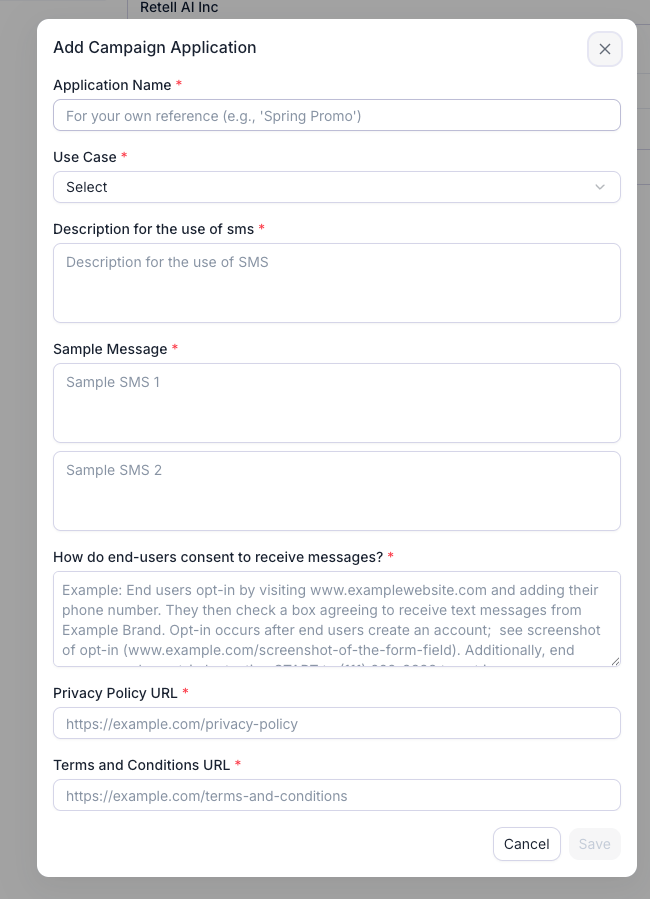 | Field | Limits (as of September 2026) | Notes |
| --------------------------------------------- | ----------------------------- | ----------------------------------------------------------------------- |
| Application Name | Any text | Internal label. Not sent to carriers. |
| Use Case | One value | Must match the description, samples, and opt-in flow. See step 1 below. |
| Description for the use of sms | 40 to 1,000 characters | Short or generic text is auto-rejected. Aim for 300 to 700. |
| Sample Message (two boxes) | 20 to 200 characters each | Both required. Each must name the business and include opt-out text. |
| How do end-users consent to receive messages? | 40 to 2,048 characters | Twilio calls this the message flow. The most-rejected field. |
| Privacy Policy URL | Full `https://` URL | Required. Must be on your own domain. |
| Terms and Conditions URL | Full `https://` URL | Required. Must be on your own domain. |
Two things Retell sets for you that affect how you write the samples:
* Your campaign is submitted with **"messages contain links" and "messages contain phone numbers" both set to yes**. A link or phone number in a sample is fine and expected. Links must point to your own domain. Public URL shorteners such as bit.ly or tinyurl are rejected.
* **STOP, UNSUBSCRIBE, CANCEL, END, QUIT, and HELP replies are handled by Twilio's default opt-out handling** on Retell numbers. You don't configure keywords, but every sample and your opt-in script must still tell people they can reply STOP.
## Fill out the application
Pick the one that describes what you will actually send. If more than one applies, choose **Mixed**. If your volume is small, choose **Low Volume Mixed**, which covers any combination up to 2,000 message segments per day. Retell's campaign fee is the same for every use case.
| Use case | Choose it when you send | Typical Retell scenario |
| ------------------------------------- | -------------------------------------------------------------- | --------------------------------------------------------------------------------------------------------------------- |
| Customer Care | Two-way support, account help, call follow-ups, requested info | Post-call summaries, "here's the link we discussed" |
| Account Notification | Account-status notices only, such as balance or plan changes | **Not appointment reminders.** Twilio's review team has rejected reminders filed here; use Mixed or Low Volume Mixed. |
| Delivery Notification | Order, shipping, or service-arrival status | Technician ETA, order ready for pickup |
| Marketing | Promotions, offers, announcements | Anything with a discount or a sales pitch |
| Mixed | Any combination of the above | Appointment reminders and confirmations, or support plus occasional offers from one number |
| Low Volume Mixed | Any combination, low daily volume | Same as Mixed for a small business or pilot. The right choice for appointment reminders at low volume. |
| 2FA | One-time passcodes | Verifying a caller's number |
| Security Alert, Fraud Alert Messaging | Account-security or suspicious-activity alerts | Rare for voice agents |
| Higher Education | Messages from a college or university | Admissions follow-ups |
| Polling and Voting | Non-political surveys and polls | Post-call satisfaction survey |
| Public Service Announcement | Informational messages for the public | Rare |
**Rejected regardless of use case:**
* Debt collection of any kind, including payment reminders that read like collections.
* Sex, hate, alcohol, firearms, and tobacco or cannabis content without age-gating.
* High-risk financial content such as loans, payday lending, credit repair, debt relief, and cryptocurrency.
* Lead generation, affiliate marketing, or messaging on behalf of a third party.
* More than one brand in a campaign.
Reviewers must be able to read this and know **who** is sending, **to whom**, **what** kinds of messages, and **how** recipients consented. Aim for three to six sentences.
```text Template wrap theme={"dark"}
[Business Name] ([Legal Name] doing business as [Website Name], if different) uses this campaign to send [message type 1], [message type 2] and [message type 3] to [existing customers / prospective customers who requested a call / patients with a booked appointment]. Recipients opt in [verbally during a phone call with our automated AI phone assistant / by submitting a form on our website at https://www.yourdomain.com/page / both]. Messages are [transactional and informational only / promotional / a mix of transactional and promotional] and are sent [after a call / before an appointment / when an order status changes]. Every message identifies [Business Name] and includes opt-out instructions (reply STOP).
```
Example for **Customer Care**:
> Acme Home Services uses this campaign to send two-way customer support messages, follow-ups to phone conversations, requested quotes and service information to existing customers and prospective customers who contact us by phone or request a call on our website at [https://www.acmehomeservices.com/contact](https://www.acmehomeservices.com/contact). Recipients opt in verbally during a call with our automated AI phone assistant, or by submitting our website contact form. Messages are transactional and informational only, sent after a call or when a customer requests information. Every message identifies Acme Home Services and includes opt-out instructions (reply STOP).
Example for **Low Volume Mixed** appointment reminders:
> Bright Smile Dental uses this campaign to send appointment confirmations, appointment reminders, reschedule notices and post-visit follow-ups to patients who have booked an appointment with our office. Patients opt in verbally when they book by phone with our automated scheduling assistant, or by checking the SMS consent box on our online booking form at [https://www.brightsmiledental.com/book](https://www.brightsmiledental.com/book). Messages are informational only and are sent when an appointment is booked, 24 hours before the appointment, and after the visit. Every message identifies Bright Smile Dental and includes opt-out instructions (reply STOP).
Say "automated AI phone assistant" plainly. Reviewers accept it, and hiding it reads as evasive. Name the content types you will send and stay consistent with the use case, rather than listing every message you might ever send.
This field must describe **where** a person encounters the chance to opt in, the **exact action** they take to consent, and every disclosure below. If consent is collected by voice, paste the exact script your agent speaks.
Mandatory disclosures:
1. Business name
2. What kind of messages they'll get
3. "Message and data rates may apply"
4. Frequency statement, such as "Message frequency varies" or "up to 4 msgs/month"
5. How to opt out (reply STOP) and get help (reply HELP)
6. Direct link to the opt-in page, or the full transcript of the verbal script
7. The customer's confirmation: their "Yes" or their checked box
8. Links to your Privacy Policy and Terms, in addition to the URL fields
9. For web forms: consent is optional, not a condition of purchase, and the box is unchecked by default
Pick the flow that matches how you collect consent. If you use both, paste both, numbered "1. WEBSITE FORM OPT-IN" and "2. VERBAL OPT-IN DURING CALL", followed by one "POST-OPT-IN CONFIRMATION" paragraph with the confirmation text.
**Verbal opt-in during a call with your agent**
```text Verbal opt-in flow wrap theme={"dark"}
End users opt in verbally during a phone call with [Business Name]'s automated AI phone assistant. Customers call [Business Name] at [your published business number] for [support / scheduling / quotes]. Before the call ends, the assistant reads the following script:
Assistant: "Before we finish up, would it be alright if [Business Name] sends you text messages regarding [your appointment / a summary of this call / the information you requested]? Message and data rates may apply. Message frequency varies. You can opt out at any time by replying STOP, or reply HELP for help. Our Terms of Service are at https://www.[yourdomain].com/terms and our Privacy Policy is at https://www.[yourdomain].com/privacy. Do I have your permission to send you these texts? Please say yes or no."
Customer: "Yes."
Assistant: "Great, you're opted in. You'll receive a confirmation text shortly. Reply STOP at any time to unsubscribe."
Only after an explicit "yes" does the assistant record consent and trigger the first message, an automated confirmation text:
"[Business Name]: You're opted in to receive [content type] texts. Msg & data rates may apply. Msg frequency varies. Reply STOP to cancel, HELP for help. https://www.[yourdomain].com/privacy"
If the customer says no or does not answer, no text messages are sent.
```
For outbound calls, replace the second sentence with: "\[Business Name]'s assistant calls customers who \[booked an appointment / requested a callback] at the number they provided."
If a website form only requests a callback, submitting it does not opt the user in to SMS. Say so in the flow, then describe how the agent collects consent on the call using the script above.
**Web form with a consent checkbox**
```text Web form opt-in flow wrap theme={"dark"}
End users opt in by visiting our website at https://www.[yourdomain].com/[page]. On the form, users enter their phone number and are presented with an optional, unchecked checkbox that reads:
"I agree to receive [transactional / promotional] SMS messages from [Business Name] regarding [content type]. Message and data rates may apply. Message frequency varies. Reply STOP to unsubscribe or HELP for help. View our Privacy Policy at https://www.[yourdomain].com/privacy and Terms at https://www.[yourdomain].com/terms."
Checking the box is optional and is not a condition of purchase; the form can be submitted with the box unchecked. When the form is submitted with the box checked, an automated confirmation text is sent to verify the opt-in:
"[Business Name]: You're opted in to receive [content type] texts. Msg & data rates may apply. Msg frequency varies. Reply STOP to cancel, HELP for help. https://www.[yourdomain].com/privacy"
```
Reviewers open your form and check that the checkbox is unchecked by default and not required to submit, that transactional and marketing texts each have their own checkbox, that SMS consent is separate from email consent and from accepting the Terms, and that the business name on the page matches the brand. If there is no checkbox because you send transactional messages only, the phone field must be optional with the disclosure directly under it.
Both URLs must be live, on your domain, start with `https://`, and appear in **both** the URL fields **and** inside the consent text.
Your Privacy Policy must state that mobile opt-in data is never shared. Paste this under the section about sharing data with third parties:
```text Privacy Policy clause wrap theme={"dark"}
No mobile information will be shared with third parties or affiliates for marketing or promotional purposes. All the above categories exclude text messaging originator opt-in data and consent; this information will not be shared with any third parties.
```
Your Terms of Service, or a dedicated "Mobile Messaging Terms" page, should state the business name, the kinds of messages, "message and data rates may apply", the frequency, how to opt out (STOP) and get help (HELP), and a support contact.
The reviewer opens the privacy URL and looks for the clause on that page. A link to a tab or anchor inside a long corporate privacy page gets rejected with "unable to locate the privacy policy details inside this provided link". Link to a page where the clause is visible without clicking tabs or expanding sections, or publish a short dedicated SMS privacy page.
Each sample must be 20 to 200 characters and must:
* Name **\[Business Name]** in the text.
* Include an opt-out line such as "Reply STOP to opt out".
* Show templated values in square brackets: `[Date]`, `[Time]`, `[Agent Name]`.
* Use only links on your own domain.
* Match the use case and description. No discount code under Customer Care.
* Use one frequency phrasing, such as "Msg frequency varies", across both samples and the consent text.
A good pairing is one opt-in confirmation plus one message that shows your real content. Recount after replacing the placeholders: a long business name can push a sample past the limit, and anything over 160 characters sends as two segments.
```text Opt-in confirmation (any use case) wrap theme={"dark"}
[Business Name]: You're opted in to receive [appointment reminders / call follow-ups] by text. Msg & data rates may apply. Msg frequency varies. Reply STOP to cancel, HELP for help.
```
```text Post-call summary (Customer Care, Mixed) wrap theme={"dark"}
[Business Name]: Thanks for calling today. As discussed, your quote is $[Amount]. Details: https://www.[yourdomain].com/quote/[ID]. Questions? Call [Phone]. Reply STOP to opt out.
```
```text Appointment reminder (Mixed, Low Volume Mixed) wrap theme={"dark"}
Reminder from [Business Name]: you have an appointment tomorrow, [Date] at [Time], at [Address]. Need to reschedule? Call [Phone]. Reply STOP to opt out.
```
```text Technician ETA (Delivery Notification) wrap theme={"dark"}
[Business Name]: Your technician [Name] is on the way and should arrive between [Start] and [End]. Track: https://www.[yourdomain].com/track/[ID]. Reply STOP to opt out.
```
```text Promotional (Marketing, Mixed) wrap theme={"dark"}
[Business Name]: Members get [Offer] on [Service] through [Date]. Book at https://www.[yourdomain].com/book. Msg frequency varies. Msg & data rates may apply. Reply STOP to opt out.
```
Click **Save**. Save stays disabled until every required field passes validation. Saving closes the dialog and fills in **Campaign Registration** with the new campaign. Back on the SMS panel, click **Next** to submit the SMS application for this number.
Each submission costs \$15, charged whether or not the campaign is approved (as of September 2026). Twilio's review of the campaign usually takes three or four business days once the brand is approved. Retell emails you when the campaign is approved or rejected, with the reason.
## Make your agent collect consent the same way
Your application promises a specific script. Whenever an agent collects consent, it must say that script. Add this to that agent's prompt, and paste in the exact script you submitted in step 3.
```text Agent prompt: SMS consent wrap theme={"dark"}
## SMS consent
You may only send a text message after the caller explicitly agrees to receive texts. Before sending any SMS, say this, word for word:
"[Paste the consent script from your campaign application here.]"
- If the caller clearly says yes: say "Great, you're opted in. You'll receive a confirmation text shortly. Reply STOP at any time to unsubscribe." Then send the SMS.
- If the caller says no, is unsure, or does not answer: say "No problem, we won't send you any texts." Do not send any SMS, and do not ask again on this call.
- Never send a text to a number the caller did not confirm is their mobile number.
```
Make the first text the confirmation message from step 5, and include the business name and "Reply STOP to opt out" in every SMS the agent sends. If your real traffic doesn't match the samples you filed, the number can be suspended.
## If your campaign is rejected
Retell shows the rejection reason on the campaign in the dashboard and emails it to you. Click **Edit** on the rejected campaign, fix the fields the reason points at, click **Save**, then click **Next** on the SMS panel to resubmit. Only rejected campaigns can be edited. Each resubmission is charged the \$15 fee; your business profile and brand approvals carry over.
### What does the rejection wording mean?
| Reviewer wording | Fix |
| --------------------------------------------------------------------------------------------------------------- | -------------------------------------------------------------------------------------------------------------------------------------------------------------------------------------------- |
| "Brand/Website mismatch: unable to validate the connection between the registered brand and the website domain" | The legal name on the brand differs from the name on the website. Add "\[Legal Name] doing business as (DBA) \[Website Name]" to the first sentence of the description and the consent text. |
| "CTA: unable to validate the opt-in process because proof of opt-in has not been included in the message flow" | The consent text described opt-in in general terms. Paste the exact opt-in page URL, or the full word-for-word voice script including the customer's "yes" and the agent's confirmation. |
| "Unable to locate the privacy policy details inside this provided link" | The clause isn't visible on the linked page. Link to a page where the no-sharing clause shows without tabs or expanders. |
| "Appointment reminders are not allowed under Account Notification use case" | Wrong use case. Resubmit as Mixed or Low Volume Mixed. |
| "Please include in Message Flow links to the privacy policy & terms of use" | The URLs are only in the URL fields. Repeat both inside the consent text. |
| Description too short, vague, or generic | Rewrite it using the template in step 2 so it names the business, the recipients, the message types, and the opt-in method. |
| Opt-in page can't be found, has a pre-checked box, or requires consent to submit | Make the page reachable without logging in, leave the box unchecked by default, and let the form submit without it. |
| Use case doesn't match the content | Remove content the use case doesn't cover, such as a marketing sample under Customer Care, or resubmit as Mixed. |
| Prohibited content | Remove debt collection, lending, credit, or other prohibited language from every field. See step 1. |
| Public URL shortener in a sample | Replace bit.ly, tinyurl, and similar links with a URL on your own domain. |
## FAQ
No. You can file the campaign as soon as the brand exists and isn't rejected. Retell holds it as pending and forwards it to Twilio automatically once the brand is approved.
No. Only rejected campaigns can be edited. To change what an approved number sends, delete the SMS capability on the number and create a new campaign. Your business profile and brand are kept and reused.
If you only need to send a fixed message during calls, you can send from an SMS-approved Retell number with no application. The content is a preset template you can't customize, and two-way SMS isn't supported. See [Option 3 on the SMS page](/deploy/enable-sms#option-3-use-an-sms-approved-retell-number-no-a2p-required).
No. Twilio's default opt-out handling applies to Retell numbers, so STOP, UNSUBSCRIBE, CANCEL, END, QUIT, and HELP are handled for you. Your samples and opt-in script must still tell people they can reply STOP.
For Twilio's own guidance, see the [campaign approval requirements](https://support.twilio.com/hc/en-us/articles/11847054539547-A2P-10DLC-Campaign-Approval-Requirements), the [list of campaign and use case types](https://help.twilio.com/articles/1260801844470-List-of-Campaign-Types-and-Use-Case-Types-for-A2P-10DLC-registration), and the [forbidden message categories](https://help.twilio.com/articles/360045004974-Forbidden-Message-Categories-in-the-US-and-Canada-Short-Code-Toll-Free-and-Long-Code).
| Field | Limits (as of September 2026) | Notes |
| --------------------------------------------- | ----------------------------- | ----------------------------------------------------------------------- |
| Application Name | Any text | Internal label. Not sent to carriers. |
| Use Case | One value | Must match the description, samples, and opt-in flow. See step 1 below. |
| Description for the use of sms | 40 to 1,000 characters | Short or generic text is auto-rejected. Aim for 300 to 700. |
| Sample Message (two boxes) | 20 to 200 characters each | Both required. Each must name the business and include opt-out text. |
| How do end-users consent to receive messages? | 40 to 2,048 characters | Twilio calls this the message flow. The most-rejected field. |
| Privacy Policy URL | Full `https://` URL | Required. Must be on your own domain. |
| Terms and Conditions URL | Full `https://` URL | Required. Must be on your own domain. |
Two things Retell sets for you that affect how you write the samples:
* Your campaign is submitted with **"messages contain links" and "messages contain phone numbers" both set to yes**. A link or phone number in a sample is fine and expected. Links must point to your own domain. Public URL shorteners such as bit.ly or tinyurl are rejected.
* **STOP, UNSUBSCRIBE, CANCEL, END, QUIT, and HELP replies are handled by Twilio's default opt-out handling** on Retell numbers. You don't configure keywords, but every sample and your opt-in script must still tell people they can reply STOP.
## Fill out the application
Pick the one that describes what you will actually send. If more than one applies, choose **Mixed**. If your volume is small, choose **Low Volume Mixed**, which covers any combination up to 2,000 message segments per day. Retell's campaign fee is the same for every use case.
| Use case | Choose it when you send | Typical Retell scenario |
| ------------------------------------- | -------------------------------------------------------------- | --------------------------------------------------------------------------------------------------------------------- |
| Customer Care | Two-way support, account help, call follow-ups, requested info | Post-call summaries, "here's the link we discussed" |
| Account Notification | Account-status notices only, such as balance or plan changes | **Not appointment reminders.** Twilio's review team has rejected reminders filed here; use Mixed or Low Volume Mixed. |
| Delivery Notification | Order, shipping, or service-arrival status | Technician ETA, order ready for pickup |
| Marketing | Promotions, offers, announcements | Anything with a discount or a sales pitch |
| Mixed | Any combination of the above | Appointment reminders and confirmations, or support plus occasional offers from one number |
| Low Volume Mixed | Any combination, low daily volume | Same as Mixed for a small business or pilot. The right choice for appointment reminders at low volume. |
| 2FA | One-time passcodes | Verifying a caller's number |
| Security Alert, Fraud Alert Messaging | Account-security or suspicious-activity alerts | Rare for voice agents |
| Higher Education | Messages from a college or university | Admissions follow-ups |
| Polling and Voting | Non-political surveys and polls | Post-call satisfaction survey |
| Public Service Announcement | Informational messages for the public | Rare |
**Rejected regardless of use case:**
* Debt collection of any kind, including payment reminders that read like collections.
* Sex, hate, alcohol, firearms, and tobacco or cannabis content without age-gating.
* High-risk financial content such as loans, payday lending, credit repair, debt relief, and cryptocurrency.
* Lead generation, affiliate marketing, or messaging on behalf of a third party.
* More than one brand in a campaign.
Reviewers must be able to read this and know **who** is sending, **to whom**, **what** kinds of messages, and **how** recipients consented. Aim for three to six sentences.
```text Template wrap theme={"dark"}
[Business Name] ([Legal Name] doing business as [Website Name], if different) uses this campaign to send [message type 1], [message type 2] and [message type 3] to [existing customers / prospective customers who requested a call / patients with a booked appointment]. Recipients opt in [verbally during a phone call with our automated AI phone assistant / by submitting a form on our website at https://www.yourdomain.com/page / both]. Messages are [transactional and informational only / promotional / a mix of transactional and promotional] and are sent [after a call / before an appointment / when an order status changes]. Every message identifies [Business Name] and includes opt-out instructions (reply STOP).
```
Example for **Customer Care**:
> Acme Home Services uses this campaign to send two-way customer support messages, follow-ups to phone conversations, requested quotes and service information to existing customers and prospective customers who contact us by phone or request a call on our website at [https://www.acmehomeservices.com/contact](https://www.acmehomeservices.com/contact). Recipients opt in verbally during a call with our automated AI phone assistant, or by submitting our website contact form. Messages are transactional and informational only, sent after a call or when a customer requests information. Every message identifies Acme Home Services and includes opt-out instructions (reply STOP).
Example for **Low Volume Mixed** appointment reminders:
> Bright Smile Dental uses this campaign to send appointment confirmations, appointment reminders, reschedule notices and post-visit follow-ups to patients who have booked an appointment with our office. Patients opt in verbally when they book by phone with our automated scheduling assistant, or by checking the SMS consent box on our online booking form at [https://www.brightsmiledental.com/book](https://www.brightsmiledental.com/book). Messages are informational only and are sent when an appointment is booked, 24 hours before the appointment, and after the visit. Every message identifies Bright Smile Dental and includes opt-out instructions (reply STOP).
Say "automated AI phone assistant" plainly. Reviewers accept it, and hiding it reads as evasive. Name the content types you will send and stay consistent with the use case, rather than listing every message you might ever send.
This field must describe **where** a person encounters the chance to opt in, the **exact action** they take to consent, and every disclosure below. If consent is collected by voice, paste the exact script your agent speaks.
Mandatory disclosures:
1. Business name
2. What kind of messages they'll get
3. "Message and data rates may apply"
4. Frequency statement, such as "Message frequency varies" or "up to 4 msgs/month"
5. How to opt out (reply STOP) and get help (reply HELP)
6. Direct link to the opt-in page, or the full transcript of the verbal script
7. The customer's confirmation: their "Yes" or their checked box
8. Links to your Privacy Policy and Terms, in addition to the URL fields
9. For web forms: consent is optional, not a condition of purchase, and the box is unchecked by default
Pick the flow that matches how you collect consent. If you use both, paste both, numbered "1. WEBSITE FORM OPT-IN" and "2. VERBAL OPT-IN DURING CALL", followed by one "POST-OPT-IN CONFIRMATION" paragraph with the confirmation text.
**Verbal opt-in during a call with your agent**
```text Verbal opt-in flow wrap theme={"dark"}
End users opt in verbally during a phone call with [Business Name]'s automated AI phone assistant. Customers call [Business Name] at [your published business number] for [support / scheduling / quotes]. Before the call ends, the assistant reads the following script:
Assistant: "Before we finish up, would it be alright if [Business Name] sends you text messages regarding [your appointment / a summary of this call / the information you requested]? Message and data rates may apply. Message frequency varies. You can opt out at any time by replying STOP, or reply HELP for help. Our Terms of Service are at https://www.[yourdomain].com/terms and our Privacy Policy is at https://www.[yourdomain].com/privacy. Do I have your permission to send you these texts? Please say yes or no."
Customer: "Yes."
Assistant: "Great, you're opted in. You'll receive a confirmation text shortly. Reply STOP at any time to unsubscribe."
Only after an explicit "yes" does the assistant record consent and trigger the first message, an automated confirmation text:
"[Business Name]: You're opted in to receive [content type] texts. Msg & data rates may apply. Msg frequency varies. Reply STOP to cancel, HELP for help. https://www.[yourdomain].com/privacy"
If the customer says no or does not answer, no text messages are sent.
```
For outbound calls, replace the second sentence with: "\[Business Name]'s assistant calls customers who \[booked an appointment / requested a callback] at the number they provided."
If a website form only requests a callback, submitting it does not opt the user in to SMS. Say so in the flow, then describe how the agent collects consent on the call using the script above.
**Web form with a consent checkbox**
```text Web form opt-in flow wrap theme={"dark"}
End users opt in by visiting our website at https://www.[yourdomain].com/[page]. On the form, users enter their phone number and are presented with an optional, unchecked checkbox that reads:
"I agree to receive [transactional / promotional] SMS messages from [Business Name] regarding [content type]. Message and data rates may apply. Message frequency varies. Reply STOP to unsubscribe or HELP for help. View our Privacy Policy at https://www.[yourdomain].com/privacy and Terms at https://www.[yourdomain].com/terms."
Checking the box is optional and is not a condition of purchase; the form can be submitted with the box unchecked. When the form is submitted with the box checked, an automated confirmation text is sent to verify the opt-in:
"[Business Name]: You're opted in to receive [content type] texts. Msg & data rates may apply. Msg frequency varies. Reply STOP to cancel, HELP for help. https://www.[yourdomain].com/privacy"
```
Reviewers open your form and check that the checkbox is unchecked by default and not required to submit, that transactional and marketing texts each have their own checkbox, that SMS consent is separate from email consent and from accepting the Terms, and that the business name on the page matches the brand. If there is no checkbox because you send transactional messages only, the phone field must be optional with the disclosure directly under it.
Both URLs must be live, on your domain, start with `https://`, and appear in **both** the URL fields **and** inside the consent text.
Your Privacy Policy must state that mobile opt-in data is never shared. Paste this under the section about sharing data with third parties:
```text Privacy Policy clause wrap theme={"dark"}
No mobile information will be shared with third parties or affiliates for marketing or promotional purposes. All the above categories exclude text messaging originator opt-in data and consent; this information will not be shared with any third parties.
```
Your Terms of Service, or a dedicated "Mobile Messaging Terms" page, should state the business name, the kinds of messages, "message and data rates may apply", the frequency, how to opt out (STOP) and get help (HELP), and a support contact.
The reviewer opens the privacy URL and looks for the clause on that page. A link to a tab or anchor inside a long corporate privacy page gets rejected with "unable to locate the privacy policy details inside this provided link". Link to a page where the clause is visible without clicking tabs or expanding sections, or publish a short dedicated SMS privacy page.
Each sample must be 20 to 200 characters and must:
* Name **\[Business Name]** in the text.
* Include an opt-out line such as "Reply STOP to opt out".
* Show templated values in square brackets: `[Date]`, `[Time]`, `[Agent Name]`.
* Use only links on your own domain.
* Match the use case and description. No discount code under Customer Care.
* Use one frequency phrasing, such as "Msg frequency varies", across both samples and the consent text.
A good pairing is one opt-in confirmation plus one message that shows your real content. Recount after replacing the placeholders: a long business name can push a sample past the limit, and anything over 160 characters sends as two segments.
```text Opt-in confirmation (any use case) wrap theme={"dark"}
[Business Name]: You're opted in to receive [appointment reminders / call follow-ups] by text. Msg & data rates may apply. Msg frequency varies. Reply STOP to cancel, HELP for help.
```
```text Post-call summary (Customer Care, Mixed) wrap theme={"dark"}
[Business Name]: Thanks for calling today. As discussed, your quote is $[Amount]. Details: https://www.[yourdomain].com/quote/[ID]. Questions? Call [Phone]. Reply STOP to opt out.
```
```text Appointment reminder (Mixed, Low Volume Mixed) wrap theme={"dark"}
Reminder from [Business Name]: you have an appointment tomorrow, [Date] at [Time], at [Address]. Need to reschedule? Call [Phone]. Reply STOP to opt out.
```
```text Technician ETA (Delivery Notification) wrap theme={"dark"}
[Business Name]: Your technician [Name] is on the way and should arrive between [Start] and [End]. Track: https://www.[yourdomain].com/track/[ID]. Reply STOP to opt out.
```
```text Promotional (Marketing, Mixed) wrap theme={"dark"}
[Business Name]: Members get [Offer] on [Service] through [Date]. Book at https://www.[yourdomain].com/book. Msg frequency varies. Msg & data rates may apply. Reply STOP to opt out.
```
Click **Save**. Save stays disabled until every required field passes validation. Saving closes the dialog and fills in **Campaign Registration** with the new campaign. Back on the SMS panel, click **Next** to submit the SMS application for this number.
Each submission costs \$15, charged whether or not the campaign is approved (as of September 2026). Twilio's review of the campaign usually takes three or four business days once the brand is approved. Retell emails you when the campaign is approved or rejected, with the reason.
## Make your agent collect consent the same way
Your application promises a specific script. Whenever an agent collects consent, it must say that script. Add this to that agent's prompt, and paste in the exact script you submitted in step 3.
```text Agent prompt: SMS consent wrap theme={"dark"}
## SMS consent
You may only send a text message after the caller explicitly agrees to receive texts. Before sending any SMS, say this, word for word:
"[Paste the consent script from your campaign application here.]"
- If the caller clearly says yes: say "Great, you're opted in. You'll receive a confirmation text shortly. Reply STOP at any time to unsubscribe." Then send the SMS.
- If the caller says no, is unsure, or does not answer: say "No problem, we won't send you any texts." Do not send any SMS, and do not ask again on this call.
- Never send a text to a number the caller did not confirm is their mobile number.
```
Make the first text the confirmation message from step 5, and include the business name and "Reply STOP to opt out" in every SMS the agent sends. If your real traffic doesn't match the samples you filed, the number can be suspended.
## If your campaign is rejected
Retell shows the rejection reason on the campaign in the dashboard and emails it to you. Click **Edit** on the rejected campaign, fix the fields the reason points at, click **Save**, then click **Next** on the SMS panel to resubmit. Only rejected campaigns can be edited. Each resubmission is charged the \$15 fee; your business profile and brand approvals carry over.
### What does the rejection wording mean?
| Reviewer wording | Fix |
| --------------------------------------------------------------------------------------------------------------- | -------------------------------------------------------------------------------------------------------------------------------------------------------------------------------------------- |
| "Brand/Website mismatch: unable to validate the connection between the registered brand and the website domain" | The legal name on the brand differs from the name on the website. Add "\[Legal Name] doing business as (DBA) \[Website Name]" to the first sentence of the description and the consent text. |
| "CTA: unable to validate the opt-in process because proof of opt-in has not been included in the message flow" | The consent text described opt-in in general terms. Paste the exact opt-in page URL, or the full word-for-word voice script including the customer's "yes" and the agent's confirmation. |
| "Unable to locate the privacy policy details inside this provided link" | The clause isn't visible on the linked page. Link to a page where the no-sharing clause shows without tabs or expanders. |
| "Appointment reminders are not allowed under Account Notification use case" | Wrong use case. Resubmit as Mixed or Low Volume Mixed. |
| "Please include in Message Flow links to the privacy policy & terms of use" | The URLs are only in the URL fields. Repeat both inside the consent text. |
| Description too short, vague, or generic | Rewrite it using the template in step 2 so it names the business, the recipients, the message types, and the opt-in method. |
| Opt-in page can't be found, has a pre-checked box, or requires consent to submit | Make the page reachable without logging in, leave the box unchecked by default, and let the form submit without it. |
| Use case doesn't match the content | Remove content the use case doesn't cover, such as a marketing sample under Customer Care, or resubmit as Mixed. |
| Prohibited content | Remove debt collection, lending, credit, or other prohibited language from every field. See step 1. |
| Public URL shortener in a sample | Replace bit.ly, tinyurl, and similar links with a URL on your own domain. |
## FAQ
No. You can file the campaign as soon as the brand exists and isn't rejected. Retell holds it as pending and forwards it to Twilio automatically once the brand is approved.
No. Only rejected campaigns can be edited. To change what an approved number sends, delete the SMS capability on the number and create a new campaign. Your business profile and brand are kept and reused.
If you only need to send a fixed message during calls, you can send from an SMS-approved Retell number with no application. The content is a preset template you can't customize, and two-way SMS isn't supported. See [Option 3 on the SMS page](/deploy/enable-sms#option-3-use-an-sms-approved-retell-number-no-a2p-required).
No. Twilio's default opt-out handling applies to Retell numbers, so STOP, UNSUBSCRIBE, CANCEL, END, QUIT, and HELP are handled for you. Your samples and opt-in script must still tell people they can reply STOP.
For Twilio's own guidance, see the [campaign approval requirements](https://support.twilio.com/hc/en-us/articles/11847054539547-A2P-10DLC-Campaign-Approval-Requirements), the [list of campaign and use case types](https://help.twilio.com/articles/1260801844470-List-of-Campaign-Types-and-Use-Case-Types-for-A2P-10DLC-registration), and the [forbidden message categories](https://help.twilio.com/articles/360045004974-Forbidden-Message-Categories-in-the-US-and-Canada-Short-Code-Toll-Free-and-Long-Code).