> ## Documentation Index
> Fetch the complete documentation index at: https://docs.retellai.com/llms.txt
> Use this file to discover all available pages before exploring further.
# Consume the analysis data
> Consume Retell post-call analysis results through the dashboard, webhooks, or API — extract structured fields and feed them into your CRM and reporting tools.
We will not populate custom post-call analysis fields for calls that were not connected or where no conversation took place. Please check whether the field exists before using it.
After a call is analyzed, you can access the analysis results through three different methods:
1. Dashboard - Visual interface for quick access and review
2. Webhook - Real-time notifications with analysis results
3. API - Programmatic access to call analysis data
### Method 1: Dashboard
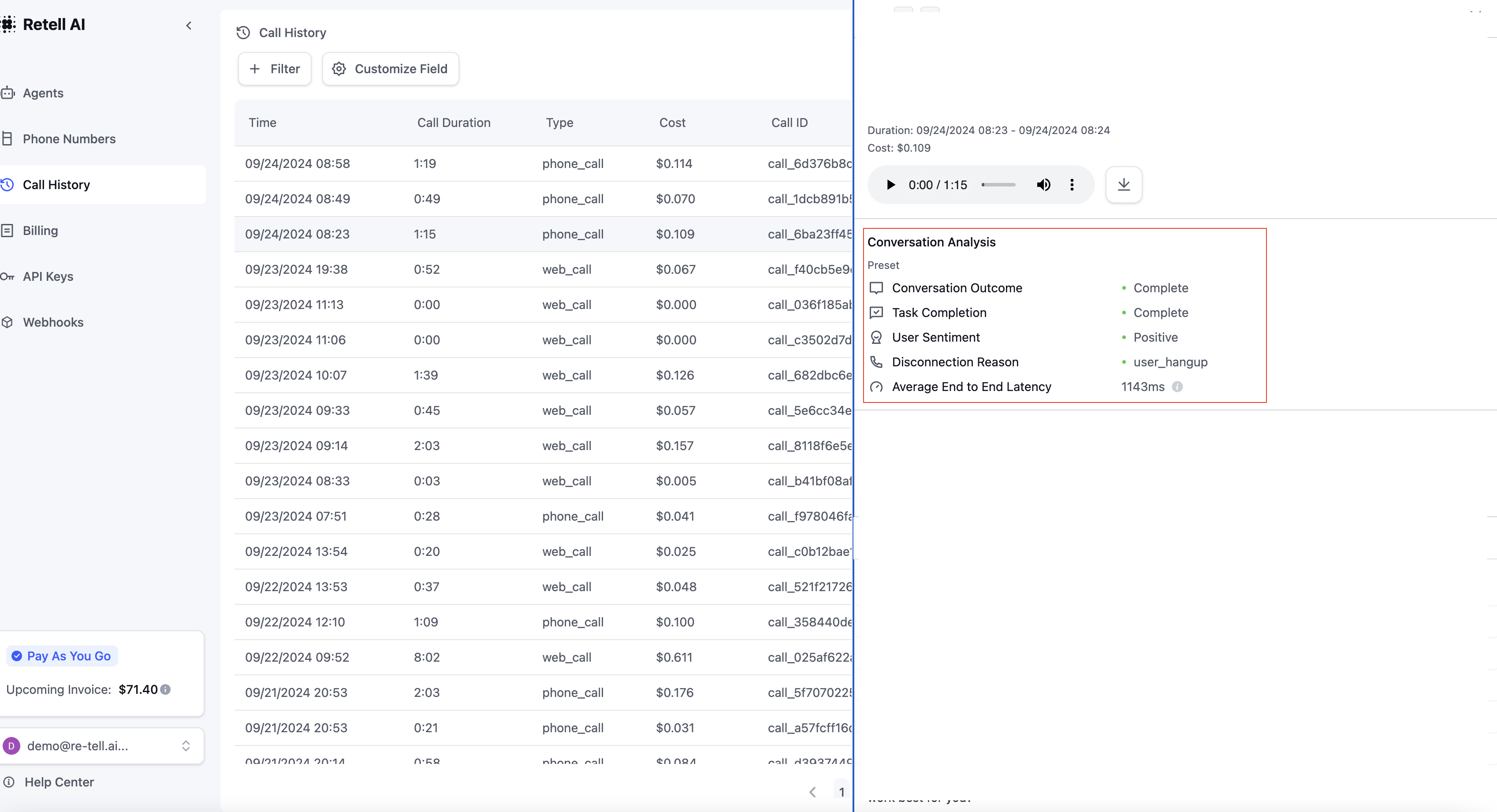
Access your analysis results directly through the dashboard's history tab. This provides a user-friendly interface to:
* View all analyzed conversations
* Filter and search through analysis results
Your defined analysis categories appear in the "Conversation Analysis" column, allowing for quick insights into each conversation.
### Method 2: Webhook
Receive real-time notifications when call analysis is complete. The webhook payload includes:
```json theme={null}
{
"event": "call_analyzed",
"call": {
// Call object with call_analysis field populated
}
}
```
To set up webhooks, visit the [Webhook Configuration](/features/webhook-overview) section.
### Method 3: Get Call API
Retrieve analysis results programmatically using the [Get Call API](/api-references/get-call).
**Example Response:**
```json theme={null}
{
"call_id": "123",
"call_analysis": {
// Analysis results object
}
}
```
For detailed API documentation and response schemas, refer to the [API Reference](/api-references/get-call).
### Video: Add Post call Analysis to Excel Using Make.com
See community templates in [docs](https://docs.google.com/document/d/1hx6hdTEjAR4y4xXZ7RLMH2byQNVW1ABxC8S4FwvTx_Y/edit?tab=t.0#heading=h.wf5bktkelope)
 ### Method 2: Webhook
Receive real-time notifications when call analysis is complete. The webhook payload includes:
```json theme={null}
{
"event": "call_analyzed",
"call": {
// Call object with call_analysis field populated
}
}
```
To set up webhooks, visit the [Webhook Configuration](/features/webhook-overview) section.
### Method 3: Get Call API
Retrieve analysis results programmatically using the [Get Call API](/api-references/get-call).
**Example Response:**
```json theme={null}
{
"call_id": "123",
"call_analysis": {
// Analysis results object
}
}
```
For detailed API documentation and response schemas, refer to the [API Reference](/api-references/get-call).
### Video: Add Post call Analysis to Excel Using Make.com
See community templates in [docs](https://docs.google.com/document/d/1hx6hdTEjAR4y4xXZ7RLMH2byQNVW1ABxC8S4FwvTx_Y/edit?tab=t.0#heading=h.wf5bktkelope)
### Method 2: Webhook
Receive real-time notifications when call analysis is complete. The webhook payload includes:
```json theme={null}
{
"event": "call_analyzed",
"call": {
// Call object with call_analysis field populated
}
}
```
To set up webhooks, visit the [Webhook Configuration](/features/webhook-overview) section.
### Method 3: Get Call API
Retrieve analysis results programmatically using the [Get Call API](/api-references/get-call).
**Example Response:**
```json theme={null}
{
"call_id": "123",
"call_analysis": {
// Analysis results object
}
}
```
For detailed API documentation and response schemas, refer to the [API Reference](/api-references/get-call).
### Video: Add Post call Analysis to Excel Using Make.com
See community templates in [docs](https://docs.google.com/document/d/1hx6hdTEjAR4y4xXZ7RLMH2byQNVW1ABxC8S4FwvTx_Y/edit?tab=t.0#heading=h.wf5bktkelope)