> ## Documentation Index
> Fetch the complete documentation index at: https://docs.retellai.com/llms.txt
> Use this file to discover all available pages before exploring further.
# Post-call analysis overview and categories
> Retell post-call analysis automatically scores and structures customer calls after they end — built-in categories plus custom analysis for your workflow.
Post-call analysis is a powerful feature that automatically analyzes customer conversations after they have ended, helping you derive valuable insights from your calls. We provide several built-in analysis categories, and you can create custom categories to match your specific business needs.
 We will not populate custom post-call analysis fields for calls that were not connected or where no conversation took place. Please check whether the field exists before using it.
## Analysis Categories
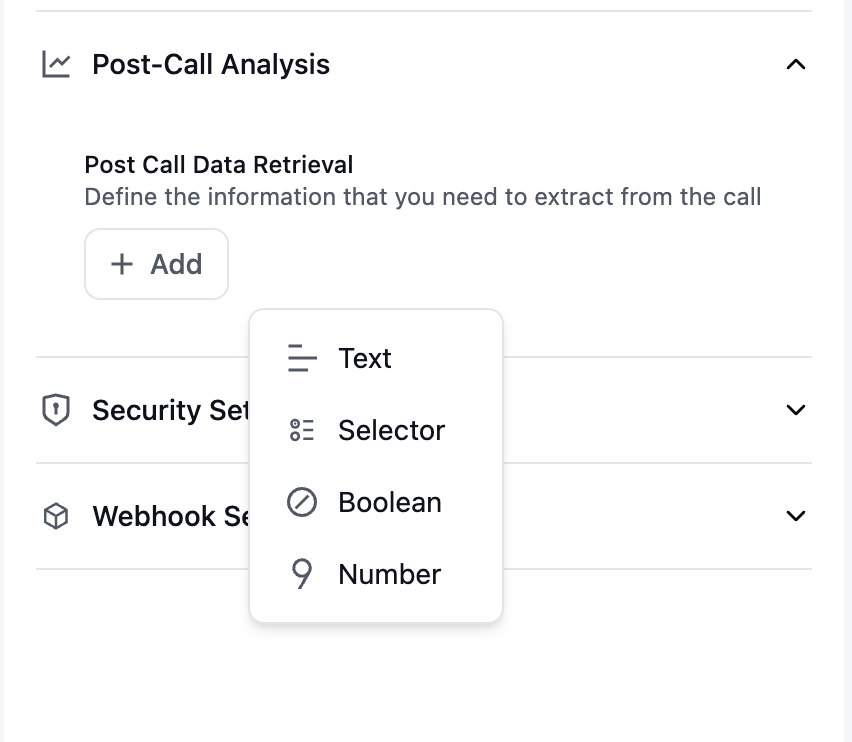
You can extract the following types of data from post-call analysis:
* **Boolean** (True/False)
* Simple yes/no determinations
* Example: Whether the customer is a first-time caller
* **Text** (String)
* Detailed textual information
* Example: Call summaries, action items, or key discussion points
* **Number** (Numerical value)
* Quantitative measurements
* Example: Transaction amounts, call duration, or satisfaction scores
* **Selector** (Enum)
* Categorization from a fixed list
* Example: Issue types, product categories, or resolution status
We will not populate custom post-call analysis fields for calls that were not connected or where no conversation took place. Please check whether the field exists before using it.
## Analysis Categories
You can extract the following types of data from post-call analysis:
* **Boolean** (True/False)
* Simple yes/no determinations
* Example: Whether the customer is a first-time caller
* **Text** (String)
* Detailed textual information
* Example: Call summaries, action items, or key discussion points
* **Number** (Numerical value)
* Quantitative measurements
* Example: Transaction amounts, call duration, or satisfaction scores
* **Selector** (Enum)
* Categorization from a fixed list
* Example: Issue types, product categories, or resolution status