> ## Documentation Index
> Fetch the complete documentation index at: https://docs.retellai.com/llms.txt
> Use this file to discover all available pages before exploring further.
# Webhook Overview
> Overview of Retell webhooks — call_started, call_ended, and call_analyzed events delivered to your server so you can react to call activity without polling.
Webhooks allow your application to receive real-time notifications about events that occur in your Retell AI account. Instead of continuously polling our API, webhooks push data to your application as events happen, making your integrations more efficient and responsive.
## Event Types
Retell AI supports the following webhook events for voice calls:
If the call did not connect (like dial failed), the `call_started` webhook event will not be triggered.
| Event Type | Description | Payload |
| -------------------- | ----------------------------------------------------------------------------------- | ----------------------------------------------------------------------------------- |
| `call_started` | Triggered when a new call begins | Basic call information |
| `call_ended` | Triggered when a call completes, transfers, or encounters an error | all fields from the [call object](/api-references/get-call) except `call_analysis`. |
| `call_analyzed` | Triggered when call analysis is complete | Full call data including `call_analysis` object |
| `transcript_updated` | Triggered on turn-taking transcript updates, plus a final update when the call ends | Full call data plus `transcript_with_tool_calls` |
| `transfer_started` | Triggered when a transfer is initiated | Full call data plus `transfer_destination` and `transfer_option` (if available) |
| `transfer_bridged` | Triggered when a transfer successfully bridges | Full call data plus `transfer_destination` and `transfer_option` (if available) |
| `transfer_cancelled` | Triggered when a transfer is cancelled or fails to connect | Full call data plus `transfer_destination` and `transfer_option` (if available) |
| `transfer_ended` | Triggered when the transfer leg ends | Full call data |
Retell AI supports the following webhook events for chat:
| Event Type | Description | Payload |
| --------------- | --------------------------------------------- | ----------------------------------------------------------------------------------- |
| `chat_started` | Triggered when a new chat begins | Basic chat information |
| `chat_ended` | Triggered when a chat completes or errors out | All fields from the [chat object](/api-references/get-chat) except `chat_analysis`. |
| `chat_analyzed` | Triggered when chat analysis is complete | Full chat data including `chat_analysis` object |
## Common Use Cases
1. **Real-time Analytics**
* Track call statistics and performance metrics
* Monitor call volumes and patterns
* Trigger alerts for specific call outcomes
2. **System Integration**
* Update CRM records when calls complete
* Trigger workflow automations based on call analysis
* Archive call transcripts in your data warehouse
3. **Call Monitoring**
* Get notified of failed or transferred calls
* Track call duration and completion status
* Monitor agent performance in real-time
## Webhook Spec
The webhook will `POST` the payload to your endpoint. The webhook has a timeout of 10 seconds. If within 10 seconds no success status (2xx) is received, the webhook will be retried, up to 3 times.
The webhook will be triggered in order, but is not blocking. For example, if the webhook for `call_started` is not successful, we can still trigger `call_ended` webhook.
When the call did not connect (like calls with `dial_failed`, `dial_no_answer`, `dial_busy` disconnection reason), it will not have its `call_started` webhook triggered. It will still have its `call_ended` and `call_analyzed` webhook triggered.
### Request payload
The webhook will contain the event type and the call object. See a sample payload in the “Handle Webhook” section below.
### Event filtering
You can limit which events are delivered per agent using the `webhook_events` field when creating or updating an agent.
* Voice agent default: `call_started`, `call_ended`, `call_analyzed`
* Chat agent default: `chat_started`, `chat_ended`, `chat_analyzed`
This is useful when you only need high-signal events and want to reduce webhook traffic.
### Register Webhook
We offer two types of webhooks: Agent-Level and Account-Level, designed to streamline your event notification process. Here's a brief on each:
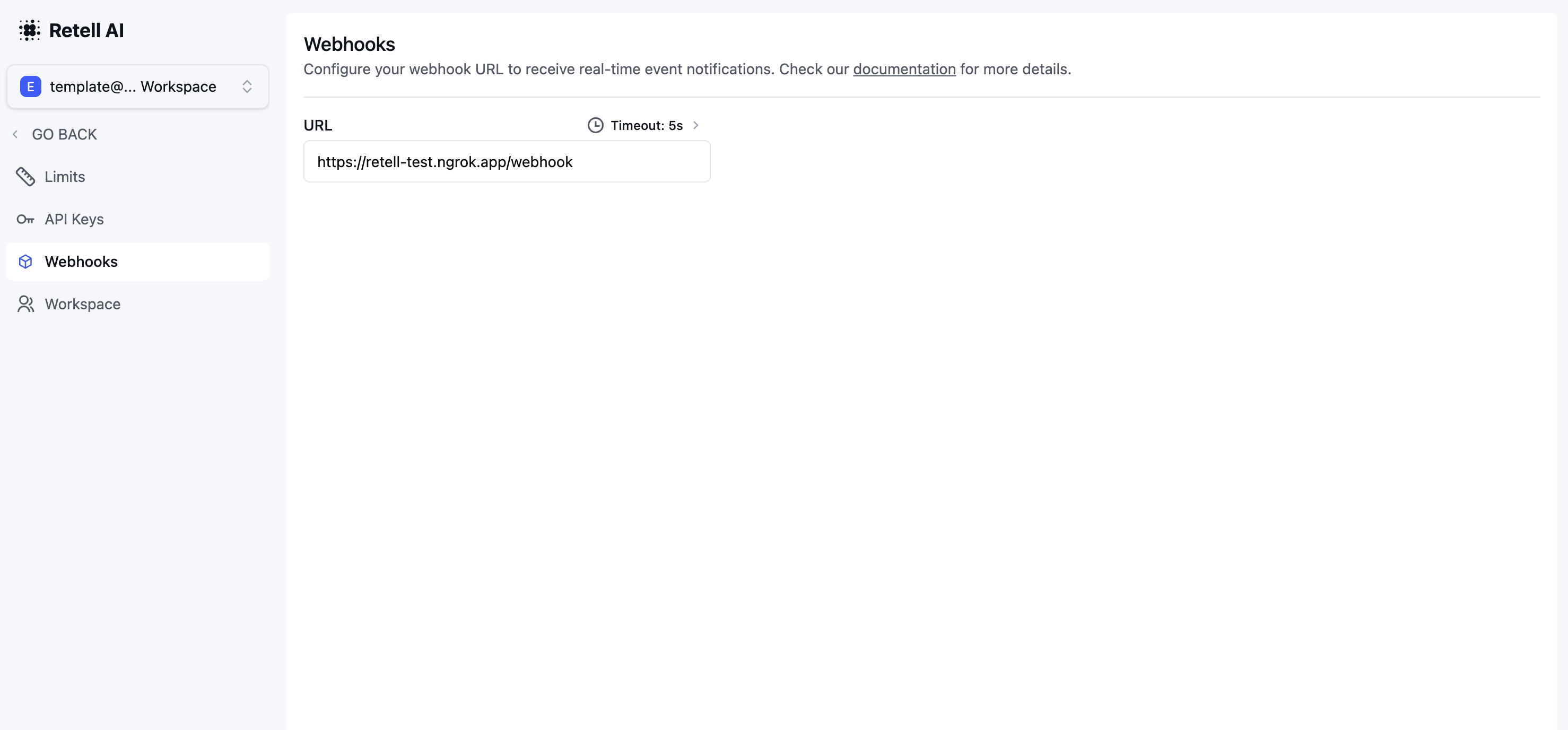
### Account-level webhooks
Set up through the dashboard's webhooks tab, these webhooks notify you of events related to any agent under your account. Specify your webhook URL in the dashboard’s webhooks tab to activate.
### Agent-level webhooks
When you [create](/api-references/create-agent) the agent, you can set the `webhook_url` field.
Any event associated with that agent will be pushed to the agent webhooks url. If set, account level webhooks url will not be triggered for that agent.
Webhook URLs support [dynamic variables](/build/dynamic-variables). For example, setting `webhook_url` to `https://example.com/webhook?customer={{customer_name}}` resolves the `{{customer_name}}` placeholder per call before the event is delivered. This applies to both agent-level and account-level webhook URLs.
## Handle Webhook
After registering the webhook, you would want to verify the webhook is from Retell and handle it.
### Webhook Payload
The webhook will be `POST` to the URL you provided with a JSON payload.
The payload will contain the event type and the call detail associated with the event.
It will contain a `x-retell-signature` header to help you verify the webhook comes from Retell.
#### Sample Payload
The `call` field in the webhook payload contains the call details. It's the same content
you would receive when you fetch the call details using the [get-call](/api-references/get-call) API.
```javascript theme={null}
{
"event": "call_ended",
"call": {
"call_type": "phone_call",
"from_number": "+12137771234",
"to_number": "+12137771235",
"direction": "inbound",
"call_id": "Jabr9TXYYJHfvl6Syypi88rdAHYHmcq6",
"agent_id": "oBeDLoLOeuAbiuaMFXRtDOLriTJ5tSxD",
"call_status": "registered",
"metadata": {},
"retell_llm_dynamic_variables": {
"customer_name": "John Doe"
},
"start_timestamp": 1714608475945,
"end_timestamp": 1714608491736,
"disconnection_reason": "user_hangup",
"transcript": "...",
"transcript_object": [ [Object], [Object], [Object], [Object] ],
"transcript_with_tool_calls": [ [Object], [Object], [Object], [Object] ],
"opt_out_sensitive_data_storage": false
}
}
```
If metadata and retell\_llm\_dynamic\_variables are not provided, they will be omitted from the webhook event payload.
For `transcript_updated` events, the payload also includes `transcript_with_tool_calls`. For transfer events, the payload includes `transfer_destination` and (when available) `transfer_option`.
#### Sample Transfer event payload
Here is a compact example of a transfer webhook payload (fields may vary by transfer type):
```json theme={null}
{
"event": "transfer_started",
"call": {
"call_id": "Jabr9TXYYJHfvl6Syypi88rdAHYHmcq6"
},
"transfer_destination": {
"number": "+12137771235",
"extension": "1234"
},
"transfer_option": {
"type": "warm_transfer",
"showTransfereeAsCaller": true,
"publicHandoffOption": {
"type": "static_message",
"message": "Hi, I am transferring the caller now."
},
"agentDetectionTimeoutMs": 15000,
"onHoldMusic": {
"type": "default"
},
"enableBridgeAudioCue": true
}
}
```
### Verifying Webhook
You can use the `x-retell-signature` header together with your Retell API Key to verify the webhook.
We have provided
a verify function in our SDKs to help you with this.
You can also check and allowlist Retell IP addresses: `100.20.5.228`.
The following code snippets demonstrate how to verify and handle the webhook in Node.js and Python.
For languages without an official SDK, see [Verify Without SDK](/features/secure-webhook#verify-without-sdk).
### Sample Code
```typescript Node.js theme={null}
// install the sdk: https://docs.retellai.com/get-started/sdk
import { Retell } from "retell-sdk";
import express from "express";
const app = express();
// Use raw body for signature verification, not JSON.stringify(req.body).
app.use(express.raw({ type: "application/json" }));
app.post("/webhook", (req, res) => {
const rawBody = req.body.toString("utf-8");
if (
!Retell.verify(
rawBody,
process.env.RETELL_API_KEY,
req.headers["x-retell-signature"],
)
) {
console.error("Invalid signature");
return;
}
const {event, call} = JSON.parse(rawBody);
switch (event) {
case "call_started":
console.log("Call started event received", call.call_id);
break;
case "call_ended":
console.log("Call ended event received", call.call_id);
break;
case "call_analyzed":
console.log("Call analyzed event received", call.call_id);
break;
case "transcript_updated":
console.log("Transcript updated event received", call.call_id);
break;
case "transfer_started":
case "transfer_bridged":
case "transfer_cancelled":
case "transfer_ended":
console.log("Transfer event received", event, call.call_id);
break;
default:
console.log("Received an unknown event:", event);
}
// Acknowledge the receipt of the event
res.status(204).send();
});
```
```Python Python theme={null}
# Install the SDK: https://docs.retellai.com/get-started/sdk
from fastapi import FastAPI, Request
from fastapi.responses import JSONResponse
from retell import Retell
retell = Retell(api_key=os.environ["RETELL_API_KEY"])
@app.post("/webhook")
async def handle_webhook(request: Request):
try:
# Use raw body for signature verification, not json.dumps(request.json()).
raw_body = (await request.body()).decode("utf-8")
valid_signature = retell.verify(
raw_body,
api_key=str(os.environ["RETELL_API_KEY"]),
signature=str(request.headers.get("X-Retell-Signature")),
)
if not valid_signature:
print("Received Unauthorized")
return JSONResponse(status_code=401, content={"message": "Unauthorized"})
post_data = json.loads(raw_body)
if post_data["event"] == "call_started":
print("Call started event", post_data["call"]["call_id"])
elif post_data["event"] == "call_ended":
print("Call ended event", post_data["call"]["call_id"])
elif post_data["event"] == "call_analyzed":
print("Call analyzed event", post_data["call"]["call_id"])
elif post_data["event"] == "transcript_updated":
print("Transcript updated event", post_data["call"]["call_id"])
elif post_data["event"] in [
"transfer_started",
"transfer_bridged",
"transfer_cancelled",
"transfer_ended",
]:
print("Transfer event", post_data["event"], post_data["call"]["call_id"])
else:
print("Unknown event", post_data["event"])
return JSONResponse(status_code=204)
except Exception as err:
print(f"Error in webhook: {err}")
return JSONResponse(
status_code=500, content={"message": "Internal Server Error"}
)
```
### Testing Locally
To test webhooks on your local machine, you can use [ngrok](https://ngrok.com/)
to generate a production url forwarding requests to your local endpoints.
### Idempotency and deduplication
Retell retries each webhook up to 3 times if no `2xx` response is returned within 10 seconds, so your endpoint may receive the same event more than once. Make your consumer idempotent:
* **Per-call lifecycle events** (`call_started`, `call_ended`, `call_analyzed`, `chat_started`, `chat_ended`, `chat_analyzed`): use the combination of `event` + `call_id` (or `chat_id`) as a unique key. These events fire at most once per call/chat, so storing the processed key in a database or cache and skipping repeats is sufficient.
* **Transfer events** (`transfer_started`, `transfer_bridged`, `transfer_cancelled`, `transfer_ended`): a single call may contain multiple transfer attempts. Use `event` + `call_id` + `start_timestamp` (and, if needed, `transfer_destination`) so each transfer attempt is processed exactly once.
* **`transcript_updated`**: this event streams throughout the call and is expected to fire many times per `call_id`. Treat each delivery as an incremental update rather than deduplicating by `call_id` — store the latest payload per call, or use the final `transcript_updated` (sent when the call ends) as the canonical transcript.
Always return a `2xx` status as soon as you have safely accepted the payload (e.g., persisted it to a queue). Doing heavy work before responding can trigger Retell's 10-second retry and create duplicate processing.
## Privacy
Choosing to "Opt-Out of Personal and Sensitive Data Storage" means transcripts and recordings post-call won't be stored.
However, transcripts and recordings remain accessible via webhooks, allowing for alternative storage
solutions on your end.
The recording will also be available in the `recording_url` field.
The link will be accessible for 10 minutes and will be
deleted and become inaccessible after 10 minutes.
### Response
We expect a successful status code (2xx) to be returned. No body is expected.
## Video Tutorial
See community templates in [docs](https://docs.google.com/document/d/1hx6hdTEjAR4y4xXZ7RLMH2byQNVW1ABxC8S4FwvTx_Y/edit?tab=t.0#heading=h.wf5bktkelope)
 ### Agent-level webhooks
When you [create](/api-references/create-agent) the agent, you can set the `webhook_url` field.
Any event associated with that agent will be pushed to the agent webhooks url. If set, account level webhooks url will not be triggered for that agent.
### Agent-level webhooks
When you [create](/api-references/create-agent) the agent, you can set the `webhook_url` field.
Any event associated with that agent will be pushed to the agent webhooks url. If set, account level webhooks url will not be triggered for that agent.