> ## Documentation Index
> Fetch the complete documentation index at: https://docs.retellai.com/llms.txt
> Use this file to discover all available pages before exploring further.
# SDKs
> Official Retell SDKs for Node.js and Python — typed clients, simple API key auth, structured error handling, and full coverage of voice and chat endpoints.
## Overview
Retell provides official SDKs for Node.js and Python to simplify integration with our platform. While you can use our [REST API](/api-references/create-phone-call) directly, our SDKs offer:
* **Type safety**: Full TypeScript support with autocomplete
* **Simplified authentication**: Built-in API key handling
* **Error handling**: Structured error responses with detailed messages
* **Reduced boilerplate**: Cleaner, more maintainable code
## Available SDKs & Requirements
### Node.js TypeScript SDK
* **Package**: [retell-sdk on NPM](https://www.npmjs.com/package/retell-sdk)
* **Requirements**: Node.js version 18.10.0 or higher
* **Features**: Full TypeScript support, async/await, promise-based API
### Python SDK
* **Package**: [retell-sdk on PyPI](https://pypi.org/project/retell-sdk/)
* **Requirements**: Python 3.9 or higher
* **Features**: Type hints, async support, comprehensive error handling
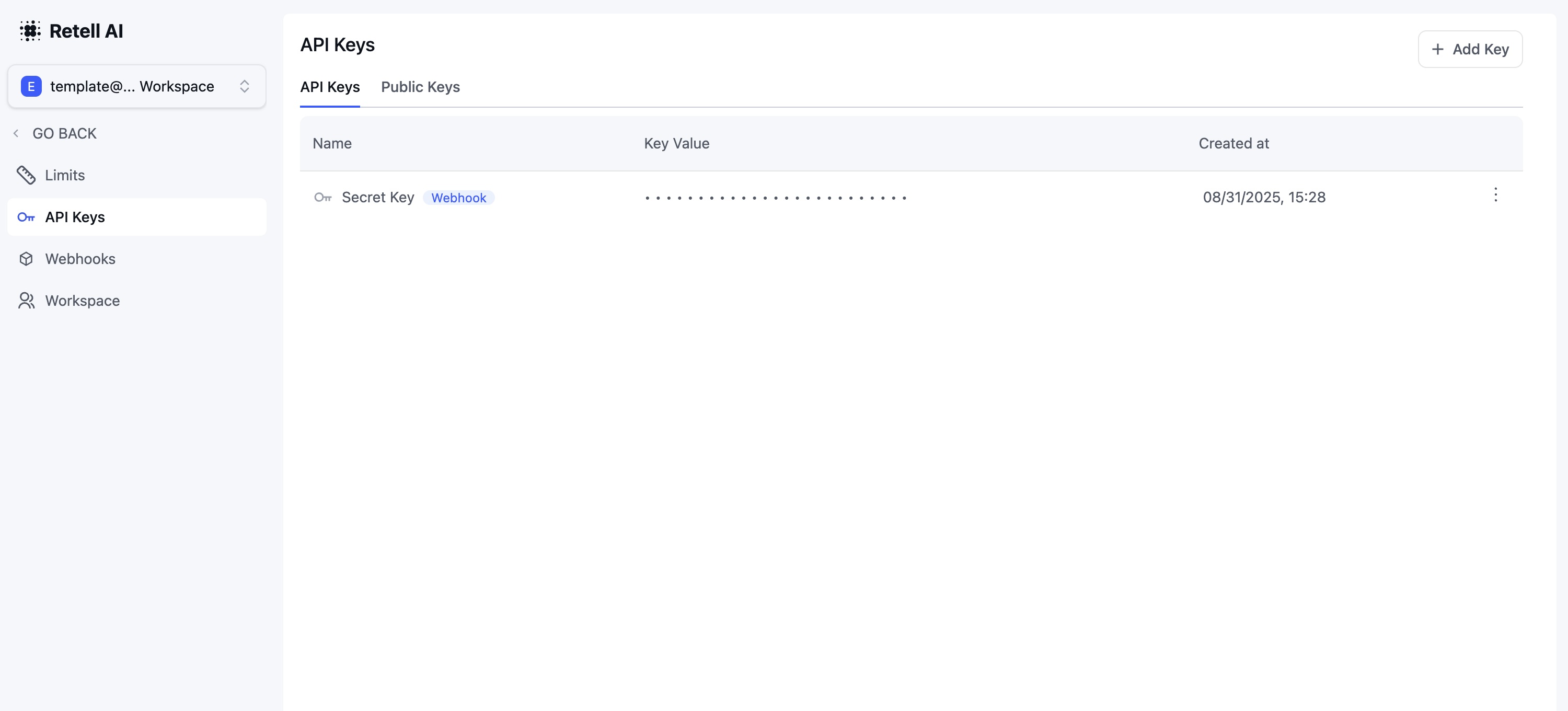
Navigate to the "API Keys" tab in your dashboard to obtain your API key.
 Choose your preferred language and install the SDK:
```bash Node Client theme={null}
npm i retell-sdk
```
```bash Python Client theme={null}
pip install retell-sdk
```
Create a new client instance using your API key:
```typescript Node Client theme={null}
import Retell from 'retell-sdk';
const retellClient = new Retell({
apiKey: "YOUR_API_KEY",
});
```
```python Python Client theme={null}
from retell import Retell
retell_client = Retell(
api_key="YOUR_API_KEY"
)
```
Here's an example of making a phone call using the SDK:
```typescript Node Client theme={null}
try {
const response = await retellClient.call.createPhoneCall({
from_number: '+14157774444',
to_number: '+12137774445',
});
console.log('Call initiated:', response);
} catch (error) {
console.error('Error making call:', error);
}
```
```python Python Client theme={null}
try:
response = retell_client.call.create_phone_call(
from_number="+14157774444",
to_number="+12137774445"
)
print(f"Call initiated: {response}")
except Exception as e:
print(f"Error making call: {e}")
```
## SDK vs REST API Comparison
To illustrate the benefits of using our SDK, here's a comparison of creating an agent using both methods:
#### Using REST API (More Verbose)
```javascript theme={null}
const options = {
method: 'POST',
headers: {
Authorization: '',
'Content-Type': 'application/json'
},
body: JSON.stringify({
response_engine: {
type: 'retell-llm',
llm_id: 'llm_234sdertfsdsfsdf'
},
agent_name: 'Jarvis',
voice_id: '11labs-Adrian',
// ... many more configuration options
})
};
fetch('https://api.retellai.com/create-agent', options)
.then(response => response.json())
.then(response => console.log(response))
.catch(err => console.error(err));
```
#### Using SDK (More Concise)
```typescript theme={null}
import Retell from 'retell-sdk';
const client = new Retell({
apiKey: 'YOUR_RETELL_API_KEY',
});
async function main() {
const params: Retell.AgentCreateParams = {
response_engine: {
llm_id: 'llm_234sdertfsdsfsdf',
type: 'retell-llm'
},
voice_id: '11labs-Adrian',
};
const agentResponse = await client.agent.create(params);
}
```
## Best Practices
### 1. Error Handling
Always wrap SDK calls in try-catch blocks to handle potential errors gracefully:
```typescript theme={null}
try {
const response = await retellClient.call.createPhoneCall(params);
// Handle success
} catch (error) {
if (error.code === 'insufficient_funds') {
// Handle specific error
}
// Log error details
}
```
### 2. Environment Variables
Store your API key securely using environment variables:
```typescript theme={null}
const retellClient = new Retell({
apiKey: process.env.RETELL_API_KEY,
});
```
### 3. Type Safety
Leverage TypeScript types for better developer experience:
```typescript theme={null}
import { Retell, AgentCreateParams } from 'retell-sdk';
const params: AgentCreateParams = {
// TypeScript will provide autocomplete here
};
```
## Rate Limits
Limits apply per **organization + route**, enforced at the HTTP layer.
| Endpoint group | Limit |
| -------------------------------------------------------- | -------------------------------------------- |
| Call creation | **1000 / 10s**, plus **60 4xx errors / min** |
| List endpoints (`list-*`, `batch-get-*`) | **15 / 10s** |
| All other SDK endpoints (get / create / update / delete) | **100 / 10s** |
| LLM / agent playground completions | **8 / 2s** |
Outbound calls are also subject to [CPS limits](/deploy/outbound-call#step-3-configure-cps-calls-per-second) (excess calls are queued, not rejected) and the per-org [concurrent call limit](/deploy/concurrency).
### 429 Response
```http theme={null}
HTTP/1.1 429 Too Many Requests
X-RateLimit-Limiter: general
RateLimit-Limit: 100
RateLimit-Remaining: 0
RateLimit-Reset: 7
{ "status": "error", "message": "Too many API requests, you are being throttled, please try again later." }
```
`X-RateLimit-Limiter` identifies which limiter fired: `general`, `list`, `call`, `call-error`, or `llm-playground`.
### Handling 429s
* Use `RateLimit-Reset` (seconds) for backoff; retry with jittered exponential backoff.
* Don't parallelize `list-*` calls — the per-route budget is small.
* For high call volume, design around CPS rather than HTTP throughput.
Choose your preferred language and install the SDK:
```bash Node Client theme={null}
npm i retell-sdk
```
```bash Python Client theme={null}
pip install retell-sdk
```
Create a new client instance using your API key:
```typescript Node Client theme={null}
import Retell from 'retell-sdk';
const retellClient = new Retell({
apiKey: "YOUR_API_KEY",
});
```
```python Python Client theme={null}
from retell import Retell
retell_client = Retell(
api_key="YOUR_API_KEY"
)
```
Here's an example of making a phone call using the SDK:
```typescript Node Client theme={null}
try {
const response = await retellClient.call.createPhoneCall({
from_number: '+14157774444',
to_number: '+12137774445',
});
console.log('Call initiated:', response);
} catch (error) {
console.error('Error making call:', error);
}
```
```python Python Client theme={null}
try:
response = retell_client.call.create_phone_call(
from_number="+14157774444",
to_number="+12137774445"
)
print(f"Call initiated: {response}")
except Exception as e:
print(f"Error making call: {e}")
```
## SDK vs REST API Comparison
To illustrate the benefits of using our SDK, here's a comparison of creating an agent using both methods:
#### Using REST API (More Verbose)
```javascript theme={null}
const options = {
method: 'POST',
headers: {
Authorization: '',
'Content-Type': 'application/json'
},
body: JSON.stringify({
response_engine: {
type: 'retell-llm',
llm_id: 'llm_234sdertfsdsfsdf'
},
agent_name: 'Jarvis',
voice_id: '11labs-Adrian',
// ... many more configuration options
})
};
fetch('https://api.retellai.com/create-agent', options)
.then(response => response.json())
.then(response => console.log(response))
.catch(err => console.error(err));
```
#### Using SDK (More Concise)
```typescript theme={null}
import Retell from 'retell-sdk';
const client = new Retell({
apiKey: 'YOUR_RETELL_API_KEY',
});
async function main() {
const params: Retell.AgentCreateParams = {
response_engine: {
llm_id: 'llm_234sdertfsdsfsdf',
type: 'retell-llm'
},
voice_id: '11labs-Adrian',
};
const agentResponse = await client.agent.create(params);
}
```
## Best Practices
### 1. Error Handling
Always wrap SDK calls in try-catch blocks to handle potential errors gracefully:
```typescript theme={null}
try {
const response = await retellClient.call.createPhoneCall(params);
// Handle success
} catch (error) {
if (error.code === 'insufficient_funds') {
// Handle specific error
}
// Log error details
}
```
### 2. Environment Variables
Store your API key securely using environment variables:
```typescript theme={null}
const retellClient = new Retell({
apiKey: process.env.RETELL_API_KEY,
});
```
### 3. Type Safety
Leverage TypeScript types for better developer experience:
```typescript theme={null}
import { Retell, AgentCreateParams } from 'retell-sdk';
const params: AgentCreateParams = {
// TypeScript will provide autocomplete here
};
```
## Rate Limits
Limits apply per **organization + route**, enforced at the HTTP layer.
| Endpoint group | Limit |
| -------------------------------------------------------- | -------------------------------------------- |
| Call creation | **1000 / 10s**, plus **60 4xx errors / min** |
| List endpoints (`list-*`, `batch-get-*`) | **15 / 10s** |
| All other SDK endpoints (get / create / update / delete) | **100 / 10s** |
| LLM / agent playground completions | **8 / 2s** |
Outbound calls are also subject to [CPS limits](/deploy/outbound-call#step-3-configure-cps-calls-per-second) (excess calls are queued, not rejected) and the per-org [concurrent call limit](/deploy/concurrency).
### 429 Response
```http theme={null}
HTTP/1.1 429 Too Many Requests
X-RateLimit-Limiter: general
RateLimit-Limit: 100
RateLimit-Remaining: 0
RateLimit-Reset: 7
{ "status": "error", "message": "Too many API requests, you are being throttled, please try again later." }
```
`X-RateLimit-Limiter` identifies which limiter fired: `general`, `list`, `call`, `call-error`, or `llm-playground`.
### Handling 429s
* Use `RateLimit-Reset` (seconds) for backoff; retry with jittered exponential backoff.
* Don't parallelize `list-*` calls — the per-route budget is small.
* For high call volume, design around CPS rather than HTTP throughput.