> ## Documentation Index
> Fetch the complete documentation index at: https://docs.retellai.com/llms.txt
> Use this file to discover all available pages before exploring further.
# Custom LLM Overview
> Overview of integrating a custom LLM with Retell over WebSocket — when to use it, what your server must implement, and links to step-by-step setup guides.
Retell agent frameworks like single prompt, conversation flow provide more capabilities and built in tool sets. We recommend using those frameworks if possible. Only use custom LLM integration if you have to due to specific compliance or use case requirements.
In this section, we will walk you through how to integrate your LLM. It involves setting up a backend server that handles
text exchanges with Retell server to provide responses to user. We have step by step instructions, and open source example repositories
for you to follow along.
### Interaction Overview Diagram
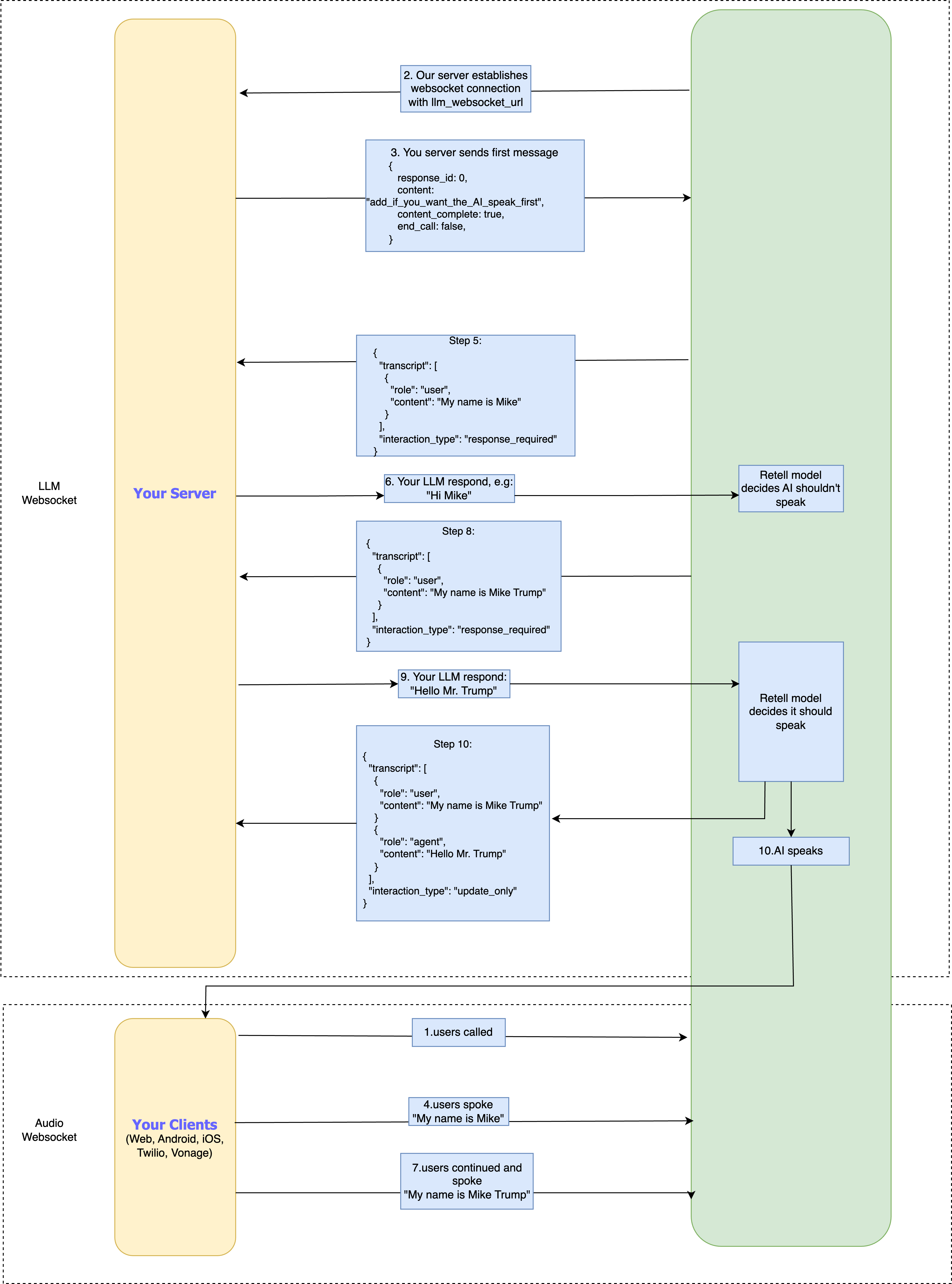
The upper part of the diagram is interaction between your backend response generating server and Retell server.
(For a higher resolution image, download the picture.)
**The interaction flow is as follows:**
1. A phone or web call is made with the AI agent. Our server establishes the `audio WebSocket`.
2. Our server will connect with `llm_websocket_url` you provided in the agent.
3. Your LLM server needs to send the message upon the WebSocket connection is ready. If you want the agent to speak first, set the content; otherwise, set content to empty string.
4. User says, "My name is Mike".
5. Our model detects a high chance of turntaking, or the user pauses, we request a response from your LLM.
6. Your server checks for `interaction_type` in our json. If it is `response_required`, you need to send the response. After receiving your response, we have our model check if AI should speak
7. User continues and says "My name is Mike Trump".
8. Same as step 3
9. Our server receives the response from your LLM and decides to speak
10. We send the AI voice in the `audio websocket`. Meanwhile, we will send you json with `interaction_type` as `update_only`. You don't need to update but you can get the transcript from the json body.
### Example Custom LLM Demo Repositories
Fork the complete code used in the following guides to follow along to integrate your custom
LLM solutions.
These demo repos show how to build an LLM solution with `openai` / `azure openai`, how to start an `LLM websocket` server,
and how to use Twilio to make phone calls with Retell agents programmatically.
* **Backend Server**:
* [Node Demo Repository](https://github.com/RetellAI/retell-backend-node-demo)
* [Python Demo Repository](https://github.com/RetellAI/python-backend-demo)
If you encounter issues, feel free to open an issue in the respective GitHub repo.
If you want to help the community, feel free to add functionalities via pull requests.
### YouTube Guide
This video might be outdated already.
Watch this YouTube guide to set up your backend server.
 (For a higher resolution image, download the picture.)
**The interaction flow is as follows:**
1. A phone or web call is made with the AI agent. Our server establishes the `audio WebSocket`.
2. Our server will connect with `llm_websocket_url` you provided in the agent.
3. Your LLM server needs to send the message upon the WebSocket connection is ready. If you want the agent to speak first, set the content; otherwise, set content to empty string.
4. User says, "My name is Mike".
5. Our model detects a high chance of turntaking, or the user pauses, we request a response from your LLM.
6. Your server checks for `interaction_type` in our json. If it is `response_required`, you need to send the response. After receiving your response, we have our model check if AI should speak
7. User continues and says "My name is Mike Trump".
8. Same as step 3
9. Our server receives the response from your LLM and decides to speak
10. We send the AI voice in the `audio websocket`. Meanwhile, we will send you json with `interaction_type` as `update_only`. You don't need to update but you can get the transcript from the json body.
### Example Custom LLM Demo Repositories
Fork the complete code used in the following guides to follow along to integrate your custom
LLM solutions.
These demo repos show how to build an LLM solution with `openai` / `azure openai`, how to start an `LLM websocket` server,
and how to use Twilio to make phone calls with Retell agents programmatically.
* **Backend Server**:
* [Node Demo Repository](https://github.com/RetellAI/retell-backend-node-demo)
* [Python Demo Repository](https://github.com/RetellAI/python-backend-demo)
If you encounter issues, feel free to open an issue in the respective GitHub repo.
If you want to help the community, feel free to add functionalities via pull requests.
### YouTube Guide
(For a higher resolution image, download the picture.)
**The interaction flow is as follows:**
1. A phone or web call is made with the AI agent. Our server establishes the `audio WebSocket`.
2. Our server will connect with `llm_websocket_url` you provided in the agent.
3. Your LLM server needs to send the message upon the WebSocket connection is ready. If you want the agent to speak first, set the content; otherwise, set content to empty string.
4. User says, "My name is Mike".
5. Our model detects a high chance of turntaking, or the user pauses, we request a response from your LLM.
6. Your server checks for `interaction_type` in our json. If it is `response_required`, you need to send the response. After receiving your response, we have our model check if AI should speak
7. User continues and says "My name is Mike Trump".
8. Same as step 3
9. Our server receives the response from your LLM and decides to speak
10. We send the AI voice in the `audio websocket`. Meanwhile, we will send you json with `interaction_type` as `update_only`. You don't need to update but you can get the transcript from the json body.
### Example Custom LLM Demo Repositories
Fork the complete code used in the following guides to follow along to integrate your custom
LLM solutions.
These demo repos show how to build an LLM solution with `openai` / `azure openai`, how to start an `LLM websocket` server,
and how to use Twilio to make phone calls with Retell agents programmatically.
* **Backend Server**:
* [Node Demo Repository](https://github.com/RetellAI/retell-backend-node-demo)
* [Python Demo Repository](https://github.com/RetellAI/python-backend-demo)
If you encounter issues, feel free to open an issue in the respective GitHub repo.
If you want to help the community, feel free to add functionalities via pull requests.
### YouTube Guide