> ## Documentation Index
> Fetch the complete documentation index at: https://docs.retellai.com/llms.txt
> Use this file to discover all available pages before exploring further.
# Setup WebSocket Server
> Step-by-step guide to setting up an LLM WebSocket server that integrates with Retell — handle the connection, receive transcripts, and stream responses.
Integrating AI with domain-specific knowledge involves setting up
[LLM WebSocket](/api-references/llm-websocket). Our API manages the acoustic interactions,
while your LLM (or any other response systems) adds
domain expertise. This setup allows our system to communicate directly with your
server via WebSocket.
In this guide, you will see a step by step walkthrough of how to set a websocket server up and integrate
with our API with a dummy response system (don't worry, we'll cover how to connect to LLM in next section).
The guide contains code snippets for Node.js (with Express.js) / Python (with FastAPI), and for other
languages / tech stacks, feel free
to adapt the underlying concepts as necessary.
The example repos are currently a bit outdated.
This guide provides a step by step tutorial, the codes are taken from [Node.js Express.js
Demo](https://github.com/RetellAI/retell-backend-node-demo) /
[Python FastAPI Demo](https://github.com/RetellAI/python-backend-demo).
Incoming requests by only allowlist these Retell IP addresses: `100.20.5.228`
### Understanding WebSockets
Unlike the request-response model of HTTPS, WebSockets maintain an open
connection between the client and server. This facilitates two-way message
exchange without needing to reestablish connections, enabling faster data streaming. For more details on
WebSockets, check out
[this blog](https://www.wallarm.com/what/a-simple-explanation-of-what-a-websocket-is) and
[Websocket API Doc](https://developer.mozilla.org/en-US/docs/Web/API/WebSockets_API).
### Understand Communication Protocol
We have defined [this protocol](/api-references/llm-websocket) that our server
would communicate with your server in. We recommend reading this first before following the guide.
Generally, the protocol requires:
* Your server to send the first message: send empty response to let user speak first.
* We will send live transcripts to your server, and expect responses when we need to.
* You will stream what you want your agent to say to our server, and we will speak it out.
### Step 1: Add a basic websocket endpoint to your server
In this step, you will add a basic websocket endpoint to your express server to
receive messages.
If you already have a server up and running, you can add the following code next to your other routes.
```javascript Node.js theme={null}
import { RawData, WebSocket } from "ws";
import { Request } from "express";
var express = require('express');
var app = express();
var expressWs = require('express-ws')(app);
const port = 3000
// Your other API endpoints
app.get('/', (req, res) => {
res.send('Hello World!')
})
app.ws("/llm-websocket/:call_id",
async (ws: WebSocket, req: Request) => {
// callId is a unique identifier of a call, containing all information about it
const callId = req.params.call_id;
// You need to send the first message here, but for now let's skip that.
ws.on("error", (err) => {
console.error("Error received in LLM websocket client: ", err);
});
ws.on("message", async (data: RawData, isBinary: boolean) => {
// Retell server will send transcript from caller along with other information
// You will be adding code to process and respond here
console.log(data);
});
},
);
app.listen(port, () => {
console.log(`Example app listening on port ${port}`)
});
```
```python Python theme={null}
import json
import os
from dotenv import load_dotenv
from fastapi import FastAPI, Request, WebSocket
from fastapi.responses import JSONResponse, PlainTextResponse
from fastapi.websockets import WebSocketState
app = FastAPI()
@app.websocket("/llm-websocket/{call_id}")
async def websocket_handler(websocket: WebSocket, call_id: str):
await websocket.accept()
# A unique call id is the identifier of each call
print(f"Handle llm ws for: {call_id}")
# You need to send the first message here, but for now let's skip that.
# listen for new updates
try:
while True:
message = await websocket.receive_text()
print(message);
except Exception as e:
print(f'LLM WebSocket error for {call_id}: {e}')
finally:
try:
await websocket.close()
except RuntimeError as e:
print(f"Websocket already closed for {call_id}")
print(f"Closing llm ws for: {call_id}")
```
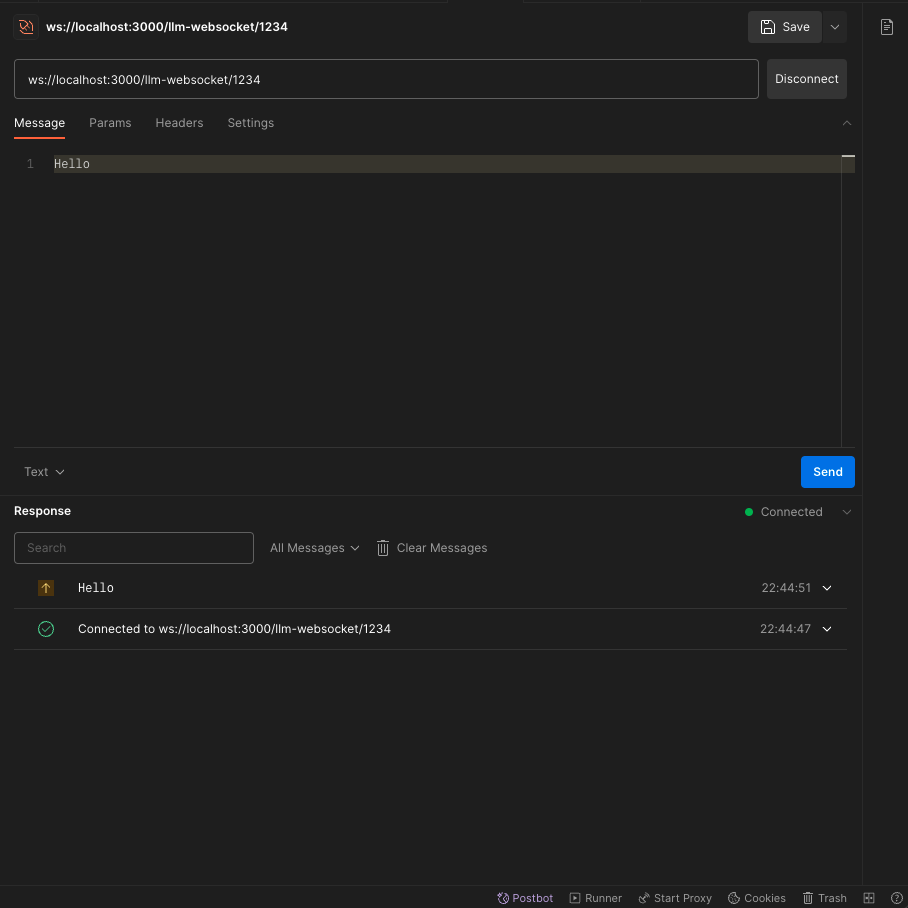
Using Postman, you can send a websocket call to your localhost. First click
"Connect", then enter "Hello" in Message tab and click "Send".
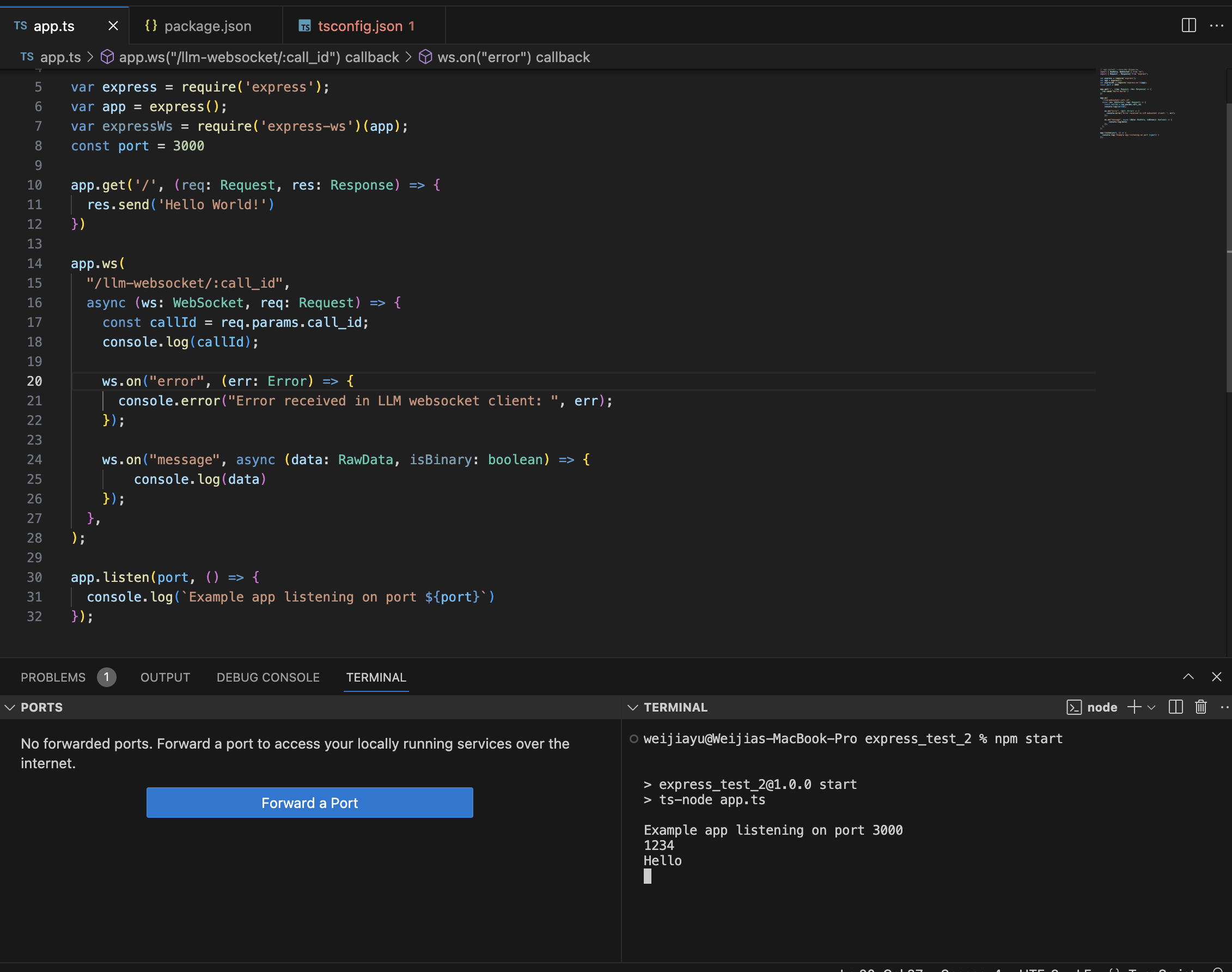
 You should be able to receive the message in your server
 ### Step 2: Create a Dummy Response System
In this step, you will not connect with your LLM yet. Instead, let's just build
a dummy response system that can greet with "How may I help you?", and reply
every user's questions with "I am sorry, can you say that again?".
Don't worry about the dumb agent, we will connect your LLM and make it smart
later.
```javascript Node.js theme={null}
import { WebSocket } from "ws";
interface Utterance {
role: "agent" | "user";
content: string;
}
// LLM Websocket Request Object
export interface RetellRequest {
response_id?: number;
transcript: Utterance[];
interaction_type: "update_only" | "response_required" | "reminder_required";
}
// LLM Websocket Response Object
export interface RetellResponse {
response_id?: number;
content: string;
content_complete: boolean;
end_call: boolean;
}
export class LLMDummyMock {
constructor() {
}
// First sentence requested
BeginMessage(ws: WebSocket) {
const res: RetellResponse = {
response_id: 0,
content: "How may I help you?",
content_complete: true,
end_call: false,
};
ws.send(JSON.stringify(res));
}
async DraftResponse(request: RetellRequest, ws: WebSocket) {
if (request.interaction_type === "update_only") {
// process live transcript update if needed
return;
}
try {
const res: RetellResponse = {
response_id: request.response_id,
content: "I am sorry, can you say that again?",
content_complete: true,
end_call: false,
};
ws.send(JSON.stringify(res));
} catch (err) {
console.error("Error in gpt stream: ", err);
}
}
}
```
```python Python theme={null}
import os
beginSentence = "How may I help you?"
class LlmDummyMock:
def __init__(self):
pass
def draft_begin_message(self):
return {
"response_id": 0,
"content": beginSentence,
"content_complete": True,
"end_call": False,
}
def draft_response(self, request):
yield {
"response_id": request['response_id'],
"content": "I am sorry, can you say that again?",
"content_complete": True,
"end_call": False,
}
```
Update your websocket endpoint. After receiving "message" event, you will call
`llmClient.DraftResponse()` to get response.
```javascript Node.js theme={null}
// Remember to import the dummy class you wrote
app.ws("/llm-websocket/:call_id",
async (ws: WebSocket, req: Request) => {
const callId = req.params.call_id;
const llmClient = new LlmDummyMock();
ws.on("error", (err: Error) => {
console.error("Error received in LLM websocket client: ", err);
});
// Send Begin message
llmClient.BeginMessage(ws);
ws.on("message", async (data: RawData, isBinary: boolean) => {
if (isBinary) {
console.error("Got binary message instead of text in websocket.");
ws.close(1002, "Cannot find corresponding Retell LLM.");
}
try {
const request: RetellRequest = JSON.parse(data.toString());
// LLM will think about a response
llmClient.DraftResponse(request, ws);
} catch (err) {
console.error("Error in parsing LLM websocket message: ", err);
ws.close(1002, "Cannot parse incoming message.");
}
});
},
);
```
```python Python theme={null}
# remember to import the dummy class you just wrote
@app.websocket("/llm-websocket/{call_id}")
async def websocket_handler(websocket: WebSocket, call_id: str):
await websocket.accept()
print(f"Handle llm ws for: {call_id}")
llm_client = LlmDummyMock()
# send first message to signal ready of server
response_id = 0
first_event = llm_client.draft_begin_message()
await websocket.send_text(json.dumps(first_event))
async def stream_response(request):
nonlocal response_id
for event in llm_client.draft_response(request):
await websocket.send_text(json.dumps(event))
if request['response_id'] < response_id:
return # new response needed, abandon this one
try:
while True:
message = await websocket.receive_text()
request = json.loads(message)
# print out transcript
os.system('cls' if os.name == 'nt' else 'clear')
print(json.dumps(request, indent=4))
if 'response_id' not in request:
continue # no response needed, process live transcript update if needed
response_id = request['response_id']
asyncio.create_task(stream_response(request))
except WebSocketDisconnect:
print(f"LLM WebSocket disconnected for {call_id}")
except Exception as e:
print(f'LLM WebSocket error for {call_id}: {e}')
finally:
print(f"LLM WebSocket connection closed for {call_id}")
```
### Step 3: Test your basic agent on Dashboard
At this point, you are ready to make your basic agent speak in the dashboard.
1. If you deploy your server, you can get a url using your domain:
`wss://your_domain_name/llm-websocket/`
2. If you want to test your code locally, you can use
[ngrok](https://ngrok.com/) to generate a production url forwarding requests
to your local endpoints. You can watch this
[video](https://youtu.be/Tz969io9cPc?si=Qod-lRgUhILG-4_K\&t=344) to learn how
to do that. After getting your ngrok url, you will have a url
`wss://xxxxx.ngrok-free.app/llm-websocket/`
Add either the ngrok url or your production url into the dashboard
### Step 2: Create a Dummy Response System
In this step, you will not connect with your LLM yet. Instead, let's just build
a dummy response system that can greet with "How may I help you?", and reply
every user's questions with "I am sorry, can you say that again?".
Don't worry about the dumb agent, we will connect your LLM and make it smart
later.
```javascript Node.js theme={null}
import { WebSocket } from "ws";
interface Utterance {
role: "agent" | "user";
content: string;
}
// LLM Websocket Request Object
export interface RetellRequest {
response_id?: number;
transcript: Utterance[];
interaction_type: "update_only" | "response_required" | "reminder_required";
}
// LLM Websocket Response Object
export interface RetellResponse {
response_id?: number;
content: string;
content_complete: boolean;
end_call: boolean;
}
export class LLMDummyMock {
constructor() {
}
// First sentence requested
BeginMessage(ws: WebSocket) {
const res: RetellResponse = {
response_id: 0,
content: "How may I help you?",
content_complete: true,
end_call: false,
};
ws.send(JSON.stringify(res));
}
async DraftResponse(request: RetellRequest, ws: WebSocket) {
if (request.interaction_type === "update_only") {
// process live transcript update if needed
return;
}
try {
const res: RetellResponse = {
response_id: request.response_id,
content: "I am sorry, can you say that again?",
content_complete: true,
end_call: false,
};
ws.send(JSON.stringify(res));
} catch (err) {
console.error("Error in gpt stream: ", err);
}
}
}
```
```python Python theme={null}
import os
beginSentence = "How may I help you?"
class LlmDummyMock:
def __init__(self):
pass
def draft_begin_message(self):
return {
"response_id": 0,
"content": beginSentence,
"content_complete": True,
"end_call": False,
}
def draft_response(self, request):
yield {
"response_id": request['response_id'],
"content": "I am sorry, can you say that again?",
"content_complete": True,
"end_call": False,
}
```
Update your websocket endpoint. After receiving "message" event, you will call
`llmClient.DraftResponse()` to get response.
```javascript Node.js theme={null}
// Remember to import the dummy class you wrote
app.ws("/llm-websocket/:call_id",
async (ws: WebSocket, req: Request) => {
const callId = req.params.call_id;
const llmClient = new LlmDummyMock();
ws.on("error", (err: Error) => {
console.error("Error received in LLM websocket client: ", err);
});
// Send Begin message
llmClient.BeginMessage(ws);
ws.on("message", async (data: RawData, isBinary: boolean) => {
if (isBinary) {
console.error("Got binary message instead of text in websocket.");
ws.close(1002, "Cannot find corresponding Retell LLM.");
}
try {
const request: RetellRequest = JSON.parse(data.toString());
// LLM will think about a response
llmClient.DraftResponse(request, ws);
} catch (err) {
console.error("Error in parsing LLM websocket message: ", err);
ws.close(1002, "Cannot parse incoming message.");
}
});
},
);
```
```python Python theme={null}
# remember to import the dummy class you just wrote
@app.websocket("/llm-websocket/{call_id}")
async def websocket_handler(websocket: WebSocket, call_id: str):
await websocket.accept()
print(f"Handle llm ws for: {call_id}")
llm_client = LlmDummyMock()
# send first message to signal ready of server
response_id = 0
first_event = llm_client.draft_begin_message()
await websocket.send_text(json.dumps(first_event))
async def stream_response(request):
nonlocal response_id
for event in llm_client.draft_response(request):
await websocket.send_text(json.dumps(event))
if request['response_id'] < response_id:
return # new response needed, abandon this one
try:
while True:
message = await websocket.receive_text()
request = json.loads(message)
# print out transcript
os.system('cls' if os.name == 'nt' else 'clear')
print(json.dumps(request, indent=4))
if 'response_id' not in request:
continue # no response needed, process live transcript update if needed
response_id = request['response_id']
asyncio.create_task(stream_response(request))
except WebSocketDisconnect:
print(f"LLM WebSocket disconnected for {call_id}")
except Exception as e:
print(f'LLM WebSocket error for {call_id}: {e}')
finally:
print(f"LLM WebSocket connection closed for {call_id}")
```
### Step 3: Test your basic agent on Dashboard
At this point, you are ready to make your basic agent speak in the dashboard.
1. If you deploy your server, you can get a url using your domain:
`wss://your_domain_name/llm-websocket/`
2. If you want to test your code locally, you can use
[ngrok](https://ngrok.com/) to generate a production url forwarding requests
to your local endpoints. You can watch this
[video](https://youtu.be/Tz969io9cPc?si=Qod-lRgUhILG-4_K\&t=344) to learn how
to do that. After getting your ngrok url, you will have a url
`wss://xxxxx.ngrok-free.app/llm-websocket/`
Add either the ngrok url or your production url into the dashboard
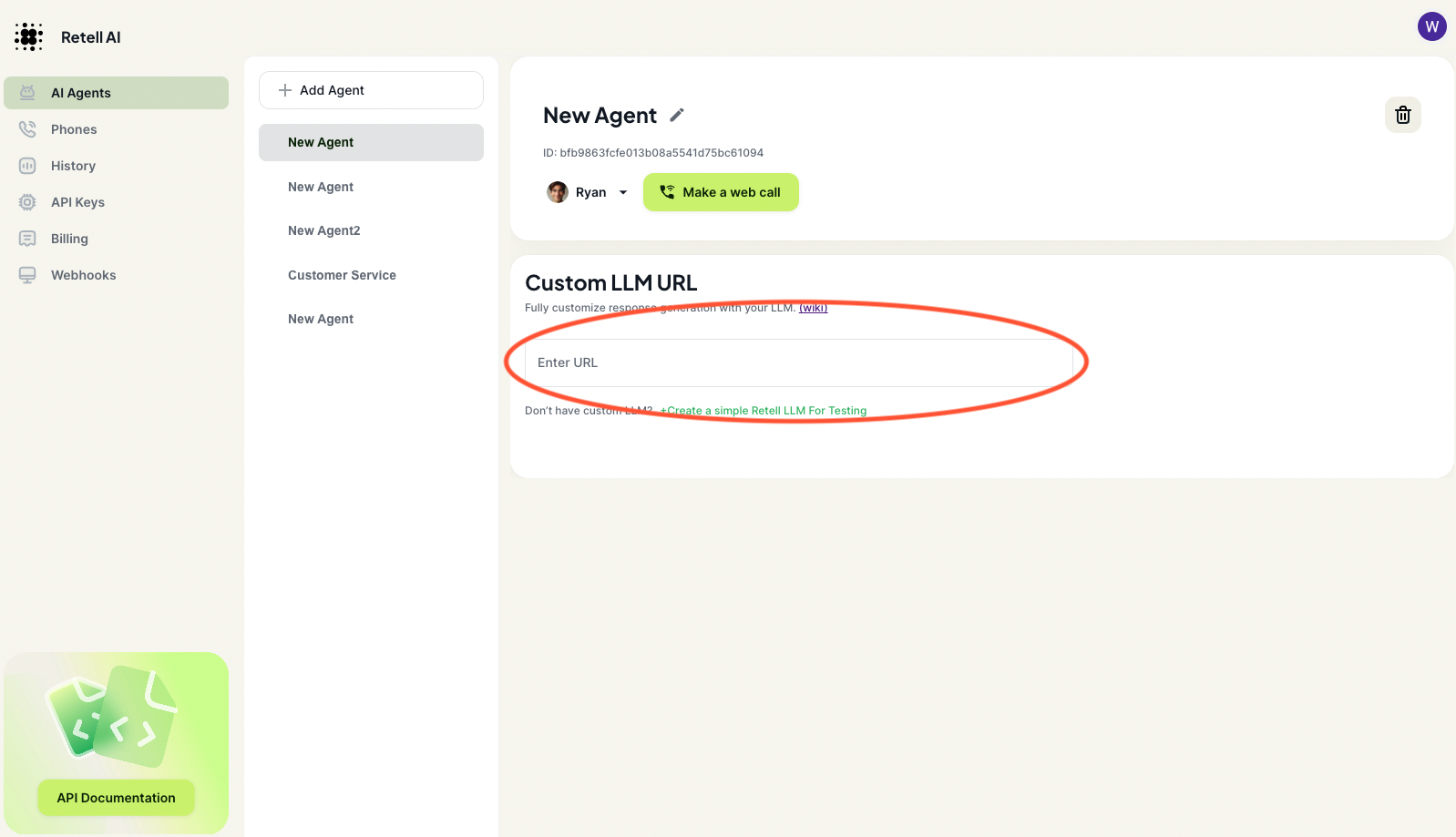 **Click "Make a web call" and you should be able to hear the agent talking. It
will greet with "How may I help you?", and reply every user's questions with "I
am sorry, can you say that again?".**
Congrats! You just connected your websocket to our server. Let's connect to your
LLM to make the agent smarter.
If you still cannot hear the agent talking, check out our [troubleshooting
guide](/integrate-llm/troubleshooting)
**Click "Make a web call" and you should be able to hear the agent talking. It
will greet with "How may I help you?", and reply every user's questions with "I
am sorry, can you say that again?".**
Congrats! You just connected your websocket to our server. Let's connect to your
LLM to make the agent smarter.
If you still cannot hear the agent talking, check out our [troubleshooting
guide](/integrate-llm/troubleshooting)