> ## Documentation Index
> Fetch the complete documentation index at: https://docs.retellai.com/llms.txt
> Use this file to discover all available pages before exploring further.
# Connect GoHighLevel
> Connect GoHighLevel to Retell AI with a Private Integration token and Location ID: the scopes to grant, where each value lives, and how to verify.
Connecting GoHighLevel takes a Private Integration token and the sub-account's Location ID. One connection covers both [contact sync](/integrations/gohighlevel-contact-sync) and [agent functions](/integrations/gohighlevel-functions): your agents work the sub-account's contacts, tags, and opportunities, and Retell keeps the records current. This page covers the GoHighLevel-side setup and the connection itself.
A GoHighLevel connection is scoped to **one sub-account (location)**. An agency managing several locations connects each one separately.
## When to use it
Connect GoHighLevel when it's your system of record and you want your agents working from it without anyone copying data between tools. It's the right choice when you want to:
* **Call or text people who already exist in GoHighLevel.** Contacts sync into Retell automatically, so your agent greets callers by name and knows their pipeline stage instead of asking.
* **Fire GoHighLevel workflows from conversation outcomes.** The **Add Contact Tags** tool tags the contact — tags are what GoHighLevel workflows trigger on, so a "booked" or "interested" tag can kick off your existing follow-up automation.
* **Work deals from the phone.** Your agent can list a contact's opportunities, move one to a different pipeline stage, or create a new one when a caller qualifies.
* **Book the sub-account's calendars.** The same connection reads free slots and books, reschedules, or cancels appointments, so one integration covers both the caller's record and their appointment.
Your agents can also look up and manage contacts, tasks, notes, and a contact's appointments through [integration tools](/integrations/gohighlevel-functions#available-tools), and book the sub-account's [calendars](/integrations/gohighlevel-functions#book-the-sub-account-s-calendars).
For example, an agency runs a med spa location's inbound line on Retell. The agent looks up the caller, answers from their record, tags them `booked` after scheduling, and the location's existing GoHighLevel workflow sends the confirmation text. Nothing about the workflow changes.
## Prerequisites
* Admin access to the GoHighLevel **sub-account** you want to connect. Private Integrations exist at both the agency and sub-account level, but Retell's connection is location-scoped, so create the token inside the sub-account.
## Step 1: Create a Private Integration token
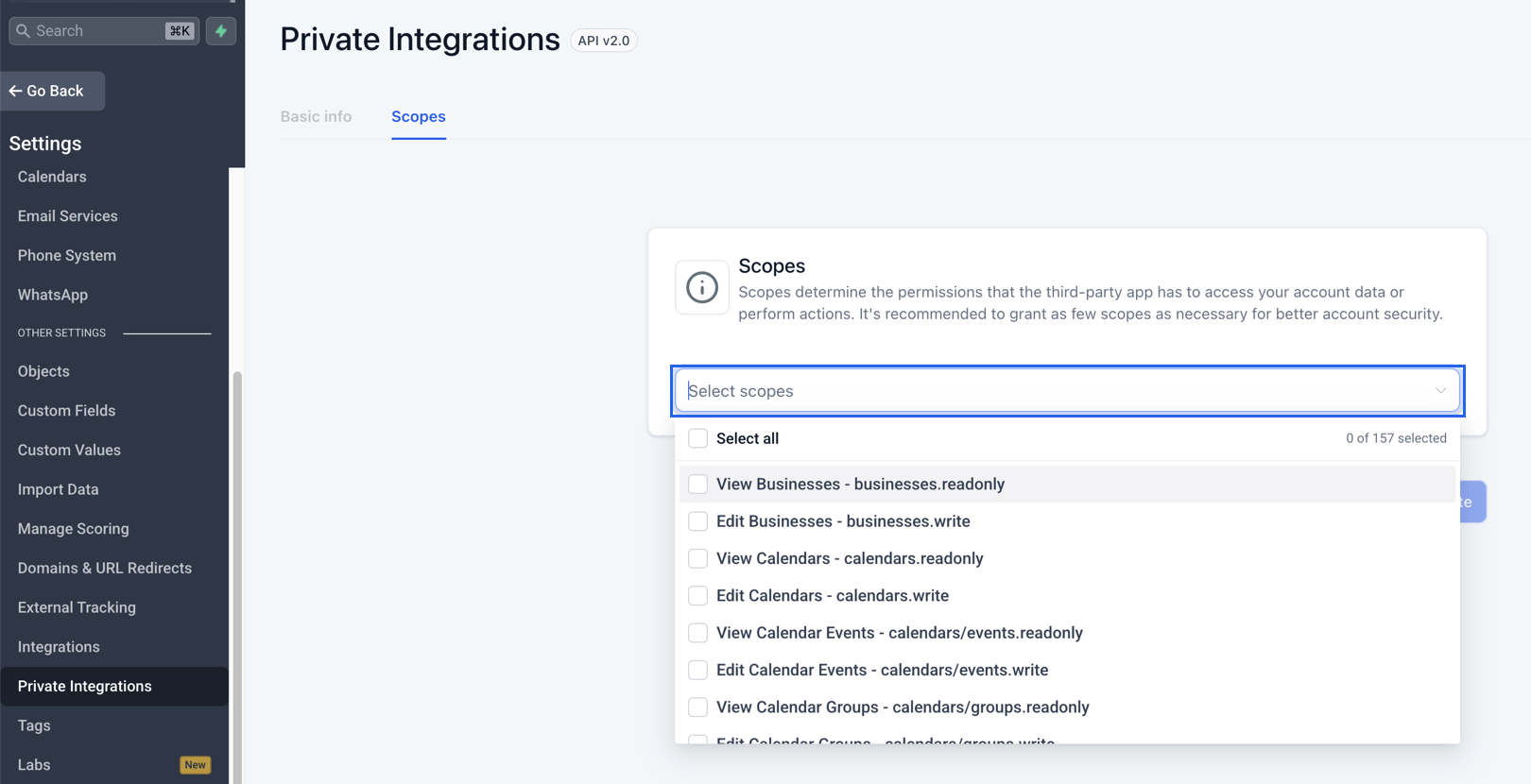
In the sub-account, go to **Settings > Private Integrations** (under **Other Settings**) and click **Create new Integration**. Name it something descriptive, for example `Retell AI`.
If **Private Integrations** isn't in the Settings menu, enable the feature under **Settings > Labs** (agency or sub-account view) first. By default admins can create Private Integrations; access can be restricted per user under **Roles & Permissions** (**Settings > Team** at the agency, **Settings > My Staff** in a sub-account).
On the **Scopes** tab, open the **Select scopes** dropdown. Each of its entries pairs a label with the scope's slug, like "View Contacts - contacts.readonly", and the list is searchable, so search by the slugs below.
Grant the scopes covering what Retell uses. At minimum:
| Scope | Required for |
| ------------------------------------------------------------------------------- | ------------------------------------------------------------------------------------------------------------------------------------------------------------------------ |
| `contacts.readonly` and `contacts.write` | Contact sync, the connection test, contact lookups and updates, tags, tasks, notes, and listing a contact's appointments |
| `opportunities.readonly` and `opportunities.write` | Listing, creating, and updating opportunities, and reading pipelines |
| `locations/customFields.readonly` | Reading custom field definitions so you can map custom fields |
| `calendars.readonly`, `calendars/events.readonly`, and `calendars/events.write` | The [calendar tools](/integrations/gohighlevel-functions#book-the-sub-account-s-calendars): checking availability, and booking, rescheduling, or cancelling appointments |
Grant the scopes up front. Without `contacts.readonly` the connection test itself fails. And when a tool call later hits a missing scope, GoHighLevel returns the same authorization error it returns for a revoked token, so the connection can end up flagged with a **Connection error** tag.
Save the integration and copy the token right away; GoHighLevel shows it only at creation.
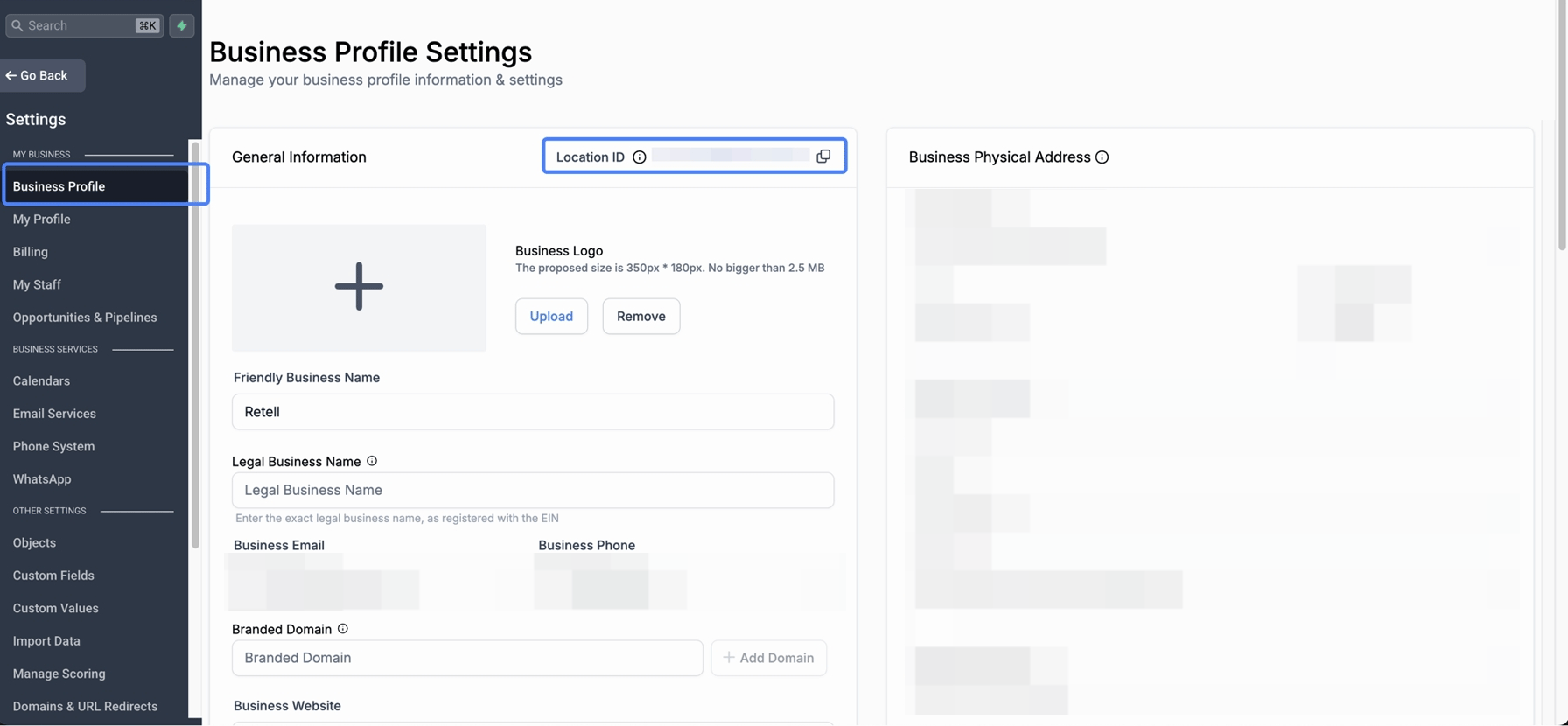
## Step 2: Find the Location ID
The Location ID identifies the sub-account. Read it in the sub-account under **Settings > Business Profile**, or from your browser's address bar while inside the sub-account — it's the string after `/location/` in the URL, for example `ve9EPM428h8vShlRW1KT`.
## Step 3: Connect GoHighLevel in Retell
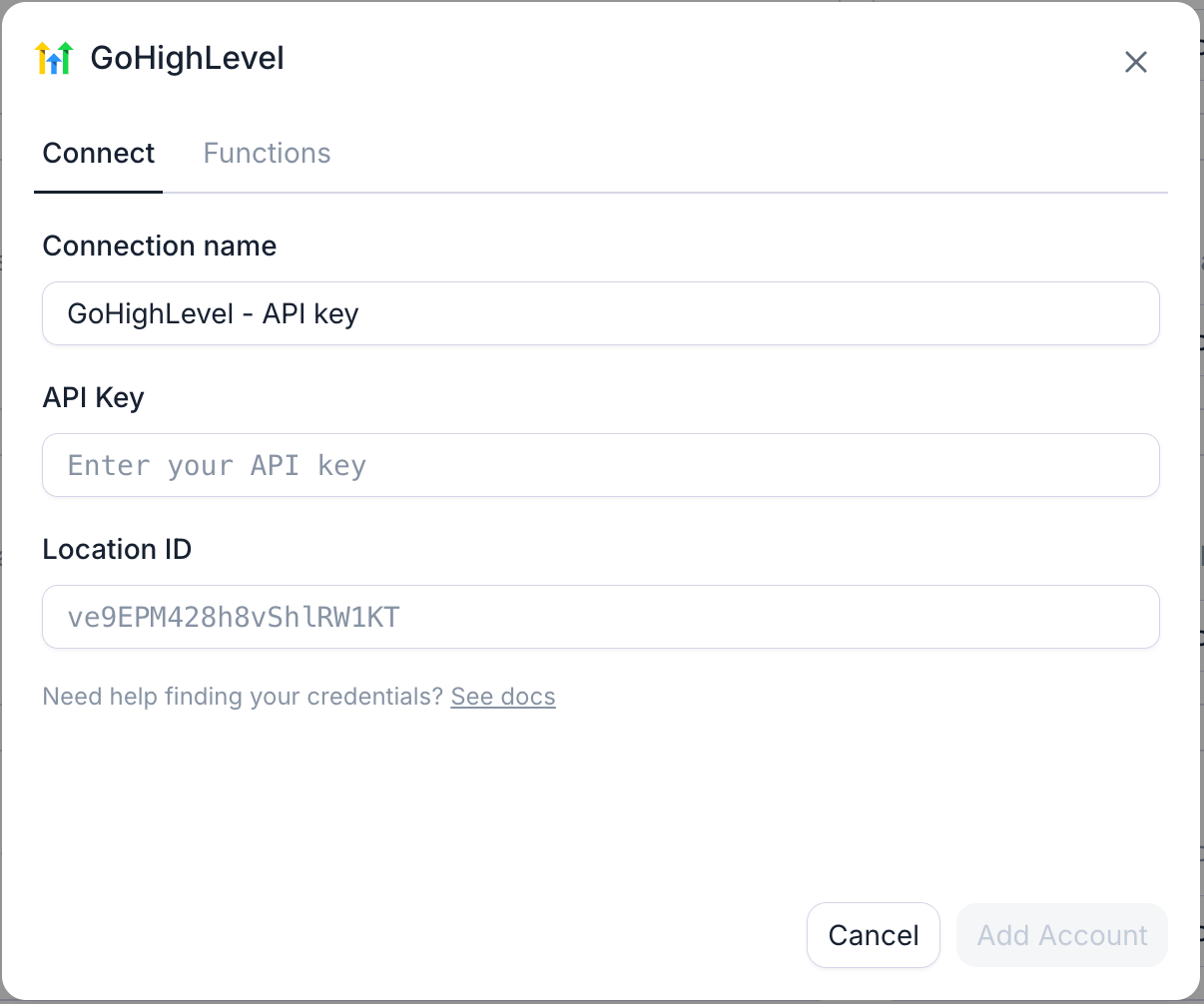
In the Retell Dashboard, open **Integrations**, select the **Available** tab, find **GoHighLevel**, and click **Connect** (**Add Account** if a connection already exists).
Fill in the fields:
| Field | Value |
| ------------------- | ------------------------------------------------------------------------------------------------------------ |
| **Connection name** | Alias for this connection; prefilled with `GoHighLevel - API key`. The location's name makes a better alias. |
| **API key** | The Private Integration token from Step 1. |
| **Location ID** | The sub-account ID from Step 2. |
Click **Connect** (**Add Account** if a connection already exists). Retell tests the credentials by searching the sub-account's contacts. On success the dialog offers **Set up contact sync**.
On the **Connected** tab, the GoHighLevel connection shows as connected. See [GoHighLevel contact sync](/integrations/gohighlevel-contact-sync) to import the sub-account's contacts, or start using [agent functions](/integrations/gohighlevel-functions) right away.
## Manage the token
* **Change scopes anytime.** Edit the Private Integration's scopes without regenerating the token — additions take effect immediately.
* **Rotate on your schedule.** Open the integration under **Settings > Private Integrations** to rotate its token; GoHighLevel recommends doing so every 90 days. **Rotate and expire this token later** keeps the old token valid for 7 days while you swap the credential over; **Rotate and expire this token now** kills it immediately, so Retell fails until it has the new one.
* **Reconnect after rotating.** On the **Connected** tab, open the connection's settings, paste the new token over the masked one, and click **Reconnect**. Retell verifies the new token before saving, and your field mappings and synced contacts are untouched.
## Troubleshooting
Confirm you pasted a **Private Integration token** from the same sub-account whose Location ID you entered, not an agency-level key or a legacy API key. A token from one location can't act on another.
Retell flags a connection as errored when GoHighLevel rejects the credentials — usually a deleted or rotated token, though a tool call that hits a missing scope reports the same way. Open the connection's settings, paste a current token (or grant the missing scope), and click **Reconnect**.
## FAQ
Yes, one connection per location, each with its own token and Location ID. Only one CRM connection in your workspace can drive [contact sync](/integrations/gohighlevel-contact-sync) at a time, across every provider — the **Contact sync** toggle in a connection's settings decides which one. Integration tools work on every connection.
## Next steps
Import the sub-account's contacts, write analysis results back, and log conversations as notes.
Look up callers, add tags that fire workflows, and work opportunities mid-conversation.
How contact sync, analysis mapping, and activity logging work across CRM providers.
See every provider Retell connects to and how integration tools work.