> ## Documentation Index
> Fetch the complete documentation index at: https://docs.retellai.com/llms.txt
> Use this file to discover all available pages before exploring further.
# Notion knowledge base sync
> Sync Notion pages into a Retell AI knowledge base: pick the pages shared with your connection, and edited pages re-sync automatically every 24 hours.
Pages you add from Notion become [knowledge base](/build/knowledge-base) sources that follow the page: when someone edits it in Notion, Retell re-syncs it on the next refresh, so your agent answers from the version your team maintains. This page covers picking pages and keeping them current.
Adding Notion pages requires a [connected Notion account](/integrations/notion) with the pages [shared with the connection](/integrations/notion#share-pages-with-the-connection).
## Add Notion pages
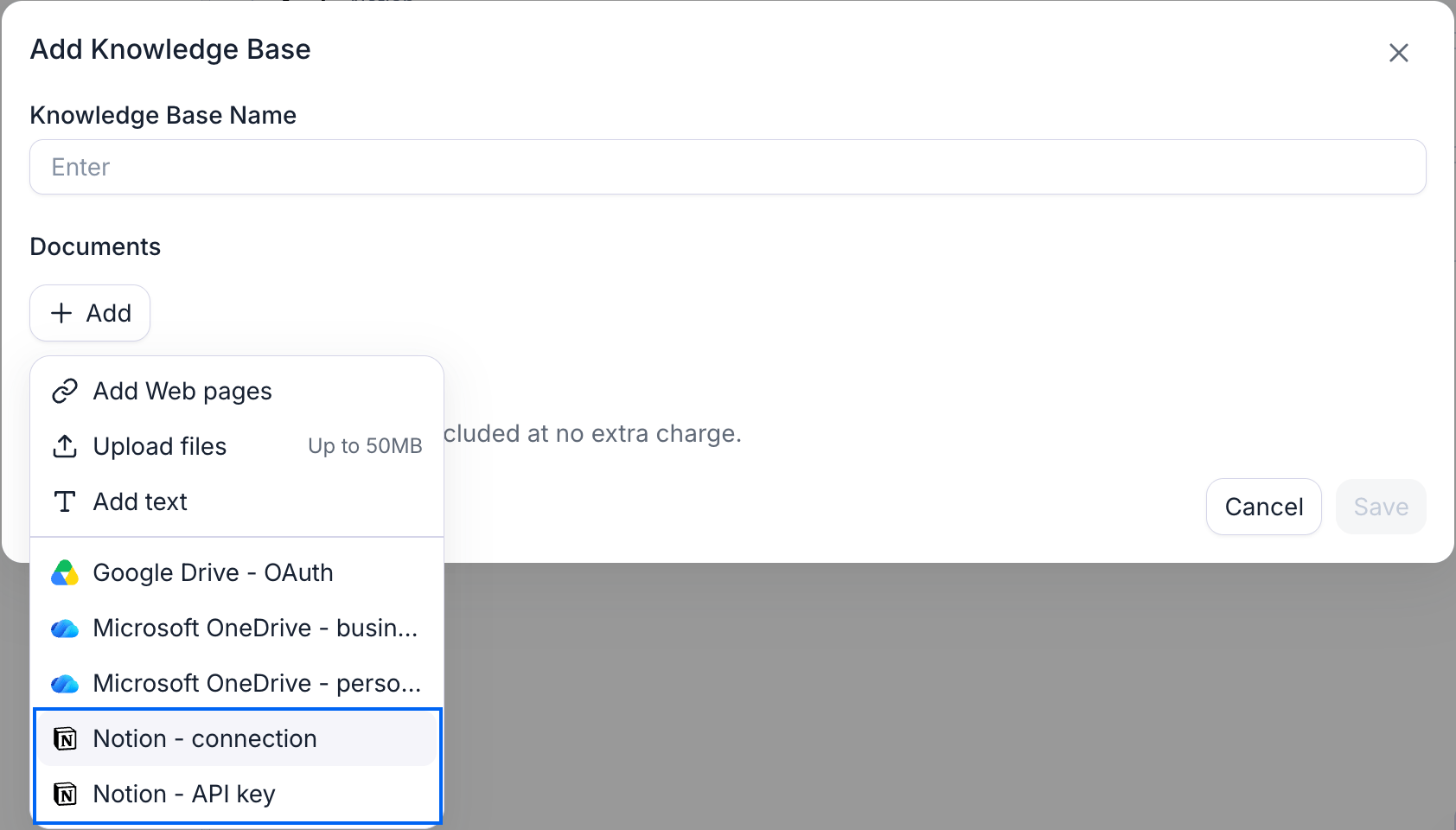
Go to **Knowledge Base**, open or create one, and open the **Add** menu. Your connected Notion accounts are listed there below the built-in source types; with none connected yet, the menu offers **Connect Notion** instead.
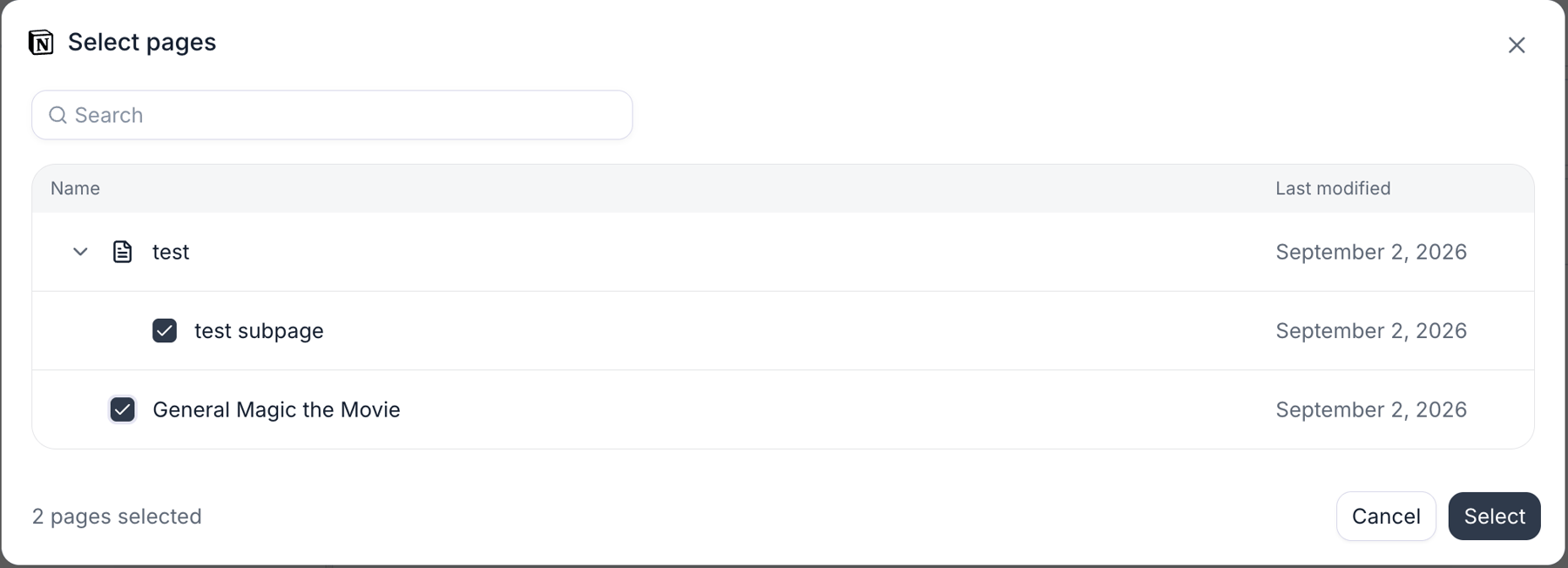
Select the Notion account. The **Select pages** dialog opens inside the dashboard, so unlike the Google Drive and OneDrive pickers it needs no pop-up window or third-party cookies.
The dialog lists every page shared with the connection as a tree, with **Name** and **Last modified** columns. A page with pages nested under it carries an arrow to expand them, and the search box filters by title, expanding any branch that holds a match. Tick the pages you want and click **Select**; the footer counts them as you go.
**Each page is its own source.** Ticking a page adds that page's own content only, so tick each nested page you want as well. Sharing the parent in Notion is what makes the nested pages appear here; adding them is still one tick per page.
Pages already in the knowledge base open ticked. Unticking one removes it when you save.
Picked pages are fetched, chunked, and embedded like any other source. The knowledge base shows each page by its Notion title, with its row labeled **Notion**. A page that fails to process doesn't block the others.
## What syncs from a page
Retell fetches each page as Markdown, so headings, paragraphs, lists, and other text blocks come through as text your agent can retrieve. The page title is attached to every chunk, so a descriptive title helps retrieval.
What is left out:
* **Nested pages.** A child page's content isn't part of its parent. Add each nested page as its own source.
* **Databases.** A database embedded in a page is skipped, and a database can't be added as a single source. Its rows are pages, though: they appear at the top level of the picker and can be added one by one.
* **Images and attached files.** An image contributes only its caption or alt text; audio, video, PDF, and file blocks contribute only their caption. Retell doesn't run OCR or read attachments.
* **Bookmarks, embeds, and link previews** contribute only their URL.
A page with nothing left after that fails with `Notion page "" produced no content to index (empty page, or all content is in nested pages which must be added separately)`. The common case is an index page that holds only a heading and links to nested pages.
<Tip>
Notion pages that retrieve well look like good Markdown: clear headings, short focused sections, and related facts kept together on one page. See the [knowledge base formatting tips](/build/knowledge-base#best-practices).
</Tip>
## Limits
| Limit | Value |
| ------------------------------- | ------------------------------------------------------------------------------------------------------------------------------------------------------------------------------------------------ |
| Notion pages per knowledge base | 25. Adding beyond that fails with `too many notion pages, please reduce the number to below 25`. Split larger wikis across several knowledge bases; an agent can use more than one. |
| Page size | No byte limit. Retell fetches a page in segments of about 20,000 blocks, up to 20 segments; a page larger than that fails with `Notion page is too large to index; split it into smaller pages`. |
| Pages the picker can list | About 3,000 shared pages per connection. Beyond that the picker fails to load; share fewer pages with the connection, or use one connection per part of the workspace. |
| Refresh cadence | Every 24 hours, with auto-refresh enabled on the knowledge base. |
Figures as of September 2026.
## Keeping content in sync
With auto-refresh enabled on the knowledge base, Retell re-checks each Notion page's last-edited time every 24 hours and re-fetches only the pages that changed; unchanged pages are skipped. Adding a Notion page to a new knowledge base turns auto-refresh on for you, and the toggle then reads **Automatically sync Notion pages every 24 hours**. An edit made within a minute of a sync is still picked up on the following refresh.
Renaming or moving a page in Notion is safe. Retell reads the current title on every sync, and the page keeps its id when moved, as long as it stays shared with the connection. Pages you share later aren't added on their own: open the picker and tick them.
If a page can't be re-fetched, the knowledge base keeps serving the previously synced content rather than dropping it. That covers a page that was unshared, moved out of a shared tree, or moved to the trash, a connection whose token Notion no longer accepts (shown with a red **Connection error** tag on the **Connected** tab), and a connection that was deleted from Retell, whose rows show **Sync not available**.
## Troubleshooting
<AccordionGroup>
<Accordion title="'This Notion connection has no pages shared with it yet'">
The connection exists but nothing has been shared with it. In Notion, open a page, click the **•••** menu, select **Connections**, and add the connection (see [share pages with the connection](/integrations/notion#share-pages-with-the-connection)). Then reopen the picker; it lists pages fresh every time.
</Accordion>
<Accordion title="'Could not load pages from this Notion connection'">
Retell couldn't list the connection's pages. Check the **Connected** tab first: a red **Connection error** tag means Notion rejected the token, so paste the current one. If the connection is healthy, the connection may have more shared pages than the picker can list (about 3,000); share fewer pages with it.
</Accordion>
<Accordion title="A page I expect isn't in the picker">
The picker shows only pages shared with the connection, so share the page or one of its parents in Notion. Pages in the trash are hidden. A database itself never appears, only its rows, and a page that lives inside a toggle, column, or other block is listed at the top level rather than under the page that contains it. Use the search box when the tree is large.
</Accordion>
<Accordion title="A page failed to process">
The knowledge base detail view names the page and the reason. The common ones are `produced no content to index` (an empty page, or one whose content is all in nested pages), `was not found or is not shared with the integration` (the page was unshared or deleted after you picked it), `is in the trash`, and `is too large to index`. Fix the page in Notion or pick a different one; the other sources still finish.
</Accordion>
<Accordion title="A Notion source stopped updating">
Check three things: the knowledge base has auto-refresh enabled, the Notion connection on the **Connected** tab exists and carries no **Connection error** tag, and the page is still shared with the connection in Notion.
</Accordion>
<Accordion title="The picker takes a while to open">
Retell lists the connection's pages from Notion when the picker opens, 100 pages per request, and Notion limits how fast those requests can run. A connection with thousands of shared pages takes several seconds to load. Sharing only the parts of the workspace the agent needs keeps it quick.
</Accordion>
</AccordionGroup>
## FAQ
<AccordionGroup>
<Accordion title="How fresh is the content?">
With auto-refresh enabled, changed pages re-sync on the knowledge base's refresh cycle, which runs every 24 hours. An edit made this morning reaches the agent after the next refresh, not instantly. You can also trigger a sync by hand from the knowledge base detail view.
</Accordion>
<Accordion title="Do I have to add every nested page separately?">
Yes. A page's content doesn't include its child pages, and ticking a parent in the picker doesn't tick its children. Sharing the top page in Notion makes the whole tree visible in the picker; you still choose the pages, up to 25 per knowledge base.
</Accordion>
<Accordion title="Can I sync a Notion database?">
Not as one source. A database embedded in a page is skipped, and the database itself isn't listed in the picker. Each row of a database is a page, so rows appear at the top level of the picker and can be added individually. For tabular content, a spreadsheet synced from [Google Drive](/integrations/google-drive-knowledge-base) or [OneDrive](/integrations/microsoft-onedrive-knowledge-base) is often the better fit.
</Accordion>
<Accordion title="Can one knowledge base mix Notion pages with uploads and URLs?">
Yes. Notion pages sit alongside uploaded documents, crawled URLs, custom text, [Google Drive files](/integrations/google-drive-knowledge-base), and [OneDrive files](/integrations/microsoft-onedrive-knowledge-base) in the same knowledge base, and the auto-refresh toggle covers whichever syncing source types it holds.
</Accordion>
<Accordion title="Can I download a Notion source from Retell?">
No. The page stays in Notion: the knowledge base row references the Notion page rather than a stored copy, so it has no download action. Retell keeps only the extracted, embedded content used for retrieval.
</Accordion>
</AccordionGroup>
## Next steps
<CardGroup cols={2}>
<Card title="Knowledge base" icon="book" href="/build/knowledge-base">
Create a knowledge base, tune retrieval, and see the formatting that retrieves well.
</Card>
<Card title="Connect Notion" icon="link" href="/integrations/notion">
Create the internal connection, share pages with it, and see exactly what Retell can read.
</Card>
</CardGroup>