

Monthly billing switches to credits on 09/30/2026
On September 30, 2026, workspaces still on monthly billing move to credit-based billing. Click Switch now on the Billing page and add credits to switch yourself. If you don’t, Retell moves the workspace that day and the credit balance starts at $0. Calls, chat, and other usage then come out of those credits instead of a bill at the end of the month. You can’t switch back. If you already see Credits Balance, you’re already on the new billing. Enterprise workspaces stay on monthly invoicing. You won’t see Switch now.What changes
- Calls, chat, and other usage come out of your credits as you use them. If the balance hits zero, that usage stops until you buy more credits or turn on auto recharge.
- You get one last bill for what you’ve used so far. It’s charged to your card.
- Any credit already on your workspace is added to the new balance, after that last bill.
- You need a card saved. The credits you add, and that last bill, are both charged to it. Add a card under payment methods before you switch.
What still bills monthly
These stay on your card. They are not paid with credits:- Phone numbers purchased through Retell
- Concurrency
- Knowledge base hosting beyond the free tier
- Calls per second (CPS)
- SMS subscriptions
Switch to credit-based billing
Do this on each workspace that is still on monthly billing.Open the Billing page

The Billing page notice: this workspace switches to credit-based billing on September 30, 2026.
Add a card if you don't have one
Choose how many credits to add
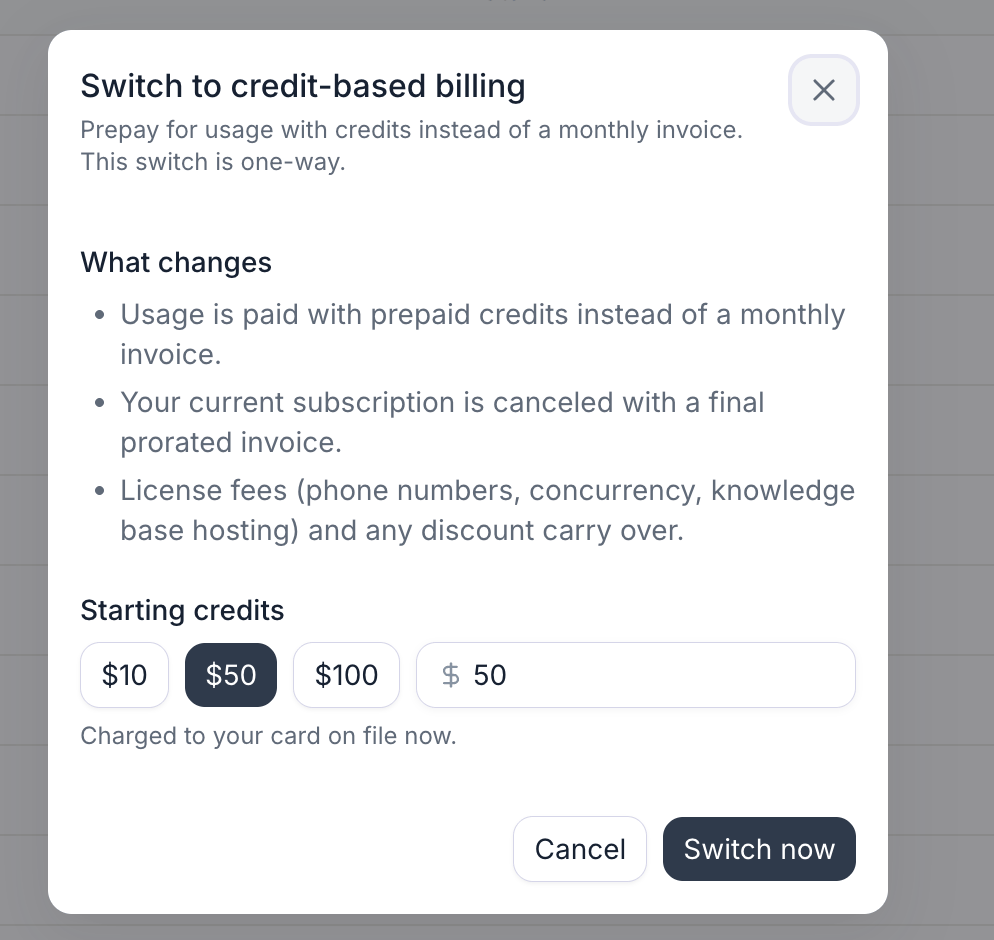
Starting credits: $10, $50, or $100, or your own amount, then Switch now.
Confirm the switch

After the switch, the Billing page shows Credits Balance, Buy credits, and Auto recharge.
Turn on auto recharge
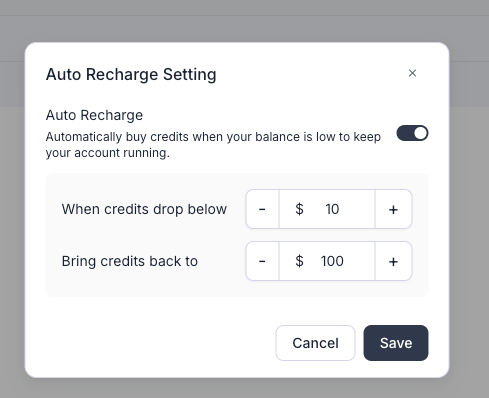
Auto recharge on: top up when the balance drops below $10, and restore it to $100.
FAQ
Why do I have to leave monthly billing?
Why do I have to leave monthly billing?
Can the September 30 date be moved?
Can the September 30 date be moved?
When does my workspace switch?
When does my workspace switch?
Can I switch back to monthly billing?
Can I switch back to monthly billing?
What about charges from this month?
What about charges from this month?
Will my phone numbers and discount stay?
Will my phone numbers and discount stay?
Do I need to change anything in my setup?
Do I need to change anything in my setup?
I'm on an enterprise plan. Does this apply to me?
I'm on an enterprise plan. Does this apply to me?
My card was charged, but the switch didn't finish. Will I be charged again?
My card was charged, but the switch didn't finish. Will I be charged again?