

Concurrency
Concurrency refers to the number of simultaneous active voice calls that can be handled by your system at any given moment. For example, if 15 users are engaged in voice calls with your agents at the same time, that counts as 15 concurrent calls. Concurrency limits apply per workspace, not per account. Each workspace has its own quota, burst settings, and reserved inbound capacity, and traffic in one workspace does not consume slots in another. Pay-As-You-Go workspaces are allocated a quota of 20 concurrent calls by default. If your operational needs require more concurrency, you can adjust your limit from the dashboard. See Manage limits in the dashboard below. You can check your current number of concurrent calls in the dashboard.- Handling multiple calls per agent: You don’t need multiple agents to handle multiple calls at once. Each agent can handle an unlimited number of calls, as long as total concurrency stays within your quota.
Reserved inbound concurrency
Reserved inbound concurrency protects inbound calls from being crowded out by outbound traffic. Whenreserved_inbound_concurrency is configured, outbound calls can use at most your concurrency
limit minus the reserved amount. Inbound calls can still use the full concurrency limit when capacity
is available.
For example, if your concurrency limit is 100 and reserved inbound concurrency is 20:
- Outbound calls can use up to 80 slots.
- Inbound calls can use the reserved 20 slots, plus any other available slots up to the full 100.
Inbound queue and fallback
When inbound call traffic reaches your concurrency limit, Retell briefly keeps new inbound calls waiting for an available slot. If a slot opens, the inbound call proceeds. If no slot opens after about 40 seconds, Retell handles the call as follows:- If the phone number has a
fallback_numberconfigured, Retell transfers the caller to that number. - If there is no fallback number, or the fallback transfer fails, the call ends with
concurrency_limit_reached. - If the fallback transfer succeeds, the Retell call record ends with
no_concurrency_fallback.
Concurrency burst
Concurrency burst lets you temporarily exceed your standard concurrency limit during peak demand. When enabled, calls that would normally be rejected for hitting your concurrency limit proceed instead, with an added surcharge.How it works
When concurrency burst is enabled:- Normal calls: Calls within your standard concurrency limit proceed as usual with no additional charge.
- Burst calls: Calls that exceed your normal limit but stay within the burst limit proceed with an added $0.10/min surcharge applied to the entire call duration.
Burst limit calculation
Your burst limit is calculated as the lower of:- 3× your concurrency limit, OR
- Your concurrency limit + 300
- If your limit is 50, burst allows up to 150 concurrent calls (3 × 50 = 150)
- If your limit is 200, burst allows up to 500 concurrent calls (200 + 300 = 500, which is less than 3 × 200 = 600)
Enabling concurrency burst
You can enable or disable concurrency burst from the Settings > Limits page in your dashboard.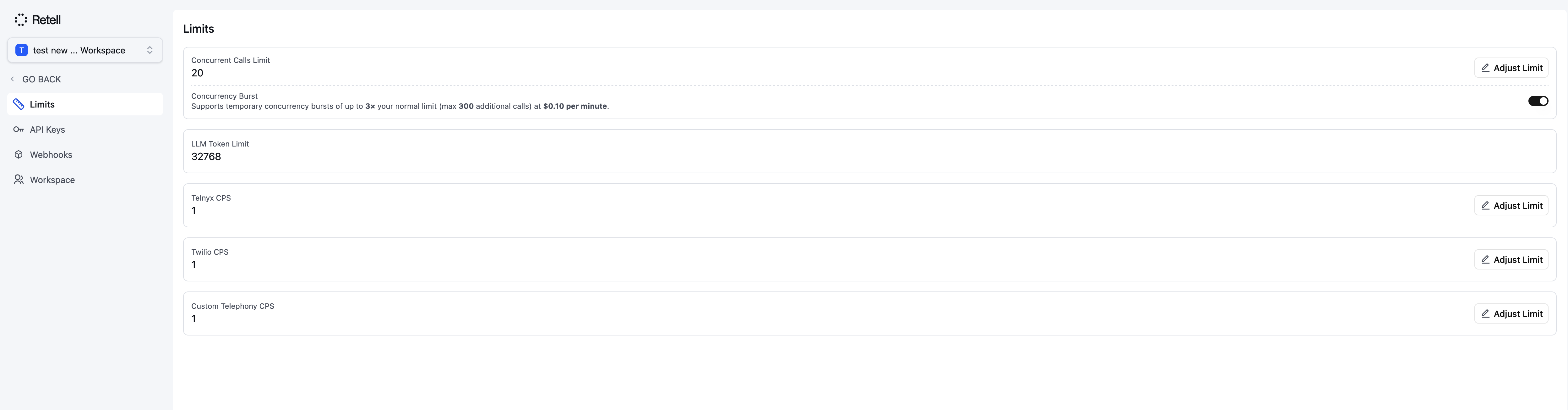
Concurrency Burst Toggle
Pricing
The burst surcharge applies to the entire duration of any call that started while in burst mode, not just the portion of time spent above the normal limit.
Use cases
Concurrency burst is a good fit for:- Unpredictable traffic spikes: Handle sudden increases in call volume without rejected calls.
- Campaign launches: Support higher-than-normal call volumes during marketing campaigns.
- Seasonal peaks: Handle increased demand during busy periods without permanently raising your concurrency limit.
Manage limits in the dashboard
You can view and adjust your concurrency and CPS limits from the Settings > Limits page. Purchased concurrency and CPS upgrades are billed monthly to your payment method on file; see the billing overview for how they appear on your invoice.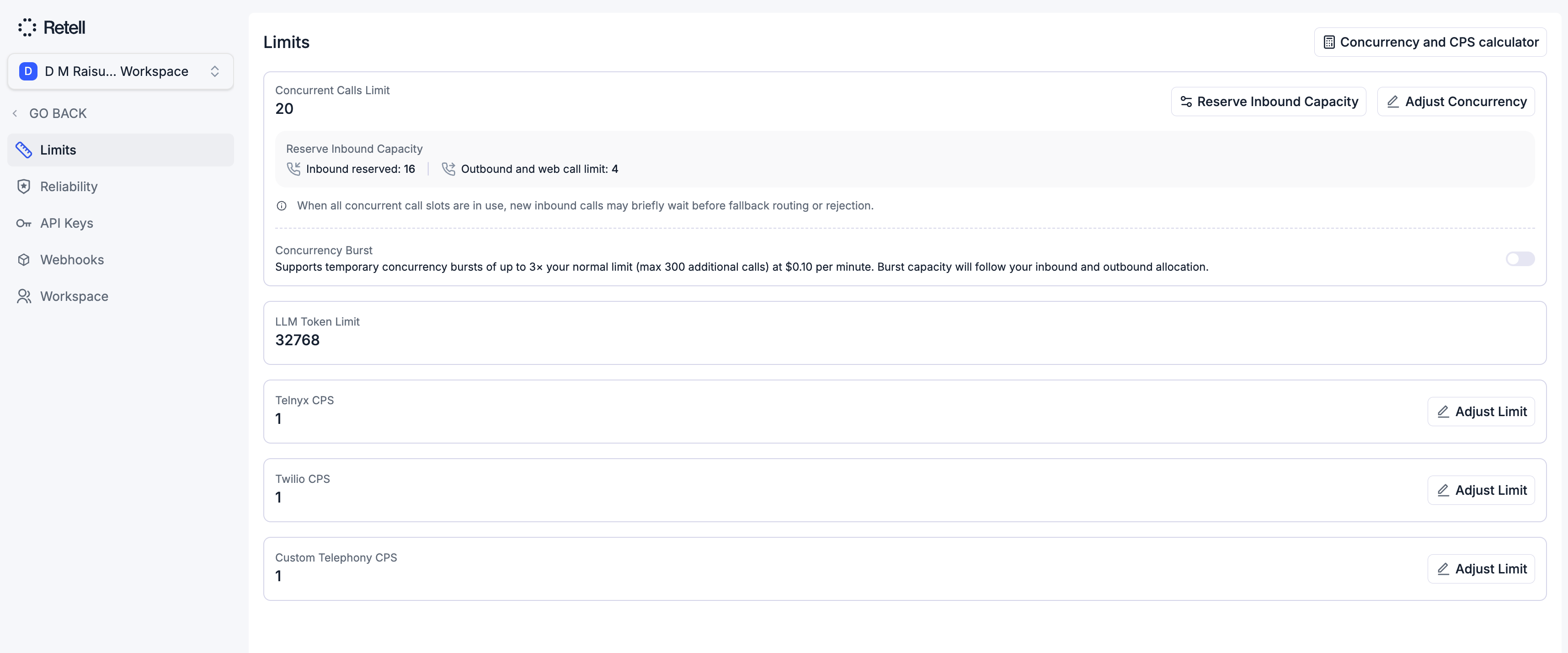
Adjusting concurrency and CPS limits is available to the Admin and Developer roles. Reserving inbound capacity and toggling concurrency burst change workspace settings and require the Admin role. See Access Control for details.
Adjust your concurrency limit
On the Concurrent Calls Limit card, click Adjust Concurrency. The dialog shows your current limit and how high you can go.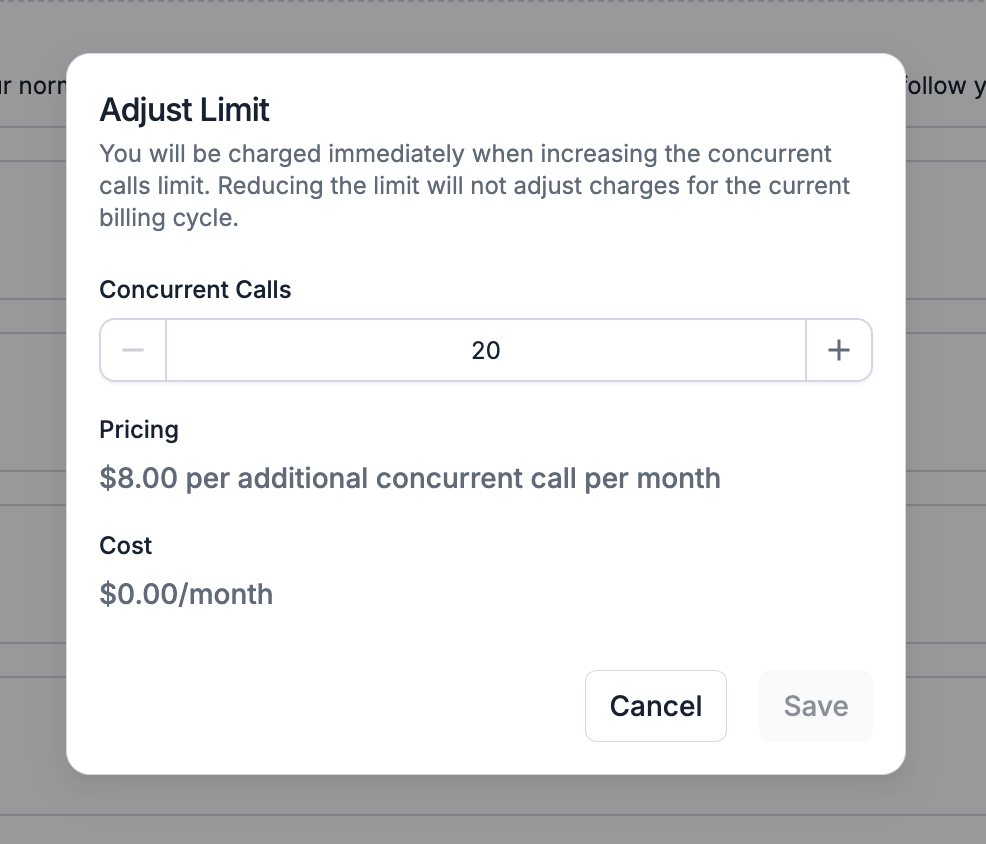
Reserve inbound capacity
On the same card, click Reserve Inbound Capacity to set how many slots are held for inbound calls (see Reserved Inbound Concurrency above). The remainder is available to outbound and web calls.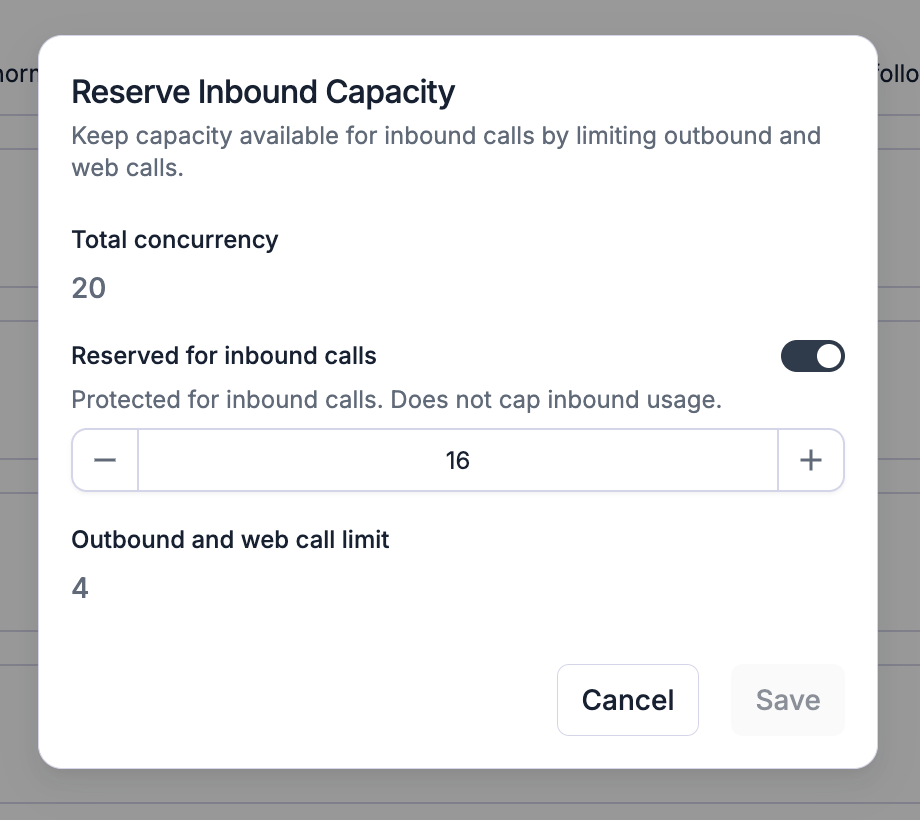
Adjust CPS (calls per second)
CPS is how quickly new calls can be started, set per telephony path. The Limits page has a card for Telnyx CPS, Twilio CPS, and Custom Telephony CPS. Click Adjust Limit on a card to change that provider’s CPS; each has its own allowed range. Custom Telephony CPS scales with your concurrency, so a higher CPS there may require more concurrency.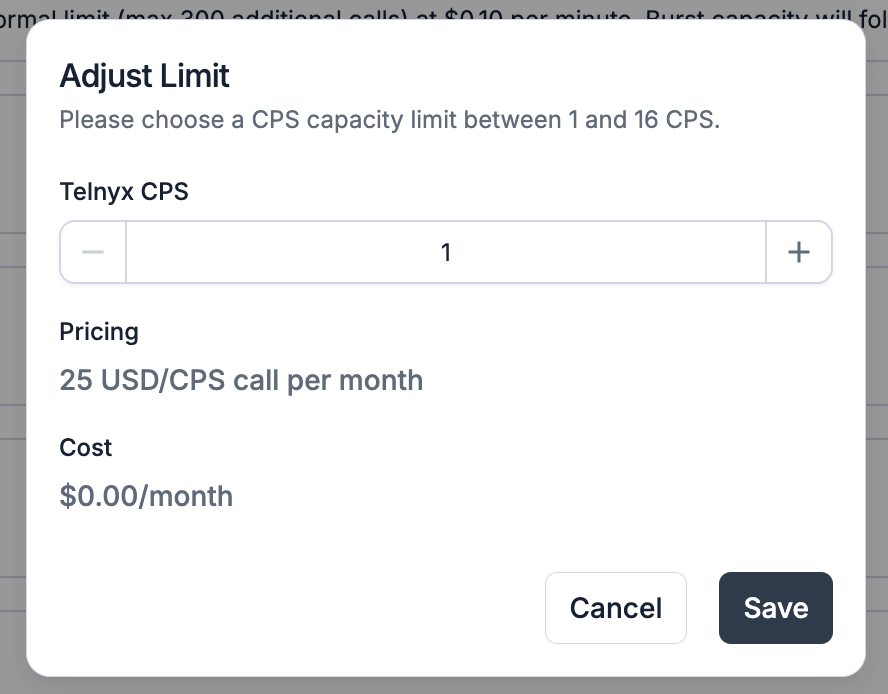
Estimate values with the calculator
If you’re unsure what to set, open the calculator from the top of the Limits page. Enter your inbound and outbound traffic (calls per busy hour, average durations, and pickup rate) and it returns a recommended concurrency, inbound reservation, and CPS, each with headroom for spikes. These are suggestions; you still apply them with the cards above.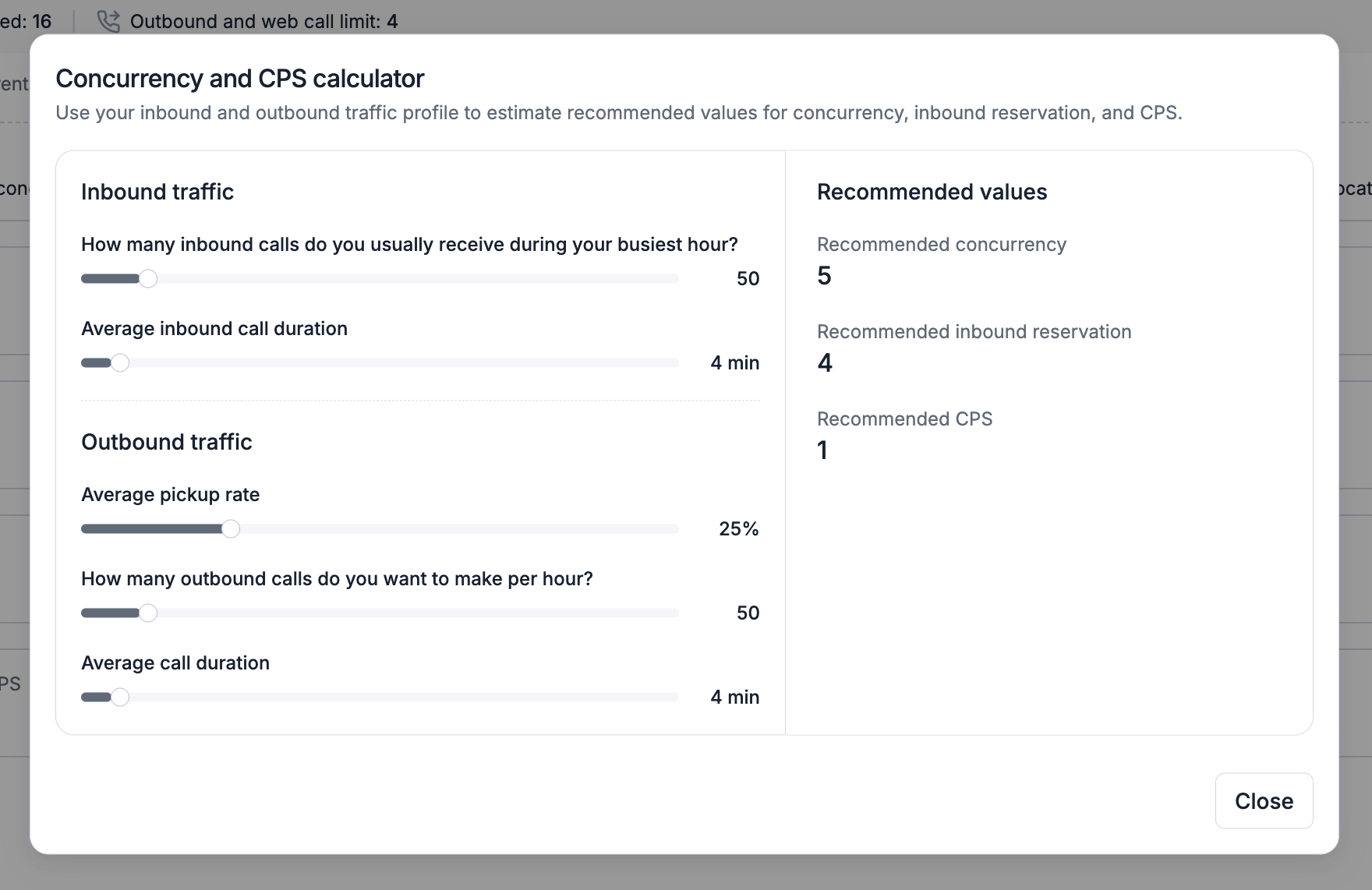
Max call duration
The maximum duration of a call is 1 hour by default, and the call will end automatically after 1 hour. You can increase this up to 2 hours in your agent settings. Should your operational needs require longer calls, please reach out to our team at support@retellai.com to discuss options.Max prompt token length
The maximum prompt length when using the Retell LLM framework is 32768 tokens by default, and longer prompts are rejected when creating or updating the LLM. Prompts over 4,000 tokens are charged extra; read more at Billing Exceptions. Should your operational needs require longer context, please reach out to our team at support@retellai.com to discuss options.FAQ
Do batch calls count toward concurrency?
Do batch calls count toward concurrency?
Yes. Batch calls are outbound calls, so they consume concurrency slots like any other outbound call. Batch calls are initiated as slots become available, so a batch runs no faster than your concurrency and CPS limits allow.
What happens to an outbound call when I've hit my concurrency limit?
What happens to an outbound call when I've hit my concurrency limit?
It’s rejected, unless concurrency burst is enabled. With burst on, the call proceeds within your burst limit and the $0.10/min surcharge applies to its entire duration.