

System Roles
Admin
Full control over workspace resources and members. Complete access to all features including billing, user management, and workspace settings. Can:- Invite, remove, and change roles for members
- View and manage billing: usage, invoices, payment methods, subscriptions, and customer portal
- Create, edit, and delete agents, conversation flows, Retell LLMs, knowledge bases, voices, and folders
- Configure developer settings
- Access all data, including raw transcripts and recordings
- Manage telephony settings
- Update or delete the workspace
- None — Admins have full permissions
Developer
Full functional access to build and test agents, view raw data, manage analytics and developer settings. Cannot manage billing or organization users. Can:- Build and edit agents, flows, LLMs, KBs, voices
- Test and simulate; manage test cases and playground
- View raw logs, transcripts, recordings, and analytics
- Create exports; run calls and batch calls
- Manage API/public keys and webhooks; adjust concurrency/CPS
- Manage billing (usage, invoices, payment methods, subscriptions)
- Invite, remove, or change member roles
- Update or delete the workspace
Member
Read-only access to agents, testing artifacts, scrubbed history, and analytics. Cannot make changes or view sensitive data. Can:- View agents and configurations (read‑only)
- View tests, playground threads, and analytics
- View scrubbed history; batch calls and phone resources
- List workspace members
- Create, edit, or delete resources
- Start calls/chats, run simulations, or change playground
- Access API/public keys, webhooks, or raw transcripts/recordings
- Manage billing, settings, or team members
Invite User
Now under the user management of your workspace, you (admin) can invite a user with a specific role.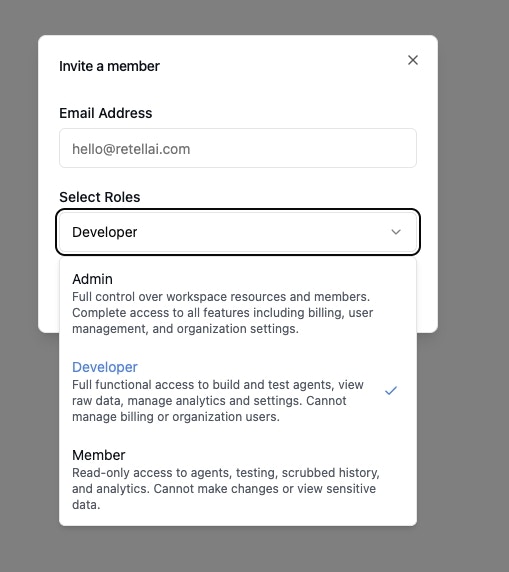
Invite user to workspace
Change User Role
You can change the role of active users in the workspace.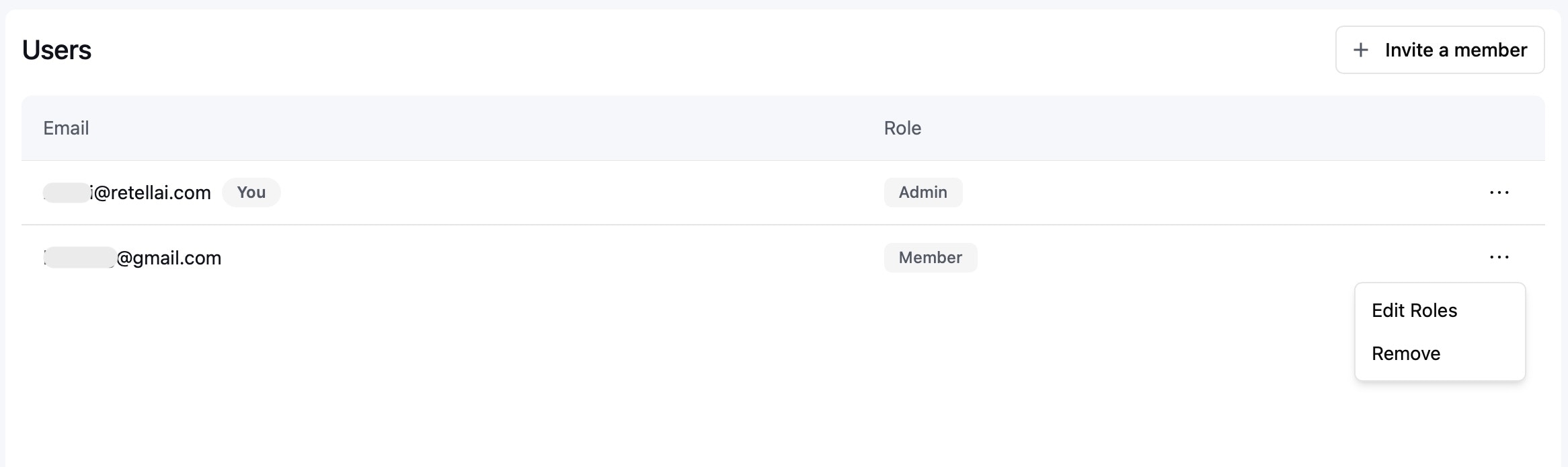
Change user role