

call_analysis object, so you can filter, report on, or sync insights to your CRM without manually reviewing each conversation.
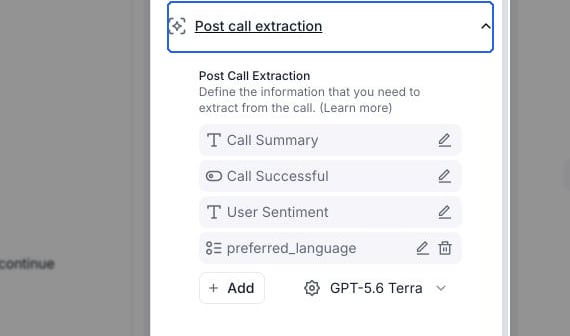
Open Post call extraction to manage fields and add a custom field.
How it works
- The call ends and Retell fires the
call_endedwebhook. - Retell analyzes the transcript against your agent’s Post Call Extraction configuration.
- Retell fires the
call_analyzedwebhook. Thecall_analysisobject is now populated on the call.
call_ended, the call_ended payload does not include call_analysis. Read results from the call_analyzed webhook or the Get Call API. See Consume the analysis data.
Retell does not populate custom Post Call Extraction fields for calls that were not connected or where no conversation took place. Check whether the field exists before using it.
Built-in fields
Every call includes these built-in analysis fields. You can customize the prompts behindcall_summary and call_successful and rerun analysis on past calls.
call_summary— high-level summary of the conversation.user_sentiment— the caller’s overall sentiment. Post Call Extraction infers this from the transcript with an LLM, so it does not use tone or pitch. The AI QA User Sentiment metric is a separate evaluation that also considers audio signals.call_successful— whether the call met the success criteria you define.in_voicemail— whether the agent reached a voicemail instead of a live person.
Custom analysis categories
In the agent editor, expand Post call extraction and select Add. For a conversation flow, select Global settings first. Chat agents use Post chat extraction. Each field has a name, a description that tells the LLM what to extract, and one of four types:
To set up your first custom field, see Define the information you want to extract.
Next steps
- Define the information you want to extract — create custom fields on your agent.
- Consume the analysis data — read results from the dashboard,
call_analyzedwebhook, or Get Call API. - Rerun Post Call Extraction — regenerate results after editing your prompts.