

Simulation tab, where you build test cases and run them against your agent without placing a call. An AI plays the caller, and each run is graded pass or fail with a written explanation, so your saved test cases become a regression suite you rerun after every prompt or flow change, one at a time or as a batch.
A test case is made up of:
- a user prompt that describes the simulated user (who they are, what they want, how they behave)
- success criteria that grade the run
- dynamic variables to preset for the run
- custom function mocks
- the LLM the simulated user runs on
end_call function, and keeps responses short. Any prompt change that breaks one of these behaviors fails the test before it reaches production.
Simulation testing works with single-prompt, multi-prompt, and Conversation Flow agents, and it runs as a text conversation. Agents using a custom LLM are not supported.
The Simulation tab
Open your agent and select theSimulation tab in the top menu bar. It has two tabs:
Test Casesholds every test case you’ve built for the agent, and is where you create or import them.Batch Testing Historyis the ledger of past runs, where you review results. See Batch testing.
The Simulation tab, with the Test Cases and Batch Testing History tabs.
Create a test case
In theTest Cases tab, click Test Case to open the Add a Test Case dialog, or Import to load cases from a JSON file. Each test case captures the scenario and how to grade it.
1
Name the test case
Give it a name you’ll recognize in a batch, like
return-refund-impatient-caller.2
Write the user prompt
Describe the person the AI should play. Include the identity details your agent asks for (name, date of birth, order number), the caller’s goal, and a personality that shapes how they respond:
3
Set success criteria, variables, and mocks
Fill in the success criteria that grade the run, plus any test variables and mocks the scenario needs.
4
Choose the simulated user's model
At the bottom of the dialog, pick which LLM generates the simulated user’s replies, then save the test case. This only affects the simulated user. Your agent keeps its own model configuration, and both bill per message.
Run Test starts a batch, Duplicate copies them, Export downloads them as JSON you can re-import to another agent, and Delete removes them for good.
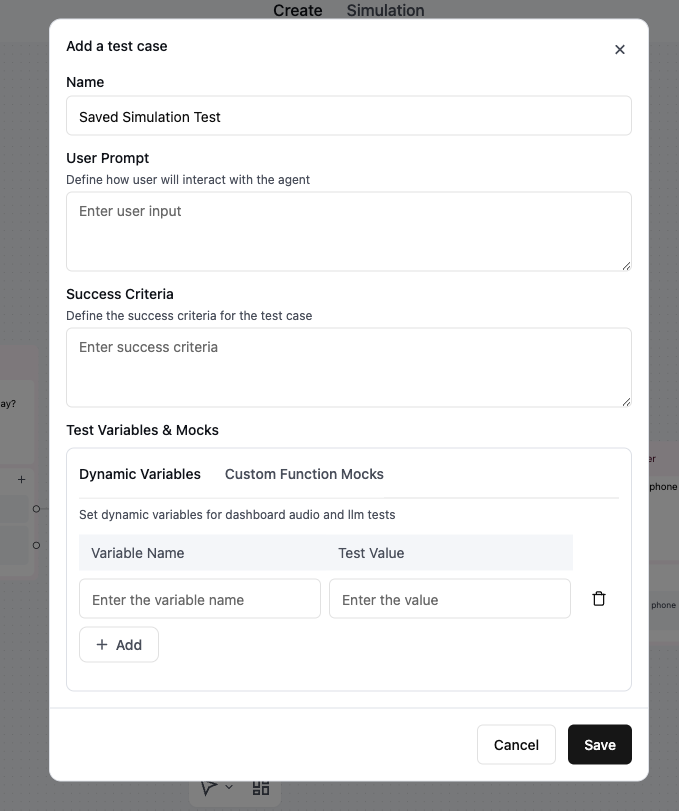
The Add a Test Case dialog.
Define success criteria
Success criteria are the checks that grade a test run. When a test case finishes, all of its criteria are judged together in a single pass against the transcript: the run passes only if every criterion is met, and you get one explanation covering the whole run rather than a verdict per criterion. Because it’s one combined judgment, a single unmet criterion fails the run. A run can also end in Error instead of being graded, which means the simulation never got as far as a verdict. A test times out after 10 minutes, and a conversation is cut off once it passes 400 utterances, the simulated user starts repeating itself, or the agent goes silent and stops responding to the caller. In that case the explanation is the error, not a grade.This is not how AI QA scores real calls. AI QA evaluates each metric separately and reports which ones passed and which failed, with a reason for each. Simulation testing gives one verdict for the run. If you need a per-criterion breakdown, phrase each check as its own test case, or use AI QA on real calls.
end_call was invoked), and conversation quality (response length, tone).
Test variables and mocks
TheTest Variables & Mocks section of a test case keeps runs realistic and repeatable. It applies to both simulation (LLM) tests and web call tests.
Dynamic variables
If your agent uses dynamic variables, set a test value for each one so placeholders like{{customer_name}} resolve during the simulation, the same way they would on a real call.
Use them to play a specific caller or to exercise a specific branch. An agent that opens with “Hi {{customer_name}}, calling about your {{appointment_date}} appointment” behaves differently for a returning customer than for someone with no record. Give both variables real values to test the returning-customer path, or leave appointment_date empty to test the “no appointment on file” branch.
Instead of retyping the same values for every test case, load them from an environment tag. Every agent ships with a prod and a staging tag, you can add your own, and each tag carries its own set of dynamic variable values. Pick one from Load Saved Values to fill the form with that tag’s values, then adjust them for this test. Your edits stay on the test case and don’t change the tag.
Custom function mocks
A mock intercepts a function call during the test and returns a set result instead of calling the real function, so the function doesn’t reach live systems and returns the same result every run. Mocks are honored for the functions that reach outside Retell: custom functions, code tools, integration tools, the built-in Cal.com tools, call transfers, and SMS. Built-in conversation actions are always simulated and ignore any mock you set for them, including end call, press digit, extract dynamic variables, and agent transfer. MCP tools also ignore mocks: the dropdown lists them, but a test calls your MCP server for real. On theCustom Function Mocks tab, click + Add and pick the function from the Function dropdown:
- For a built-in action like a transfer, choose
SuccessfullyorFailed. - For a custom function, enter the mock result it should return.
check_availability custom function might return:
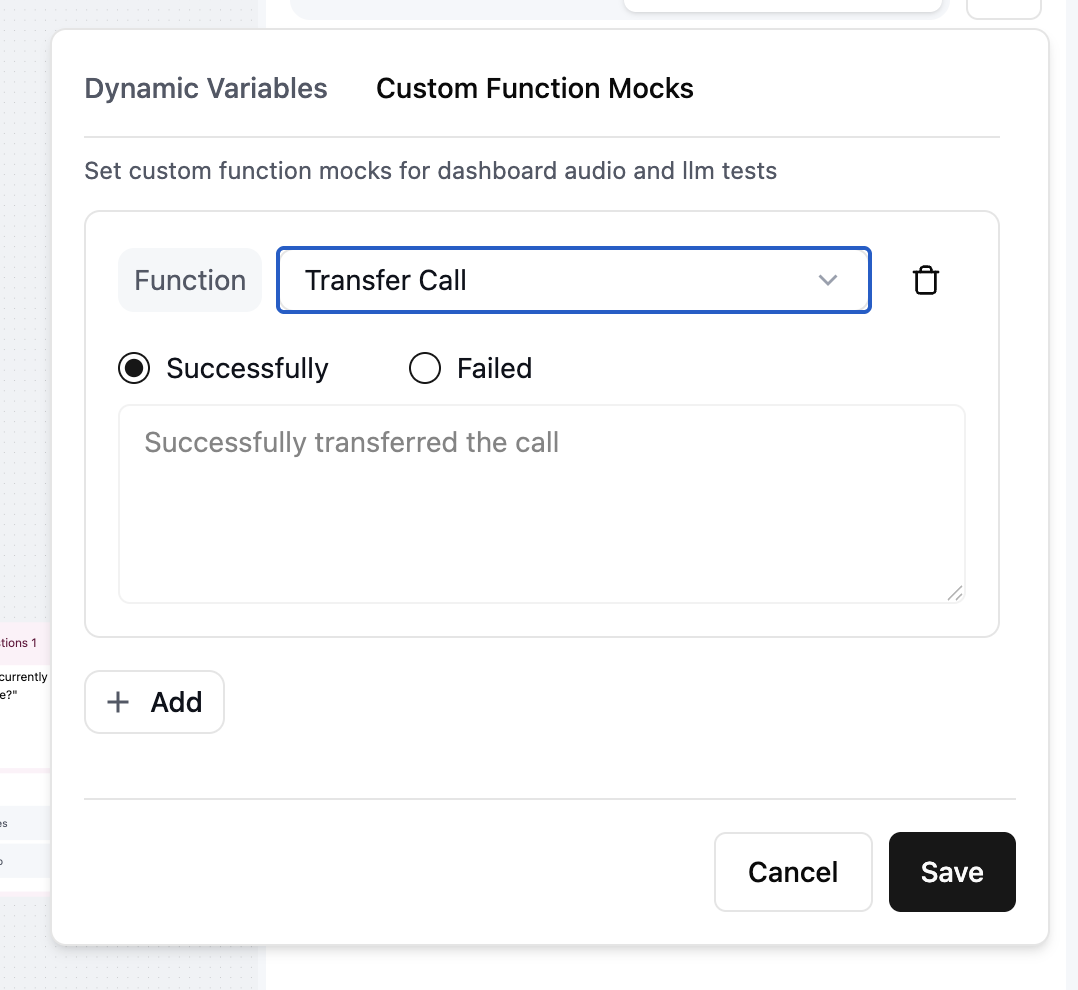
Mocking the Transfer to Human function to return a canned success.
Run and review test cases
To run test cases, select them in theTest Cases tab and click Run Test, or run a single case with the Test button on its row. Retell launches a batch either way, even for one case, and grades each run in Batch Testing History.
A batch runs each selected case exactly once. To sample the same scenario several times, duplicate the case or run it again. Batch testing covers reading the results.
Manage test cases with the API
Test cases and batch runs are both available over the API, so you can gate a deploy on your suite from CI:1
Create or update your cases
Create a test case definition for each scenario, or list and update the ones you already have.
2
Start the batch
Run a batch test with the case IDs you want. The response is the batch ID and a
status of in_progress; the runs are queued and graded asynchronously, so nothing is finished yet.3
Poll until it's done
Call Get batch test until
status is complete, then read pass_count, fail_count, error_count, and total_count to decide whether to ship.4
Read the individual runs
List test runs for the batch to get each run’s ID and result, and Get a test run for one run’s transcript and explanation.
Best practices
- Mock functions that reach production before you run. An unmocked custom function, code tool, calendar tool, or MCP tool calls its real endpoint, so a test can create a real booking or record.
- Write one behavior per success criterion, phrased as a checkable outcome.
- Mirror real call context with dynamic variables, and keep a separate case per branch (returning customer versus no record on file).
- Rerun a batch before you trust a single failure, since the simulated user and the grader are both LLMs. Judge a scenario on its pass rate across runs, not one run.
- Grow the suite from real calls. Turn a failed production call into a regression case with Testing with Conductor or AI QA.
- Cover edge cases, not just happy paths: an angry caller, a refusal to verify identity, a mid-call change of mind.
- Rerun the suite after every prompt or flow change before you deploy.
Glossary
Next steps
- Batch test your agent to run many test cases at once and track the pass rate across releases.
- Testing with Conductor to generate and run test cases automatically.
- Testing overview compares simulation testing with the LLM Playground and live web or phone call testing.