

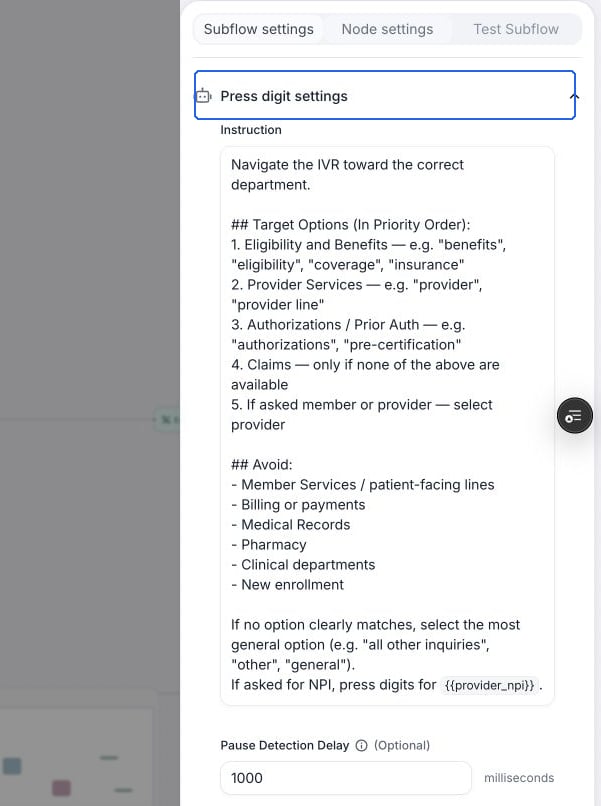
Configure instructions and pause detection in Press digit settings.
Configure Press Digit Behavior
1
Set up IVR Navigation Instructions
Select the node, open Node settings, and expand Press digit settings. Provide clear instructions so the agent knows whether and what digit to press. Include keywords or phrases to listen for, as well as which ones to avoid.Sample prompt:
2
Configure Detection Delay
Some IVR systems speak slowly, so to make sure the agent does not make any decision prematurely, you can set a delay on pauses to make sure the whole IVR menu is captured. We recommend setting this to 1 second.
3
Configure Transitions
Transitions occur when the IVR system finishes speaking. When writing your transitions, ensure you cover both successful navigation and potential failure scenarios or edge cases.Success scenario: Define when the agent has successfully navigated to the target. For example, write conditions like
Reached scheduling department. If the digit press was correct, the IVR response will confirm this.Edge cases: Cover scenarios like getting stuck in loops. For example, write conditions like Menu repeated 3 times to handle repetitive menus.Example transition conditions:Rest of Node settings
- Global Node: read more at Global Node
- LLM: choose a different model for this particular node. Will be used for determining whether and what digit to press.
- Fine-tuning examples: Add example conversations to train your AI agent how to handle specific scenarios. Read more at finetune examples.