

Node settings
- Talk While Waiting: When enabled, a text box appears where you define the closing message the agent speaks before hanging up. Choose Prompt to let the LLM generate a farewell from your instruction, or Static Sentence for an exact line like
Goodbye, have a nice day. - Global Node: Make the end node reachable from anywhere in the flow when its condition is met — for example
User wants to end the call or says goodbye— so you don’t have to wire an edge to it from every node. Read more at global node.
Custom SIP headers
For phone calls, open the end node’s settings and use Custom SIP Headers to send metadata when this node ends the call. Click Add, enter a header name starting withX- or x-, and set a static value or a dynamic variable such as {{appointment_id}}. Valid edits save when you leave the field.
For example, set X-Call-Outcome to booked on the booking path and cancelled on the cancellation path. Each end node can have its own headers. See end-call SIP headers for naming rules and configuration details.
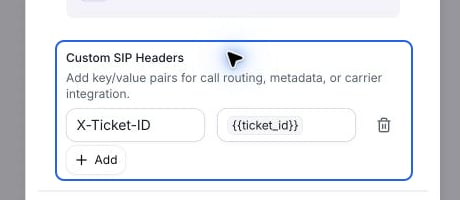
Configure custom SIP headers in the end node's settings.