

Introduction
Function calling transforms your AI agent from a conversational interface into an action-oriented assistant. By connecting your agent to functions, you enable it to interact with external systems, manage call flows, and perform real-world tasks.Common use cases
Function calling enables your agent to:Call management
- Transfer calls: Route to human agents or other departments
- End calls: Gracefully terminate conversations
- Send DTMF tones: Navigate phone menus
Business operations
- Book appointments: Integrate with scheduling systems
- Check availability: Query calendars or inventory
- Process orders: Create, modify, or cancel orders
Data integration
- Retrieve information: Pull data from CRMs, databases, or APIs
- Update records: Modify customer information or case details
- Send notifications: Trigger emails, SMS, or push notifications
How function calling works
The process
- Agent Decision: Based on the conversation context, the LLM determines when a function is needed
- Parameter Extraction: The agent extracts required information from the conversation
- Function Execution: Retell calls your function with the extracted parameters
- Response Handling: The function result is processed and incorporated into the conversation
Technical overview
Function calling uses structured JSON to communicate between the LLM and your systems:Additional resources
- OpenAI’s Function Calling Guide: Technical deep dive
- Function Calling Tutorial: Step-by-step implementation guide
Configuring tool calls
Dashboard configuration
Access and manage tools in the agent detail page under the “Functions” section.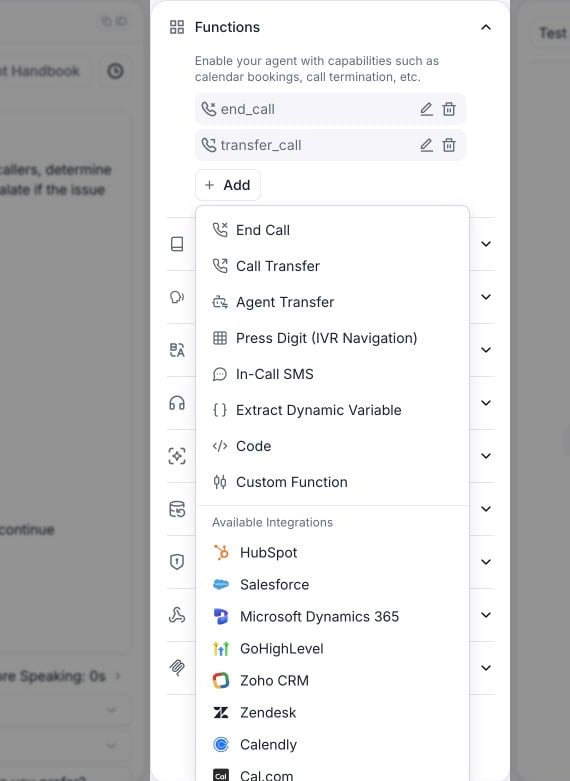
Open Functions and select Add to choose a tool.
Available function types
1. Pre-built functions
Retell provides ready-to-use functions for common scenarios:For appointment scheduling, use the Cal.com integration or Calendly integration. The built-in Check Availability and Book Calendar tools are no longer offered here — see the deprecation notice for what happens to agents that still have them.
2. Integration tools
Call a connected provider (HubSpot, Salesforce, Zendesk, Cal.com, and the other supported providers) live during the conversation — look up the caller, book an appointment, create a ticket. Retell handles the provider’s API and auth. See integration tools for setup.3. Custom functions
Create your own functions to:- Integrate with your APIs: Connect to CRM, ERP, or custom systems
- Execute business logic: Validate data, calculate prices, check inventory
- Trigger workflows: Start processes in other systems
Custom function features
- Flexible parameters: Define any input structure
- Async execution: Run in background without blocking conversation
- Error handling: Graceful fallbacks for failures
- Response control: Customize what the agent says during/after execution
4. Code tool
Run JavaScript code directly in Retell’s sandbox without setting up an external server. Useful for:- Data transformation: Format, combine, or compute values from dynamic variables
- Simple API calls: Fetch data using the built-in
fetch()function - Logic and calculations: Implement conditional logic, math, or string operations
Video tutorial
Additional resources
- Community Templates: Real-world function examples
- API Reference: Technical documentation
- Single prompt best practices: Choosing tools and deciding where to put their instructions
- General prompting principles: Keeping prompts and tool definitions clear and concise