Configure the End Call tool in Retell AI to hang up when a conversation is complete and send optional custom SIP headers with call outcomes or reference IDs.
By default, the agent won’t end the call automatically. You’ll need to configure when and how the call should be terminated using the end call tool.
1
Add End Call Tool
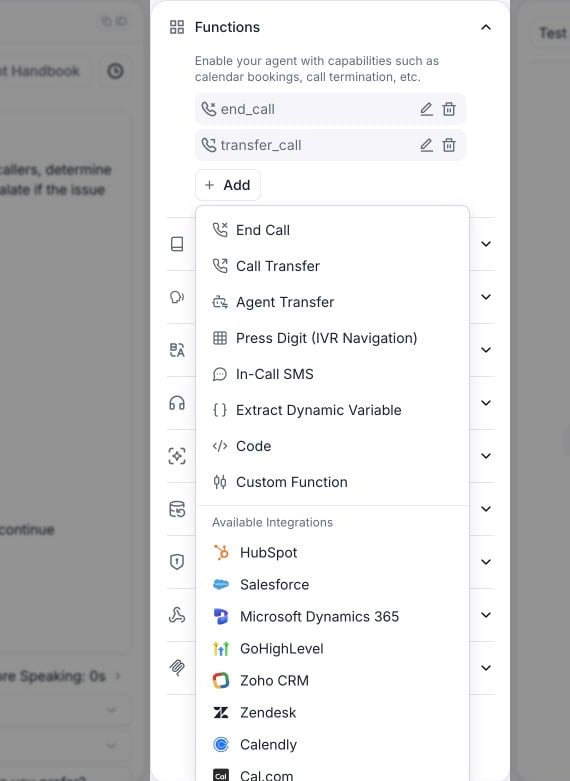
Click ”+ Add” in the tools section and select “End Call” from the dropdown menu.
Open Functions and select Add to choose a tool.
2
Configure Termination Conditions
Define specific conditions under which the call should be terminated. For example:
“If the user says ‘thank you’, ‘goodbye’, or ‘bye’, use the end_call tool to terminate the conversation.”
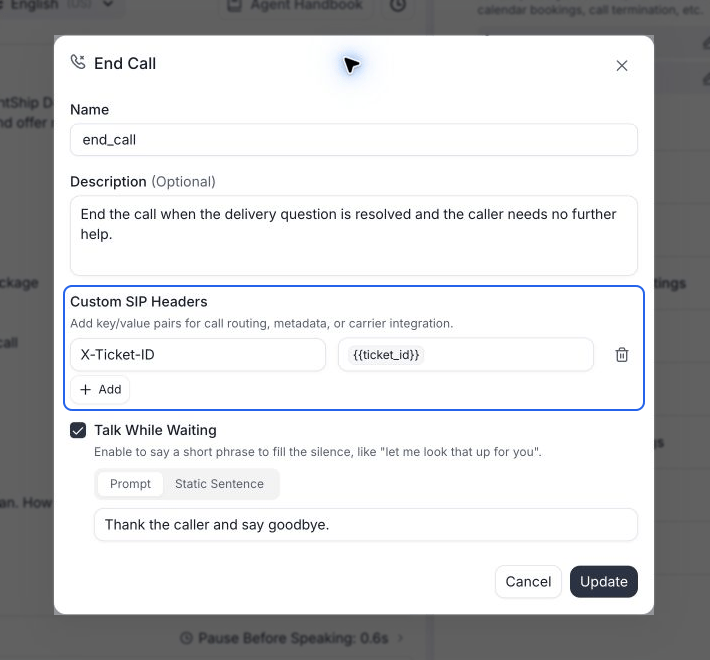
Set the end-call condition and optional custom SIP headers.
3
Update the Prompt
Enhance the agent’s understanding by incorporating the end call conditions into the prompt. Include specific instructions such as:“If the user says ‘thank you’, ‘goodbye’, or ‘bye’, use the end_call tool to terminate the conversation.”
For phone calls, add or edit the End Call tool and click Add under Custom SIP Headers. Enter a header name starting with X- or x-, then a static value or a dynamic variable, and save the tool.For example, use X-Ticket-ID with the value {{ticket_id}} to pass the ticket created during the conversation to your SIP system when the tool ends the call. You can also configure headers on End Call tools in subagent nodes.Headers are optional. See end-call SIP headers for allowed names, validation errors, and when the headers apply.
The steps above configure the agent to hang up on its own. You can also work with call termination through the API:
Stop an ongoing call: Call Stop Call (POST /v2/stop-call/{call_id}) to immediately end a live call from your server.
Add the End Call tool programmatically: Include a tool with type: end_call in general_tools when you create or update a Retell LLM. This is equivalent to adding the tool in the dashboard.
Custom LLM integrations: If you bring your own LLM over WebSocket, set end_call: true in your response and Retell ends the call after the content is fully spoken. See the LLM WebSocket reference.
Was this page helpful?
⌘I
Assistant
Responses are generated using AI and may contain mistakes.