

Start from real conversations
Use Call and chat history to investigate unsuccessful sessions before deciding what to test. Turn the problem into a repeatable scenario, then check whether the proposed agent change resolves it.Test and refine edge cases
Edge cases are the unusual situations that trip agents up — an angry caller, a wrong number, someone who changes their mind. Ask Conductor to help you handle them:- “What edge cases should I worry about for this agent?”
- “Make sure the agent handles a caller who refuses to give their name.”
Run simulations
Conductor can run simulation tests that play out a scenario against your agent and show how it responds. This lets you check changes without making real phone calls. See Testing with Conductor for creating test cases from calls, configuring mocks, and running a saved suite.- “Run a simulation where the caller wants to reschedule an appointment.”
- Attach a saved test case and say “Run this and tell me if it passes.”
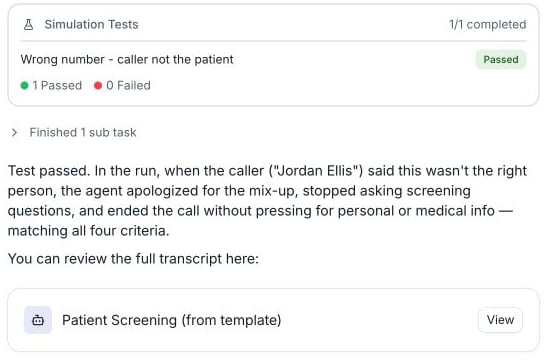
A wrong-number simulation passes for Patient Screening (from template).
Manage test cases and runs
Ask Conductor to list or inspect saved test cases, update their scenarios or success criteria, or delete cases you no longer need. You can also ask it to run a batch, report the pass rate, and inspect individual run transcripts. Use Add context (+) → Test Cases or Testing History on the agent page to attach the case or run you mean. See Testing with Conductor for personas, dynamic variables, function mocks, and batch workflows.A good loop to follow
1
Make a change
Ask Conductor to build or adjust something, then accept the proposal.
2
Test it
Run a simulation or review a relevant call or chat to see how the change behaves.
3
Refine
Tell Conductor what to improve, and repeat until you’re happy.
See the testing guides for the LLM Playground, simulation testing, and audio testing.