Connect Zoho CRM to Retell AI with one OAuth sign-in: Retell detects your Zoho data center, then syncs contacts and runs agent tools on your records.
Connecting Zoho CRM takes one sign-in and nothing else: authorize Retell in Zoho, and it works out your data center and API domain on its own. One connection covers both contact sync and agent functions, so your agents work your Contacts, Deals, Tasks, Notes, and Calls live while Retell keeps the records current.
Connect Zoho CRM when it’s your system of record and you want your agents working from it without anyone copying data between tools. It’s the right choice when you want to:
Call or text people who already exist in Zoho. Contacts sync into Retell automatically, so your agent greets callers by name and knows their details instead of asking.
Keep Zoho current without manual data entry. Analysis results from each conversation write back to fields on the Contact record.
Give your team call history where they already work. Each call lands on the Contact’s timeline as a Call record; each chat lands as a completed Task.
Your agents can also look up Contacts and their Deals, and create Tasks, Notes, and Calls, through integration tools.For example, an insurance brokerage syncs its Zoho Contacts into Retell. Its renewal agent greets each policyholder by name, reads the Deals open on their record, books the callback they ask for as a Zoho Task, and the call lands on the contact’s timeline as a Call record.
A Zoho user whose profile holds View, Create, and Edit on Contacts, Deals, Tasks, Notes, and Calls, and can read field definitions in Setup.
Retell acts as whoever authorizes the connection, so every record it creates is owned by that user. Use a dedicated integration user rather than a person’s account, so the connection doesn’t break when someone changes roles or leaves.
You don’t need to register a client in the Zoho API console. Retell authorizes with its own Zoho client, so there’s no client ID or secret to create, copy, or rotate.
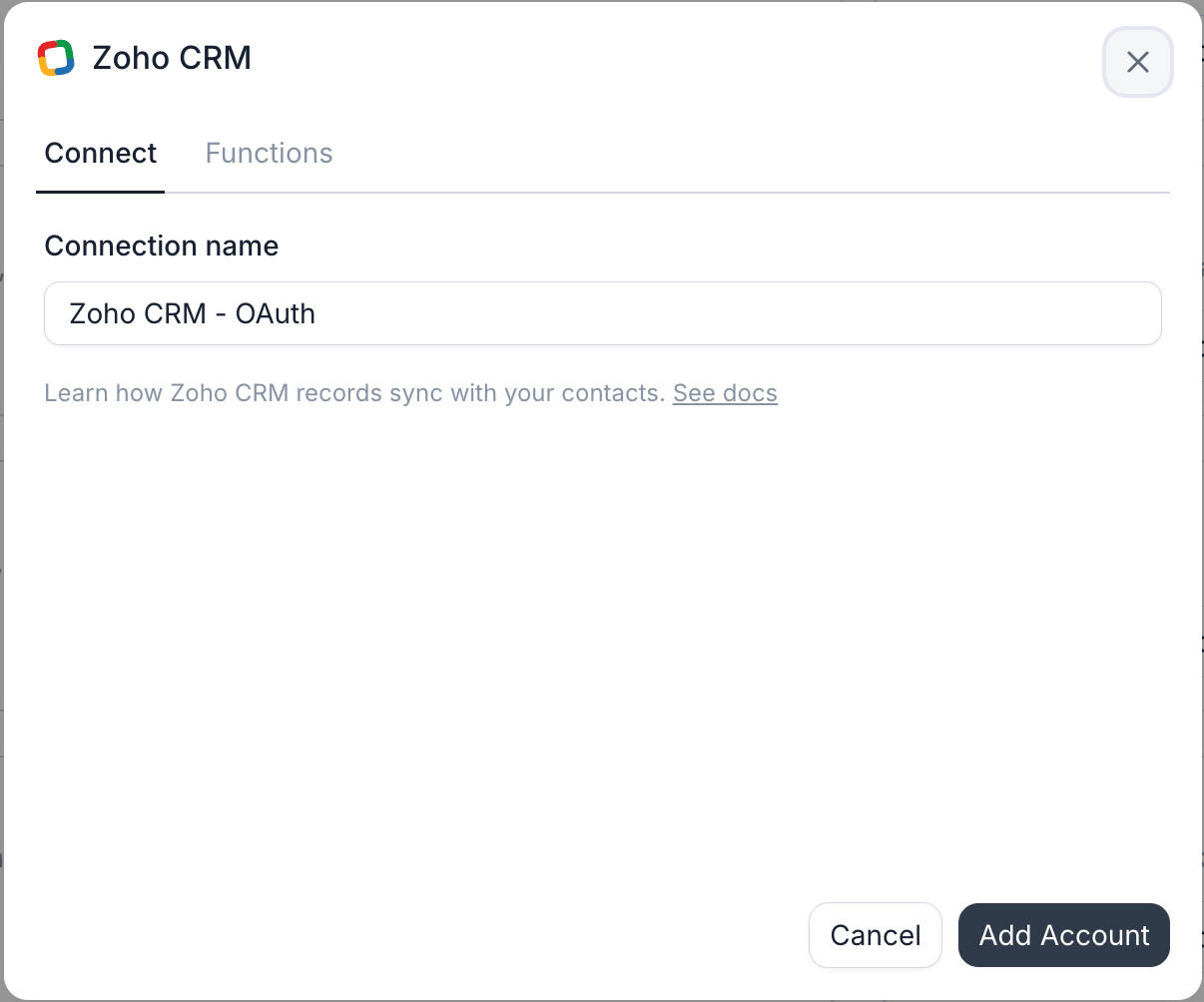
In the Retell Dashboard, open Integrations, select the Available tab, find Zoho CRM, and click Connect (Add Account if a connection already exists). The dialog asks for one thing, a Connection name, prefilled with Zoho CRM - OAuth. There’s no URL or region to enter, so the form is ready to submit as soon as it opens.
The Zoho CRM connection dialog: a connection name, then an OAuth sign-in.
2
Authorize Retell in Zoho
Click Add Account. A Zoho sign-in window opens: sign in with the integration user, pick the Zoho org if you belong to more than one, and accept the access Retell asks for. Retell stores a refresh token, so nobody has to sign in again.
Zoho’s consent screen is where the data center is decided. Sign in as a user of the org whose records you want your agents working on: Zoho routes the sign-in to that user’s home data center, and Retell binds the connection to it.
3
Verify it worked
Retell tests the connection by reading the Contacts module’s field definitions as the authorizing user. On success the connection appears on the Connected tab and the dialog offers Set up contact sync — see Zoho contact sync to import your Contacts, or start using agent functions right away.
Read and write records across your CRM modules. It’s a group scope, so Zoho grants it broadly; Retell uses it for Contacts, Deals, Tasks, Notes, and Calls
ZohoCRM.settings.fields.READ
Read each module’s field definitions, which populate the field pickers when you configure a tool or a sync mapping
ZohoSearch.securesearch.READ
Zoho’s search service, which the Search Records API requires on top of the module scope. It’s what backs finding a Contact by phone number
Granting a scope isn’t the same as having the permission. The authorizing user’s Zoho profile still decides which modules and fields they can touch, through its View, Create, Edit, and Delete permissions, and a profile restriction is narrower than the scope. A restriction doesn’t flag the connection either, because Zoho answers with a permission error rather than rejecting the token, so that one tool or field quietly stops working.
The one your Zoho account is homed in. Zoho keeps each account in a single data center and serves its API from a matching domain, and Retell picks that up during the sign-in rather than asking you: consent starts at accounts.zoho.com, Zoho routes the user to their own data center, and the callback names it. Retell then stores that data center’s API domain on the connection and uses it for every later API call and token refresh.
Data center
Accounts server
API domain
United States
accounts.zoho.com
www.zohoapis.com
Europe
accounts.zoho.eu
www.zohoapis.eu
India
accounts.zoho.in
www.zohoapis.in
Australia
accounts.zoho.com.au
www.zohoapis.com.au
Japan
accounts.zoho.jp
www.zohoapis.jp
Saudi Arabia
accounts.zoho.sa
www.zohoapis.sa
Canada
accounts.zohocloud.ca
www.zohoapis.ca
China
accounts.zoho.com.cn
www.zohoapis.com.cn
Retell calls Zoho CRM’s v8 REST API on that domain (as of August 2026).
Sign-in completes but the connection doesn't appear
Zoho reports a declined or cancelled consent back as an error, and Retell leaves the connection unmade. Start again from the Available tab and click Accept on the consent screen. Retell asks Zoho for a fresh consent on every connect, so an approval you gave earlier never silently skips the screen.
Sign-in succeeds but the connection test fails
The test reads the Contacts module’s field definitions. It fails when the authorizing user’s profile can’t see Contacts or its field setup, or when the user belongs to a different Zoho org than the records you expect. Confirm the user can open Contacts in Zoho CRM, then reconnect as a user with the right profile.
The connection errored after working for a while
Retell flags a connection as errored when Zoho rejects the stored refresh token. That usually means the token was revoked under Connected Apps, or the authorizing user was deactivated or removed from the org. Open the connection’s settings and click Reconnect to authorize again with a working user.
A single tool or field fails while everything else works
That’s a Zoho profile permission, not the connection. Zoho answers a blocked module or field with a permission error, which leaves the connection reading as healthy. Check the authorizing user’s profile permissions for the module the tool writes to, or for the specific field that isn’t syncing.
The user who authorized the connection. That’s why a dedicated integration user is worth setting up: the record owner and the contact’s timeline then read “Retell integration” rather than a teammate’s name.
Can I connect more than one Zoho org?
Yes, add one connection per org, authorizing each as a user of that org. Only one CRM connection in your workspace can drive contact sync at a time, across every provider — the Contact sync toggle in a connection’s settings decides which one. Integration tools work on every connection.
Do I need to create a Zoho self-client or connected app?
No. Retell authorizes with its own registered Zoho client, so the whole setup is the consent screen. Nothing to create in the Zoho API console, and no client secret to rotate on your side.
Can Retell work on a custom Zoho module?
Not today (as of August 2026). Contact sync and the agent tools work on the standard Contacts, Deals, Tasks, Notes, and Calls modules. Custom fields on those modules are fully supported — they show up in the field pickers alongside the standard ones.
Import your Zoho Contacts, write analysis results back, and log calls on the contact’s timeline.
Zoho agent functions
Look up callers, read their Deals, and create Tasks, Notes, and Calls mid-conversation.
Integrations overview
See every provider Retell connects to and how integration tools work.
CRM integrations
How contact sync, analysis mapping, and activity logging work across CRM providers.
Was this page helpful?
⌘I
{"docsConfig":{"theme":"almond","$schema":"https://mintlify.com/docs.json","name":"Retell AI","description":"Explore Retell AI docs to learn how to build, test, deploy, and optimize AI voice agents with APIs, integrations, conversation flows, and production-ready tools.","colors":{"primary":"#606A78","light":"#F5F5FA","dark":"#172131"},"logo":{"light":"https://mintcdn.com/retellai/-E9UettTBfBiCBBS/images/docs-light.png?fit=max\u0026auto=format\u0026n=-E9UettTBfBiCBBS\u0026q=85\u0026s=64eb26a2d3cc9a67ee3ea0bfe086dd14","dark":"https://mintcdn.com/retellai/-E9UettTBfBiCBBS/images/docs-dark.png?fit=max\u0026auto=format\u0026n=-E9UettTBfBiCBBS\u0026q=85\u0026s=08472a0c78599498b85d23348d7826f6"},"favicon":"https://mintcdn.com/retellai/TsBk7Stx4694-7p1/logo/favicon-light.ico?fit=max\u0026auto=format\u0026n=TsBk7Stx4694-7p1\u0026q=85\u0026s=4e90f4db5e89b5ec7fe249a4844c2d97","api":{"openapi":["openapi-final.yaml"],"playground":{"display":"interactive"},"mdx":{"auth":{"method":"bearer"},"server":"https://api.retellai.com"}},"navbar":{"links":[{"icon":"message-circle-question-mark","href":"https://docs.retellai.com/general/support","label":"Support"},{"icon":"chart-line","href":"https://status.retellai.com/","label":"Status"},{"icon":"book","href":"https://www.retellai.com/changelog","label":"Changelog"}],"primary":{"type":"button","label":"Dashboard","href":"https://dashboard.retellai.com"}},"footer":{"socials":{"x":"https://x.com/retellai","linkedin":"https://www.linkedin.com/company/98828489","github":"https://github.com/RetellAI","instagram":"https://www.instagram.com/retell_ai","youtube":"https://www.youtube.com/@retellai"}},"fonts":{"family":"Inter"},"icons":{"library":"lucide"},"styling":{"codeblocks":"dark","latex":false},"integrations":{"mixpanel":{"projectToken":"c8676d3561adb5eefc366aa2a66725bc"}},"contextual":{"options":["copy","view","chatgpt","claude","cursor"],"display":"header"},"interaction":{"drilldown":false},"navigation":{"pages":[]}},"deployment":{"deploymentMetadataValue":{"subdomain":"retellai","hasAudioNarration":false,"actualSubdomain":"retellai","customDomains":["docs.retellai.com"],"gitSource":{"type":"github","owner":"retellai","repo":"docs","deployBranch":"main","contentDirectory":"","isPrivate":true,"mountPath":"","label":""},"chroma":{"liveDeploymentHistoryId":"6ae121718a6e6bc56b7195e2","collectionId":"e8832539-c5f8-46ae-b020-2b8810211cfc","schemaVersion":"v3","latestBuiltDeploymentHistoryId":"6ae121718a6e6bc56b7195e2"},"feedback":{"thumbs":true,"edits":false,"issues":false,"agentFeedback":true},"entitlements":{"AI_CHAT":{"status":"ENABLED"},"CONTEXTUAL_FEEDBACK":{"status":"ENABLED"},"CODE_SNIPPET_FEEDBACK":{"status":"ENABLED"},"WEB_MCP":{"status":"ENABLED"},"NARRATION":{"status":"ENABLED"}},"buildId":"6ae1223fb7d719af330cabd0","clientVersion":"0.0.3990","searchFilterCounts":[{"language":"default","tag":"Guides","count":207},{"language":"default","tag":"API Reference","count":107},{"language":"default","tag":"Build","count":67},{"language":"default","tag":"Integrations","count":30},{"language":"default","tag":"Deploy","count":29},{"language":"default","tag":"Conversation flow agents","count":24},{"language":"default","tag":"Deprecations","count":22},{"language":"default","tag":"CRM","count":21},{"language":"default","tag":"Detailed Deprecation Guide","count":21},{"language":"default","tag":"Monitor","count":17}]},"assistantConfig":{},"basePath":"","hasChatPermissions":true,"hasWebMcpPermissions":true,"toggles":[{"name":"kill-isr","enabled":true,"variant":{"name":"disabled","enabled":false,"feature_enabled":true},"impressionData":false},{"name":"agent-mintlify-slack","enabled":true,"variant":{"name":"disabled","enabled":false,"feature_enabled":true},"impressionData":false},{"name":"editor-v7-file-tree","enabled":true,"variant":{"name":"disabled","enabled":false,"feature_enabled":true},"impressionData":false},{"name":"agent-integrations-settings","enabled":true,"variant":{"name":"disabled","enabled":false,"feature_enabled":true},"impressionData":false},{"name":"automations-pr-grouping","enabled":true,"variant":{"name":"disabled","enabled":false,"feature_enabled":true},"impressionData":false},{"name":"custom-prefix","enabled":true,"variant":{"name":"disabled","enabled":false,"feature_enabled":true},"impressionData":false},{"name":"analytics-v7","enabled":true,"variant":{"name":"disabled","enabled":false,"feature_enabled":true},"impressionData":false},{"name":"user-flows-analytics","enabled":true,"variant":{"name":"disabled","enabled":false,"feature_enabled":true},"impressionData":false},{"name":"no-publish-flow","enabled":true,"variant":{"name":"disabled","enabled":false,"feature_enabled":true},"impressionData":false},{"name":"workos-onboarding","enabled":true,"variant":{"name":"disabled","enabled":false,"feature_enabled":true},"impressionData":false},{"name":"llms-txt-v2","enabled":true,"variant":{"name":"disabled","enabled":false,"feature_enabled":true},"impressionData":false},{"name":"pause-universal-search-reconcile","enabled":true,"variant":{"name":"disabled","enabled":false,"feature_enabled":true},"impressionData":false},{"name":"snapshot-serving-live","enabled":true,"variant":{"name":"disabled","enabled":false,"feature_enabled":true},"impressionData":false},{"name":"stripTemperatureMiddleware","enabled":true,"variant":{"name":"disabled","enabled":false,"feature_enabled":true},"impressionData":false},{"name":"per-site-search-delta","enabled":true,"variant":{"name":"disabled","enabled":false,"feature_enabled":true},"impressionData":false},{"name":"support-platform-pylon-zendesk","enabled":true,"variant":{"name":"disabled","enabled":false,"feature_enabled":true},"impressionData":false},{"name":"snapshot-serving","enabled":true,"variant":{"name":"disabled","enabled":false,"feature_enabled":true},"impressionData":false},{"name":"instant-rollback","enabled":true,"variant":{"name":"disabled","enabled":false,"feature_enabled":true},"impressionData":false},{"name":"granular-notifications-server","enabled":true,"variant":{"name":"disabled","enabled":false,"feature_enabled":true},"impressionData":false},{"name":"granular-notifications","enabled":true,"variant":{"name":"disabled","enabled":false,"feature_enabled":true},"impressionData":false},{"name":"editor-private-page-search","enabled":true,"variant":{"name":"disabled","enabled":false,"feature_enabled":true},"impressionData":false},{"name":"automations-fable","enabled":true,"variant":{"name":"disabled","enabled":false,"feature_enabled":true},"impressionData":false},{"name":"fixed-ai-action-pricing","enabled":true,"variant":{"name":"disabled","enabled":false,"feature_enabled":true},"impressionData":false},{"name":"automation-resolve-merge-conflict","enabled":true,"variant":{"name":"disabled","enabled":false,"feature_enabled":true},"impressionData":false},{"name":"scoped-publishing","enabled":true,"variant":{"name":"disabled","enabled":false,"feature_enabled":true},"impressionData":false},{"name":"mintql","enabled":true,"variant":{"name":"disabled","enabled":false,"feature_enabled":true},"impressionData":false},{"name":"page-level-analytics","enabled":true,"variant":{"name":"disabled","enabled":false,"feature_enabled":true},"impressionData":false},{"name":"editor-version-history-v2","enabled":true,"variant":{"name":"disabled","enabled":false,"feature_enabled":true},"impressionData":false},{"name":"instinct-self-updating-docs","enabled":true,"variant":{"name":"disabled","enabled":false,"feature_enabled":true},"impressionData":false},{"name":"editor-nav-generations","enabled":true,"variant":{"name":"disabled","enabled":false,"feature_enabled":true},"impressionData":false},{"name":"billing-page-v2","enabled":true,"variant":{"name":"disabled","enabled":false,"feature_enabled":true},"impressionData":false},{"name":"workspace-projects","enabled":true,"variant":{"name":"disabled","enabled":false,"feature_enabled":true},"impressionData":false},{"name":"assistant-v5","enabled":true,"variant":{"name":"disabled","enabled":false,"feature_enabled":true},"impressionData":false},{"name":"byok-sep-25","enabled":true,"variant":{"name":"disabled","enabled":false,"feature_enabled":true},"impressionData":false},{"name":"fork-pr-previews","enabled":true,"variant":{"name":"disabled","enabled":false,"feature_enabled":true},"impressionData":false},{"name":"revalidation-jwt","enabled":true,"variant":{"name":"disabled","enabled":false,"feature_enabled":true},"impressionData":false},{"name":"vite-origin","enabled":true,"variant":{"name":"disabled","enabled":false,"feature_enabled":true},"impressionData":false},{"name":"editor-agent-model-picker","enabled":true,"variant":{"name":"disabled","enabled":false,"feature_enabled":true},"impressionData":false},{"name":"billing-updated-9-15","enabled":true,"variant":{"name":"disabled","enabled":false,"feature_enabled":true},"impressionData":false},{"name":"workos-sso-scim","enabled":true,"variant":{"name":"disabled","enabled":false,"feature_enabled":true},"impressionData":false},{"name":"hobby-abuse-scan","enabled":true,"variant":{"name":"disabled","enabled":false,"feature_enabled":true},"impressionData":false},{"name":"dashboard-inbox","enabled":true,"variant":{"name":"disabled","enabled":false,"feature_enabled":true},"impressionData":false},{"name":"workos-signup","enabled":true,"variant":{"name":"disabled","enabled":false,"feature_enabled":true},"impressionData":false},{"name":"workos-enabled","enabled":true,"variant":{"name":"disabled","enabled":false,"feature_enabled":true},"impressionData":false}],"isAtlas":false,"googleFontsInlined":false},"customCss":[{"filePath":"style.css","content":"@media (min-width:1024px){#navbar .flex-1:has(>[data-slot=context-menu-trigger]),#navbar .flex-1:has(>a>.nav-logo){flex:none!important;width:15rem}#navbar .justify-end:has(.nav-tabs),#navbar .ustify-end:has(.nav-tabs){justify-content:space-between!important;margin-left:0!important}#navbar .flex:has(>.justify-end),#navbar .flex:has(>.ustify-end){flex:1!important}#navbar .nav-tabs{white-space:nowrap}}.max-w-prose,.max-w-xl,article{max-width:48rem!important}video.scroll-play{cursor:zoom-in}.video-zoom-overlay{position:fixed;inset:0;z-index:9999;display:flex;align-items:center;justify-content:center;padding:4vmin;background:rgba(0,0,0,.8);backdrop-filter:blur(2px);cursor:zoom-out}.video-zoom-media{max-width:92vw;max-height:92vh;width:auto;height:auto;border-radius:12px;box-shadow:0 10px 40px rgba(0,0,0,.5);cursor:default}.video-zoom-close{position:fixed;top:16px;right:20px;display:flex;align-items:center;justify-content:center;width:40px;height:40px;padding:0;border:0;border-radius:999px;background:rgba(255,255,255,.15);color:#fff;font-size:24px;line-height:1;cursor:pointer}.video-zoom-close:hover{background:rgba(255,255,255,.3)}.ui-btn{background-color:#f4f5f7!important;color:#1f2328!important;border:1px solid #d0d5dd!important;border-bottom-width:2px!important;border-radius:6px!important;padding:.1em .42em!important}[data-theme=dark] .ui-btn,html.dark .ui-btn{background-color:#21252d!important;color:#e6e8eb!important;border-color:#3a4048!important}img[src$=\"/images/icons/wss-badge.svg\"]{width:auto!important;height:15px!important}a[aria-current=page] img[src$=\"/images/icons/wss-badge.svg\"]{content:url(\"data:image/svg+xml,%3Csvg xmlns=%22http://www.w3.org/2000/svg%22 width=%2227%22 height=%2215%22 viewBox=%220 0 27 15%22 role=%22img%22 aria-label=%22WSS%22%3E %3Crect width=%2227%22 height=%2215%22 rx=%224%22 fill=%22%23F54A00%22/%3E %3Ctext x=%2213.5%22 y=%2210.7%22 text-anchor=%22middle%22 font-family=%22ui-sans-serif, system-ui, -apple-system, Segoe UI, Inter, Helvetica, Arial, sans-serif%22 font-size=%228.8%22 font-weight=%22700%22 fill=%22%23FFFFFF%22%3EWSS%3C/text%3E %3C/svg%3E\")}"}],"page":{"pagePath":"integrations/zoho","slug":"/integrations/zoho","pageMetadata":{"title":"Connect Zoho CRM","sidebarTitle":"Connect","description":"Connect Zoho CRM to Retell AI with one OAuth sign-in: Retell detects your Zoho data center, then syncs contacts and runs agent tools on your records.","keywords":["Zoho CRM integration","Zoho voice AI","connect Zoho CRM","Zoho OAuth","Zoho data center","voicebot Zoho CRM","AI assistant Zoho CRM"],"og:title":"Connect Zoho CRM to Retell — OAuth setup and data centers","og:description":"Authorize Retell in Zoho CRM with a single sign-in, let it detect your Zoho data center automatically, and connect for contact sync and live agent tools.","href":"/integrations/zoho"},"description":{"compiledSource":"\"use strict\";\nconst {jsx: _jsx} = arguments[0];\nconst {useMDXComponents: _provideComponents} = arguments[0];\nfunction _createMdxContent(props) {\n const _components = {\n p: \"p\",\n ..._provideComponents(),\n ...props.components\n };\n return _jsx(_components.p, {\n children: \"Connect Zoho CRM to Retell AI with one OAuth sign-in: Retell detects your Zoho data center, then syncs contacts and runs agent tools on your records.\"\n });\n}\nfunction MDXContent(props = {}) {\n const {wrapper: MDXLayout} = {\n ..._provideComponents(),\n ...props.components\n };\n return MDXLayout ? _jsx(MDXLayout, {\n ...props,\n children: _jsx(_createMdxContent, {\n ...props\n })\n }) : _createMdxContent(props);\n}\nreturn {\n default: MDXContent\n};\n","frontmatter":{},"scope":{}},"pageType":"default","mdx":{"mdxSource":{"compiledSource":"\"use strict\";const{Fragment:_Fragment,jsx:_jsx,jsxs:_jsxs}=arguments[0];const{useMDXComponents:_provideComponents}=arguments[0];function _createMdxContent(props){const _components={a:`a`,code:`code`,em:`em`,li:`li`,p:`p`,strong:`strong`,tbody:`tbody`,td:`td`,th:`th`,thead:`thead`,tr:`tr`,ul:`ul`,..._provideComponents(),...props.components},{Accordion,AccordionGroup,Card,CardGroup,Frame,Heading,Note,OptimizedImage,Step,Steps,Table}=_components;if(!Accordion)_missingMdxReference(`Accordion`,true);if(!AccordionGroup)_missingMdxReference(`AccordionGroup`,true);if(!Card)_missingMdxReference(`Card`,true);if(!CardGroup)_missingMdxReference(`CardGroup`,true);if(!Frame)_missingMdxReference(`Frame`,true);if(!Heading)_missingMdxReference(`Heading`,true);if(!Note)_missingMdxReference(`Note`,true);if(!OptimizedImage)_missingMdxReference(`OptimizedImage`,true);if(!Step)_missingMdxReference(`Step`,true);if(!Steps)_missingMdxReference(`Steps`,true);if(!Table)_missingMdxReference(`Table`,true);return _jsxs(_Fragment,{children:[_jsxs(_components.p,{children:[`Connecting Zoho CRM takes one sign-in and nothing else: authorize Retell in Zoho, and it works out your data center and API domain on its own. One connection covers both `,_jsx(_components.a,{href:`/integrations/zoho-contact-sync`,children:`contact sync`}),` and `,_jsx(_components.a,{href:`/integrations/zoho-functions`,children:`agent functions`}),`, so your agents work your Contacts, Deals, Tasks, Notes, and Calls live while Retell keeps the records current.`]}),`\n`,_jsx(Heading,{level:`2`,id:`when-to-use-it`,children:`When to use it`}),`\n`,_jsx(_components.p,{children:`Connect Zoho CRM when it’s your system of record and you want your agents working from it without anyone copying data between tools. It’s the right choice when you want to:`}),`\n`,_jsxs(_components.ul,{children:[`\n`,_jsxs(_components.li,{children:[_jsx(_components.strong,{children:`Call or text people who already exist in Zoho.`}),` Contacts sync into Retell automatically, so your agent greets callers by name and knows their details instead of asking.`]}),`\n`,_jsxs(_components.li,{children:[_jsx(_components.strong,{children:`Keep Zoho current without manual data entry.`}),` Analysis results from each conversation write back to fields on the Contact record.`]}),`\n`,_jsxs(_components.li,{children:[_jsx(_components.strong,{children:`Give your team call history where they already work.`}),` Each call lands on the Contact’s timeline as a Call record; each chat lands as a completed Task.`]}),`\n`]}),`\n`,_jsxs(_components.p,{children:[`Your agents can also look up Contacts and their Deals, and create Tasks, Notes, and Calls, through `,_jsx(_components.a,{href:`/integrations/zoho-functions#available-tools`,children:`integration tools`}),`.`]}),`\n`,_jsx(_components.p,{children:`For example, an insurance brokerage syncs its Zoho Contacts into Retell. Its renewal agent greets each policyholder by name, reads the Deals open on their record, books the callback they ask for as a Zoho Task, and the call lands on the contact’s timeline as a Call record.`}),`\n`,_jsx(Heading,{level:`2`,id:`prerequisites`,children:`Prerequisites`}),`\n`,_jsxs(_components.ul,{children:[`\n`,_jsxs(_components.li,{children:[`A Zoho CRM account on a `,_jsx(_components.a,{href:`#which-zoho-data-center-does-retell-use`,children:`data center Retell supports`}),`.`]}),`\n`,_jsxs(_components.li,{children:[`A Zoho user whose profile holds `,_jsx(_components.strong,{children:`View`}),`, `,_jsx(_components.strong,{children:`Create`}),`, and `,_jsx(_components.strong,{children:`Edit`}),` on `,_jsx(_components.strong,{children:`Contacts`}),`, `,_jsx(_components.strong,{children:`Deals`}),`, `,_jsx(_components.strong,{children:`Tasks`}),`, `,_jsx(_components.strong,{children:`Notes`}),`, and `,_jsx(_components.strong,{children:`Calls`}),`, and can read field definitions in Setup.`]}),`\n`,_jsx(_components.li,{children:`Retell acts as whoever authorizes the connection, so every record it creates is owned by that user. Use a dedicated integration user rather than a person’s account, so the connection doesn’t break when someone changes roles or leaves.`}),`\n`]}),`\n`,_jsx(_components.p,{children:`You don’t need to register a client in the Zoho API console. Retell authorizes with its own Zoho client, so there’s no client ID or secret to create, copy, or rotate.`}),`\n`,_jsx(Heading,{level:`2`,id:`connect-zoho-crm-in-retell`,children:`Connect Zoho CRM in Retell`}),`\n`,_jsxs(Steps,{children:[_jsxs(Step,{title:`Add the connection`,children:[_jsxs(_components.p,{children:[`In the Retell Dashboard, open `,_jsx(_components.strong,{children:`Integrations`}),`, select the `,_jsx(_components.strong,{children:`Available`}),` tab, find `,_jsx(_components.strong,{children:`Zoho CRM`}),`, and click `,_jsx(_components.strong,{children:`Connect`}),` (`,_jsx(_components.strong,{children:`Add Account`}),` if a connection already exists). The dialog asks for one thing, a `,_jsx(_components.strong,{children:`Connection name`}),`, prefilled with `,_jsx(_components.code,{children:`Zoho CRM - OAuth`}),`. There’s no URL or region to enter, so the form is ready to submit as soon as it opens.`]}),_jsx(Frame,{caption:`The Zoho CRM connection dialog: a connection name, then an OAuth sign-in.`,children:_jsx(`div`,{style:{aspectRatio:`16 / 9`,width:`100%`,background:`rgba(128,128,128,0.15)`,display:`flex`,alignItems:`center`,justifyContent:`center`,borderRadius:`8px`,overflow:`hidden`},children:_jsx(OptimizedImage,{src:`https://mintcdn.com/retellai/E9lBDpcEWOeDePme/images/integration/zoho-connect-dialog.png?fit=max\u0026auto=format\u0026n=E9lBDpcEWOeDePme\u0026q=85\u0026s=b4adbe77f6c312c19c7a5b7b07961c4b`,alt:`Retell's Zoho CRM connection dialog on its Connect tab, with a Functions tab beside it. A single Connection name field is prefilled with Zoho CRM - OAuth, above the line Learn how Zoho CRM records sync with your contacts and a See docs link. Cancel and Add Account buttons sit at the bottom, with Add Account already enabled because the form asks for no credentials.`,style:{maxWidth:`100%`,maxHeight:`100%`,objectFit:`contain`},\"data-og-width\":`1206`,width:`1206`,\"data-og-height\":`1004`,height:`1004`,\"data-path\":`images/integration/zoho-connect-dialog.png`,\"data-optimize\":`true`,\"data-opv\":`3`,srcset:`https://mintcdn.com/retellai/E9lBDpcEWOeDePme/images/integration/zoho-connect-dialog.png?w=280\u0026fit=max\u0026auto=format\u0026n=E9lBDpcEWOeDePme\u0026q=85\u0026s=b7a523e34f7f719329650a54c0ae2e52 280w, https://mintcdn.com/retellai/E9lBDpcEWOeDePme/images/integration/zoho-connect-dialog.png?w=560\u0026fit=max\u0026auto=format\u0026n=E9lBDpcEWOeDePme\u0026q=85\u0026s=20262ba7482facf8f4ef46783876d165 560w, https://mintcdn.com/retellai/E9lBDpcEWOeDePme/images/integration/zoho-connect-dialog.png?w=840\u0026fit=max\u0026auto=format\u0026n=E9lBDpcEWOeDePme\u0026q=85\u0026s=7f64582f4a2d4657c49e6f8c84dfd46f 840w, https://mintcdn.com/retellai/E9lBDpcEWOeDePme/images/integration/zoho-connect-dialog.png?w=1100\u0026fit=max\u0026auto=format\u0026n=E9lBDpcEWOeDePme\u0026q=85\u0026s=95bdb6c8362da31463081e0d40a16fe2 1100w, https://mintcdn.com/retellai/E9lBDpcEWOeDePme/images/integration/zoho-connect-dialog.png?w=1650\u0026fit=max\u0026auto=format\u0026n=E9lBDpcEWOeDePme\u0026q=85\u0026s=30dfbed8d58675558e7d020efd83a3c2 1650w, https://mintcdn.com/retellai/E9lBDpcEWOeDePme/images/integration/zoho-connect-dialog.png?w=2500\u0026fit=max\u0026auto=format\u0026n=E9lBDpcEWOeDePme\u0026q=85\u0026s=12096110ce04862b42767727fc9e0934 2500w`})})})]}),_jsxs(Step,{title:`Authorize Retell in Zoho`,children:[_jsxs(_components.p,{children:[`Click `,_jsx(_components.strong,{children:`Add Account`}),`. A Zoho sign-in window opens: sign in with the integration user, pick the Zoho org if you belong to more than one, and accept the `,_jsx(_components.a,{href:`#what-access-does-retell-ask-for`,children:`access Retell asks for`}),`. Retell stores a refresh token, so nobody has to sign in again.`]}),_jsx(Note,{children:_jsx(_components.p,{children:`Zoho’s consent screen is where the data center is decided. Sign in as a user of the org whose records you want your agents working on: Zoho routes the sign-in to that user’s home data center, and Retell binds the connection to it.`})})]}),_jsx(Step,{title:`Verify it worked`,children:_jsxs(_components.p,{children:[`Retell tests the connection by reading the Contacts module’s field definitions as the authorizing user. On success the connection appears on the `,_jsx(_components.strong,{children:`Connected`}),` tab and the dialog offers `,_jsx(_components.strong,{children:`Set up contact sync`}),` — see `,_jsx(_components.a,{href:`/integrations/zoho-contact-sync`,children:`Zoho contact sync`}),` to import your Contacts, or start using `,_jsx(_components.a,{href:`/integrations/zoho-functions`,children:`agent functions`}),` right away.`]})})]}),`\n`,_jsx(Heading,{level:`2`,id:`what-access-does-retell-ask-for`,children:`What access does Retell ask for?`}),`\n`,_jsx(_components.p,{children:`Zoho’s consent screen lists three scopes:`}),`\n`,_jsxs(Table,{children:[_jsx(_components.thead,{children:_jsxs(_components.tr,{children:[_jsx(_components.th,{children:`Scope`}),_jsx(_components.th,{children:`What it covers`})]})}),_jsxs(_components.tbody,{children:[_jsxs(_components.tr,{children:[_jsx(_components.td,{children:_jsx(_components.code,{children:`ZohoCRM.modules.ALL`})}),_jsx(_components.td,{children:`Read and write records across your CRM modules. It’s a group scope, so Zoho grants it broadly; Retell uses it for Contacts, Deals, Tasks, Notes, and Calls`})]}),_jsxs(_components.tr,{children:[_jsx(_components.td,{children:_jsx(_components.code,{children:`ZohoCRM.settings.fields.READ`})}),_jsx(_components.td,{children:`Read each module’s field definitions, which populate the field pickers when you configure a tool or a sync mapping`})]}),_jsxs(_components.tr,{children:[_jsx(_components.td,{children:_jsx(_components.code,{children:`ZohoSearch.securesearch.READ`})}),_jsx(_components.td,{children:`Zoho’s search service, which the Search Records API requires on top of the module scope. It’s what backs finding a Contact by phone number`})]})]})]}),`\n`,_jsxs(_components.p,{children:[`Granting a scope isn’t the same as having the permission. The authorizing user’s Zoho profile still decides which modules and fields they can touch, through its `,_jsx(_components.strong,{children:`View`}),`, `,_jsx(_components.strong,{children:`Create`}),`, `,_jsx(_components.strong,{children:`Edit`}),`, and `,_jsx(_components.strong,{children:`Delete`}),` permissions, and a profile restriction is narrower than the scope. A restriction doesn’t flag the connection either, because Zoho answers with a permission error rather than rejecting the token, so that one tool or field quietly stops working.`]}),`\n`,_jsx(Heading,{level:`2`,id:`which-zoho-data-center-does-retell-use`,children:`Which Zoho data center does Retell use?`}),`\n`,_jsxs(_components.p,{children:[`The one your Zoho account is homed in. Zoho keeps each account in a single data center and serves its API from a matching domain, and Retell picks that up during the sign-in rather than asking you: consent starts at `,_jsx(_components.code,{children:`accounts.zoho.com`}),`, Zoho routes the user to their own data center, and the callback names it. Retell then stores that data center’s API domain on the connection and uses it for every later API call and token refresh.`]}),`\n`,_jsxs(Table,{children:[_jsx(_components.thead,{children:_jsxs(_components.tr,{children:[_jsx(_components.th,{children:`Data center`}),_jsx(_components.th,{children:`Accounts server`}),_jsx(_components.th,{children:`API domain`})]})}),_jsxs(_components.tbody,{children:[_jsxs(_components.tr,{children:[_jsx(_components.td,{children:`United States`}),_jsx(_components.td,{children:_jsx(_components.code,{children:`accounts.zoho.com`})}),_jsx(_components.td,{children:_jsx(_components.code,{children:`www.zohoapis.com`})})]}),_jsxs(_components.tr,{children:[_jsx(_components.td,{children:`Europe`}),_jsx(_components.td,{children:_jsx(_components.code,{children:`accounts.zoho.eu`})}),_jsx(_components.td,{children:_jsx(_components.code,{children:`www.zohoapis.eu`})})]}),_jsxs(_components.tr,{children:[_jsx(_components.td,{children:`India`}),_jsx(_components.td,{children:_jsx(_components.code,{children:`accounts.zoho.in`})}),_jsx(_components.td,{children:_jsx(_components.code,{children:`www.zohoapis.in`})})]}),_jsxs(_components.tr,{children:[_jsx(_components.td,{children:`Australia`}),_jsx(_components.td,{children:_jsx(_components.code,{children:`accounts.zoho.com.au`})}),_jsx(_components.td,{children:_jsx(_components.code,{children:`www.zohoapis.com.au`})})]}),_jsxs(_components.tr,{children:[_jsx(_components.td,{children:`Japan`}),_jsx(_components.td,{children:_jsx(_components.code,{children:`accounts.zoho.jp`})}),_jsx(_components.td,{children:_jsx(_components.code,{children:`www.zohoapis.jp`})})]}),_jsxs(_components.tr,{children:[_jsx(_components.td,{children:`Saudi Arabia`}),_jsx(_components.td,{children:_jsx(_components.code,{children:`accounts.zoho.sa`})}),_jsx(_components.td,{children:_jsx(_components.code,{children:`www.zohoapis.sa`})})]}),_jsxs(_components.tr,{children:[_jsx(_components.td,{children:`Canada`}),_jsx(_components.td,{children:_jsx(_components.code,{children:`accounts.zohocloud.ca`})}),_jsx(_components.td,{children:_jsx(_components.code,{children:`www.zohoapis.ca`})})]}),_jsxs(_components.tr,{children:[_jsx(_components.td,{children:`China`}),_jsx(_components.td,{children:_jsx(_components.code,{children:`accounts.zoho.com.cn`})}),_jsx(_components.td,{children:_jsx(_components.code,{children:`www.zohoapis.com.cn`})})]})]})]}),`\n`,_jsx(_components.p,{children:`Retell calls Zoho CRM’s v8 REST API on that domain (as of August 2026).`}),`\n`,_jsx(Heading,{level:`2`,id:`troubleshooting`,children:`Troubleshooting`}),`\n`,_jsxs(AccordionGroup,{children:[_jsx(Accordion,{title:`Sign-in completes but the connection doesn't appear`,id:`sign-in-completes-but-the-connection-doesnt-appear`,children:_jsxs(_components.p,{children:[`Zoho reports a declined or cancelled consent back as an error, and Retell leaves the connection unmade. Start again from the `,_jsx(_components.strong,{children:`Available`}),` tab and click `,_jsx(_components.strong,{children:`Accept`}),` on the consent screen. Retell asks Zoho for a fresh consent on every connect, so an approval you gave earlier never silently skips the screen.`]})}),_jsx(Accordion,{title:`Sign-in succeeds but the connection test fails`,id:`sign-in-succeeds-but-the-connection-test-fails`,children:_jsx(_components.p,{children:`The test reads the Contacts module’s field definitions. It fails when the authorizing user’s profile can’t see Contacts or its field setup, or when the user belongs to a different Zoho org than the records you expect. Confirm the user can open Contacts in Zoho CRM, then reconnect as a user with the right profile.`})}),_jsx(Accordion,{title:`The connection errored after working for a while`,id:`the-connection-errored-after-working-for-a-while`,children:_jsxs(_components.p,{children:[`Retell flags a connection as errored when Zoho rejects the stored refresh token. That usually means the token was revoked under `,_jsx(_components.strong,{children:`Connected Apps`}),`, or the authorizing user was deactivated or removed from the org. Open the connection’s settings and click `,_jsx(_components.strong,{children:`Reconnect`}),` to authorize again with a working user.`]})}),_jsx(Accordion,{title:`A single tool or field fails while everything else works`,id:`a-single-tool-or-field-fails-while-everything-else-works`,children:_jsx(_components.p,{children:`That’s a Zoho profile permission, not the connection. Zoho answers a blocked module or field with a permission error, which leaves the connection reading as healthy. Check the authorizing user’s profile permissions for the module the tool writes to, or for the specific field that isn’t syncing.`})})]}),`\n`,_jsx(Heading,{level:`2`,id:`faq`,children:`FAQ`}),`\n`,_jsxs(AccordionGroup,{children:[_jsx(Accordion,{title:`Who owns the records Retell creates in Zoho?`,id:`who-owns-the-records-retell-creates-in-zoho`,children:_jsx(_components.p,{children:`The user who authorized the connection. That’s why a dedicated integration user is worth setting up: the record owner and the contact’s timeline then read “Retell integration” rather than a teammate’s name.`})}),_jsx(Accordion,{title:`Can I connect more than one Zoho org?`,id:`can-i-connect-more-than-one-zoho-org`,children:_jsxs(_components.p,{children:[`Yes, add one connection per org, authorizing each as a user of that org. Only one CRM connection in your workspace can drive `,_jsx(_components.a,{href:`/integrations/zoho-contact-sync`,children:`contact sync`}),` at a time, across every provider — the `,_jsx(_components.strong,{children:`Contact sync`}),` toggle in a connection’s settings decides which one. Integration tools work on every connection.`]})}),_jsx(Accordion,{title:`Do I need to create a Zoho self-client or connected app?`,id:`do-i-need-to-create-a-zoho-self-client-or-connected-app`,children:_jsx(_components.p,{children:`No. Retell authorizes with its own registered Zoho client, so the whole setup is the consent screen. Nothing to create in the Zoho API console, and no client secret to rotate on your side.`})}),_jsx(Accordion,{title:`Can Retell work on a custom Zoho module?`,id:`can-retell-work-on-a-custom-zoho-module`,children:_jsxs(_components.p,{children:[`Not today (as of August 2026). Contact sync and the agent tools work on the standard Contacts, Deals, Tasks, Notes, and Calls modules. Custom `,_jsx(_components.em,{children:`fields`}),` on those modules are fully supported — they show up in the field pickers alongside the standard ones.`]})})]}),`\n`,_jsx(Heading,{level:`2`,id:`next-steps`,children:`Next steps`}),`\n`,_jsxs(CardGroup,{cols:2,children:[_jsx(Card,{title:`Zoho contact sync`,icon:`rotate`,href:`/integrations/zoho-contact-sync`,children:_jsx(_components.p,{children:`Import your Zoho Contacts, write analysis results back, and log calls on the contact’s timeline.`})}),_jsx(Card,{title:`Zoho agent functions`,icon:`wrench`,href:`/integrations/zoho-functions`,children:_jsx(_components.p,{children:`Look up callers, read their Deals, and create Tasks, Notes, and Calls mid-conversation.`})}),_jsx(Card,{title:`Integrations overview`,icon:`plug`,href:`/integrations/overview`,children:_jsx(_components.p,{children:`See every provider Retell connects to and how integration tools work.`})}),_jsx(Card,{title:`CRM integrations`,icon:`database`,href:`/integrations/crm-overview`,children:_jsx(_components.p,{children:`How contact sync, analysis mapping, and activity logging work across CRM providers.`})})]})]})}function MDXContent(props={}){const{wrapper:MDXLayout}={..._provideComponents(),...props.components};return MDXLayout?_jsx(MDXLayout,{...props,children:_jsx(_createMdxContent,{...props})}):_createMdxContent(props)}return{default:MDXContent};function _missingMdxReference(id,component){throw new Error(`Expected `+(component?`component`:`object`)+\" `\"+id+\"` to be defined: you likely forgot to import, pass, or provide it.\")}","frontmatter":{},"scope":{"codeStyling":"dark","config":{},"pageMetadata":{"title":"Connect Zoho CRM","sidebarTitle":"Connect","description":"Connect Zoho CRM to Retell AI with one OAuth sign-in: Retell detects your Zoho data center, then syncs contacts and runs agent tools on your records.","keywords":["Zoho CRM integration","Zoho voice AI","connect Zoho CRM","Zoho OAuth","Zoho data center","voicebot Zoho CRM","AI assistant Zoho CRM"],"og:title":"Connect Zoho CRM to Retell — OAuth setup and data centers","og:description":"Authorize Retell in Zoho CRM with a single sign-in, let it detect your Zoho data center automatically, and connect for contact sync and live agent tools.","href":"/integrations/zoho"}}},"mdxSourceWithNoJs":null},"mdxExtracts":{"tableOfContents":[{"title":"When to use it","slug":"when-to-use-it","depth":2,"children":[]},{"title":"Prerequisites","slug":"prerequisites","depth":2,"children":[]},{"title":"Connect Zoho CRM in Retell","slug":"connect-zoho-crm-in-retell","depth":2,"children":[]},{"title":"What access does Retell ask for?","slug":"what-access-does-retell-ask-for","depth":2,"children":[]},{"title":"Which Zoho data center does Retell use?","slug":"which-zoho-data-center-does-retell-use","depth":2,"children":[]},{"title":"Troubleshooting","slug":"troubleshooting","depth":2,"children":[]},{"title":"FAQ","slug":"faq","depth":2,"children":[]},{"title":"Next steps","slug":"next-steps","depth":2,"children":[]}],"codeExamples":{}},"jsLinks":["/_mintlify/custom/retellai/e3fe5c9b64f9e274/scroll-play-videos.js"],"subdomain":"retellai","siteName":"Retell AI","title":"Connect Zoho CRM to Retell — OAuth setup and data centers","navMaps":{"firstHrefInVersion":{},"firstHrefInLanguage":{}},"lastModified":"2026-08-27T21:18:15.136Z","originalFileLocation":"integrations/zoho.mdx"},"headHtml":"\u003cscript data-mint-head>(function(){var d=document.documentElement,p=null;if(!p){try{p=localStorage.getItem(\"isDarkMode\")}catch(e){}if(p==='true')p='dark';else if(p==='false')p='light';if(p!=='light'\u0026\u0026p!=='dark'\u0026\u0026p!=='system')p=\"system\"}var r=p==='system'?(matchMedia(\"(prefers-color-scheme: dark)\").matches?'dark':'light'):p;d.classList.remove(r==='dark'?'light':'dark');d.classList.add(r);d.setAttribute(\"data-theme-preference\",p)})();\u003c/script>\u003cmeta data-mint-head name=\"description\" content=\"Connect Zoho CRM to Retell AI with one OAuth sign-in: Retell detects your Zoho data center, then syncs contacts and runs agent tools on your records.\">\u003cmeta data-mint-head name=\"application-name\" content=\"Retell AI\">\u003cmeta data-mint-head name=\"generator\" content=\"Mintlify\">\u003clink data-mint-head rel=\"icon\" type=\"image/png\" sizes=\"192x192\" href=\"/mintlify-assets/_mintlify/favicons/retellai/aRxZhiMifgkRJF_R/_generated/favicon/android-chrome-192x192.png\" media=\"(prefers-color-scheme: light)\">\u003clink data-mint-head rel=\"apple-touch-icon\" type=\"image/png\" sizes=\"180x180\" href=\"/mintlify-assets/_mintlify/favicons/retellai/aRxZhiMifgkRJF_R/_generated/favicon/apple-touch-icon.png\">\u003clink data-mint-head rel=\"icon\" type=\"image/png\" sizes=\"16x16\" href=\"/mintlify-assets/_mintlify/favicons/retellai/aRxZhiMifgkRJF_R/_generated/favicon/favicon-16x16.png\" media=\"(prefers-color-scheme: light)\">\u003clink data-mint-head rel=\"icon\" type=\"image/png\" sizes=\"32x32\" href=\"/mintlify-assets/_mintlify/favicons/retellai/aRxZhiMifgkRJF_R/_generated/favicon/favicon-32x32.png\" media=\"(prefers-color-scheme: light)\">\u003clink data-mint-head rel=\"shortcut icon\" type=\"image/x-icon\" href=\"/mintlify-assets/_mintlify/favicons/retellai/aRxZhiMifgkRJF_R/_generated/favicon/favicon.ico\" media=\"(prefers-color-scheme: light)\">\u003clink data-mint-head rel=\"icon\" type=\"image/png\" sizes=\"192x192\" href=\"/mintlify-assets/_mintlify/favicons/retellai/aRxZhiMifgkRJF_R/_generated/favicon-dark/android-chrome-192x192.png\" media=\"(prefers-color-scheme: dark)\">\u003clink data-mint-head rel=\"icon\" type=\"image/png\" sizes=\"16x16\" href=\"/mintlify-assets/_mintlify/favicons/retellai/aRxZhiMifgkRJF_R/_generated/favicon-dark/favicon-16x16.png\" media=\"(prefers-color-scheme: dark)\">\u003clink data-mint-head rel=\"icon\" type=\"image/png\" sizes=\"32x32\" href=\"/mintlify-assets/_mintlify/favicons/retellai/aRxZhiMifgkRJF_R/_generated/favicon-dark/favicon-32x32.png\" media=\"(prefers-color-scheme: dark)\">\u003clink data-mint-head rel=\"shortcut icon\" type=\"image/x-icon\" href=\"/mintlify-assets/_mintlify/favicons/retellai/aRxZhiMifgkRJF_R/_generated/favicon-dark/favicon.ico\" media=\"(prefers-color-scheme: dark)\">\u003cmeta data-mint-head property=\"og:title\" content=\"Connect Zoho CRM to Retell — OAuth setup and data centers\">\u003cmeta data-mint-head property=\"og:description\" content=\"Authorize Retell in Zoho CRM with a single sign-in, let it detect your Zoho data center automatically, and connect for contact sync and live agent tools.\">\u003cmeta data-mint-head property=\"og:site_name\" content=\"Retell AI\">\u003cmeta data-mint-head property=\"og:url\" content=\"https://docs.retellai.com/integrations/zoho\">\u003cmeta data-mint-head property=\"og:type\" content=\"website\">\u003cmeta data-mint-head property=\"og:image\" content=\"https://retellai.mintlify.app/_mintlify/api/og/v2?division=Zoho+CRM\u0026amp;title=Connect+Zoho+CRM\u0026amp;description=Connect+Zoho+CRM+to+Retell+AI+with+one+OAuth+sign-in%3A+Retell+detects+your+Zoho+data+center%2C+then+syncs+contacts+and+runs+agent+tools+on+your+records.\u0026amp;theme=35696226f7b423b96c359dbf\u0026amp;signature=5acc0442ed1669f52edd6bf6bc29aef3d783890b8c698709fa6bdd154dc184b6\">\u003cmeta data-mint-head property=\"og:image:width\" content=\"1200\">\u003cmeta data-mint-head property=\"og:image:height\" content=\"630\">\u003cmeta data-mint-head name=\"twitter:card\" content=\"summary_large_image\">\u003cmeta data-mint-head name=\"twitter:title\" content=\"Connect Zoho CRM to Retell — OAuth setup and data centers\">\u003cmeta data-mint-head name=\"twitter:description\" content=\"Authorize Retell in Zoho CRM with a single sign-in, let it detect your Zoho data center automatically, and connect for contact sync and live agent tools.\">\u003cmeta data-mint-head name=\"twitter:image\" content=\"https://retellai.mintlify.app/_mintlify/api/og/v2?division=Zoho+CRM\u0026amp;title=Connect+Zoho+CRM\u0026amp;description=Connect+Zoho+CRM+to+Retell+AI+with+one+OAuth+sign-in%3A+Retell+detects+your+Zoho+data+center%2C+then+syncs+contacts+and+runs+agent+tools+on+your+records.\u0026amp;theme=35696226f7b423b96c359dbf\u0026amp;signature=5acc0442ed1669f52edd6bf6bc29aef3d783890b8c698709fa6bdd154dc184b6\">\u003cmeta data-mint-head name=\"twitter:image:width\" content=\"1200\">\u003cmeta data-mint-head name=\"twitter:image:height\" content=\"630\">\u003cmeta data-mint-head name=\"msapplication-config\" content=\"/mintlify-assets/_mintlify/favicons/retellai/aRxZhiMifgkRJF_R/_generated/favicon/browserconfig.xml\">\u003cmeta data-mint-head name=\"apple-mobile-web-app-title\" content=\"Retell AI\">\u003cmeta data-mint-head name=\"msapplication-TileColor\" content=\"#606A78\">\u003clink data-mint-head rel=\"canonical\" href=\"https://docs.retellai.com/integrations/zoho\">\u003clink data-mint-head rel=\"alternate\" type=\"application/xml\" href=\"/sitemap.xml\">\u003clink data-mint-head rel=\"alternate\" type=\"text/markdown\" href=\"/integrations/zoho.md\">\u003cscript data-mint-head type=\"application/ld+json\">{\"@context\":\"https://schema.org\",\"@graph\":[{\"@type\":\"Organization\",\"@id\":\"https://docs.retellai.com/#organization\",\"name\":\"Retell AI\",\"url\":\"https://docs.retellai.com\",\"logo\":{\"@type\":\"ImageObject\",\"url\":\"https://mintcdn.com/retellai/-E9UettTBfBiCBBS/images/docs-light.png?fit=max\u0026auto=format\u0026n=-E9UettTBfBiCBBS\u0026q=85\u0026s=64eb26a2d3cc9a67ee3ea0bfe086dd14\"}},{\"@type\":\"WebSite\",\"@id\":\"https://docs.retellai.com#website\",\"name\":\"Retell AI\",\"url\":\"https://docs.retellai.com\",\"publisher\":{\"@id\":\"https://docs.retellai.com/#organization\"}},{\"@type\":\"WebPage\",\"@id\":\"https://docs.retellai.com/integrations/zoho#webpage\",\"url\":\"https://docs.retellai.com/integrations/zoho\",\"name\":\"Connect Zoho CRM\",\"description\":\"Connect Zoho CRM to Retell AI with one OAuth sign-in: Retell detects your Zoho data center, then syncs contacts and runs agent tools on your records.\",\"dateModified\":\"2026-08-27T21:18:15.136Z\",\"isPartOf\":{\"@id\":\"https://docs.retellai.com#website\"},\"breadcrumb\":{\"@id\":\"https://docs.retellai.com/integrations/zoho#breadcrumb\"}},{\"@type\":\"BreadcrumbList\",\"@id\":\"https://docs.retellai.com/integrations/zoho#breadcrumb\",\"itemListElement\":[{\"@type\":\"ListItem\",\"position\":1,\"name\":\"Integrations\",\"item\":\"https://docs.retellai.com/integrations/overview\"},{\"@type\":\"ListItem\",\"position\":2,\"name\":\"CRM\",\"item\":\"https://docs.retellai.com/integrations/crm-overview\"},{\"@type\":\"ListItem\",\"position\":3,\"name\":\"Connect Zoho CRM\",\"item\":\"https://docs.retellai.com/integrations/zoho\"}]},{\"@type\":[\"Article\",\"TechArticle\"],\"@id\":\"https://docs.retellai.com/integrations/zoho#article\",\"headline\":\"Connect Zoho CRM\",\"name\":\"Connect Zoho CRM\",\"description\":\"Connect Zoho CRM to Retell AI with one OAuth sign-in: Retell detects your Zoho data center, then syncs contacts and runs agent tools on your records.\",\"url\":\"https://docs.retellai.com/integrations/zoho\",\"mainEntityOfPage\":{\"@id\":\"https://docs.retellai.com/integrations/zoho#webpage\"},\"dateModified\":\"2026-08-27T21:18:15.136Z\",\"keywords\":\"Zoho CRM integration, Zoho voice AI, connect Zoho CRM, Zoho OAuth, Zoho data center, voicebot Zoho CRM, AI assistant Zoho CRM\",\"publisher\":{\"@id\":\"https://docs.retellai.com/#organization\"},\"isPartOf\":{\"@id\":\"https://docs.retellai.com#website\"}}]}\u003c/script>\u003cscript data-mint-head type=\"application/ld+json\">{\"@context\":\"https://schema.org\",\"@type\":\"WebSite\",\"name\":\"Retell AI\",\"creator\":{\"@type\":\"Organization\",\"name\":\"Mintlify\",\"url\":\"https://mintlify.com\"}}\u003c/script>","siteName":"Retell AI","nav":{"global":null,"tabs":[{"tab":"Guides","icon":"book","groups":[{"group":" ","pages":[{"title":"Introduction to Retell","href":"/general/introduction"},{"title":"Build your first phone agent in 15 minutes","href":"/get-started/quick-start"}]},{"group":"Conductor (AI Assistant)","icon":"https://mintlify.s3.us-west-1.amazonaws.com/retellai/images/conductor/conductor-icon.svg","pages":[{"title":"Retell AI Conductor overview","sidebarTitle":"Overview","href":"/conductor/overview"},{"group":"Functionality","pages":[{"title":"Build and refine agents","href":"/conductor/build-and-refine"},{"title":"Test and improve agents","href":"/conductor/test-and-improve"},{"title":"Inspect knowledge bases","href":"/conductor/knowledge-base"},{"title":"Review calls and chats","href":"/conductor/call-and-chat-history"},{"title":"Build analytics dashboards","href":"/conductor/analytics-dashboards"},{"title":"Review QA results","href":"/conductor/ai-qa"},{"title":"Review contacts","href":"/conductor/contacts"}]},{"title":"Pricing","href":"/conductor/usage-and-billing"}]},{"group":"Build","icon":"bot","pages":[{"title":"Build a Retell agent: configuration overview","href":"/build/overview"},{"title":"Single prompt vs. conversation flow","href":"/build/choose-agent-type"},{"title":"General prompting principles","href":"/build/prompt-engineering-guide"},{"group":"Single prompt agents","pages":[{"title":"Single prompt best practices","href":"/build/single-multi-prompt/write-single-prompt"},{"title":"Configure basic settings","href":"/build/single-multi-prompt/configure-basic-settings"},{"group":"Functions","pages":[{"title":"Function calling for single and multi-prompt agents","href":"/build/single-multi-prompt/function-calling"},{"title":"End call","href":"/build/single-multi-prompt/end-call"},{"title":"Transfer call tool (single \u0026 multi-prompt agents)","href":"/build/single-multi-prompt/transfer-call"},{"title":"Send SMS","href":"/build/single-multi-prompt/send-sms"},{"title":"Press digit (IVR navigation)","href":"/build/single-multi-prompt/press-digit"},{"title":"Integrate any system with custom function","href":"/build/single-multi-prompt/custom-function"},{"title":"Integration tools","href":"/build/single-multi-prompt/integration-tools"},{"title":"Code tool: run JavaScript in a Retell agent","href":"/build/single-multi-prompt/code-tool"},{"title":"Extract Dynamic Variables","href":"/build/single-multi-prompt/extract-dv"},{"title":"Agent Transfer tool: hand a call to another AI agent","href":"/build/single-multi-prompt/transfer-agent"},{"title":"MCP tools for single and multi-prompt agents","href":"/build/single-multi-prompt/mcp"}]}]},{"group":"Conversation flow agents","pages":[{"title":"Conversation flow agents: structured voice AI call control","href":"/build/conversation-flow/overview"},{"title":"Conversation flow best practices","href":"/build/conversation-flow/best-practices"},{"title":"Configure global settings","href":"/build/conversation-flow/global-setting"},{"group":"Nodes","pages":[{"title":"Nodes and edges","href":"/build/conversation-flow/node"},{"title":"Subagent node","href":"/build/conversation-flow/subagent-node"},{"title":"Conversation node","href":"/build/conversation-flow/conversation-node"},{"group":"Function Node","pages":[{"title":"Call a function from a conversation flow node","href":"/build/conversation-flow/function-node"},{"title":"Custom function in conversation flow","href":"/build/conversation-flow/custom-function"},{"title":"Integration tools in conversation flow","href":"/build/conversation-flow/integration-tools"}]},{"title":"Code node: run JavaScript in a conversation flow","href":"/build/conversation-flow/code-node"},{"title":"Call transfer node in conversation flow","href":"/build/conversation-flow/call-transfer-node"},{"title":"Press Digit Node","href":"/build/conversation-flow/press-digit-node"},{"title":"End node","href":"/build/conversation-flow/end-node"},{"title":"Logic Split Node","href":"/build/conversation-flow/logic-split-node"},{"title":"SMS Node","href":"/build/conversation-flow/sms-node"},{"title":"Extract Dynamic Variable Node","href":"/build/conversation-flow/extract-dv-node"},{"title":"Agent Transfer Node","href":"/build/conversation-flow/transfer-agent-node"},{"title":"MCP node in conversation flow","href":"/build/conversation-flow/mcp-node"}]},{"title":"Transition conditions","href":"/build/conversation-flow/transition-condition"},{"title":"Reusable subflows for conversation flow agents","href":"/build/conversation-flow/components"},{"title":"Flex Mode: dynamic conversation flow execution","href":"/build/conversation-flow/flex-mode"},{"group":"Advanced features","pages":[{"title":"Global Node","href":"/build/conversation-flow/global-node"},{"title":"Finetune Examples","href":"/build/conversation-flow/finetune-examples"}]},{"title":"Debug guide","href":"/build/conversation-flow/debug-guide"}]},{"group":"Multi-prompt agents (legacy)","pages":[{"title":"Multi-prompt agents","href":"/build/single-multi-prompt/write-multi-prompt"}]},{"title":"Create chat agent","href":"/build/create-chat-agent"},{"title":"Agent workflow","href":"/agent/agent-workflow"},{"title":"Set language for your agent","href":"/agent/language"},{"title":"Configure a multilingual agent","href":"/agent/multilingual"},{"title":"Supported languages by provider","href":"/build/language-support"},{"group":"Understand user speech better","pages":[{"title":"Speech recognition providers","href":"/build/asr-providers"},{"title":"Transcription modes","href":"/build/transcription-mode"},{"title":"Handle background speech \u0026 noise","href":"/build/handle-background-noise"}]},{"group":"Generate better responses from LLM","pages":[{"title":"Agent Handbook","href":"/build/agent-handbook"},{"title":"Conversational Mode","href":"/build/conversational-mode"},{"title":"Pronunciation examples","href":"/build/prompt-situation-guide"},{"title":"Configure LLM Options","href":"/build/llm-options"}]},{"group":"Customize the synthesized speech","pages":[{"title":"Choose a custom voice","href":"/build/voice"},{"title":"Platform voices","href":"/build/platform-voices"},{"title":"Expressive Mode: add emotion and emphasis to agent speech","href":"/build/expressive-mode"},{"title":"Add custom pronunciation","href":"/build/add-pronunciation"},{"title":"Make the agent stay silent","href":"/build/no-response"},{"title":"Speech controls","href":"/build/speech-controls"},{"title":"Set up TTS fallback","href":"/build/tts-fallback"}]},{"group":"Integrate telephony features","pages":[{"title":"Handle voicemail and IVR","href":"/build/handle-voicemail"},{"title":"Capture DTMF input from user","href":"/build/user-dtmf"},{"title":"Set \u0026 parse custom SIP headers","href":"/build/telephony/sip-headers"}]},{"group":"Provide context to the agent","pages":[{"title":"Knowledge base setup and retrieval tuning","href":"/build/knowledge-base"},{"title":"Dynamic variables","href":"/build/dynamic-variables"}]},{"title":"Guardrails","href":"/build/guardrails"},{"title":"Do-not-call requests","href":"/build/do-not-call"}]},{"group":"Test","icon":"flask-conical","pages":[{"title":"Testing overview","href":"/test/test-overview"},{"group":"LLM Playground","pages":[{"title":"Manually test your agent","href":"/test/llm-playground"},{"title":"Debug your agent response","href":"/test/llm-playground-debug"}]},{"group":"LLM Simulation Testing","pages":[{"title":"Automatically test your agent","href":"/test/llm-simulation-testing"},{"title":"Batch test your agent","href":"/test/batch-test-simulation"}]},{"group":"Audio Testing","pages":[{"title":"Web call testing","href":"/test/test-web"},{"title":"Phone call testing","href":"/test/test-phone"}]},{"title":"Testing with Conductor","icon":"https://mintlify.s3.us-west-1.amazonaws.com/retellai/images/conductor/conductor-icon.svg","href":"/test/testing-with-conductor"},{"title":"Testing pricing","href":"/test/testing-pricing"}]},{"group":"Deploy","icon":"phone","pages":[{"title":"Purchase phone number","href":"/deploy/purchase-number"},{"title":"A/B Testing","href":"/deploy/ab-testing"},{"group":"Connect to custom telephony providers via SIP","pages":[{"title":"Connect Retell voice agents to custom telephony","href":"/deploy/custom-telephony"},{"group":"Connect via SIP trunking","pages":[{"title":"Connect a Twilio number to Retell with elastic SIP trunking","sidebarTitle":"Twilio","href":"/deploy/twilio"},{"title":"Telnyx","href":"/deploy/telnyx"},{"title":"Vonage","href":"/deploy/vonage"}]},{"group":"Connect to CCaaS","pages":[{"title":"Avaya","href":"/deploy/avaya"},{"title":"Connect Genesys Cloud to Retell","href":"/deploy/genesys"},{"title":"Connect Five9 to Retell","href":"/deploy/five9"},{"title":"Amazon Connect","href":"/deploy/amazon-connect"}]}]},{"group":"Make \u0026 receive phone calls","pages":[{"title":"Make outbound calls","href":"/deploy/outbound-call"},{"group":"Inbound calls","pages":[{"title":"Receive calls","href":"/deploy/inbound-call"},{"title":"Inbound call \u0026 SMS webhook","href":"/features/inbound-call-webhook"}]},{"title":"International calling","href":"/deploy/international-call"}]},{"title":"Implement chat with create chat completion","href":"/deploy/create-chat-completion"},{"title":"Website widget","href":"/deploy/chat-widget"},{"group":"Send \u0026 receive SMS","pages":[{"title":"Enable SMS","href":"/deploy/enable-sms"},{"title":"SMS campaign application","href":"/deploy/sms-campaign-application"}]},{"title":"Agent versions and tags","href":"/agent/version"},{"title":"Compare agent versions","href":"/agent/version-comparison"},{"title":"Create and schedule batch calls","href":"/deploy/make-batch-call"},{"group":"Increase call pickup rate","pages":[{"title":"Spam likely overview","href":"/build/telephony/call_efficiency_overview"},{"title":"Add a business profile","href":"/build/telephony/business-profile"},{"title":"Apply for verified phone number","href":"/build/telephony/verified-phone"},{"title":"Apply for branded call","href":"/build/telephony/branded-call"},{"title":"Handle application rejection","href":"/build/telephony/branded-call-rejection"},{"title":"Stop caller ID service","href":"/build/telephony/delete-service"}]},{"title":"Make a web call","href":"/deploy/web-call"},{"title":"Understand concurrency \u0026 limits","href":"/deploy/concurrency"}]},{"group":"Data","icon":"database","pages":[{"title":"Call \u0026 chat history","href":"/features/session-history"},{"title":"Contacts","href":"/features/contacts"},{"title":"Contact memory","href":"/features/contact-memory"}]},{"group":"Monitor","icon":"square-activity","pages":[{"title":"Monitor live calls","href":"/features/live-monitoring"},{"title":"Analytics dashboard","href":"/features/analytics-dashboard"},{"title":"Alert rules for call and chat metrics","href":"/features/alerting-overview"},{"group":"Register \u0026 handle webhooks","pages":[{"group":"Call Event Webhook","pages":[{"title":"Retell webhooks overview","href":"/features/webhook-overview"},{"title":"Register and set up a Retell webhook","href":"/features/register-webhook"}]},{"title":"Secure the webhook","href":"/features/secure-webhook"}]},{"group":"Post Call Extraction","pages":[{"title":"Post Call Extraction overview and categories","href":"/features/post-call-analysis-overview"},{"title":"Define the information you want to extract","href":"/features/post-call-analysis-create"},{"title":"Consume the analysis data","href":"/features/post-call-analysis-consumption"},{"title":"Rerun Post Call/Chat Extraction","href":"/features/rerun-call-analysis"}]},{"group":"AI Quality Assurance","pages":[{"title":"Automatically evaluate call quality with AI QA","sidebarTitle":"AI Quality Assurance","href":"/ai-qa/overview"},{"group":"Create QA","pages":[{"title":"Access AI QA","href":"/ai-qa/get-started"},{"title":"Define a QA cohort","href":"/ai-qa/create-cohort"},{"title":"Define resolution criteria","href":"/ai-qa/define-resolution-criteria"}]},{"title":"View QA results","href":"/ai-qa/view-qa-results"},{"title":"AI QA metrics","href":"/ai-qa/terminologies"},{"title":"Address metric issues","href":"/ai-qa/address-metric-issues"}]}]},{"group":"Reliability \u0026 Debugging","icon":"bug","pages":[{"title":"Reliability Overview","href":"/reliability/reliability-overview"},{"group":"Latency","pages":[{"title":"Check estimated latency","href":"/reliability/check-estimated-latency"},{"title":"Check actual latency","href":"/reliability/check-actual-latency"},{"title":"Troubleshoot high latency","href":"/reliability/troubleshoot-latency"}]},{"group":"Fix agent behaviors","pages":[{"title":"Transcription accuracy","href":"/reliability/wrong-transcript"},{"title":"Debug wrong response","href":"/reliability/wrong-response"}]},{"group":"Debug phone call issues","pages":[{"title":"Debug call transfer failure","href":"/reliability/call-performance"},{"title":"Debug call disconnection","href":"/reliability/debug-call-disconnect"},{"title":"Debug outbound connection issues","href":"/reliability/debug-outbound-call"},{"title":"Debug SIP calls using PCAP file","href":"/reliability/debug-calls-pcap"}]},{"title":"Agent paused or banned","href":"/reliability/agent-paused"},{"title":"Prevent abuse","href":"/reliability/prevent-abuse"},{"title":"Fraud Protection","href":"/reliability/fraud-protection"}]},{"group":"Accounts and Workspace","icon":"circle-user-round","pages":[{"title":"Create and manage Retell workspaces","href":"/accounts/workspace"},{"title":"Manage your Retell AI account","href":"/accounts/account"},{"title":"Use your business email","href":"/accounts/business-email"},{"title":"Access Control","href":"/accounts/access-control"},{"title":"KYC Verification","href":"/accounts/kyc"},{"group":"Billing","pages":[{"title":"Retell AI billing: credits, auto recharge, and invoices","href":"/accounts/billing"},{"title":"Exceptions to Our Per-Minute Pricing","href":"/accounts/billing-exceptions"},{"title":"Add payment methods","href":"/accounts/add-payment"},{"title":"Handle failed payments","href":"/accounts/fail-payment"}]},{"group":"Keys","pages":[{"title":"API Key Overview","href":"/accounts/api-keys-overview"},{"title":"Manage API keys and permission scopes","href":"/accounts/manage-api-keys"},{"title":"Public keys","href":"/accounts/public-keys"}]},{"group":"Privacy and Compliance","pages":[{"title":"Data Storage Settings","href":"/accounts/privacy-disable"},{"title":"Data Retention Policy","href":"/accounts/data-retention"},{"title":"Opt in to secure URL","href":"/accounts/signed-secure-url"},{"title":"Security and compliance","href":"/general/compliance"}]}]},{"group":"Integrations","icon":"unplug","pages":[{"title":"Connect CRMs, calendars, and knowledge sources to Retell","sidebarTitle":"Integrations overview","href":"/integrations/overview"},{"group":"CRM","pages":[{"title":"CRM integrations","href":"/integrations/crm-overview"},{"title":"CRM data mappings","href":"/integrations/crm-mappings"},{"group":"HubSpot","pages":[{"title":"Connect HubSpot","sidebarTitle":"Connect","href":"/integrations/hubspot"},{"title":"HubSpot contact sync","sidebarTitle":"Contact sync","href":"/integrations/hubspot-contact-sync"},{"title":"HubSpot agent functions","sidebarTitle":"Agent functions","href":"/integrations/hubspot-functions"}]},{"group":"Salesforce","pages":[{"title":"Connect Salesforce","sidebarTitle":"Connect","href":"/integrations/salesforce"},{"title":"Salesforce contact sync","sidebarTitle":"Contact sync","href":"/integrations/salesforce-contact-sync"},{"title":"Salesforce agent functions","sidebarTitle":"Agent functions","href":"/integrations/salesforce-functions"}]},{"group":"Microsoft Dynamics 365","pages":[{"title":"Connect Dynamics 365","sidebarTitle":"Connect","href":"/integrations/microsoft-dynamics"},{"title":"Dynamics 365 contact sync","sidebarTitle":"Contact sync","href":"/integrations/microsoft-dynamics-contact-sync"},{"title":"Dynamics 365 agent functions","sidebarTitle":"Agent functions","href":"/integrations/microsoft-dynamics-functions"}]},{"group":"GoHighLevel","pages":[{"title":"Connect GoHighLevel","sidebarTitle":"Connect","href":"/integrations/gohighlevel"},{"title":"GoHighLevel contact sync","sidebarTitle":"Contact sync","href":"/integrations/gohighlevel-contact-sync"},{"title":"GoHighLevel agent functions","sidebarTitle":"Agent functions","description":"GoHighLevel tools for Retell AI agents: look up and update contacts, add tags, work opportunities and tasks, and book the sub-account's calendars.","href":"/integrations/gohighlevel-functions"}]},{"group":"Zoho CRM","pages":[{"title":"Connect Zoho CRM","sidebarTitle":"Connect","href":"/integrations/zoho"},{"title":"Zoho contact sync","sidebarTitle":"Contact sync","description":"Sync Zoho CRM Contacts with Retell AI: field mappings, Post Call Extraction write-back, and every call logged as a Zoho Call record on the timeline.","href":"/integrations/zoho-contact-sync"},{"title":"Zoho agent functions","sidebarTitle":"Agent functions","href":"/integrations/zoho-functions"}]}]},{"group":"Helpdesk","pages":[{"group":"Zendesk","pages":[{"title":"Connect Zendesk","sidebarTitle":"Connect","href":"/integrations/zendesk"},{"title":"Zendesk agent functions","sidebarTitle":"Agent functions","href":"/integrations/zendesk-functions"}]}]},{"group":"Knowledge Base","pages":[{"group":"Google Drive","pages":[{"title":"Connect Google Drive","sidebarTitle":"Connect","href":"/integrations/google-drive"},{"title":"Google Drive knowledge base sync","sidebarTitle":"Knowledge base sync","href":"/integrations/google-drive-knowledge-base"}]},{"group":"Microsoft OneDrive","pages":[{"title":"Connect OneDrive","sidebarTitle":"Connect","href":"/integrations/microsoft-onedrive"},{"title":"OneDrive knowledge base sync","sidebarTitle":"Knowledge base sync","href":"/integrations/microsoft-onedrive-knowledge-base"}]},{"group":"Notion","pages":[{"title":"Connect Notion","sidebarTitle":"Connect","href":"/integrations/notion"},{"title":"Notion knowledge base sync","sidebarTitle":"Knowledge base sync","href":"/integrations/notion-knowledge-base"}]}]},{"group":"Calendar","pages":[{"group":"GoHighLevel","pages":[{"title":"GoHighLevel agent functions","sidebarTitle":"Agent functions","href":"/integrations/gohighlevel-functions"}]},{"group":"Calendly","pages":[{"title":"Connect Calendly","sidebarTitle":"Connect","href":"/integrations/calendly"},{"title":"Calendly agent functions","sidebarTitle":"Agent functions","href":"/integrations/calendly-functions"}]},{"group":"Cal.com","pages":[{"title":"Connect Cal.com","sidebarTitle":"Connect","href":"/integrations/cal-com"},{"title":"Cal.com agent functions","sidebarTitle":"Agent functions","href":"/integrations/cal-com-functions"}]}]}]},{"group":"Marketplace","icon":"store","pages":[{"title":"Trigger Retell calls from HubSpot workflows","href":"/integrations/hubspot-marketplace"},{"title":"Trigger Retell calls from Zoho CRM workflows","href":"/integrations/zoho-marketplace"},{"title":"Trigger Retell calls from Slack","href":"/integrations/slack-marketplace"},{"title":"Trigger Retell calls from Notion","href":"/integrations/notion-marketplace"},{"title":"Trigger Retell calls from Google Sheets","href":"/integrations/google-sheets-marketplace"}]},{"group":"Other Topics","pages":[{"group":"Custom LLM","pages":[{"title":"Custom LLM overview","href":"/integrate-llm/overview"},{"title":"Set up a custom LLM WebSocket server for your Retell agent","href":"/integrate-llm/setup-websocket-server"},{"title":"Connect your LLM","href":"/integrate-llm/integrate-llm"},{"title":"Add function calling","href":"/integrate-llm/integrate-function-calling"},{"title":"Troubleshooting","href":"/integrate-llm/troubleshooting"},{"title":"Best practices","href":"/integrate-llm/llm-best-practice"}]},{"title":"Audio Basics","href":"/knowledge/audio-basics"}]}]},{"tab":"API Reference","icon":"code-xml","pages":[{"title":"API Reference","href":"/api-references/overview"}]},{"tab":"SDK","icon":"package","pages":[{"title":"SDK","href":"/get-started/sdk"}]},{"tab":"MCP","icon":"plug-zap","pages":[{"title":"MCP","href":"/get-started/mcp-server"}]},{"tab":"CLI","icon":"terminal","pages":[{"title":"CLI","href":"/get-started/cli"}]},{"tab":"Deprecations","icon":"book-alert","pages":[{"title":"Deprecations","href":"/deprecation-notice/overview"}]}]},"title":"Connect Zoho CRM to Retell — OAuth setup and data centers","buildId":"dpl_2oYXwqkEXirXBPk8wV1FtM5USFWi","deploymentId":"dpl_2oYXwqkEXirXBPk8wV1FtM5USFWi","dynamics":["07c022d89b","a74be98ba7"],"chunks":["Frame-BbYRHtLl.js","DynamicMarkdown-DN96a4Ur.js","zoom-image-lightbox-D7yRe3On.js","lightbox-handle-r17bVUz3.js"]}