

Form fields and limits
In the dashboard, open your phone number and go to Advanced Add-Ons > SMS > Campaign Registration > Add Campaign Application.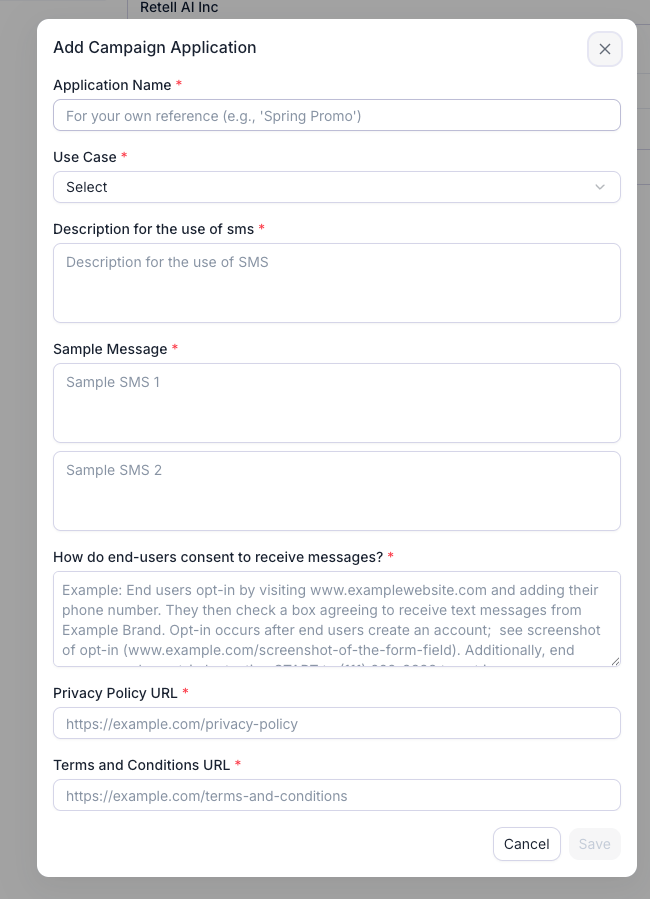
The Add Campaign Application form, with the business profile and brand steps completed behind it.
Two things Retell sets for you that affect how you write the samples:
- Your campaign is submitted with “messages contain links” and “messages contain phone numbers” both set to yes. A link or phone number in a sample is fine and expected. Links must point to your own domain. Public URL shorteners such as bit.ly or tinyurl are rejected.
- STOP, UNSUBSCRIBE, CANCEL, END, QUIT, and HELP replies are handled by Twilio’s default opt-out handling on Retell numbers. You don’t configure keywords, but every sample and your opt-in script must still tell people they can reply STOP.
Fill out the application
1
Choose a use case
Pick the one that describes what you will actually send. If more than one applies, choose Mixed. If your volume is small, choose Low Volume Mixed, which covers any combination up to 2,000 message segments per day. Retell’s campaign fee is the same for every use case.
2
Write the campaign description
Reviewers must be able to read this and know who is sending, to whom, what kinds of messages, and how recipients consented. Aim for three to six sentences.Example for Customer Care:
Template
Acme Home Services uses this campaign to send two-way customer support messages, follow-ups to phone conversations, requested quotes and service information to existing customers and prospective customers who contact us by phone or request a call on our website at https://www.acmehomeservices.com/contact. Recipients opt in verbally during a call with our automated AI phone assistant, or by submitting our website contact form. Messages are transactional and informational only, sent after a call or when a customer requests information. Every message identifies Acme Home Services and includes opt-out instructions (reply STOP).Example for Low Volume Mixed appointment reminders:
Bright Smile Dental uses this campaign to send appointment confirmations, appointment reminders, reschedule notices and post-visit follow-ups to patients who have booked an appointment with our office. Patients opt in verbally when they book by phone with our automated scheduling assistant, or by checking the SMS consent box on our online booking form at https://www.brightsmiledental.com/book. Messages are informational only and are sent when an appointment is booked, 24 hours before the appointment, and after the visit. Every message identifies Bright Smile Dental and includes opt-out instructions (reply STOP).
3
Describe how end users consent
This field must describe where a person encounters the chance to opt in, the exact action they take to consent, and every disclosure below. If consent is collected by voice, paste the exact script your agent speaks.Mandatory disclosures:For outbound calls, replace the second sentence with: “[Business Name]‘s assistant calls customers who [booked an appointment / requested a callback] at the number they provided.”If a website form only requests a callback, submitting it does not opt the user in to SMS. Say so in the flow, then describe how the agent collects consent on the call using the script above.Web form with a consent checkbox
- Business name
- What kind of messages they’ll get
- “Message and data rates may apply”
- Frequency statement, such as “Message frequency varies” or “up to 4 msgs/month”
- How to opt out (reply STOP) and get help (reply HELP)
- Direct link to the opt-in page, or the full transcript of the verbal script
- The customer’s confirmation: their “Yes” or their checked box
- Links to your Privacy Policy and Terms, in addition to the URL fields
- For web forms: consent is optional, not a condition of purchase, and the box is unchecked by default
Verbal opt-in flow
Web form opt-in flow
4
Add your Privacy Policy and Terms URLs
Both URLs must be live, on your domain, start with Your Terms of Service, or a dedicated “Mobile Messaging Terms” page, should state the business name, the kinds of messages, “message and data rates may apply”, the frequency, how to opt out (STOP) and get help (HELP), and a support contact.
https://, and appear in both the URL fields and inside the consent text.Your Privacy Policy must state that mobile opt-in data is never shared. Paste this under the section about sharing data with third parties:Privacy Policy clause
5
Write two sample messages
Each sample must be 20 to 200 characters and must:
- Name [Business Name] in the text.
- Include an opt-out line such as “Reply STOP to opt out”.
- Show templated values in square brackets:
[Date],[Time],[Agent Name]. - Use only links on your own domain.
- Match the use case and description. No discount code under Customer Care.
- Use one frequency phrasing, such as “Msg frequency varies”, across both samples and the consent text.
Opt-in confirmation (any use case)
Post-call summary (Customer Care, Mixed)
Appointment reminder (Mixed, Low Volume Mixed)
Technician ETA (Delivery Notification)
Promotional (Marketing, Mixed)
6
Save and submit
Click Save. Save stays disabled until every required field passes validation. Saving closes the dialog and fills in Campaign Registration with the new campaign. Back on the SMS panel, click Next to submit the SMS application for this number.Registering the campaign costs $15, charged whether or not it’s approved (as of September 2026). Correcting a rejected campaign and resubmitting it under the same use case is free. Twilio’s review usually takes three or four business days once the brand is approved. Retell emails you when the campaign is approved or rejected, with the reason.
Make your agent collect consent the same way
Your application promises a specific script. Whenever an agent collects consent, it must say that script. Add this to that agent’s prompt, and paste in the exact script you submitted in step 3.Agent prompt: SMS consent
If your campaign is rejected
Retell shows the rejection reason on the campaign in the dashboard and emails it to you. Click Edit on the rejected campaign, fix the fields the reason points at, click Save, then click Next on the SMS panel to resubmit. Only rejected campaigns can be edited.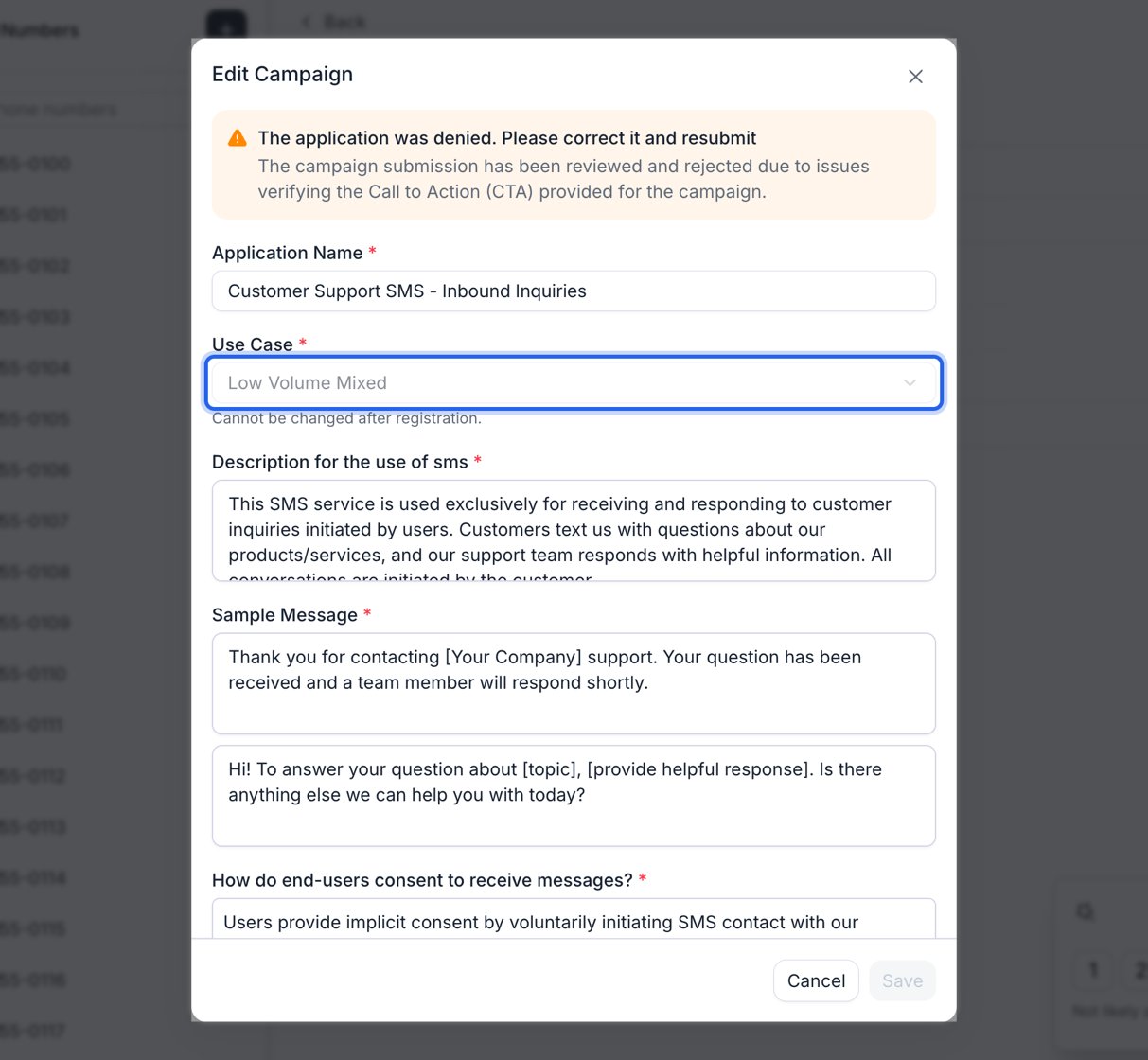
Reopening a rejected campaign. The reason sits at the top and every field stays editable except Use Case.
Fix the steps in order
A rejection cascades downward. When a business profile is rejected, Retell marks its brand and every campaign under it rejected too, all carrying the profile’s reason (“The business profile is rejected with reason …”). Identical text on all three means the profile is the only thing actually at fault. Repair whichever step really failed, working down:- Business profile. Nothing below it can be submitted while it’s rejected. See handle application rejection.
- Brand. Reopen the brand under Brand Registration on the SMS panel and correct it. Free as long as the brand type stays the same, which is why the brand type is read-only after registration. While the brand is rejected, the campaign controls on the SMS panel stay disabled.
- Campaign. Edit and resubmit it once the brand is approved or pending. Submitting the number while either the brand or the campaign is still rejected fails with “Please update and resubmit the brand first” or “…the campaign first”, because a rejected record gets no further review updates.
What does the rejection wording mean?
FAQ
Do I need the brand approved before I submit the campaign?
Do I need the brand approved before I submit the campaign?
No. You can file the campaign as soon as the brand exists and isn’t rejected. Retell holds it as pending and forwards it to Twilio automatically once the brand is approved.
Does resubmitting a rejected campaign cost another $15?
Does resubmitting a rejected campaign cost another $15?
No, as long as the use case is unchanged. The corrected campaign is edited in place and reviewed again at no extra charge. You’re charged $15 again only when a new campaign has to be registered, which happens if the use case changed, the brand was re-registered, or Twilio declined the in-place edit (as of September 2026).
My brand was rejected too. What do I fix first?
My brand was rejected too. What do I fix first?
The business profile, then the brand, then the campaign. A rejected business profile marks its brand and campaigns rejected as well, so the same reason text on all three points at the profile alone. Correcting a rejected brand is free while the brand type stays the same, and the campaign controls stay disabled until the brand is approved or pending.
The rejection says my use case is wrong. Can I just change it?
The rejection says my use case is wrong. Can I just change it?
No, Use Case is read-only after registration. File a new campaign under the right use case with Add Campaign Application, select it, and click Next to point the number at it. That new campaign costs $15. Deleting the SMS capability first isn’t necessary while the number’s application is rejected.
Can I edit a campaign that is pending or approved?
Can I edit a campaign that is pending or approved?
No. Only rejected campaigns can be edited. To change what an approved number sends, delete the SMS capability on the number and create a new campaign. Your business profile and brand are kept and reused.
Can I skip the campaign application?
Can I skip the campaign application?
If you only need to send a fixed message during calls, you can send from an SMS-approved Retell number with no application. The content is a preset template you can’t customize, and two-way SMS isn’t supported. See Option 3 on the SMS page.
Do I need to set up STOP and HELP keywords?
Do I need to set up STOP and HELP keywords?
No. Twilio’s default opt-out handling applies to Retell numbers, so STOP, UNSUBSCRIBE, CANCEL, END, QUIT, and HELP are handled for you. Your samples and opt-in script must still tell people they can reply STOP.