Sync a Monday.com contacts board with Retell AI: choose a primary Phone column, map fields both ways, and log conversations as updates on each contact item.
Monday.com contact sync treats each item in one board as a contact and matches it to Retell by a primary Phone column. You can import mapped fields, write Retell contact updates back, and log calls and chats as updates on the linked item.Start with a connected Monday.com account. Agent functions work independently and don’t require sync.
When to use it
Enable sync when you keep caller records on a Monday.com board and want those records available as Retell contacts. For example, import a lead’s phone number and first name, then map a qualification result from Post Call Extraction back to the lead’s Status column.
Prepare your contacts board
Use an active classic board that the authorizing user can read and edit. Add a writable Phone column containing each contact’s number, including its country code. A Text column containing phone numbers can’t be used as the primary phone column.Keep one item per phone number. When outbound sync searches for an unlinked contact, multiple matching Monday.com items cause an error rather than an arbitrary selection.Use separate supported columns for fields such as first name and last name. The item’s name isn’t offered as a contact field mapping.
Set up contact sync
1
Choose your contacts board
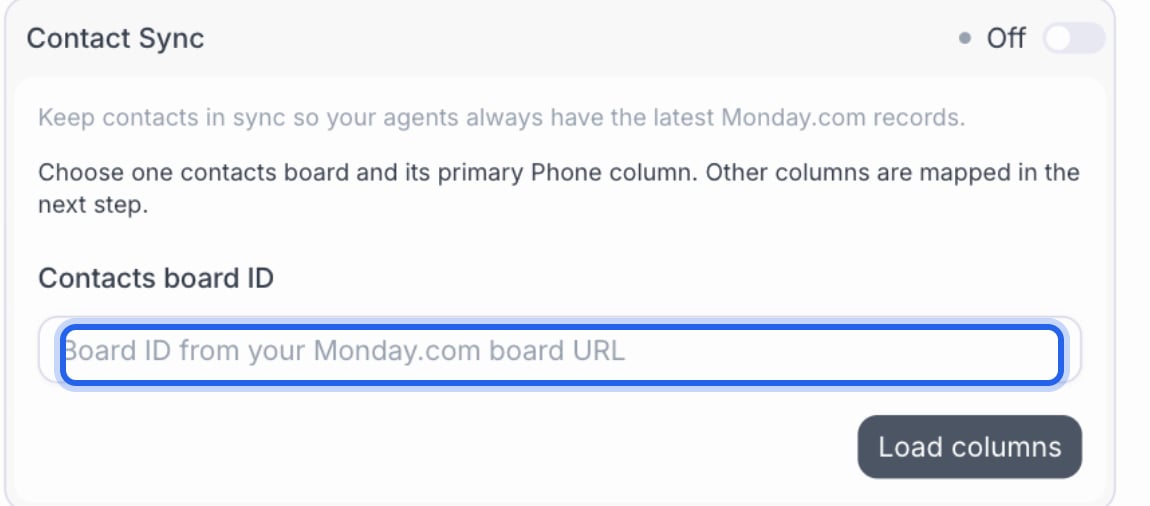
From Integrations → Connected, open your Monday.com connection. Under Connect → Contact Sync, paste the digits after /boards/ in your Monday.com board URL into Contacts board ID. Click Load columns.
Enter your contacts board ID, then select Load columns.
If you loaded the wrong board, click Change board before continuing to field mapping. Enter the correct ID and load its columns.
2
Select the primary phone column
Select a Primary phone column of type Phone and click Continue to field mapping. Retell saves your board ID and maps that column to phone_number in both directions.The board ID then appears as read-only. To choose a different board or primary Phone column later, switch the contacts board.
3
Map the fields to import
On Import contacts, map Monday.com columns to Retell contact fields. The primary phone mapping stays locked. Add mappings such as First name to first_name, or create a custom Retell field for a Status column.
4
Choose what to write back
On Sync to [connection name], map Retell fields to Monday.com columns. Both directions must use the same primary Phone column. See CRM data mappings for compatible types and extraction update modes.Optionally enable Log activities automatically to post conversation activity as item updates. Enable Create new contacts in CRM if you want Retell to create an item after a conversation for a contact that isn’t linked to Monday.com. Both options are off by default.
5
Save and enable sync
Click Save on the Sync to [connection name] tab, then turn on Contact Sync in the connection’s settings. Only one CRM connection can drive contact sync at a time. To revise other mappings later, click Edit field mappings.
6
Run and verify the first import
In Contacts, choose Actions → Run full sync and confirm. When the sync finishes, check that your test contact appears once with its phone number and mapped fields. Items with no usable value in the primary Phone column are skipped.The first import scans the board. Subsequent scheduled runs read changed items. Run a full sync after changing mappings to scan the board again.
Switch the contacts board
1
Start a new Monday.com authorization
From Integrations → Connected, open your configured Monday.com connection. Under Contact Sync, click Switch board and authorize the Monday.com account that holds the destination board. Retell opens the new connection’s settings after authorization.
2
Configure the new board
Enter the Contacts board ID, click Load columns, and select the Primary phone column. To change only the primary Phone column, use the same board ID. Click Continue to field mapping, configure the mappings, and click Save. Your current sync source stays active while you configure the new connection.
3
Confirm the switch
Click Switch contact sync. In Integrations → Connected, check that the new connection shows Contacts sync on. Agent functions already linked to the original connection continue to use that connection. Use Run full sync in Contacts to verify an item from the new board.
Which columns can you sync?
Retell offers supported writable columns from your board, excluding archived and calculated columns.
Monday.com column type
Retell field type
Text, Long text, Phone, Email
string
Numbers
number
Checkbox
boolean
Date
date
Status
enum with the board’s existing active labels
People columns are available to agent tools, but aren’t offered for contact sync. Other column types aren’t mapped.Status write-back must match one existing label unambiguously. Retell doesn’t create new status labels. Phone values must be valid international numbers; dates use YYYY-MM-DD. Empty contact values aren’t sent as instructions to clear a Monday.com field.
How does write-back work?
Mapped updates go to the linked item on the contacts board. The phone number is the matching key and isn’t changed by ordinary outbound field updates.With Create new contacts in CRM enabled, the post-conversation flow first searches the primary Phone column for an existing match. It links that item if found; otherwise, it creates an item using the mapped contact fields. The new item’s name uses the contact’s first and last name, or its phone number if neither is available.Automatic activity logging adds a plain-text update to the linked item. The update includes the conversation ID, timestamp, available direction and phone numbers, and summary. Calls also include duration. A contact linked or created through the post-conversation flow can receive the activity update in that same flow.
Verify both directions
Use a dedicated test board and synthetic contact. Before importing it, check whether your workspace has any always-on Dialer campaigns that could enroll newly synced contacts.
Add a test item with a Phone value and a mapped first name in Monday.com. In Contacts, choose Run full sync and confirm the contact appears in Retell.
Change a mapped non-phone field on the linked Retell contact. Confirm the corresponding Monday.com column changes.
If automatic activity logging is enabled, complete a test conversation with the matched contact and check the item’s Updates. The tool’s Run a test button alone doesn’t run post-conversation sync.
Troubleshooting
Why can't I load the board's columns?
If saving the board ID fails, check the error notification for the cause. Verify that you copied the digits after /boards/ and that the authorizing user has access to that board. If authorization expired, use Reconnect in the Connection section and try Load columns again. If saving the board succeeds but loading its columns fails, click Retry loading columns.
The Phone column isn't available during setup
Check that the column is type Phone, writable, and on the chosen classic board. Text and Email columns aren’t valid match keys. Also check the authorizing user’s board access.
An item imports without its name or other fields
Only mapped columns are imported. Map a supported column to first_name or last_name; the Monday.com item name doesn’t automatically become the Retell contact’s name.
A new Retell contact doesn't create a Monday.com item
Enable Create new contacts in CRM, configure outbound mappings, and use the connection as the active CRM. Creation happens through post-conversation sync, not just because you added a contact in Retell. Check for duplicate phone numbers and invalid mapped values if it still fails.
How do I stop syncing contacts?
Open the active connection from Integrations → Connected and turn off Contact Sync.
{"docsConfig":{"theme":"almond","$schema":"https://mintlify.com/docs.json","name":"Retell AI","description":"Explore Retell AI docs to learn how to build, test, deploy, and optimize AI voice agents with APIs, integrations, conversation flows, and production-ready tools.","colors":{"primary":"#606A78","light":"#F5F5FA","dark":"#172131"},"logo":{"light":"https://mintcdn.com/retellai/-E9UettTBfBiCBBS/images/docs-light.png?fit=max\u0026auto=format\u0026n=-E9UettTBfBiCBBS\u0026q=85\u0026s=64eb26a2d3cc9a67ee3ea0bfe086dd14","dark":"https://mintcdn.com/retellai/-E9UettTBfBiCBBS/images/docs-dark.png?fit=max\u0026auto=format\u0026n=-E9UettTBfBiCBBS\u0026q=85\u0026s=08472a0c78599498b85d23348d7826f6"},"favicon":"https://mintcdn.com/retellai/TsBk7Stx4694-7p1/logo/favicon-light.ico?fit=max\u0026auto=format\u0026n=TsBk7Stx4694-7p1\u0026q=85\u0026s=4e90f4db5e89b5ec7fe249a4844c2d97","api":{"openapi":["openapi-final.yaml"],"playground":{"display":"interactive"},"mdx":{"auth":{"method":"bearer"},"server":"https://api.retellai.com"}},"navbar":{"links":[{"icon":"message-circle-question-mark","href":"https://docs.retellai.com/general/support","label":"Support"},{"icon":"chart-line","href":"https://status.retellai.com/","label":"Status"},{"icon":"book","href":"https://www.retellai.com/changelog","label":"Changelog"}],"primary":{"type":"button","label":"Dashboard","href":"https://dashboard.retellai.com"}},"footer":{"socials":{"x":"https://x.com/retellai","linkedin":"https://www.linkedin.com/company/98828489","github":"https://github.com/RetellAI","instagram":"https://www.instagram.com/retell_ai","youtube":"https://www.youtube.com/@retellai"}},"fonts":{"family":"Inter"},"icons":{"library":"lucide"},"styling":{"codeblocks":"dark","latex":true},"integrations":{"mixpanel":{"projectToken":"c8676d3561adb5eefc366aa2a66725bc"}},"contextual":{"options":["copy","view","chatgpt","claude","cursor"],"display":"header"},"interaction":{"drilldown":false},"navigation":{"pages":[]}},"deployment":{"deploymentMetadataValue":{"subdomain":"retellai","hasAudioNarration":false,"actualSubdomain":"retellai","customDomains":["docs.retellai.com"],"gitSource":{"type":"github","owner":"retellai","repo":"docs","deployBranch":"main","contentDirectory":"","isPrivate":true,"mountPath":"","label":""},"feedback":{"thumbs":true,"edits":false,"issues":false,"agentFeedback":true},"entitlements":{"AI_CHAT":{"status":"ENABLED"},"CONTEXTUAL_FEEDBACK":{"status":"ENABLED"},"CODE_SNIPPET_FEEDBACK":{"status":"ENABLED"},"WEB_MCP":{"status":"ENABLED"},"NARRATION":{"status":"ENABLED"}},"buildId":"6b0716d38df58e3bad062e75","clientVersion":"0.0.4304","searchFilterCounts":[{"language":"default","tag":"Guides","count":222},{"language":"default","tag":"API Reference","count":109},{"language":"default","tag":"Build","count":69},{"language":"default","tag":"Deploy","count":35},{"language":"default","tag":"Integrations","count":35},{"language":"default","tag":"Deprecations","count":25},{"language":"default","tag":"CRM","count":24},{"language":"default","tag":"Conversation flow agents","count":24},{"language":"default","tag":"Detailed Deprecation Guide","count":24},{"language":"default","tag":"Accounts and Workspace","count":17}]},"assistantConfig":{},"basePath":"","hasChatPermissions":true,"hasWebMcpPermissions":true,"toggles":[{"name":"kill-isr","enabled":true,"variant":{"name":"disabled","enabled":false,"feature_enabled":true},"impressionData":false},{"name":"custom-rbac-roles","enabled":true,"variant":{"name":"disabled","enabled":false,"feature_enabled":true},"impressionData":false},{"name":"agent-mintlify-slack","enabled":true,"variant":{"name":"disabled","enabled":false,"feature_enabled":true},"impressionData":false},{"name":"agent-integrations-settings","enabled":true,"variant":{"name":"disabled","enabled":false,"feature_enabled":true},"impressionData":false},{"name":"rbac-expansion","enabled":true,"variant":{"name":"disabled","enabled":false,"feature_enabled":true},"impressionData":false},{"name":"automations-pr-grouping","enabled":true,"variant":{"name":"disabled","enabled":false,"feature_enabled":true},"impressionData":false},{"name":"custom-prefix","enabled":true,"variant":{"name":"disabled","enabled":false,"feature_enabled":true},"impressionData":false},{"name":"analytics-v7","enabled":true,"variant":{"name":"disabled","enabled":false,"feature_enabled":true},"impressionData":false},{"name":"user-flows-analytics","enabled":true,"variant":{"name":"disabled","enabled":false,"feature_enabled":true},"impressionData":false},{"name":"no-publish-flow","enabled":true,"variant":{"name":"disabled","enabled":false,"feature_enabled":true},"impressionData":false},{"name":"snapshot-serving-live","enabled":true,"variant":{"name":"disabled","enabled":false,"feature_enabled":true},"impressionData":false},{"name":"stripTemperatureMiddleware","enabled":true,"variant":{"name":"disabled","enabled":false,"feature_enabled":true},"impressionData":false},{"name":"support-platform-pylon-zendesk","enabled":true,"variant":{"name":"disabled","enabled":false,"feature_enabled":true},"impressionData":false},{"name":"snapshot-serving","enabled":true,"variant":{"name":"disabled","enabled":false,"feature_enabled":true},"impressionData":false},{"name":"instant-rollback","enabled":true,"variant":{"name":"disabled","enabled":false,"feature_enabled":true},"impressionData":false},{"name":"granular-notifications-server","enabled":true,"variant":{"name":"disabled","enabled":false,"feature_enabled":true},"impressionData":false},{"name":"granular-notifications","enabled":true,"variant":{"name":"disabled","enabled":false,"feature_enabled":true},"impressionData":false},{"name":"automations-fable","enabled":true,"variant":{"name":"disabled","enabled":false,"feature_enabled":true},"impressionData":false},{"name":"fixed-ai-action-pricing","enabled":true,"variant":{"name":"disabled","enabled":false,"feature_enabled":true},"impressionData":false},{"name":"site-roles","enabled":true,"variant":{"name":"disabled","enabled":false,"feature_enabled":true},"impressionData":false},{"name":"automation-resolve-merge-conflict","enabled":true,"variant":{"name":"disabled","enabled":false,"feature_enabled":true},"impressionData":false},{"name":"scoped-publishing","enabled":true,"variant":{"name":"disabled","enabled":false,"feature_enabled":true},"impressionData":false},{"name":"mintql","enabled":true,"variant":{"name":"disabled","enabled":false,"feature_enabled":true},"impressionData":false},{"name":"page-level-analytics","enabled":true,"variant":{"name":"disabled","enabled":false,"feature_enabled":true},"impressionData":false},{"name":"editor-version-history-v2","enabled":true,"variant":{"name":"disabled","enabled":false,"feature_enabled":true},"impressionData":false},{"name":"instinct-self-updating-docs","enabled":true,"variant":{"name":"disabled","enabled":false,"feature_enabled":true},"impressionData":false},{"name":"billing-page-v2","enabled":true,"variant":{"name":"disabled","enabled":false,"feature_enabled":true},"impressionData":false},{"name":"full-page-search","enabled":true,"variant":{"name":"disabled","enabled":false,"feature_enabled":true},"impressionData":false},{"name":"workspace-projects","enabled":true,"variant":{"name":"disabled","enabled":false,"feature_enabled":true},"impressionData":false},{"name":"fork-pr-previews","enabled":true,"variant":{"name":"disabled","enabled":false,"feature_enabled":true},"impressionData":false},{"name":"revalidation-jwt","enabled":true,"variant":{"name":"disabled","enabled":false,"feature_enabled":true},"impressionData":false},{"name":"hobby-abuse-scan","enabled":true,"variant":{"name":"disabled","enabled":false,"feature_enabled":true},"impressionData":false},{"name":"dashboard-inbox","enabled":true,"variant":{"name":"disabled","enabled":false,"feature_enabled":true},"impressionData":false},{"name":"turbopuffer-dual-write","enabled":true,"variant":{"name":"disabled","enabled":false,"feature_enabled":true},"impressionData":false},{"name":"approve-review-flow","enabled":true,"variant":{"name":"disabled","enabled":false,"feature_enabled":true},"impressionData":false},{"name":"editor-metadata","enabled":true,"variant":{"name":"disabled","enabled":false,"feature_enabled":true},"impressionData":false},{"name":"sso-setup-deadline-banner","enabled":true,"variant":{"name":"disabled","enabled":false,"feature_enabled":true},"impressionData":false},{"name":"turbopuffer-serve","enabled":true,"variant":{"name":"disabled","enabled":false,"feature_enabled":true},"impressionData":false},{"name":"live-agents","enabled":true,"variant":{"name":"disabled","enabled":false,"feature_enabled":true},"impressionData":false},{"name":"starter-pricing","enabled":true,"variant":{"name":"control","enabled":true,"payload":{"type":"string","value":"control"},"feature_enabled":true},"impressionData":false},{"name":"llms-txt-v2","enabled":true,"variant":{"name":"disabled","enabled":false,"feature_enabled":true},"impressionData":false},{"name":"wildcard-email-auth","enabled":true,"variant":{"name":"disabled","enabled":false,"feature_enabled":true},"impressionData":false}],"googleFontsInlined":false},"customCss":[{"filePath":"style.css","content":"@media (min-width: 1024px){#navbar .flex-1:has(>[data-slot=\"context-menu-trigger\"]),#navbar .flex-1:has(>a>.nav-logo){flex:none!important;width:15rem}#navbar .ustify-end:has(.nav-tabs),#navbar .justify-end:has(.nav-tabs){justify-content:space-between!important;margin-left:0!important}#navbar .flex:has(>.ustify-end),#navbar .flex:has(>.justify-end){flex:1!important}#navbar .nav-tabs{white-space:nowrap}}article{max-width:48rem!important}.max-w-prose{max-width:48rem!important}.max-w-xl{max-width:48rem!important}video.scroll-play{cursor:zoom-in}.video-zoom-overlay{position:fixed;inset:0;z-index:9999;display:flex;align-items:center;justify-content:center;padding:4vmin;background:rgba(0, 0, 0, 0.8);backdrop-filter:blur(2px);cursor:zoom-out}.video-zoom-media{max-width:92vw;max-height:92vh;width:auto;height:auto;border-radius:12px;box-shadow:0 10px 40px rgba(0, 0, 0, 0.5);cursor:default}.video-zoom-close{position:fixed;top:16px;right:20px;display:flex;align-items:center;justify-content:center;width:40px;height:40px;padding:0;border:none;border-radius:999px;background:rgba(255, 255, 255, 0.15);color:#fff;font-size:24px;line-height:1;cursor:pointer}.video-zoom-close:hover{background:rgba(255, 255, 255, 0.3)}.ui-btn{background-color:#f4f5f7!important;color:#1f2328!important;border:1px solid #d0d5dd!important;border-bottom-width:2px!important;border-radius:6px!important;padding:0.1em 0.42em!important}html.dark .ui-btn,[data-theme=\"dark\"] .ui-btn{background-color:#21252d!important;color:#e6e8eb!important;border-color:#3a4048!important}img[src$=\"/images/icons/wss-badge.svg\"]{width:auto!important;height:15px!important}a[aria-current=\"page\"] img[src$=\"/images/icons/wss-badge.svg\"]{content:url(\"data:image/svg+xml,%3Csvg xmlns=%22http://www.w3.org/2000/svg%22 width=%2227%22 height=%2215%22 viewBox=%220 0 27 15%22 role=%22img%22 aria-label=%22WSS%22%3E %3Crect width=%2227%22 height=%2215%22 rx=%224%22 fill=%22%23F54A00%22/%3E %3Ctext x=%2213.5%22 y=%2210.7%22 text-anchor=%22middle%22 font-family=%22ui-sans-serif, system-ui, -apple-system, Segoe UI, Inter, Helvetica, Arial, sans-serif%22 font-size=%228.8%22 font-weight=%22700%22 fill=%22%23FFFFFF%22%3EWSS%3C/text%3E %3C/svg%3E\")}"}]}
{"page":{"pagePath":"integrations/monday-contact-sync","slug":"/integrations/monday-contact-sync","pageMetadata":{"title":"Monday.com contact sync","sidebarTitle":"Contact sync","description":"Sync a Monday.com contacts board with Retell AI: choose a primary Phone column, map fields both ways, and log conversations as updates on each contact item.","keywords":["Monday.com contact sync","Monday CRM two-way sync","Monday Phone column","Monday call logging","AI assistant Monday contacts"],"og:title":"Sync Monday.com contacts and conversation activity with Retell AI","og:description":"Import a Monday.com contacts board into Retell AI, write mapped contact fields back, and log each conversation as an update on the linked item.","href":"/integrations/monday-contact-sync"},"description":{"compiledSource":"\"use strict\";\nconst {jsx: _jsx} = arguments[0];\nconst {useMDXComponents: _provideComponents} = arguments[0];\nfunction _createMdxContent(props) {\n const _components = {\n p: \"p\",\n ..._provideComponents(),\n ...props.components\n };\n return _jsx(_components.p, {\n children: \"Sync a Monday.com contacts board with Retell AI: choose a primary Phone column, map fields both ways, and log conversations as updates on each contact item.\"\n });\n}\nfunction MDXContent(props = {}) {\n const {wrapper: MDXLayout} = {\n ..._provideComponents(),\n ...props.components\n };\n return MDXLayout ? _jsx(MDXLayout, {\n ...props,\n children: _jsx(_createMdxContent, {\n ...props\n })\n }) : _createMdxContent(props);\n}\nreturn {\n default: MDXContent\n};\n","frontmatter":{},"scope":{}},"pageType":"default","mdx":{"mdxSource":{"compiledSource":"\"use strict\";const{Fragment:_Fragment,jsx:_jsx,jsxs:_jsxs}=arguments[0];const{useMDXComponents:_provideComponents}=arguments[0];function _createMdxContent(props){const _components={a:`a`,code:`code`,li:`li`,ol:`ol`,p:`p`,strong:`strong`,tbody:`tbody`,td:`td`,th:`th`,thead:`thead`,tr:`tr`,ul:`ul`,..._provideComponents(),...props.components},{Accordion,AccordionGroup,Frame,Heading,OptimizedImage,Step,Steps,Table}=_components;if(!Accordion)_missingMdxReference(`Accordion`,true);if(!AccordionGroup)_missingMdxReference(`AccordionGroup`,true);if(!Frame)_missingMdxReference(`Frame`,true);if(!Heading)_missingMdxReference(`Heading`,true);if(!OptimizedImage)_missingMdxReference(`OptimizedImage`,true);if(!Step)_missingMdxReference(`Step`,true);if(!Steps)_missingMdxReference(`Steps`,true);if(!Table)_missingMdxReference(`Table`,true);return _jsxs(_Fragment,{children:[_jsx(_components.p,{children:`Monday.com contact sync treats each item in one board as a contact and matches it to Retell by a primary Phone column. You can import mapped fields, write Retell contact updates back, and log calls and chats as updates on the linked item.`}),`\n`,_jsxs(_components.p,{children:[`Start with a `,_jsx(_components.a,{href:`/integrations/monday`,children:`connected Monday.com account`}),`. `,_jsx(_components.a,{href:`/integrations/monday-functions`,children:`Agent functions`}),` work independently and don’t require sync.`]}),`\n`,_jsx(Heading,{level:`2`,id:`when-to-use-it`,children:`When to use it`}),`\n`,_jsxs(_components.p,{children:[`Enable sync when you keep caller records on a Monday.com board and want those records available as `,_jsx(_components.a,{href:`/features/contacts`,children:`Retell contacts`}),`. For example, import a lead’s phone number and first name, then map a qualification result from `,_jsx(_components.a,{href:`/features/post-call-analysis-overview`,children:`Post Call Extraction`}),` back to the lead’s Status column.`]}),`\n`,_jsx(Heading,{level:`2`,id:`prepare-your-contacts-board`,children:`Prepare your contacts board`}),`\n`,_jsxs(_components.p,{children:[`Use an active classic board that the authorizing user can read and edit. Add a writable `,_jsx(_components.strong,{children:`Phone`}),` column containing each contact’s number, including its country code. A Text column containing phone numbers can’t be used as the primary phone column.`]}),`\n`,_jsx(_components.p,{children:`Keep one item per phone number. When outbound sync searches for an unlinked contact, multiple matching Monday.com items cause an error rather than an arbitrary selection.`}),`\n`,_jsx(_components.p,{children:`Use separate supported columns for fields such as first name and last name. The item’s name isn’t offered as a contact field mapping.`}),`\n`,_jsx(Heading,{level:`2`,id:`set-up-contact-sync`,children:`Set up contact sync`}),`\n`,_jsxs(Steps,{children:[_jsxs(Step,{title:`Choose your contacts board`,children:[_jsxs(_components.p,{children:[`From `,_jsx(_components.strong,{children:`Integrations → Connected`}),`, open your Monday.com connection. Under `,_jsx(_components.strong,{children:`Connect → Contact Sync`}),`, paste the digits after `,_jsx(_components.code,{children:`/boards/`}),` in your Monday.com board URL into `,_jsx(_components.strong,{children:`Contacts board ID`}),`. Click `,_jsx(_components.strong,{children:`Load columns`}),`.`]}),_jsx(Frame,{caption:`Enter your contacts board ID, then select Load columns.`,children:_jsx(OptimizedImage,{src:`https://mintcdn.com/retellai/gYWW1BAJXcMw-4G7/images/integration/monday-contact-sync.png?fit=max\u0026auto=format\u0026n=gYWW1BAJXcMw-4G7\u0026q=85\u0026s=ff6557403a921232964670d812f6f5b2`,alt:`The Contact Sync section with sync off, the empty Contacts board ID field outlined in blue, and the Load columns button below it.`,style:{maxHeight:560},\"data-og-width\":`1150`,width:`1150`,\"data-og-height\":`506`,height:`506`,\"data-path\":`images/integration/monday-contact-sync.png`,\"data-optimize\":`true`,\"data-opv\":`3`,srcset:`https://mintcdn.com/retellai/gYWW1BAJXcMw-4G7/images/integration/monday-contact-sync.png?w=280\u0026fit=max\u0026auto=format\u0026n=gYWW1BAJXcMw-4G7\u0026q=85\u0026s=7dd8a071747e65a576cd8bbedc0de952 280w, https://mintcdn.com/retellai/gYWW1BAJXcMw-4G7/images/integration/monday-contact-sync.png?w=560\u0026fit=max\u0026auto=format\u0026n=gYWW1BAJXcMw-4G7\u0026q=85\u0026s=521d38b4d08e47814c43b6753a1e3ce9 560w, https://mintcdn.com/retellai/gYWW1BAJXcMw-4G7/images/integration/monday-contact-sync.png?w=840\u0026fit=max\u0026auto=format\u0026n=gYWW1BAJXcMw-4G7\u0026q=85\u0026s=d70ebdd354d15b2b2b1c02a06b58cc98 840w, https://mintcdn.com/retellai/gYWW1BAJXcMw-4G7/images/integration/monday-contact-sync.png?w=1100\u0026fit=max\u0026auto=format\u0026n=gYWW1BAJXcMw-4G7\u0026q=85\u0026s=64341601fc5ef8b7a1b35e7b47d7573e 1100w, https://mintcdn.com/retellai/gYWW1BAJXcMw-4G7/images/integration/monday-contact-sync.png?w=1650\u0026fit=max\u0026auto=format\u0026n=gYWW1BAJXcMw-4G7\u0026q=85\u0026s=b66030ee233161a93292311db075d1ab 1650w, https://mintcdn.com/retellai/gYWW1BAJXcMw-4G7/images/integration/monday-contact-sync.png?w=2500\u0026fit=max\u0026auto=format\u0026n=gYWW1BAJXcMw-4G7\u0026q=85\u0026s=24a9b5853d2e24c69206ee7ef9b223ad 2500w`})}),_jsxs(_components.p,{children:[`If you loaded the wrong board, click `,_jsx(_components.strong,{children:`Change board`}),` before continuing to field mapping. Enter the correct ID and load its columns.`]})]}),_jsxs(Step,{title:`Select the primary phone column`,children:[_jsxs(_components.p,{children:[`Select a `,_jsx(_components.strong,{children:`Primary phone column`}),` of type Phone and click `,_jsx(_components.strong,{children:`Continue to field mapping`}),`. Retell saves your board ID and maps that column to `,_jsx(_components.code,{children:`phone_number`}),` in both directions.`]}),_jsxs(_components.p,{children:[`The board ID then appears as read-only. To choose a different board or primary Phone column later, `,_jsx(_components.a,{href:`#switch-the-contacts-board`,children:`switch the contacts board`}),`.`]})]}),_jsx(Step,{title:`Map the fields to import`,children:_jsxs(_components.p,{children:[`On `,_jsx(_components.strong,{children:`Import contacts`}),`, map Monday.com columns to Retell contact fields. The primary phone mapping stays locked. Add mappings such as First name to `,_jsx(_components.code,{children:`first_name`}),`, or create a custom Retell field for a Status column.`]})}),_jsxs(Step,{title:`Choose what to write back`,children:[_jsxs(_components.p,{children:[`On `,_jsx(_components.strong,{children:`Sync to [connection name]`}),`, map Retell fields to Monday.com columns. Both directions must use the same primary Phone column. See `,_jsx(_components.a,{href:`/integrations/crm-mappings`,children:`CRM data mappings`}),` for compatible types and extraction update modes.`]}),_jsxs(_components.p,{children:[`Optionally enable `,_jsx(_components.strong,{children:`Log activities automatically`}),` to post conversation activity as item updates. Enable `,_jsx(_components.strong,{children:`Create new contacts in CRM`}),` if you want Retell to create an item after a conversation for a contact that isn’t linked to Monday.com. Both options are off by default.`]})]}),_jsx(Step,{title:`Save and enable sync`,children:_jsxs(_components.p,{children:[`Click `,_jsx(_components.strong,{children:`Save`}),` on the `,_jsx(_components.strong,{children:`Sync to [connection name]`}),` tab, then turn on `,_jsx(_components.strong,{children:`Contact Sync`}),` in the connection’s settings. Only one CRM connection can drive contact sync at a time. To revise other mappings later, click `,_jsx(_components.strong,{children:`Edit field mappings`}),`.`]})}),_jsxs(Step,{title:`Run and verify the first import`,children:[_jsxs(_components.p,{children:[`In `,_jsx(_components.strong,{children:`Contacts`}),`, choose `,_jsx(_components.strong,{children:`Actions → Run full sync`}),` and confirm. When the sync finishes, check that your test contact appears once with its phone number and mapped fields. Items with no usable value in the primary Phone column are skipped.`]}),_jsx(_components.p,{children:`The first import scans the board. Subsequent scheduled runs read changed items. Run a full sync after changing mappings to scan the board again.`})]})]}),`\n`,_jsx(Heading,{level:`2`,id:`switch-the-contacts-board`,children:`Switch the contacts board`}),`\n`,_jsxs(Steps,{children:[_jsx(Step,{title:`Start a new Monday.com authorization`,children:_jsxs(_components.p,{children:[`From `,_jsx(_components.strong,{children:`Integrations → Connected`}),`, open your configured Monday.com connection. Under `,_jsx(_components.strong,{children:`Contact Sync`}),`, click `,_jsx(_components.strong,{children:`Switch board`}),` and authorize the Monday.com account that holds the destination board. Retell opens the new connection’s settings after authorization.`]})}),_jsx(Step,{title:`Configure the new board`,children:_jsxs(_components.p,{children:[`Enter the `,_jsx(_components.strong,{children:`Contacts board ID`}),`, click `,_jsx(_components.strong,{children:`Load columns`}),`, and select the `,_jsx(_components.strong,{children:`Primary phone column`}),`. To change only the primary Phone column, use the same board ID. Click `,_jsx(_components.strong,{children:`Continue to field mapping`}),`, configure the mappings, and click `,_jsx(_components.strong,{children:`Save`}),`. Your current sync source stays active while you configure the new connection.`]})}),_jsx(Step,{title:`Confirm the switch`,children:_jsxs(_components.p,{children:[`Click `,_jsx(_components.strong,{children:`Switch contact sync`}),`. In `,_jsx(_components.strong,{children:`Integrations → Connected`}),`, check that the new connection shows `,_jsx(_components.strong,{children:`Contacts sync on`}),`. Agent functions already linked to the original connection continue to use that connection. Use `,_jsx(_components.strong,{children:`Run full sync`}),` in `,_jsx(_components.strong,{children:`Contacts`}),` to verify an item from the new board.`]})})]}),`\n`,_jsx(Heading,{level:`2`,id:`which-columns-can-you-sync`,children:`Which columns can you sync?`}),`\n`,_jsx(_components.p,{children:`Retell offers supported writable columns from your board, excluding archived and calculated columns.`}),`\n`,_jsxs(Table,{children:[_jsx(_components.thead,{children:_jsxs(_components.tr,{children:[_jsx(_components.th,{children:`Monday.com column type`}),_jsx(_components.th,{children:`Retell field type`})]})}),_jsxs(_components.tbody,{children:[_jsxs(_components.tr,{children:[_jsx(_components.td,{children:`Text, Long text, Phone, Email`}),_jsx(_components.td,{children:`string`})]}),_jsxs(_components.tr,{children:[_jsx(_components.td,{children:`Numbers`}),_jsx(_components.td,{children:`number`})]}),_jsxs(_components.tr,{children:[_jsx(_components.td,{children:`Checkbox`}),_jsx(_components.td,{children:`boolean`})]}),_jsxs(_components.tr,{children:[_jsx(_components.td,{children:`Date`}),_jsx(_components.td,{children:`date`})]}),_jsxs(_components.tr,{children:[_jsx(_components.td,{children:`Status`}),_jsx(_components.td,{children:`enum with the board’s existing active labels`})]})]})]}),`\n`,_jsxs(_components.p,{children:[`People columns are available to `,_jsx(_components.a,{href:`/integrations/monday-functions#supported-fields`,children:`agent tools`}),`, but aren’t offered for contact sync. Other column types aren’t mapped.`]}),`\n`,_jsxs(_components.p,{children:[`Status write-back must match one existing label unambiguously. Retell doesn’t create new status labels. Phone values must be valid international numbers; dates use `,_jsx(_components.code,{children:`YYYY-MM-DD`}),`. Empty contact values aren’t sent as instructions to clear a Monday.com field.`]}),`\n`,_jsx(Heading,{level:`2`,id:`how-does-write-back-work`,children:`How does write-back work?`}),`\n`,_jsx(_components.p,{children:`Mapped updates go to the linked item on the contacts board. The phone number is the matching key and isn’t changed by ordinary outbound field updates.`}),`\n`,_jsxs(_components.p,{children:[`With `,_jsx(_components.strong,{children:`Create new contacts in CRM`}),` enabled, the post-conversation flow first searches the primary Phone column for an existing match. It links that item if found; otherwise, it creates an item using the mapped contact fields. The new item’s name uses the contact’s first and last name, or its phone number if neither is available.`]}),`\n`,_jsx(_components.p,{children:`Automatic activity logging adds a plain-text update to the linked item. The update includes the conversation ID, timestamp, available direction and phone numbers, and summary. Calls also include duration. A contact linked or created through the post-conversation flow can receive the activity update in that same flow.`}),`\n`,_jsx(Heading,{level:`2`,id:`verify-both-directions`,children:`Verify both directions`}),`\n`,_jsxs(_components.p,{children:[`Use a dedicated test board and synthetic contact. Before importing it, check whether your workspace has any `,_jsx(_components.a,{href:`/dialer/sequences`,children:`always-on Dialer campaigns`}),` that could enroll newly synced contacts.`]}),`\n`,_jsxs(_components.ol,{children:[`\n`,_jsxs(_components.li,{children:[`Add a test item with a Phone value and a mapped first name in Monday.com. In `,_jsx(_components.strong,{children:`Contacts`}),`, choose `,_jsx(_components.strong,{children:`Run full sync`}),` and confirm the contact appears in Retell.`]}),`\n`,_jsx(_components.li,{children:`Change a mapped non-phone field on the linked Retell contact. Confirm the corresponding Monday.com column changes.`}),`\n`,_jsxs(_components.li,{children:[`If automatic activity logging is enabled, complete a test conversation with the matched contact and check the item’s `,_jsx(_components.strong,{children:`Updates`}),`. The tool’s `,_jsx(_components.strong,{children:`Run a test`}),` button alone doesn’t run post-conversation sync.`]}),`\n`]}),`\n`,_jsx(Heading,{level:`2`,id:`troubleshooting`,children:`Troubleshooting`}),`\n`,_jsxs(AccordionGroup,{children:[_jsx(Accordion,{title:`Why can't I load the board's columns?`,id:`why-cant-i-load-the-boards-columns`,children:_jsxs(_components.p,{children:[`If saving the board ID fails, check the error notification for the cause. Verify that you copied the digits after `,_jsx(_components.code,{children:`/boards/`}),` and that the authorizing user has access to that board. If authorization expired, use `,_jsx(_components.strong,{children:`Reconnect`}),` in the `,_jsx(_components.strong,{children:`Connection`}),` section and try `,_jsx(_components.strong,{children:`Load columns`}),` again. If saving the board succeeds but loading its columns fails, click `,_jsx(_components.strong,{children:`Retry loading columns`}),`.`]})}),_jsx(Accordion,{title:`The Phone column isn't available during setup`,id:`the-phone-column-isnt-available-during-setup`,children:_jsx(_components.p,{children:`Check that the column is type Phone, writable, and on the chosen classic board. Text and Email columns aren’t valid match keys. Also check the authorizing user’s board access.`})}),_jsx(Accordion,{title:`An item imports without its name or other fields`,id:`an-item-imports-without-its-name-or-other-fields`,children:_jsxs(_components.p,{children:[`Only mapped columns are imported. Map a supported column to `,_jsx(_components.code,{children:`first_name`}),` or `,_jsx(_components.code,{children:`last_name`}),`; the Monday.com item name doesn’t automatically become the Retell contact’s name.`]})}),_jsx(Accordion,{title:`A new Retell contact doesn't create a Monday.com item`,id:`a-new-retell-contact-doesnt-create-a-monday-com-item`,children:_jsxs(_components.p,{children:[`Enable `,_jsx(_components.strong,{children:`Create new contacts in CRM`}),`, configure outbound mappings, and use the connection as the active CRM. Creation happens through post-conversation sync, not just because you added a contact in Retell. Check for duplicate phone numbers and invalid mapped values if it still fails.`]})}),_jsx(Accordion,{title:`How do I stop syncing contacts?`,id:`how-do-i-stop-syncing-contacts`,children:_jsxs(_components.p,{children:[`Open the active connection from `,_jsx(_components.strong,{children:`Integrations → Connected`}),` and turn off `,_jsx(_components.strong,{children:`Contact Sync`}),`.`]})})]}),`\n`,_jsx(Heading,{level:`2`,id:`next-steps`,children:`Next steps`}),`\n`,_jsxs(_components.ul,{children:[`\n`,_jsxs(_components.li,{children:[_jsx(_components.a,{href:`/integrations/crm-mappings`,children:`Map extraction results to contact fields`}),`.`]}),`\n`,_jsxs(_components.li,{children:[_jsx(_components.a,{href:`/build/dynamic-variables`,children:`Use contact fields as dynamic variables`}),`.`]}),`\n`,_jsxs(_components.li,{children:[_jsx(_components.a,{href:`/integrations/monday-functions`,children:`Use Monday.com tools during a conversation`}),`.`]}),`\n`]})]})}function MDXContent(props={}){const{wrapper:MDXLayout}={..._provideComponents(),...props.components};return MDXLayout?_jsx(MDXLayout,{...props,children:_jsx(_createMdxContent,{...props})}):_createMdxContent(props)}return{default:MDXContent};function _missingMdxReference(id,component){throw new Error(`Expected `+(component?`component`:`object`)+\" `\"+id+\"` to be defined: you likely forgot to import, pass, or provide it.\")}","frontmatter":{},"scope":{"codeStyling":"dark","config":{},"pageMetadata":{"title":"Monday.com contact sync","sidebarTitle":"Contact sync","description":"Sync a Monday.com contacts board with Retell AI: choose a primary Phone column, map fields both ways, and log conversations as updates on each contact item.","keywords":["Monday.com contact sync","Monday CRM two-way sync","Monday Phone column","Monday call logging","AI assistant Monday contacts"],"og:title":"Sync Monday.com contacts and conversation activity with Retell AI","og:description":"Import a Monday.com contacts board into Retell AI, write mapped contact fields back, and log each conversation as an update on the linked item.","href":"/integrations/monday-contact-sync"}}},"mdxSourceWithNoJs":null},"mdxExtracts":{"tableOfContents":[{"title":"When to use it","slug":"when-to-use-it","depth":2,"children":[]},{"title":"Prepare your contacts board","slug":"prepare-your-contacts-board","depth":2,"children":[]},{"title":"Set up contact sync","slug":"set-up-contact-sync","depth":2,"children":[]},{"title":"Switch the contacts board","slug":"switch-the-contacts-board","depth":2,"children":[]},{"title":"Which columns can you sync?","slug":"which-columns-can-you-sync","depth":2,"children":[]},{"title":"How does write-back work?","slug":"how-does-write-back-work","depth":2,"children":[]},{"title":"Verify both directions","slug":"verify-both-directions","depth":2,"children":[]},{"title":"Troubleshooting","slug":"troubleshooting","depth":2,"children":[]},{"title":"Next steps","slug":"next-steps","depth":2,"children":[]}],"codeExamples":{}},"jsLinks":["/_mintlify/custom/retellai/e3fe5c9b64f9e274/scroll-play-videos.js"],"subdomain":"retellai","siteName":"Retell AI","title":"Sync Monday.com contacts and conversation activity with Retell AI","navMaps":{"firstHrefInVersion":{},"firstHrefInLanguage":{}},"lastModified":"2026-11-25T17:09:05.649Z","originalFileLocation":"integrations/monday-contact-sync.mdx"},"headHtml":"\u003cscript data-mint-head>(function(){var d=document.documentElement,p=null;if(!p){try{p=localStorage.getItem(\"isDarkMode\")}catch(e){}if(p==='true')p='dark';else if(p==='false')p='light';if(p!=='light'\u0026\u0026p!=='dark'\u0026\u0026p!=='system')p=\"system\"}var r=p==='system'?(matchMedia(\"(prefers-color-scheme: dark)\").matches?'dark':'light'):p;d.classList.remove(r==='dark'?'light':'dark');d.classList.add(r);d.setAttribute(\"data-theme-preference\",p)})();\u003c/script>\u003cmeta data-mint-head name=\"description\" content=\"Sync a Monday.com contacts board with Retell AI: choose a primary Phone column, map fields both ways, and log conversations as updates on each contact item.\">\u003cmeta data-mint-head name=\"application-name\" content=\"Retell AI\">\u003cmeta data-mint-head name=\"generator\" content=\"Mintlify\">\u003clink data-mint-head rel=\"icon\" type=\"image/png\" sizes=\"192x192\" href=\"/mintlify-assets/_mintlify/favicons/retellai/aRxZhiMifgkRJF_R/_generated/favicon/android-chrome-192x192.png\" media=\"(prefers-color-scheme: light)\">\u003clink data-mint-head rel=\"apple-touch-icon\" type=\"image/png\" sizes=\"180x180\" href=\"/mintlify-assets/_mintlify/favicons/retellai/aRxZhiMifgkRJF_R/_generated/favicon/apple-touch-icon.png\">\u003clink data-mint-head rel=\"icon\" type=\"image/png\" sizes=\"16x16\" href=\"/mintlify-assets/_mintlify/favicons/retellai/aRxZhiMifgkRJF_R/_generated/favicon/favicon-16x16.png\" media=\"(prefers-color-scheme: light)\">\u003clink data-mint-head rel=\"icon\" type=\"image/png\" sizes=\"32x32\" href=\"/mintlify-assets/_mintlify/favicons/retellai/aRxZhiMifgkRJF_R/_generated/favicon/favicon-32x32.png\" media=\"(prefers-color-scheme: light)\">\u003clink data-mint-head rel=\"shortcut icon\" type=\"image/x-icon\" href=\"/mintlify-assets/_mintlify/favicons/retellai/aRxZhiMifgkRJF_R/_generated/favicon/favicon.ico\" media=\"(prefers-color-scheme: light)\">\u003clink data-mint-head rel=\"icon\" type=\"image/png\" sizes=\"192x192\" href=\"/mintlify-assets/_mintlify/favicons/retellai/aRxZhiMifgkRJF_R/_generated/favicon-dark/android-chrome-192x192.png\" media=\"(prefers-color-scheme: dark)\">\u003clink data-mint-head rel=\"icon\" type=\"image/png\" sizes=\"16x16\" href=\"/mintlify-assets/_mintlify/favicons/retellai/aRxZhiMifgkRJF_R/_generated/favicon-dark/favicon-16x16.png\" media=\"(prefers-color-scheme: dark)\">\u003clink data-mint-head rel=\"icon\" type=\"image/png\" sizes=\"32x32\" href=\"/mintlify-assets/_mintlify/favicons/retellai/aRxZhiMifgkRJF_R/_generated/favicon-dark/favicon-32x32.png\" media=\"(prefers-color-scheme: dark)\">\u003clink data-mint-head rel=\"shortcut icon\" type=\"image/x-icon\" href=\"/mintlify-assets/_mintlify/favicons/retellai/aRxZhiMifgkRJF_R/_generated/favicon-dark/favicon.ico\" media=\"(prefers-color-scheme: dark)\">\u003cmeta data-mint-head property=\"og:title\" content=\"Sync Monday.com contacts and conversation activity with Retell AI\">\u003cmeta data-mint-head property=\"og:description\" content=\"Import a Monday.com contacts board into Retell AI, write mapped contact fields back, and log each conversation as an update on the linked item.\">\u003cmeta data-mint-head property=\"og:site_name\" content=\"Retell AI\">\u003cmeta data-mint-head property=\"og:url\" content=\"https://docs.retellai.com/integrations/monday-contact-sync\">\u003cmeta data-mint-head property=\"og:type\" content=\"website\">\u003cmeta data-mint-head property=\"og:image\" content=\"https://retellai.mintlify.site/_mintlify/api/og/v2?division=Monday.com\u0026amp;title=Monday.com+contact+sync\u0026amp;description=Sync+a+Monday.com+contacts+board+with+Retell+AI%3A+choose+a+primary+Phone+column%2C+map+fields+both+ways%2C+and+log+conversations+as+updates+on+each+contact+item.\u0026amp;theme=2259d4172d4ae0cc61d9b63d\u0026amp;signature=9b6d457a917c7645925f800e1e0c96afdfb1d3cb3ae6f8c47a125d642ee2b4c0\">\u003cmeta data-mint-head property=\"og:image:width\" content=\"1200\">\u003cmeta data-mint-head property=\"og:image:height\" content=\"630\">\u003cmeta data-mint-head name=\"twitter:card\" content=\"summary_large_image\">\u003cmeta data-mint-head name=\"twitter:title\" content=\"Sync Monday.com contacts and conversation activity with Retell AI\">\u003cmeta data-mint-head name=\"twitter:description\" content=\"Import a Monday.com contacts board into Retell AI, write mapped contact fields back, and log each conversation as an update on the linked item.\">\u003cmeta data-mint-head name=\"twitter:image\" content=\"https://retellai.mintlify.site/_mintlify/api/og/v2?division=Monday.com\u0026amp;title=Monday.com+contact+sync\u0026amp;description=Sync+a+Monday.com+contacts+board+with+Retell+AI%3A+choose+a+primary+Phone+column%2C+map+fields+both+ways%2C+and+log+conversations+as+updates+on+each+contact+item.\u0026amp;theme=2259d4172d4ae0cc61d9b63d\u0026amp;signature=9b6d457a917c7645925f800e1e0c96afdfb1d3cb3ae6f8c47a125d642ee2b4c0\">\u003cmeta data-mint-head name=\"twitter:image:width\" content=\"1200\">\u003cmeta data-mint-head name=\"twitter:image:height\" content=\"630\">\u003cmeta data-mint-head name=\"msapplication-config\" content=\"/mintlify-assets/_mintlify/favicons/retellai/aRxZhiMifgkRJF_R/_generated/favicon/browserconfig.xml\">\u003cmeta data-mint-head name=\"apple-mobile-web-app-title\" content=\"Retell AI\">\u003cmeta data-mint-head name=\"msapplication-TileColor\" content=\"#606A78\">\u003clink data-mint-head rel=\"canonical\" href=\"https://docs.retellai.com/integrations/monday-contact-sync\">\u003clink data-mint-head rel=\"alternate\" type=\"application/xml\" href=\"/sitemap.xml\">\u003clink data-mint-head rel=\"alternate\" type=\"text/markdown\" href=\"/integrations/monday-contact-sync.md\">\u003cscript data-mint-head type=\"application/ld+json\">{\"@context\":\"https://schema.org\",\"@graph\":[{\"@type\":\"Organization\",\"@id\":\"https://docs.retellai.com/#organization\",\"name\":\"Retell AI\",\"url\":\"https://docs.retellai.com\",\"logo\":{\"@type\":\"ImageObject\",\"url\":\"https://mintcdn.com/retellai/-E9UettTBfBiCBBS/images/docs-light.png?fit=max\u0026auto=format\u0026n=-E9UettTBfBiCBBS\u0026q=85\u0026s=64eb26a2d3cc9a67ee3ea0bfe086dd14\"}},{\"@type\":\"WebSite\",\"@id\":\"https://docs.retellai.com#website\",\"name\":\"Retell AI\",\"url\":\"https://docs.retellai.com\",\"publisher\":{\"@id\":\"https://docs.retellai.com/#organization\"}},{\"@type\":\"WebPage\",\"@id\":\"https://docs.retellai.com/integrations/monday-contact-sync#webpage\",\"url\":\"https://docs.retellai.com/integrations/monday-contact-sync\",\"name\":\"Monday.com contact sync\",\"description\":\"Sync a Monday.com contacts board with Retell AI: choose a primary Phone column, map fields both ways, and log conversations as updates on each contact item.\",\"dateModified\":\"2026-11-25T17:09:05.649Z\",\"isPartOf\":{\"@id\":\"https://docs.retellai.com#website\"},\"breadcrumb\":{\"@id\":\"https://docs.retellai.com/integrations/monday-contact-sync#breadcrumb\"}},{\"@type\":\"BreadcrumbList\",\"@id\":\"https://docs.retellai.com/integrations/monday-contact-sync#breadcrumb\",\"itemListElement\":[{\"@type\":\"ListItem\",\"position\":1,\"name\":\"Integrations\",\"item\":\"https://docs.retellai.com/integrations/overview\"},{\"@type\":\"ListItem\",\"position\":2,\"name\":\"CRM\",\"item\":\"https://docs.retellai.com/integrations/crm-overview\"},{\"@type\":\"ListItem\",\"position\":3,\"name\":\"Monday.com\",\"item\":\"https://docs.retellai.com/integrations/monday\"},{\"@type\":\"ListItem\",\"position\":4,\"name\":\"Monday.com contact sync\",\"item\":\"https://docs.retellai.com/integrations/monday-contact-sync\"}]},{\"@type\":[\"Article\",\"TechArticle\"],\"@id\":\"https://docs.retellai.com/integrations/monday-contact-sync#article\",\"headline\":\"Monday.com contact sync\",\"name\":\"Monday.com contact sync\",\"description\":\"Sync a Monday.com contacts board with Retell AI: choose a primary Phone column, map fields both ways, and log conversations as updates on each contact item.\",\"url\":\"https://docs.retellai.com/integrations/monday-contact-sync\",\"mainEntityOfPage\":{\"@id\":\"https://docs.retellai.com/integrations/monday-contact-sync#webpage\"},\"dateModified\":\"2026-11-25T17:09:05.649Z\",\"keywords\":\"Monday.com contact sync, Monday CRM two-way sync, Monday Phone column, Monday call logging, AI assistant Monday contacts\",\"publisher\":{\"@id\":\"https://docs.retellai.com/#organization\"},\"isPartOf\":{\"@id\":\"https://docs.retellai.com#website\"}}]}\u003c/script>\u003cscript data-mint-head type=\"application/ld+json\">{\"@context\":\"https://schema.org\",\"@type\":\"WebSite\",\"name\":\"Retell AI\",\"publisher\":{\"@type\":\"Organization\",\"name\":\"Retell AI\"},\"provider\":{\"@type\":\"Organization\",\"name\":\"Mintlify\",\"url\":\"https://mintlify.com\"}}\u003c/script>","agentPointerHref":"/integrations/monday-contact-sync.md","siteName":"Retell AI","nav":{"global":null,"tabs":[{"tab":"Guides","icon":"book","groups":[{"group":" ","pages":[{"title":"Introduction to Retell","href":"/general/introduction"},{"title":"Build your first phone agent in 15 minutes","href":"/get-started/quick-start"},{"title":"Global search","href":"/get-started/global-search"}]},{"group":"Conductor (AI Assistant)","icon":"https://mintlify.s3.us-west-1.amazonaws.com/retellai/images/conductor/conductor-icon.svg","pages":[{"title":"Retell AI Conductor overview","sidebarTitle":"Overview","href":"/conductor/overview"},{"group":"Functionality","pages":[{"title":"Build and refine agents","href":"/conductor/build-and-refine"},{"title":"Test and improve agents","href":"/conductor/test-and-improve"},{"title":"Inspect knowledge bases","href":"/conductor/knowledge-base"},{"title":"Review calls and chats","href":"/conductor/call-and-chat-history"},{"title":"Build analytics dashboards","href":"/conductor/analytics-dashboards"},{"title":"Review QA results","href":"/conductor/ai-qa"},{"title":"Review contacts","href":"/conductor/contacts"}]},{"title":"Pricing","href":"/conductor/usage-and-billing"}]},{"group":"Build","icon":"bot","pages":[{"title":"Build a Retell agent: configuration overview","href":"/build/overview"},{"title":"Single prompt vs. conversation flow","href":"/build/choose-agent-type"},{"title":"General prompting principles","href":"/build/prompt-engineering-guide"},{"group":"Single prompt agents","pages":[{"title":"Single prompt best practices","href":"/build/single-multi-prompt/write-single-prompt"},{"title":"Configure basic settings","href":"/build/single-multi-prompt/configure-basic-settings"},{"group":"Functions","pages":[{"title":"Function calling for single and multi-prompt agents","href":"/build/single-multi-prompt/function-calling"},{"title":"End call","href":"/build/single-multi-prompt/end-call"},{"title":"Transfer call tool (single \u0026 multi-prompt agents)","href":"/build/single-multi-prompt/transfer-call"},{"title":"Send SMS","href":"/build/single-multi-prompt/send-sms"},{"title":"Press digit (IVR navigation)","href":"/build/single-multi-prompt/press-digit"},{"title":"Integrate any system with custom function","href":"/build/single-multi-prompt/custom-function"},{"title":"Integration tools","href":"/build/single-multi-prompt/integration-tools"},{"title":"Code tool: run JavaScript in a Retell agent","href":"/build/single-multi-prompt/code-tool"},{"title":"Extract Dynamic Variables","href":"/build/single-multi-prompt/extract-dv"},{"title":"Agent Transfer tool: hand a call to another AI agent","href":"/build/single-multi-prompt/transfer-agent"},{"title":"MCP tools for single and multi-prompt agents","href":"/build/single-multi-prompt/mcp"}]}]},{"group":"Conversation flow agents","pages":[{"title":"Conversation flow agents: structured voice AI call control","href":"/build/conversation-flow/overview"},{"title":"Conversation flow best practices","href":"/build/conversation-flow/best-practices"},{"title":"Configure global settings","href":"/build/conversation-flow/global-setting"},{"group":"Nodes","pages":[{"title":"Nodes and edges","href":"/build/conversation-flow/node"},{"title":"Subagent node","href":"/build/conversation-flow/subagent-node"},{"title":"Conversation node","href":"/build/conversation-flow/conversation-node"},{"group":"Function Node","pages":[{"title":"Call a function from a conversation flow node","href":"/build/conversation-flow/function-node"},{"title":"Custom function in conversation flow","href":"/build/conversation-flow/custom-function"},{"title":"Integration tools in conversation flow","href":"/build/conversation-flow/integration-tools"}]},{"title":"Code node: run JavaScript in a conversation flow","href":"/build/conversation-flow/code-node"},{"title":"Call transfer node in conversation flow","href":"/build/conversation-flow/call-transfer-node"},{"title":"Press Digit Node","href":"/build/conversation-flow/press-digit-node"},{"title":"End node","href":"/build/conversation-flow/end-node"},{"title":"Logic Split Node","href":"/build/conversation-flow/logic-split-node"},{"title":"SMS Node","href":"/build/conversation-flow/sms-node"},{"title":"Extract Dynamic Variable Node","href":"/build/conversation-flow/extract-dv-node"},{"title":"Agent Transfer Node","href":"/build/conversation-flow/transfer-agent-node"},{"title":"MCP node in conversation flow","href":"/build/conversation-flow/mcp-node"}]},{"title":"Transition conditions","href":"/build/conversation-flow/transition-condition"},{"title":"Reusable subflows for conversation flow agents","href":"/build/conversation-flow/components"},{"title":"Flex Mode: dynamic conversation flow execution","href":"/build/conversation-flow/flex-mode"},{"group":"Advanced features","pages":[{"title":"Global Node","href":"/build/conversation-flow/global-node"},{"title":"Finetune Examples","href":"/build/conversation-flow/finetune-examples"}]},{"title":"Debug guide","href":"/build/conversation-flow/debug-guide"}]},{"group":"Multi-prompt agents (legacy)","pages":[{"title":"Multi-prompt agents","href":"/build/single-multi-prompt/write-multi-prompt"}]},{"title":"Create chat agent","href":"/build/create-chat-agent"},{"title":"Agent workflow","href":"/agent/agent-workflow"},{"title":"Set language for your agent","href":"/agent/language"},{"title":"Configure a multilingual agent","href":"/agent/multilingual"},{"title":"Supported languages by provider","href":"/build/language-support"},{"group":"Understand user speech better","pages":[{"title":"Speech recognition providers","href":"/build/asr-providers"},{"title":"Transcription modes","href":"/build/transcription-mode"},{"title":"Handle background speech \u0026 noise","href":"/build/handle-background-noise"}]},{"group":"Generate better responses from LLM","pages":[{"title":"Agent Handbook","href":"/build/agent-handbook"},{"title":"Conversational Mode","href":"/build/conversational-mode"},{"title":"Pronunciation examples","href":"/build/prompt-situation-guide"},{"title":"LLM settings","href":"/build/llm-options"},{"title":"GPT Live voice model","href":"/build/gpt-live"},{"title":"GPT Live prompting guide","href":"/build/gpt-live-prompting"}]},{"group":"Customize the synthesized speech","pages":[{"title":"Platform voices","href":"/build/platform-voices"},{"title":"Choose a custom provider","href":"/build/voice"},{"title":"Expressive Mode: add emotion and emphasis to agent speech","href":"/build/expressive-mode"},{"title":"Add custom pronunciation","href":"/build/add-pronunciation"},{"title":"Make the agent stay silent","href":"/build/no-response"},{"title":"Speech controls","href":"/build/speech-controls"},{"title":"Set up TTS fallback","href":"/build/tts-fallback"}]},{"group":"Integrate telephony features","pages":[{"title":"Handle voicemail and IVR","href":"/build/handle-voicemail"},{"title":"Capture DTMF input from user","href":"/build/user-dtmf"},{"title":"Set \u0026 parse custom SIP headers","href":"/build/telephony/sip-headers"}]},{"group":"Provide context to the agent","pages":[{"title":"Knowledge base setup and retrieval tuning","href":"/build/knowledge-base"},{"title":"Dynamic variables","href":"/build/dynamic-variables"}]},{"title":"Guardrails","href":"/build/guardrails"},{"title":"Do-not-call requests","href":"/build/do-not-call"}]},{"group":"Test","icon":"flask-conical","pages":[{"title":"Testing overview","href":"/test/test-overview"},{"group":"LLM Playground","pages":[{"title":"Manually test your agent","href":"/test/llm-playground"},{"title":"Debug your agent response","href":"/test/llm-playground-debug"}]},{"group":"LLM Simulation Testing","pages":[{"title":"Automatically test your agent","href":"/test/llm-simulation-testing"},{"title":"Batch test your agent","href":"/test/batch-test-simulation"}]},{"group":"Audio Testing","pages":[{"title":"Web call testing","href":"/test/test-web"},{"title":"Phone call testing","href":"/test/test-phone"}]},{"title":"Testing with Conductor","icon":"https://mintlify.s3.us-west-1.amazonaws.com/retellai/images/conductor/conductor-icon.svg","href":"/test/testing-with-conductor"},{"title":"Testing pricing","href":"/test/testing-pricing"}]},{"group":"Deploy","icon":"phone","pages":[{"title":"Purchase phone number","href":"/deploy/purchase-number"},{"title":"A/B Testing","href":"/deploy/ab-testing"},{"group":"Connect to custom telephony providers via SIP","pages":[{"title":"Connect Retell voice agents to custom telephony","href":"/deploy/custom-telephony"},{"group":"Connect via SIP trunking","pages":[{"title":"Connect a Twilio number to Retell with elastic SIP trunking","sidebarTitle":"Twilio","href":"/deploy/twilio"},{"title":"Telnyx","href":"/deploy/telnyx"},{"title":"Vonage","href":"/deploy/vonage"}]},{"group":"Connect to CCaaS","pages":[{"title":"Avaya","href":"/deploy/avaya"},{"title":"Connect Genesys Cloud to Retell","href":"/deploy/genesys"},{"title":"Connect Five9 to Retell","href":"/deploy/five9"},{"title":"Amazon Connect","href":"/deploy/amazon-connect"}]}]},{"group":"Make \u0026 receive phone calls","pages":[{"title":"Make outbound calls","href":"/deploy/outbound-call"},{"group":"Inbound calls","pages":[{"title":"Receive calls","href":"/deploy/inbound-call"},{"title":"Inbound call \u0026 SMS webhook","href":"/features/inbound-call-webhook"}]},{"title":"International calling","href":"/deploy/international-call"}]},{"title":"Implement chat with create chat completion","href":"/deploy/create-chat-completion"},{"title":"Website widget","href":"/deploy/chat-widget"},{"group":"Send \u0026 receive SMS","pages":[{"title":"Enable SMS","href":"/deploy/enable-sms"},{"title":"SMS campaign application (A2P 10DLC)","href":"/deploy/sms-campaign-application"}]},{"title":"Agent versions and tags","href":"/agent/version"},{"title":"Compare agent versions","href":"/agent/version-comparison"},{"title":"Create and schedule batch calls","href":"/deploy/make-batch-call"},{"group":"Dialer","pages":[{"title":"Outbound call campaigns","sidebarTitle":"Overview","href":"/dialer/overview"},{"title":"Choose contacts","href":"/dialer/contacts"},{"title":"Compliance checks","href":"/dialer/compliance-checks"},{"title":"Build a sequence","href":"/dialer/sequences"},{"title":"Caller ID and pacing","href":"/dialer/phone-numbers"}]},{"group":"Increase call pickup rate","pages":[{"title":"Spam likely overview","href":"/build/telephony/call_efficiency_overview"},{"title":"Add a business profile","href":"/build/telephony/business-profile"},{"title":"Apply for verified phone number","href":"/build/telephony/verified-phone"},{"title":"Apply for branded call","href":"/build/telephony/branded-call"},{"title":"Handle application rejection","href":"/build/telephony/branded-call-rejection"},{"title":"Stop caller ID service","href":"/build/telephony/delete-service"}]},{"title":"Make a web call","href":"/deploy/web-call"},{"title":"Web calls in native apps","href":"/deploy/native-web-call"},{"title":"Understand concurrency \u0026 limits","href":"/deploy/concurrency"}]},{"group":"Data","icon":"database","pages":[{"title":"Call \u0026 chat history","href":"/features/session-history"},{"title":"Contacts","href":"/features/contacts"},{"title":"Contact memory","href":"/features/contact-memory"}]},{"group":"Monitor","icon":"square-activity","pages":[{"title":"Monitor live calls","href":"/features/live-monitoring"},{"title":"Analytics dashboard","href":"/features/analytics-dashboard"},{"title":"Alert rules for call and chat metrics","href":"/features/alerting-overview"},{"group":"Register \u0026 handle webhooks","pages":[{"group":"Call Event Webhook","pages":[{"title":"Retell webhooks overview","href":"/features/webhook-overview"},{"title":"Register and set up a Retell webhook","href":"/features/register-webhook"}]},{"title":"Secure the webhook","href":"/features/secure-webhook"}]},{"group":"Post Call Extraction","pages":[{"title":"Post Call Extraction overview and categories","href":"/features/post-call-analysis-overview"},{"title":"Define the information you want to extract","href":"/features/post-call-analysis-create"},{"title":"Consume the analysis data","href":"/features/post-call-analysis-consumption"},{"title":"Rerun Post Call/Chat Extraction","href":"/features/rerun-call-analysis"}]},{"group":"AI Quality Assurance","pages":[{"title":"Automatically evaluate call quality with AI QA","sidebarTitle":"AI Quality Assurance","href":"/ai-qa/overview"},{"group":"Create QA","pages":[{"title":"Access AI QA","href":"/ai-qa/get-started"},{"title":"Define a QA cohort","href":"/ai-qa/create-cohort"},{"title":"Define resolution criteria","href":"/ai-qa/define-resolution-criteria"}]},{"title":"View QA results","href":"/ai-qa/view-qa-results"},{"title":"AI QA metrics","href":"/ai-qa/terminologies"},{"title":"Address metric issues","href":"/ai-qa/address-metric-issues"}]}]},{"group":"Reliability \u0026 Debugging","icon":"bug","pages":[{"title":"Reliability Overview","href":"/reliability/reliability-overview"},{"group":"Latency","pages":[{"title":"Check estimated latency","href":"/reliability/check-estimated-latency"},{"title":"Check actual latency","href":"/reliability/check-actual-latency"},{"title":"Troubleshoot high latency","href":"/reliability/troubleshoot-latency"}]},{"group":"Fix agent behaviors","pages":[{"title":"Transcription accuracy","href":"/reliability/wrong-transcript"},{"title":"Debug wrong response","href":"/reliability/wrong-response"}]},{"group":"Debug phone call issues","pages":[{"title":"Debug call transfer failure","href":"/reliability/call-performance"},{"title":"Debug call disconnection","href":"/reliability/debug-call-disconnect"},{"title":"Debug outbound connection issues","href":"/reliability/debug-outbound-call"},{"title":"Debug SIP calls using PCAP file","href":"/reliability/debug-calls-pcap"}]},{"title":"Agent paused or banned","href":"/reliability/agent-paused"},{"title":"Prevent abuse","href":"/reliability/prevent-abuse"},{"title":"Fraud Protection","href":"/reliability/fraud-protection"}]},{"group":"Accounts and Workspace","icon":"circle-user-round","pages":[{"title":"Create and manage Retell workspaces","href":"/accounts/workspace"},{"title":"Manage your Retell AI account","href":"/accounts/account"},{"title":"Use your business email","href":"/accounts/business-email"},{"title":"Access Control","href":"/accounts/access-control"},{"title":"KYC Verification","href":"/accounts/kyc"},{"group":"Billing","pages":[{"title":"Billing and payments","href":"/accounts/billing"},{"title":"Usage and costs","href":"/accounts/usage"},{"title":"How usage is billed","href":"/accounts/billing-exceptions"},{"title":"Payment methods","href":"/accounts/add-payment"},{"title":"Failed payments","href":"/accounts/fail-payment"}]},{"group":"Keys","pages":[{"title":"API Key Overview","href":"/accounts/api-keys-overview"},{"title":"Manage API keys and permission scopes","href":"/accounts/manage-api-keys"},{"title":"Public keys","href":"/accounts/public-keys"}]},{"group":"Privacy and Compliance","pages":[{"title":"Data Storage Settings","href":"/accounts/privacy-disable"},{"title":"Data Retention Policy","href":"/accounts/data-retention"},{"title":"Opt in to secure URL","href":"/accounts/signed-secure-url"},{"title":"Security and compliance","href":"/general/compliance"}]}]},{"group":"Integrations","icon":"unplug","pages":[{"title":"Connect CRMs, calendars, and knowledge sources to Retell","sidebarTitle":"Integrations overview","href":"/integrations/overview"},{"group":"CRM","pages":[{"title":"CRM integrations","href":"/integrations/crm-overview"},{"title":"CRM data mappings","href":"/integrations/crm-mappings"},{"group":"HubSpot","pages":[{"title":"Connect HubSpot","sidebarTitle":"Connect","href":"/integrations/hubspot"},{"title":"HubSpot contact sync","sidebarTitle":"Contact sync","href":"/integrations/hubspot-contact-sync"},{"title":"HubSpot agent functions","sidebarTitle":"Agent functions","href":"/integrations/hubspot-functions"}]},{"group":"Salesforce","pages":[{"title":"Connect Salesforce","sidebarTitle":"Connect","href":"/integrations/salesforce"},{"title":"Salesforce contact sync","sidebarTitle":"Contact sync","href":"/integrations/salesforce-contact-sync"},{"title":"Salesforce agent functions","sidebarTitle":"Agent functions","href":"/integrations/salesforce-functions"}]},{"group":"Microsoft Dynamics 365","pages":[{"title":"Connect Dynamics 365","sidebarTitle":"Connect","href":"/integrations/microsoft-dynamics"},{"title":"Dynamics 365 contact sync","sidebarTitle":"Contact sync","href":"/integrations/microsoft-dynamics-contact-sync"},{"title":"Dynamics 365 agent functions","sidebarTitle":"Agent functions","href":"/integrations/microsoft-dynamics-functions"}]},{"group":"GoHighLevel","pages":[{"title":"Connect GoHighLevel","sidebarTitle":"Connect","href":"/integrations/gohighlevel"},{"title":"GoHighLevel contact sync","sidebarTitle":"Contact sync","href":"/integrations/gohighlevel-contact-sync"},{"title":"GoHighLevel agent functions","sidebarTitle":"Agent functions","href":"/integrations/gohighlevel-functions"}]},{"group":"Zoho CRM","pages":[{"title":"Connect Zoho CRM","sidebarTitle":"Connect","href":"/integrations/zoho"},{"title":"Zoho contact sync","sidebarTitle":"Contact sync","href":"/integrations/zoho-contact-sync"},{"title":"Zoho agent functions","sidebarTitle":"Agent functions","href":"/integrations/zoho-functions"}]},{"group":"Monday.com","pages":[{"title":"Connect Monday.com","sidebarTitle":"Connect","description":"Connect Monday.com to Retell AI with OAuth to give your agents work item tools, sync contacts both ways, and log call and chat summaries on your boards.","href":"/integrations/monday"},{"title":"Monday.com contact sync","sidebarTitle":"Contact sync","href":"/integrations/monday-contact-sync"},{"title":"Monday.com functions","sidebarTitle":"Agent functions","description":"Use Monday.com tools in Retell AI agents to find board items, create follow-up work, update fields, and read or add conversation notes during calls and chats.","href":"/integrations/monday-functions"}]}]},{"group":"Helpdesk","pages":[{"group":"Zendesk","pages":[{"title":"Connect Zendesk","sidebarTitle":"Connect","href":"/integrations/zendesk"},{"title":"Zendesk agent functions","sidebarTitle":"Agent functions","href":"/integrations/zendesk-functions"}]}]},{"group":"Knowledge Base","pages":[{"group":"Google Drive","pages":[{"title":"Connect Google Drive","sidebarTitle":"Connect","href":"/integrations/google-drive"},{"title":"Google Drive knowledge base sync","sidebarTitle":"Knowledge base sync","href":"/integrations/google-drive-knowledge-base"}]},{"group":"Microsoft OneDrive","pages":[{"title":"Connect OneDrive","sidebarTitle":"Connect","href":"/integrations/microsoft-onedrive"},{"title":"OneDrive knowledge base sync","sidebarTitle":"Knowledge base sync","href":"/integrations/microsoft-onedrive-knowledge-base"}]},{"group":"Notion","pages":[{"title":"Connect Notion","sidebarTitle":"Connect","href":"/integrations/notion"},{"title":"Notion knowledge base sync","sidebarTitle":"Knowledge base sync","href":"/integrations/notion-knowledge-base"}]}]},{"group":"Calendar","pages":[{"group":"GoHighLevel","pages":[{"title":"GoHighLevel agent functions","sidebarTitle":"Agent functions","href":"/integrations/gohighlevel-functions"}]},{"group":"Calendly","pages":[{"title":"Connect Calendly","sidebarTitle":"Connect","href":"/integrations/calendly"},{"title":"Calendly agent functions","sidebarTitle":"Agent functions","href":"/integrations/calendly-functions"}]},{"group":"Cal.com","pages":[{"title":"Connect Cal.com","sidebarTitle":"Connect","href":"/integrations/cal-com"},{"title":"Cal.com agent functions","sidebarTitle":"Agent functions","href":"/integrations/cal-com-functions"}]},{"group":"Google Calendar","pages":[{"title":"Connect Google Calendar","sidebarTitle":"Connect","href":"/integrations/google-calendar"},{"title":"Google Calendar tools","sidebarTitle":"Agent functions","href":"/integrations/google-calendar-functions"}]}]}]},{"group":"Marketplace","icon":"store","pages":[{"title":"Trigger Retell calls from HubSpot workflows","href":"/integrations/hubspot-marketplace"},{"title":"Trigger Retell calls from Zoho CRM workflows","href":"/integrations/zoho-marketplace"},{"title":"Trigger Retell calls from Slack","href":"/integrations/slack-marketplace"},{"title":"Trigger Retell calls from Notion","href":"/integrations/notion-marketplace"},{"title":"Trigger Retell calls from Google Sheets","href":"/integrations/google-sheets-marketplace"}]},{"group":"Other Topics","pages":[{"group":"Custom LLM","pages":[{"title":"Custom LLM overview","href":"/integrate-llm/overview"},{"title":"Set up a custom LLM WebSocket server for your Retell agent","href":"/integrate-llm/setup-websocket-server"},{"title":"Connect your LLM","href":"/integrate-llm/integrate-llm"},{"title":"Add function calling","href":"/integrate-llm/integrate-function-calling"},{"title":"Troubleshooting","href":"/integrate-llm/troubleshooting"},{"title":"Best practices","href":"/integrate-llm/llm-best-practice"}]},{"title":"Audio Basics","href":"/knowledge/audio-basics"}]}]},{"tab":"API Reference","icon":"code-xml","pages":[{"title":"API Reference","href":"/api-references/overview"}]},{"tab":"SDK","icon":"package","pages":[{"title":"SDK","href":"/get-started/sdk"}]},{"tab":"MCP","icon":"plug-zap","pages":[{"title":"MCP","href":"/get-started/mcp-server"}]},{"tab":"CLI","icon":"terminal","pages":[{"title":"CLI","href":"/get-started/cli"}]},{"tab":"Deprecations","icon":"book-alert","pages":[{"title":"Deprecations","href":"/deprecation-notice/overview"}]}]},"basePath":"","title":"Sync Monday.com contacts and conversation activity with Retell AI","deploymentId":"dpl_57NA6NKtrcUBhuxv6Tm2hAi21TK4","buildId":"dpl_57NA6NKtrcUBhuxv6Tm2hAi21TK4","dynamics":["07c022d89b","a74be98ba7"],"chunks":["Frame-C7yGukkT.js","DynamicMarkdown-XsrWkK-b.js","zoom-image-lightbox-C5J5Gw3i.js","lightbox-handle-r17bVUz3.js"]}