

How does a sequence work?
Each contact starts at the first conversation node. What happens after each attempt decides the next step:
Every node has a No Response outcome. Retell applies it when the node’s last attempt goes unanswered. To send these contacts to another node, such as an SMS follow-up, change its Next. It can’t end the sequence as successful.
Either exit sets the contact’s stage to Completed. Only the successful exit counts the contact as Converted in the campaign’s analytics.
The default sequence
Every new campaign starts with this sequence:
Select an agent for Conversation 1 before you launch. Then check the global outcome descriptions. Success reads “The lead agreed to move forward and booked an appointment.” Rewrite it to match what success means for your campaign.
The canvas
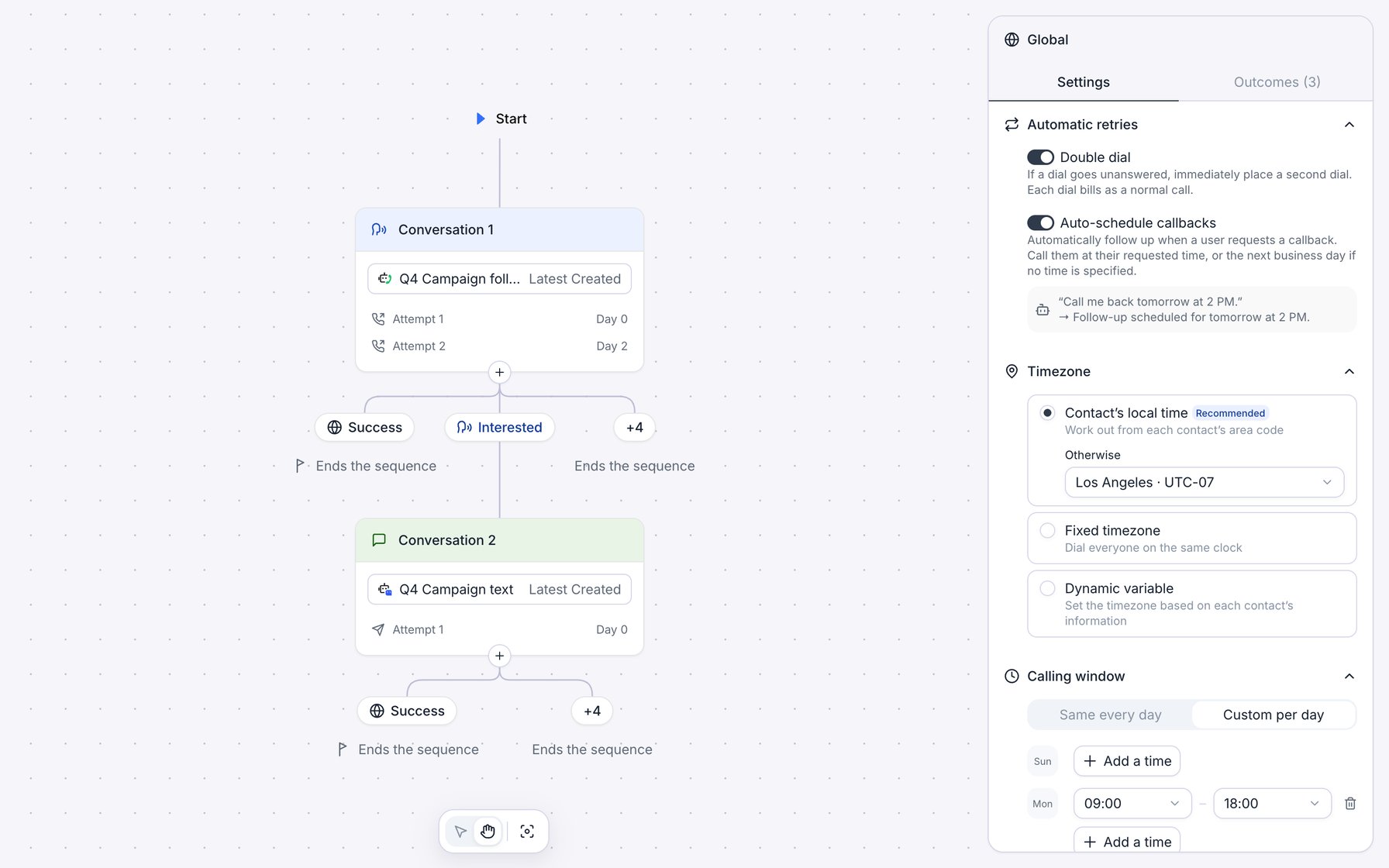
A two-node sequence: a call node that sends Interested contacts to an SMS node, with the Global panel open.
- Start marks where every contact enters.
- Each conversation node shows its agent and its attempts. Each attempt row shows the day it runs, such as “Day 3”. Hover the timing to see the delay after the previous attempt.
- Ends the sequence marks an exit. The exit with a flag is the successful exit.
- Each line between them carries an outcome name. Outcomes that go to the same place share one label, such as +3; hover it to list them. A globe icon marks a global outcome, and Other outcome is the line a contact follows when no outcome matches.
Add and delete nodes
To add a branch, click + under a node (“Create new outcome and conversation node”). Retell adds an outcome named “Outcome N” with an empty condition, and points it at a new “Conversation N” node. The new node uses the same channel as its parent, starts with the same four attempts as Conversation 1, and has no agent. Add outcome on a node’s Outcomes tab does the same. To delete a node, select it and click its trash icon, or click Delete at the bottom of its Settings tab:- If other nodes come after it, “Delete node and children?” asks you to confirm. Those nodes are deleted too, unless another path still reaches them.
- If it’s the first node, “Delete entire sequence?” asks you to confirm, and the sequence starts over with one empty node.
- You can’t delete the only node.
- Node outcomes that pointed to a deleted node stay, with no destination. Pick a new Next for each one before launch. An Other outcome that pointed to it changes to Ends the sequence.
Campaign is not ready to launch: Node "Conversation 2" is not reachable from the start node. Delete the node or point an outcome at it.
Use the toolbar at the bottom of the canvas to switch between Select and Pan, or click Center canvas to fit the sequence on screen. Press Cmd/Ctrl + Z to undo and Cmd/Ctrl + Shift + Z to redo, up to 100 steps.
Saving and launch
Every change saves automatically, and the footer shows “Auto saved at” with the time of the last save. If Retell rejects a change, “Failed to save sequence. Changes reverted” appears and that change is undone. If the save fails for another reason, “Failed to save sequence” appears with a Retry button, your edits stay, and the footer reads “Changes are not saved”. Before launch, every conversation node needs an agent, every outcome needs a condition and a destination, and the calling window needs at least one time and a time zone. Retell also rejects agents that take payments and agents whose channel doesn’t match the node. The sequence locks when you launch or schedule the campaign. To change it afterward, duplicate the campaign and edit the copy.Conversation nodes
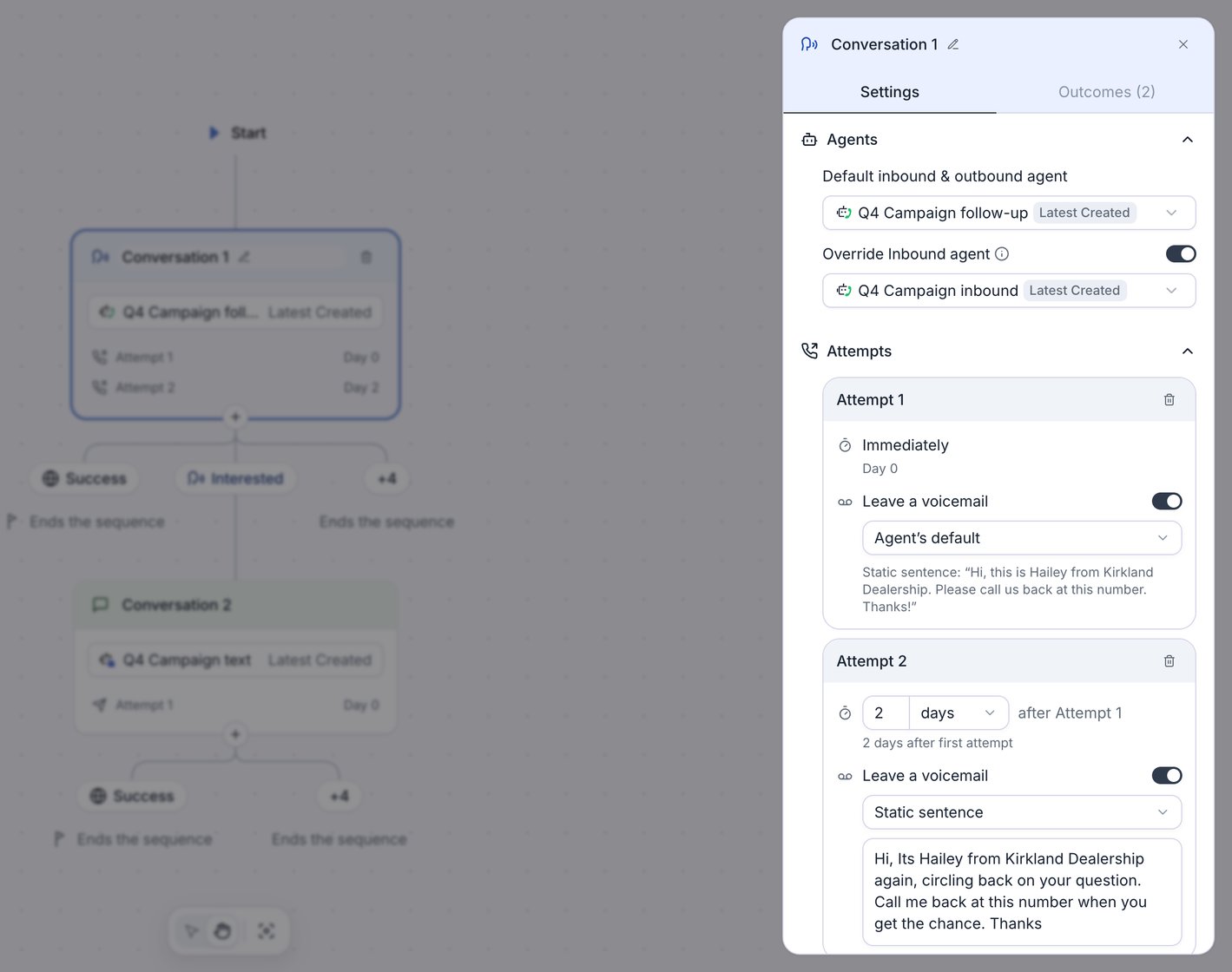
The Settings tab of a selected phone call node.
Choose the agent
Pick the agent under Default inbound & outbound agent. The agent decides the node’s channel:- A voice agent makes it a phone call node.
- A chat agent makes it an SMS node.
Retell resolves the version at each dial, not at launch. Choose a specific version to keep the agent fixed for the whole campaign, or Latest Published to roll published changes into a running campaign. Avoid Latest Created: a draft you’re still editing reaches live calls on the next dial. If the agent or version is deleted, contacts that reach the node fail with “Agent not found”.
Answer callbacks to the campaign number
When a lead calls back the number the campaign dialed them from, the node’s agent answers if all of these are true:- The lead calls within 30 days of the campaign’s last dial to them.
- The campaign is Running or Paused.
- The contact is waiting for its next attempt (stage Enrolled) on a phone call node.
Set attempts and delays
Attempt 1 runs Immediately, and a node needs at least one attempt. Each later Attempt card sets a number of minutes, hours, or days after the previous attempt started, and a line below it shows how long after the first attempt it runs. Click Add attempt to add one with a 1-day delay. There’s no limit on the number of attempts or the length of a delay. If an attempt comes due outside the calling window, it waits for the next opening. An attempt is one dial (plus its double dial) or one SMS conversation. The contact moves to the next attempt only when the current one goes unanswered.Leave a voicemail
On a phone call node, each attempt has its own voicemail setting. With Leave a voicemail on, choose the message:
Turn Leave a voicemail off to hang up on voicemail for that attempt.
Campaign calls always detect voicemail. If the attempt uses Agent’s default and the agent has voicemail detection off, the call hangs up when it reaches voicemail. A voicemail always counts as unanswered, even when the agent leaves a message, so the next attempt follows.
SMS nodes
An SMS node texts the contact from one of the campaign’s numbers:- The chat agent writes the first message. There’s no message template, so describe the opening message in the agent’s prompt.
- The chat stays open for replies until the next attempt is due. If the agent has Auto-Close Inactive Chats on, the chat can close sooner. On the last attempt, the chat closes on that timeout, or after 2 days if the agent has none.
- If the lead replies, the chat stays open until the agent’s auto-close timeout plus about 1 hour, or 2 days if the agent has none. Retell evaluates the outcomes when the chat closes, so timing is approximate. A chat with no reply counts as unanswered.
- A reply that arrives after the chat closes goes to the number’s own inbound SMS agent.
Outcomes
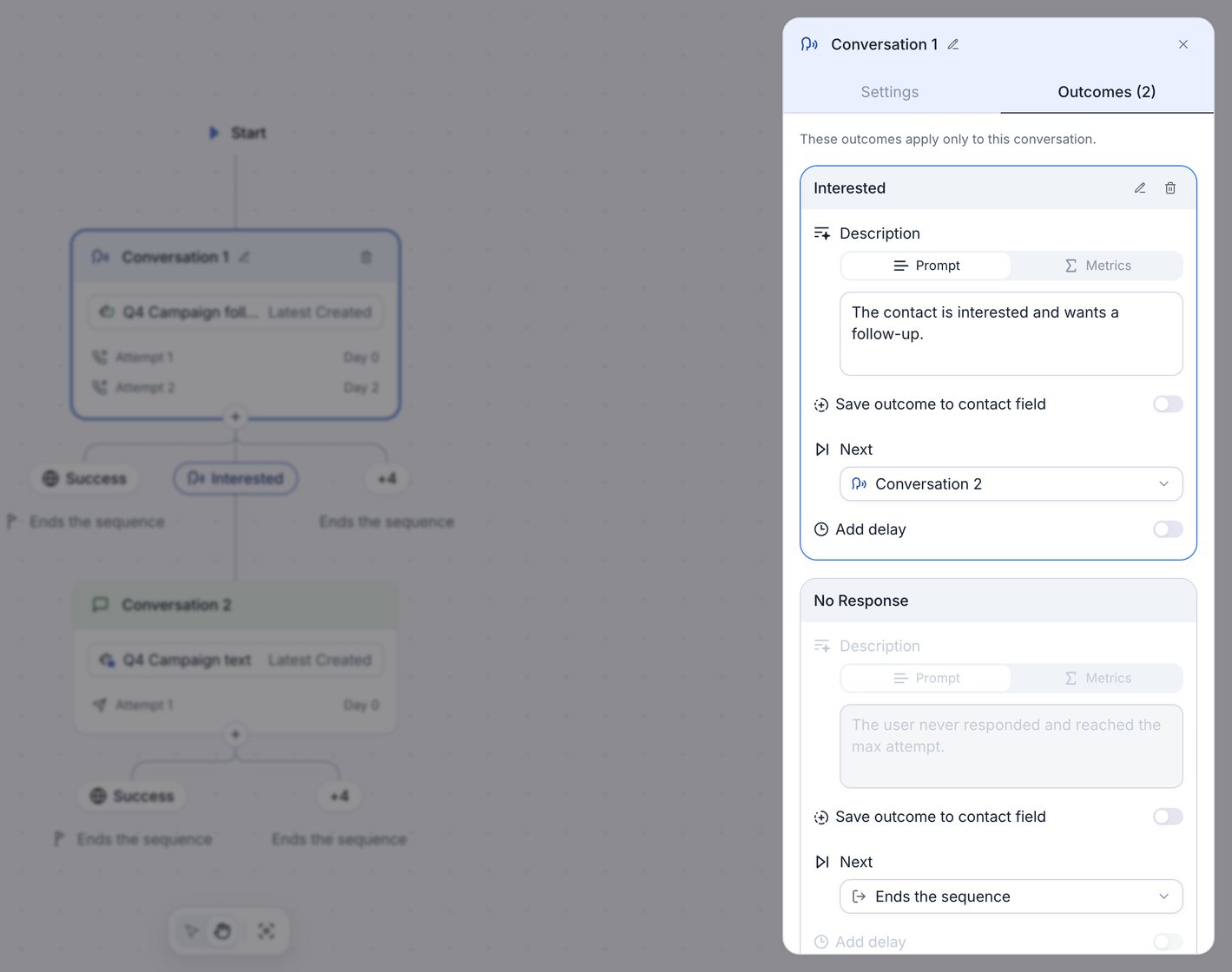
A node outcome that routes Interested contacts to the next conversation node.
- Node outcomes apply only to one conversation node. They’re on the node’s Outcomes tab.
- Global outcomes apply to every node. They’re on the Global panel’s Outcomes tab. A global outcome ends the sequence. To route one to another node, choose Add Conversation Node on it. Retell then moves it onto every conversation node, so you can set the next step on each node.
- Other outcome sets where the contact goes when no outcome matches (“When no outcome matches, continue to:”).
- No Response applies when the node runs out of attempts without a pickup or reply. You can change where it goes, but not its condition.
Next offers these destinations:
In the dashboard, a node outcome can point to any conversation node except its own and the nodes that lead to it, so a sequence can’t loop. Rename an outcome with its pencil icon, and delete it with its trash icon.
Write the condition
Each outcome’s Description has two tabs:- Prompt: describe the result in plain words, such as “The lead booked an appointment.” An LLM classifier reads the transcript, up to its last 100 entries, and picks the outcome whose description matches by meaning.
- Metrics: compare variables with values, in code rather than with an LLM. Choose All or Any “of the following conditions match”, then add rows with Add Condition. Each row has a
{{variable}}, an operator, and a Value. The operators are=,≠,>,≥,<,≤, Contains, Does not contain, Exists, and Does not exist.
{{first_name}} or a custom field, and values the agent collected during the call, such as with an Extract Dynamic Variable tool. They also read the call’s post-call analysis fields, such as call_successful, user_sentiment, and your custom analysis fields, plus disconnection_reason and call_status.
= and ≠ compare text and ignore case. >, ≥, <, and ≤ need a number on both sides, so a value such as $5,000 never matches.
Every Metrics row needs a variable. Retell won’t launch a campaign with an empty variable field. An empty Value is allowed and compares to an empty value.
When are outcomes evaluated?
Retell evaluates outcomes only when a person picked up the call or replied to the SMS. These attempts count as unanswered instead, and the contact moves to the node’s next attempt without reaching Other outcome:- No answer, a busy line, or a failed dial
- Voicemail or an automated phone menu (IVR)
- An SMS with no reply
- A call where the conversation never got going, for example when someone else answered or the lead had no time to talk. The contact still counts as Connected in analytics.
Evaluation order
When a person answered, Retell picks one outcome:- Metrics outcomes, in list order: the node’s outcomes, then the global outcomes. The first one whose conditions match wins.
- If none match, every Prompt outcome, node and global, goes to the classifier together. The classifier picks the best match.
- If no outcome matches, or the classifier fails, the contact follows Other outcome.
Save the outcome to a contact field
Turn on Save outcome to contact field to write values to the workspace contact when the outcome applies. Pick a contact field, enter a value of the field’s type, and click Add field to write more than one.- The outcome writes the value you enter, not data from the call.
- Phone number and Contact memory can’t be written.
- For the same field, the outcome’s value overwrites a value from a post-call analysis mapping.
- With a CRM connected, the change syncs out if the field is in your CRM mappings.
- The change can enroll the contact in an Auto-enroll campaign whose conditions it now matches.
The Do Not Call outcome
Every sequence has a global Do Not Call outcome that you can’t edit, rename, or delete. It sets the contact’s Do not call field to true and ends the sequence, without counting as a successful exit. It applies when:- The agent’s Do-not-contact Handling ends a call after the lead confirms a do-not-call request.
- The classifier matches its description, “The lead asked not to be called or contacted again.”
- The lead replies to an SMS with an opt-out keyword such as STOP.
Calling hours
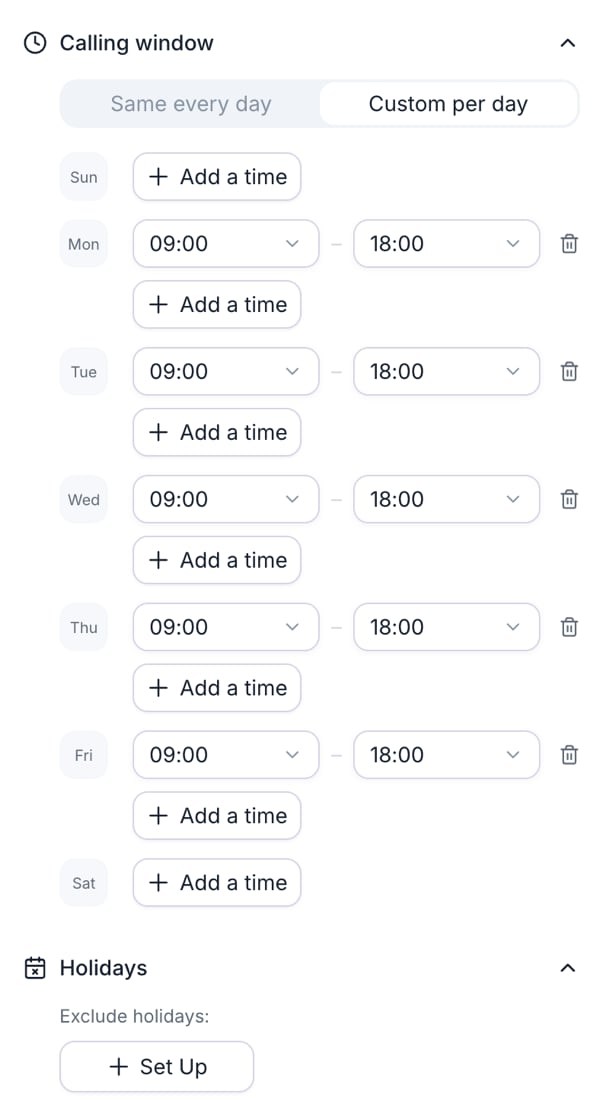
A calling window of 09:00 to 18:00 on weekdays, set with Custom per day.
Timezone
- Contact’s local time (Recommended): Retell works out each contact’s time zone from the area code of their US or Canadian number. The zone is the area code’s, which may not match where the person is. Other numbers, including US territory and toll-free numbers, use the Otherwise time zone, which defaults to Los Angeles.
- Dynamic variable: Retell reads a time zone name, such as
America/Chicago, from a text contact field you pick. A contact with an empty or invalid value uses the Otherwise time zone. - Fixed timezone: “Dial everyone on the same clock.” Every contact uses the time zone you pick.
Calling window
Choose Same every day or Custom per day, then set start and end times in 15-minute steps. Click Add a time to add a second window to a day, for example to skip a lunch hour.- A day with no window has no dialing.
- A window can’t cross midnight. The end must be after the start, up to 24:00.
- Switching to Same every day copies Monday’s windows to every day.
- An attempt that comes due outside the window waits for the next opening. It doesn’t use up an attempt.
- New dials stop 1 minute before the window closes. A call in progress isn’t cut off.
- A callback for a time the lead asked for goes out at that time, even outside the window. See Auto-schedule callbacks.
Holidays
Under Exclude holidays:, click Set Up:- Public holidays lists US and Canadian public holidays for the next 12 months, on their calendar date rather than the observed weekday. Check the ones to skip, or click Select all.
- Custom dates adds a single date or a range.
Retries
Both retry settings are on the Global panel under Automatic retries, and both are on by default. They apply only to phone calls.Double dial
With Double dial on, a dial that goes unanswered gets a second dial right away. Each dial bills as a normal call. The second dial is part of the same attempt, and it never triggers a third. A voicemail that the agent hung up on counts as unanswered, so it gets a second dial. The second dial goes out immediately, and Retell doesn’t check it against the calling window or holidays again. Retell skips the double dial when:- The agent left a voicemail message on the first dial.
- The number doesn’t exist or the carrier rejected it.
- The campaign is paused or stopped.
- You stopped the call manually, or the contact is no longer in progress.
Auto-schedule callbacks
With Auto-schedule callbacks on, the agent handles callback requests on campaign calls. It works with agents that use a Retell LLM or a Conversation Flow. When a lead asks to be called back, the agent asks once for a time if they didn’t give one, reads the time back, and ends the call. The request sets when the contact’s next call goes out:- With a time: at that time, even outside the calling window or on a holiday. The time is in the contact’s time zone unless the lead names another, such as “3 PM Eastern”.
- Without a time: at the first time inside the calling window that’s at least 24 hours after the call.
Examples
Appointment reminders with an SMS follow-up
A dental clinic calls patients two days before their appointment, and texts a booking link to patients who need a new time.- Conversation 1 is a phone call node with the clinic’s reminder agent. Attempt 1 runs Immediately and Attempt 2 After 4 hours, both with Leave a voicemail off. Attempt 3 runs After 1 day with a Static sentence:
Hi {{first_name}}, this is Bright Smile Dental confirming your cleaning on {{appointment_time}}. Please call us at 555-0134.Hereappointment_timeis a Text contact field, such as “Tuesday, November 12 at 10 AM”. - The global Success description reads “The patient confirmed or booked an appointment.”
- A node outcome, Needs new time, has the prompt “The patient can’t make the appointment and wants to reschedule.” Its Next is Conversation 2.
- Conversation 2 is an SMS node with a chat agent that offers new times, with 1 attempt. If the patient replies and confirms a new time, the global Success outcome ends the sequence as successful. A patient who doesn’t reply exits when the chat closes.
- The calling window is Custom per day: 9:00 to 17:00 on weekdays and 9:00 to 12:00 on Saturday.
Lead qualification that updates a contact field
A software company qualifies new leads and hands the qualified ones to a demo-booking campaign.- Conversation 1 is a phone call node with a qualification agent pinned to a specific version. Its attempts run Immediately, then After 1 day and 3 days. The agent saves
budgetandwants_demowith an Extract Dynamic Variable tool. - A node outcome, Qualified, uses Metrics with All:
{{wants_demo}} = trueand{{budget}} ≥ 5000. It saveslead_status=Qualifiedto the contact, and its Next is Ends the sequence (Successful). - A node outcome, Send pricing, has the prompt “The lead asked to receive pricing by text message.” Its Next is Conversation 2, an SMS node with a chat agent that sends the pricing and answers questions.
- The global Success outcome is deleted, so only Qualified leads count as converted. Not Interested and Do Not Call stay.
lead_status equals Qualified then enrolls the lead and calls to book the demo.
FAQ
Does the campaign retry when nobody answers or it reaches voicemail?
Does the campaign retry when nobody answers or it reaches voicemail?
Yes. With Double dial on, Retell redials once right away. If that dial goes unanswered too, the node’s next attempt runs after its delay, inside the calling window. When the node has no attempts left, the contact exits. A voicemail counts as unanswered even when the agent leaves a message.
What is double dial, and does it cost extra?
What is double dial, and does it cost extra?
It places a second dial right after an unanswered one, as part of the same attempt. Each dial bills as a normal call. See Double dial.
Can the agent call back on a date the lead asks for?
Can the agent call back on a date the lead asks for?
Yes, with Auto-schedule callbacks on. The agent reads the time back, and the next call goes out then, even outside the calling window. The node’s attempts start over from Attempt 1. See Auto-schedule callbacks.
Can I call each contact during their own local hours?
Can I call each contact during their own local hours?
Yes. Choose Contact’s local time under Timezone, and Retell applies the calling window in each contact’s time zone, worked out from the area code of their US or Canadian number. Other numbers use the Otherwise time zone.
What happens if a lead calls the campaign number back?
What happens if a lead calls the campaign number back?
If the contact is still waiting for an attempt on a phone call node, the node’s agent answers and the call’s outcomes apply as if the campaign had dialed. See Answer callbacks to the campaign number.
Can I send contacts who never answer to an SMS step?
Can I send contacts who never answer to an SMS step?
Yes. When the call node runs out of attempts, its No Response outcome applies. Change its Next to the SMS node. By default, No Response ends the sequence.
Can I edit the sequence after launch?
Can I edit the sequence after launch?
No. The sequence locks when you launch or schedule the campaign. Duplicate the campaign, edit the copy’s sequence, and launch it.