

New agents are created with the Default Tone (Professional) and AI Disclosure When Asked presets enabled by default.
How It Works
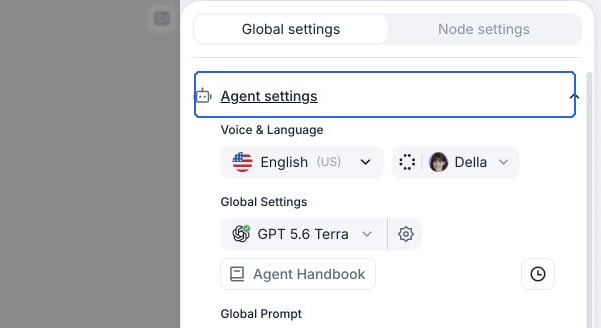
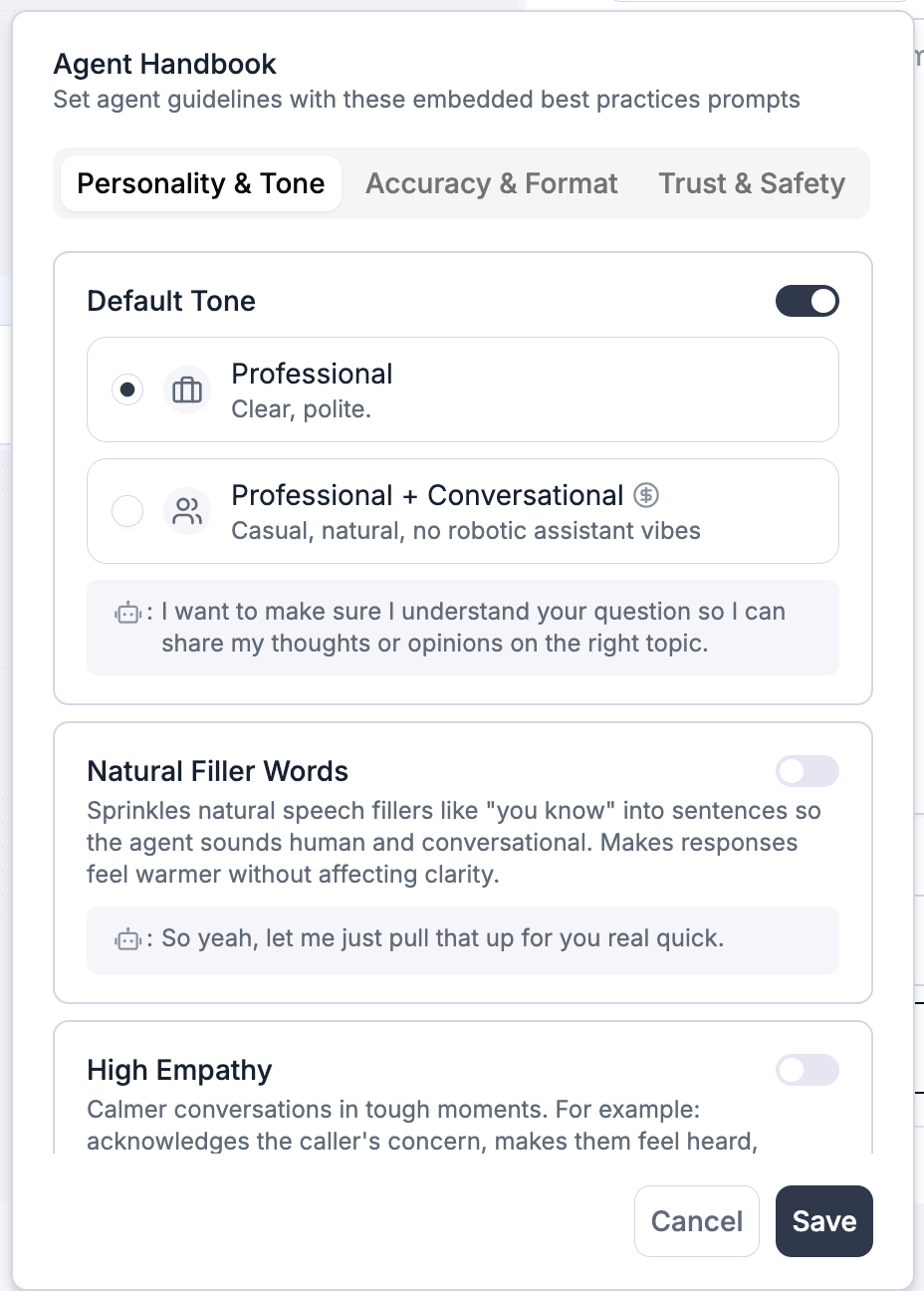
The Agent Handbook organizes presets into three categories:- Personality & Tone — Shape how the agent sounds and feels in conversation
- Accuracy & Format — Improve how the agent handles names, numbers, and data (voice agents only)
- Trust & Safety — Control transparency and scope of responses
Presets
Personality & Tone
Default Tone
Default Tone
Sets your agent’s baseline speaking style. Choose one of two tones:
- Professional (~480 tokens · Voice and Chat · default) — clear and polite, like a courteous representative. Follows an Acknowledge → Statement → Next Step structure, limits filler acknowledgments, and avoids robotic phrases like “Certainly!” or “Absolutely!”.
- Professional + Conversational (~910 tokens · Voice only) — casual and natural, with no robotic assistant vibes: short turns, one question at a time, real recommendations instead of “it depends”, and numbers and times spoken the way people say them. Best for sales, front desk, scheduling, and customer success. See Conversational Mode for side-by-side examples.
Natural Filler Words (~100 tokens)
Natural Filler Words (~100 tokens)
Available for: Voice agents only | Default: DisabledAdds occasional filler words like “um”, “uh”, and “you know” to make the agent sound more human and conversational. Fillers are used sparingly — roughly once every 2–3 sentences.When to use: Great for sales, customer success, or casual conversations. Avoid for formal or regulated contexts (medical, legal).Example: “So yeah, let me just pull that up for you real quick.”
High Empathy (~70 tokens)
High Empathy (~70 tokens)
Available for: Voice and Chat agents | Default: DisabledGuides the agent to use empathetic language when the situation calls for it — acknowledging concerns, making callers feel heard, and reassuring them before moving to a solution.When to use: Useful for support agents, complaint handling, or any scenario where callers may be frustrated or emotional.Example: “I’m sorry you’re dealing with this. Let’s get it sorted.”
Accuracy & Format
All presets in this category are available for voice agents only. They are automatically disabled for chat agents.
Echo Verification (~190 tokens)
Echo Verification (~190 tokens)
Default: DisabledThe agent repeats back names, phone numbers, and other critical details for confirmation. For uncommon names, it spells them out letter by letter.When to use: Enable for appointment booking, data collection, or any workflow where accurate information capture is critical.Example: “Just to confirm, your first name is Ryan, last name is James — is that correct?”
NATO Phonetic Alphabet (~190 tokens)
NATO Phonetic Alphabet (~190 tokens)
Default: DisabledWhen spelling is needed, the agent uses the NATO phonetic alphabet (A as in Alfa, B as in Bravo, etc.) with natural pauses for clarity.When to use: Useful for confirming email addresses, reference numbers, account IDs, or names over the phone.Example: “That’s B as in Bravo, 7, K as in Kilo, 2 — correct?”
Speech Normalization (~910 tokens)
Speech Normalization (~910 tokens)
Default: DisabledFormats numbers, dates, money, phone numbers, addresses, and emails into natural spoken form. For example, “$758.08” becomes “seven fifty-eight dollars and eight cents” and phone numbers are read digit by digit with pauses.When to use: Enable when your agent frequently reads back structured data like prices, dates, or contact information. Note the higher token cost (~910 tokens).Example: “Your total is seventy dollars and eighty-four cents.”
Smart Matching (~110 tokens)
Smart Matching (~110 tokens)
Default: DisabledHandles common speech recognition variations of names gracefully. If a caller confirms their name but the transcription is slightly different (e.g., “Brandon” vs. “Brendon”), the agent treats it as a match and continues naturally.When to use: Enable when your agent looks up names in a database or CRM and needs tolerance for transcription variations.Example: Agent asks “Are you Brandon?” and the caller says “Yes, this is Brendon” — the agent continues without flagging the difference.
Trust & Safety
AI Disclosure When Asked (~30 tokens)
AI Disclosure When Asked (~30 tokens)
Available for: Voice and Chat agents | Default: EnabledWhen someone asks if they’re speaking to a human or an AI, the agent clearly acknowledges that it’s a virtual assistant.When to use: Recommended for transparency and compliance. Only disable if your use case has specific reasons not to disclose.Example: “Yes — I’m an AI assistant here to help.”
Scope Boundaries (~60 tokens)
Scope Boundaries (~60 tokens)
Available for: Voice and Chat agents | Default: DisabledRestricts the agent to only answer questions based on information available in its prompt and knowledge base. If it doesn’t know, it says so instead of guessing.When to use: Enable for any agent where factual accuracy is critical, such as healthcare, finance, or legal use cases.Example: “I don’t have that information, but I can connect you to someone who can help.”
Token Cost Summary
Token counts are approximate. The token cost of all enabled presets is added to every interaction.
FAQ
Can I customize the content of a preset?
Can I customize the content of a preset?
No — presets are fixed best-practice prompts. For custom instructions, write them directly in your agent’s prompt. See the general prompting principles for guidance.
Do handbook presets conflict with my custom prompt?
Do handbook presets conflict with my custom prompt?
Handbook presets work alongside your custom prompt. If your prompt gives instructions that overlap with a preset (e.g., you wrote your own empathy guidelines), you may want to disable the overlapping preset to avoid inconsistent behavior.
Why are some presets grayed out for my chat agent?
Why are some presets grayed out for my chat agent?
Five presets — Natural Filler Words, Echo Verification, NATO Phonetic Alphabet, Speech Normalization, and Smart Matching — are designed specifically for voice interactions and are not applicable to chat agents.