

Choose how numbers rotate
Under Phone number setup, pick one option:- Local presence dialing: “Match local area codes to improve pickup rates.” This is the default. Each contact is called from a number assigned to its own area.
- Round robin phone numbers: “Initiate call from your numbers pool.” Each new contact gets the next number in the pool, so calls spread evenly across every number.
In both modes, a contact keeps the caller ID it got first for every later call and text, as long as that number stays in the pool. The contact sees one number from your campaign, and a callback to that number reaches the campaign. See Build a sequence for how callbacks are handled.
The choice locks at launch.
For example, a solar installer calls 6,000 leads across Texas with local presence. Dallas leads see a 214 number, Houston leads see a 713 number, and leads in smaller towns see the installer’s Default phone number.
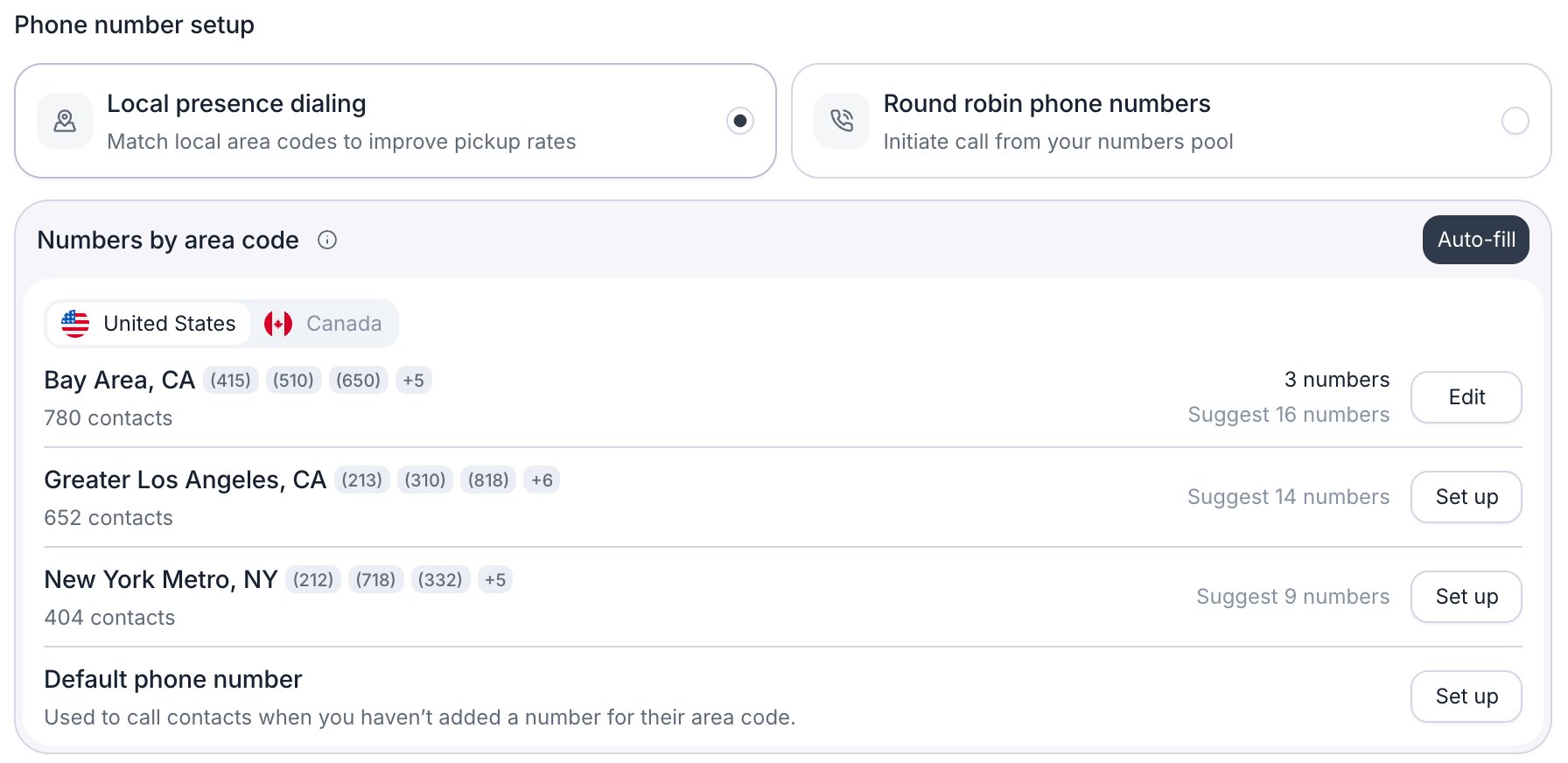
Local presence dialing with regions ranked by contact count.
How local presence picks a caller ID
The Numbers by area code card lists the regions where your contacts are, ranked by contact count, with a United States or Canada tab for each country that has contacts. A region is a group of area codes that serve the same place, such as all the overlay codes of one city. Eleven metro regions, such as Bay Area, CA and New York Metro, NY, combine several neighboring areas. A number you assign to a region can call every contact in all of its area codes. When a contact is due, Retell picks its caller ID in this order:- The caller ID the contact already has from this campaign, if that number is still in the pool.
- A number assigned to the contact’s region. The contact’s country and area code must match the region exactly. When a region has several numbers, they take turns.
- A number in the Default phone number row: “Used to call contacts when you haven’t added a number for their area code.” Contacts outside the US and Canada also use this row.
- If none of these exist, the contact fails with “No number available to call from” and isn’t called.
Add numbers you own
Any number in your workspace can join the pool, including numbers you connected through custom telephony.- Round robin: click Add numbers, select numbers under Reusing numbers you own, and click Save.
- Local presence: click Set up on a region. The list shows the numbers you own in that region’s area codes.
Buy new numbers
While the campaign is a draft, you can plan new numbers in the Buy new numbers section of the Add numbers or Auto-fill dialog. Local numbers cost $2 per month and toll-free numbers cost $5 per month (as of October 2026).- A region’s dialog offers that region’s area codes.
- The round robin dialog and the Default phone number row offer Normal numbers, which can have any US area code, and Toll free.
- Auto-fill offers area codes, normal numbers, and toll-free numbers in both the US and Canada.
- Now: on the Overview tab, click Purchase on the Phone numbers card. Retell “buys the numbers now and adds them to this campaign.”
- At launch: when you click Launch Now or Schedule Launch, Retell buys the remaining planned numbers. For a scheduled campaign, the numbers are bought and billed from that moment, not from the start time.
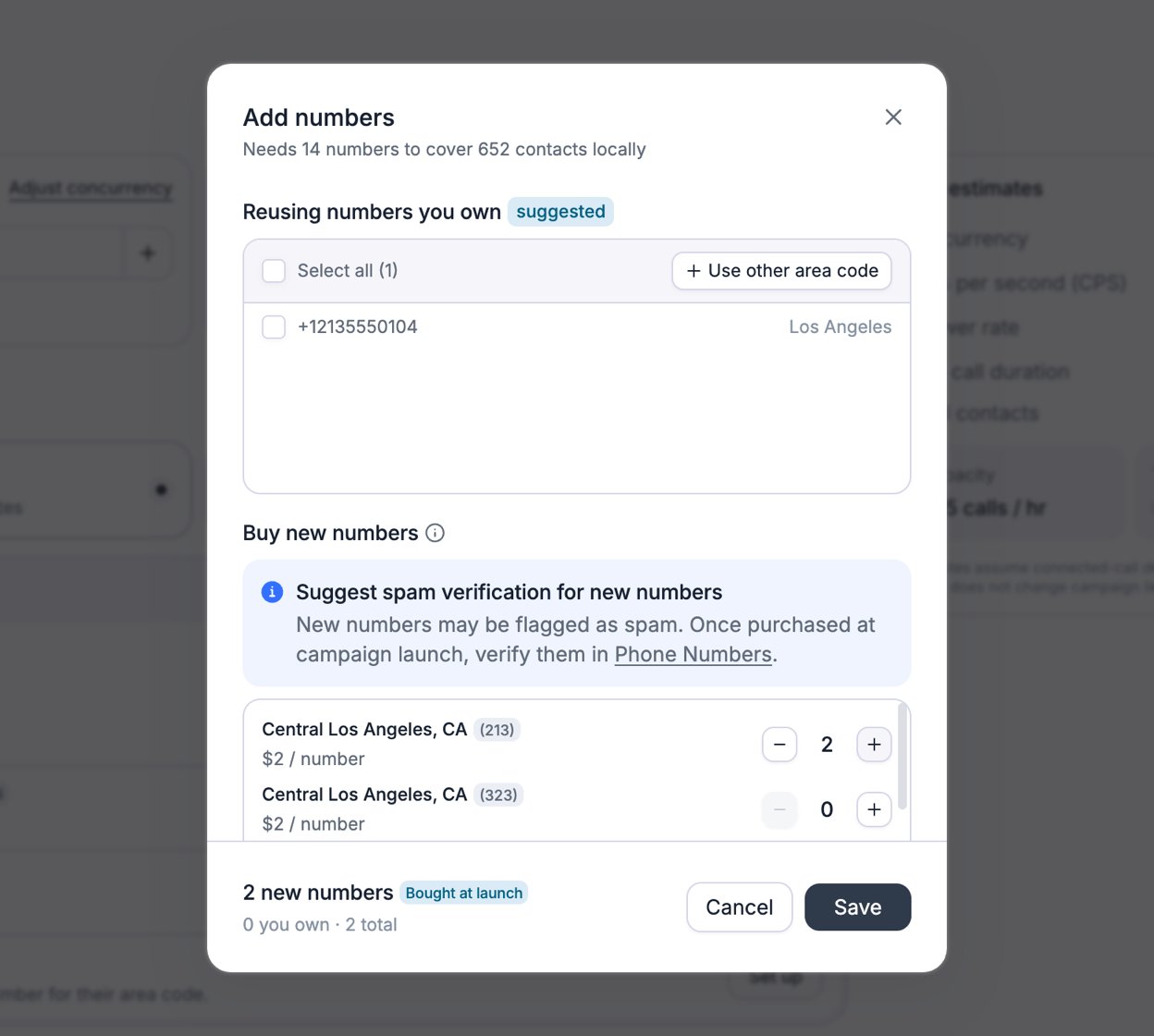
The Add numbers dialog for one region, with two new numbers planned.
SMS requirements
If your sequence has an SMS node, two rules apply to the pool:- Every number must be SMS-enabled. That means a Retell Twilio number with an approved A2P campaign, or your own Twilio number set up for SMS. See Enable SMS.
- The plan can’t include new numbers. Newly bought numbers can’t send SMS, so Purchase is disabled. Remove planned numbers on the Numbers tab.
Spam and reputation
Carriers can label a number that places many calls as “Spam Likely”, and a recycled number can arrive already flagged. Retell doesn’t replace flagged numbers in a campaign automatically. To keep pickup rates up:- Use enough numbers. More numbers means fewer calls from each one. Follow the suggestion of one number per 50 contacts.
- Check new numbers. After Retell buys them, turn on Daily spam check for them on the Phone Numbers page. It checks carrier spam flags every 24 hours, for US numbers only, and costs $2 per month per number (as of October 2026).
- Register your numbers. Apply for a verified phone number and branded call, both for US numbers.
- Swap out flagged numbers. Remove a flagged number from the pool and add a clean one. The change reaches the campaign within about 15 minutes, and contacts that had the flagged number then get a new caller ID.
Set the dialing rate
The Dialing capacity section caps how many calls the campaign runs at once and how fast it starts them. Both are caps, not reservations: they limit this campaign, but they don’t hold capacity for it.
The Dialing capacity section of the Numbers tab.
Campaign concurrency limit
The campaign concurrency limit is the most calls this campaign runs at the same time. In the dashboard, the default is half your workspace concurrency limit, rounded down, but never more than your workspace limit minus the inbound reserve. A campaign created through the API without a dialing capacity has no campaign limit.- The lower limit wins. The campaign runs at most its own limit, and never more than the workspace’s free outbound capacity.
- No burst, no inbound reserve. Campaign calls never use concurrency burst or the reserved inbound concurrency.
- Shared capacity. All campaigns, your other outbound calls, and web calls share the same outbound capacity. Several campaigns can each set the full amount, and the first call ready takes the next free slot. Hover over Other in the “Total limit · Inbound reserve · Other” line to see the other campaigns’ limits.
- Calls wait at capacity. When no slot is free, the next call waits until one opens. Waiting doesn’t use one of the contact’s attempts.
Calls per second (CPS)
CPS caps how many calls the campaign starts each second, separately for each telephony provider: Twilio, Telnyx, and Custom Telephony. SMS steps don’t count toward the concurrency or CPS limits. A call counts against the provider of the number it’s placed from. The card shows the sum, such as “3 CPS capacity”. By default, the campaign can use your full workspace CPS for each provider. A workspace has 1 CPS per provider unless it’s been raised. All campaigns share the workspace CPS. To cap the campaign lower, click Adjust CPS limit and set a value for each provider, between 1 and your workspace limit. This buys nothing. To raise workspace CPS, adjust it on Settings > Limits. After you confirm, the campaign keeps these values even if you buy more workspace CPS later. CPS calculator opens the same calculator as the Limits page.Live estimates
The Live estimates panel estimates how fast the campaign can reach your contacts. Edit the inputs to test scenarios:
The panel returns:
- Capacity: calls per hour. It’s the lower of what CPS allows and what concurrency allows, since only answered calls hold a line for the average duration.
- Time: how long one call to each of the Total contacts takes.
- Costs: an estimate for the answered first calls: contacts × answer rate × average duration × the starting agent’s price per minute, plus $0.01 per minute when the pool has Retell Twilio or Telnyx numbers. It shows a dash unless the sequence starts with a phone call node that has an agent.
What you can change after launch
On the campaign page, click Edit and open Numbers. For a stopped or completed campaign, the button reads Details and every tab is read-only. Until then, you can:- Add or remove numbers you own. You can’t remove the last number.
- Change the campaign concurrency limit and CPS.
FAQ
How does caller ID rotation work?
How does caller ID rotation work?
Rotation happens across contacts, not across calls to one contact. With round robin, each new contact gets the next number in the pool. With local presence, each new contact gets the next number assigned to its region. Every later call and text to that contact uses the same caller ID while the number stays in the pool.
Why do my campaign calls show as Spam Likely?
Why do my campaign calls show as Spam Likely?
Carriers can flag a number that places many calls, and a recycled number can arrive already flagged. Retell doesn’t swap flagged numbers out of a campaign. Remove the flagged number on the Numbers tab, add a clean one, and follow the steps in Spam and reputation.
How many phone numbers does a campaign need?
How many phone numbers does a campaign need?
At least one. For local presence, Retell suggests one number per 50 contacts in each region, and Auto-fill plans that many. More numbers spread the volume, so each one places fewer calls. A pool holds up to 500 numbers.
Can a campaign make only one call at a time?
Can a campaign make only one call at a time?
Yes. Set the campaign concurrency limit to 1, and the campaign starts its next call only after the current one ends. The limit applies to the campaign, not to a phone number. Another campaign or your own outbound calls can still use the same number at the same time.
Why is my campaign dialing slower than its limits?
Why is my campaign dialing slower than its limits?
The limits are maximums. A campaign waits while other campaigns and outbound calls use the workspace’s outbound capacity, starts calls no faster than its CPS, and dials only inside the calling window. A contact that waits keeps all its attempts. To see what else shares your capacity, hover over Other under Campaign concurrency limit.