Call HubSpot, Salesforce, Zendesk, or Cal.com tools from a Retell AI conversation flow function node, and branch transitions on what comes back.
In a conversation flow, integration tools run through a function node: the node fires the tool on entry, and the flow transitions on the result. Retell handles the provider’s API and auth, so there’s no server of your own in between. For single- and multi-prompt agents, add the same tools from the Functions section instead; see integration tools for prompt agents.See the integrations overview for the providers Retell connects to, what each one’s tools do, and how to connect them. Subagent nodes can use integration tools too, alongside their other tool types. Integration tools can also run outside the conversation, before it starts or after it ends; see agent workflow.
Connect it once on the dashboard’s Integrations page — a workspace-level step covered in the integrations overview.
2
Add the tool from the function menu
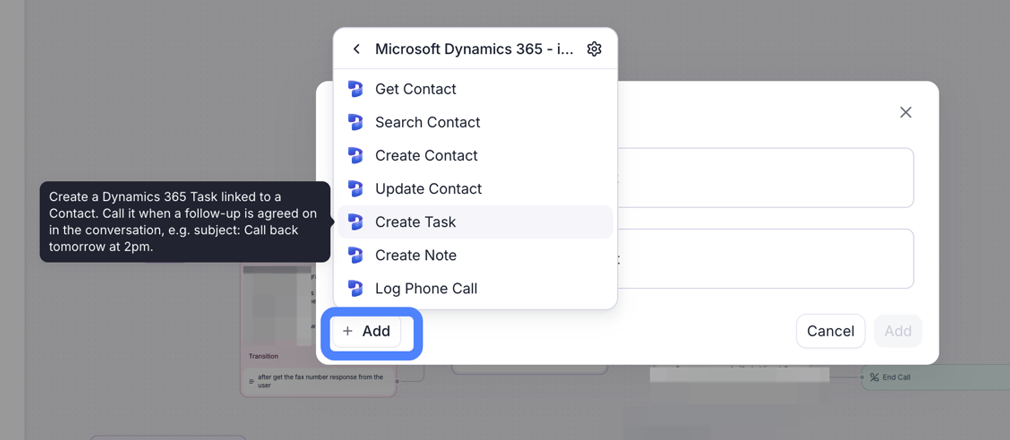
In the flow, add a function; connected providers’ tools appear in the menu grouped by provider. You can also pick Add integration in the menu to connect a new provider without leaving the flow.
Adding a Microsoft Dynamics 365 tool to a conversation flow's function node.
3
Select it inside a function node
Pick the tool in the node, as with any function. Configuration works the same as for prompt agents: inputs are fixed values or filled from the conversation, response fields map to dynamic variables, and you can test the tool with a live request before the first call.
The function node considers the tool’s result for transition timing (see when transitions happen), so your transition conditions can branch on what came back: one edge for “contact found”, another for “no match”, each leading to a different conversation node.Each tool call times out after 3 to 14 seconds, depending on the provider and tool (as of August 2026). On timeout or error the flow still transitions, so give errors their own edge rather than letting them fall through a success path.
Was this page helpful?
⌘I
Assistant
Responses are generated using AI and may contain mistakes.